
AI Diagram Maker
Aspect Ratio
Quality
Sign in to start creating your own diagrams
Example Diagrams
Turn Text Into Diagrams With AI
No templates. No drag-and-drop.
Skip the blank canvas. Tell the AI what you're working on and get a structured diagram back — designed around your actual content, not generic shapes.
Write What You're Thinking
Paste your research question, lecture outline, or project brief. The AI reads context — not just keywords — so describe your topic the way you'd explain it to someone.
Get a Structured Diagram
The AI identifies the concepts, hierarchies, and cause-effect chains in your description. Within 30 seconds you get a diagram that organizes your thinking visually.
Export Print-Ready Files
Download as 4K PNG for presentations and posters, or SVG vector for fine-tuning in Figma, Illustrator, or Inkscape. Every export is 300 DPI and publication-ready.
One Tool, Three Workflows
Students · Researchers · Educators
The same AI diagram maker handles a homework assignment on Monday and a journal figure on Friday. Here's how different users put it to work.

Students
From first-year to final thesis
You know what your project is about — you just can't get it onto paper visually. Describe your topic and the AI builds a clear diagram you can submit, present, or include in your thesis.
- Works at 11 PM the night before — results in 30 seconds
- Handles any subject: biology, business, psychology, engineering
- Free credits on sign-up — no payment info needed

Researchers
Publish faster, revise easier
Reviewer 2 wants a clearer figure. Your co-author needs the framework updated. Instead of rebuilding from scratch in PowerPoint, re-describe and regenerate — new diagram in seconds.
- Editable SVG output — adjust labels and layout in any vector editor
- 4K Ultra HD for conference posters and large-format prints
- Consistent visual style across multiple figures in the same paper

Educators
Prep less, teach more
Stop spending Sunday nights searching for the right diagram online. Describe what you're teaching this week — the AI builds a diagram sized for your slides, handouts, or whiteboard.
- Match the diagram to your lesson — not the other way around
- High-contrast output that reads clearly on projectors
- PNG for slides, printable format for worksheets and exams
Generated by AI, Used in Real Work
Browse by subject
Every image below was generated from a plain-text description. Click any example to load the same prompt and try it yourself.
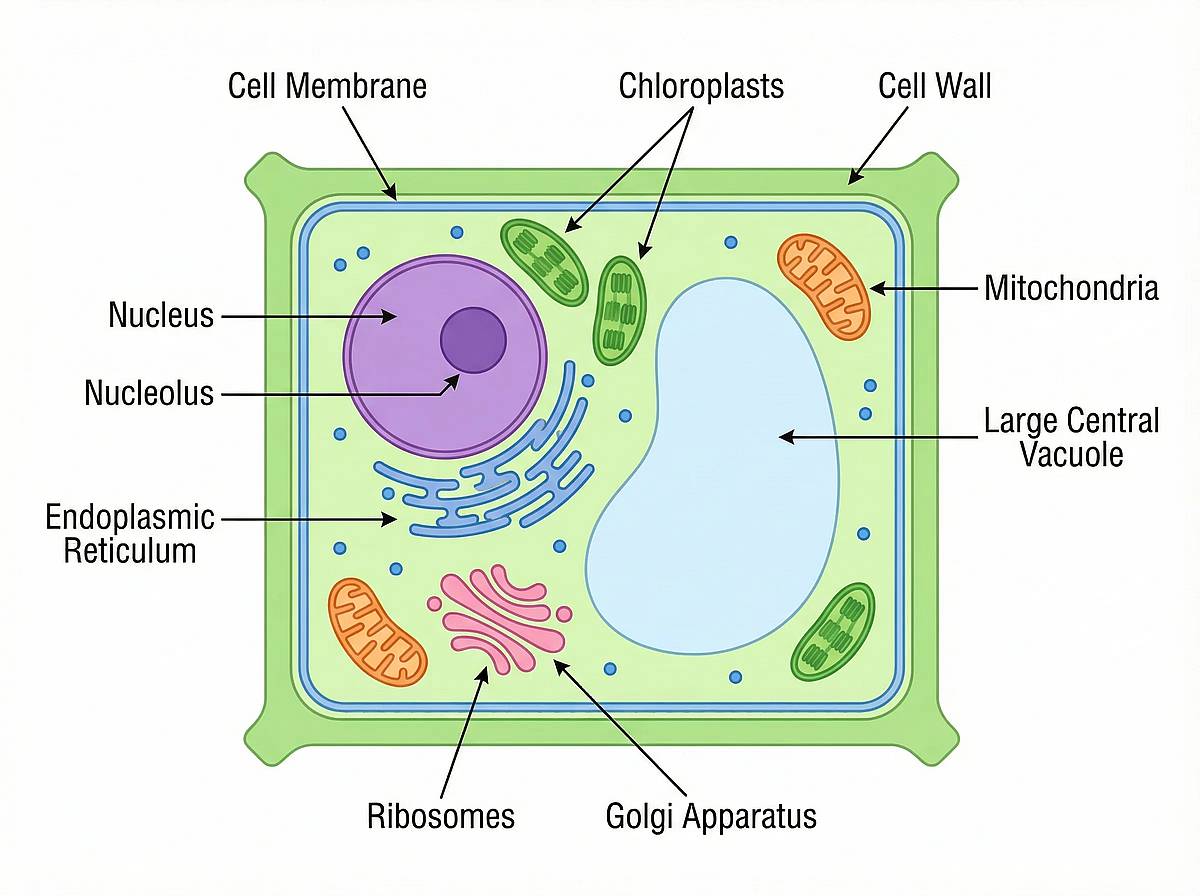
Plant Cell Structure
Organelles, membranes, and internal layout
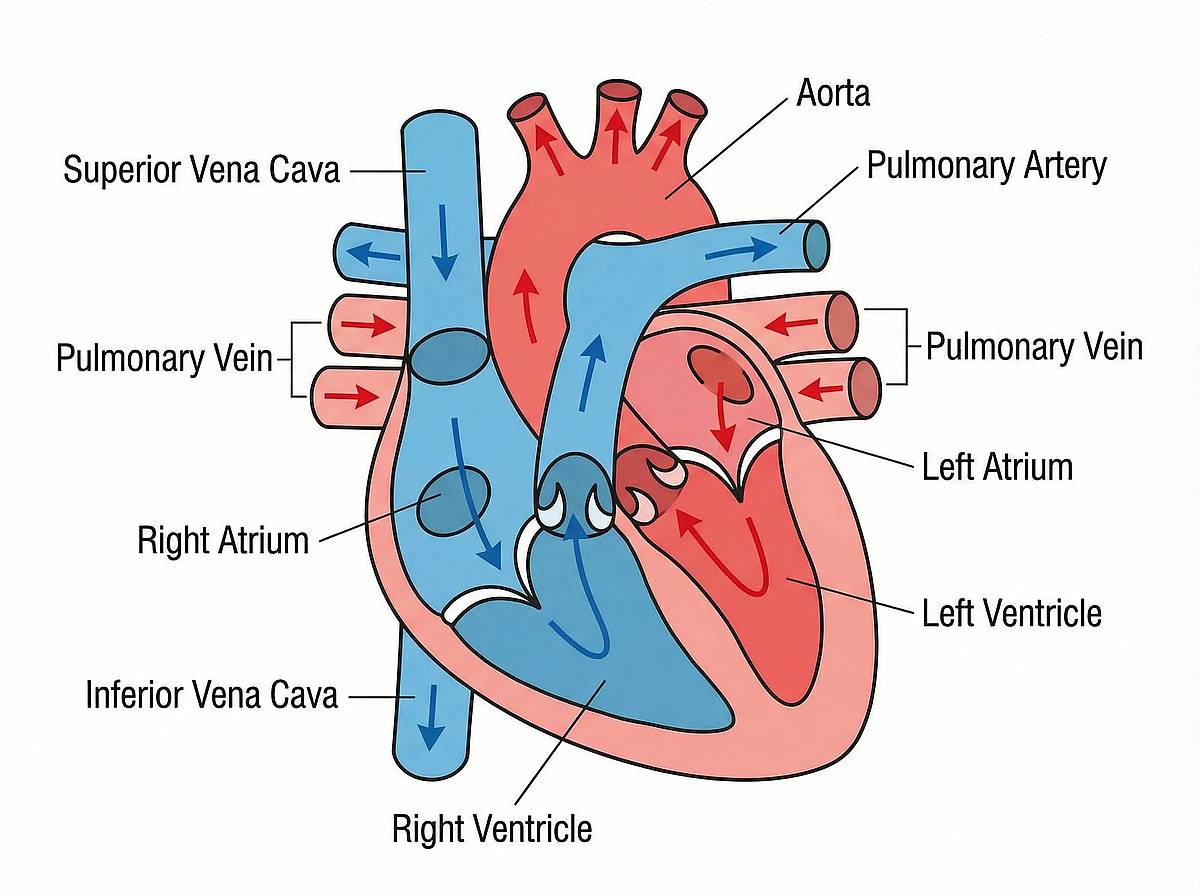
Human Heart Anatomy
Blood flow path through four chambers
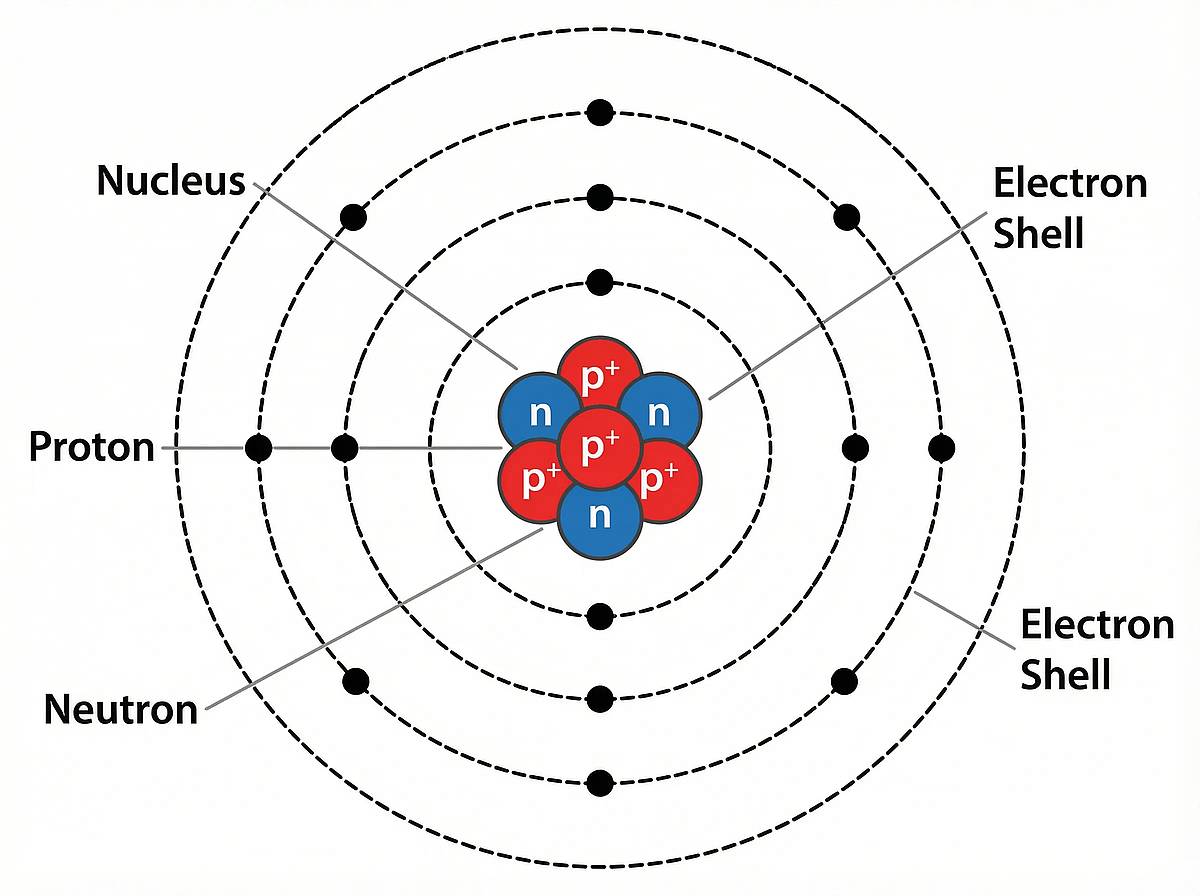
Atom Structure
Nucleus, electron shells, and subatomic particles
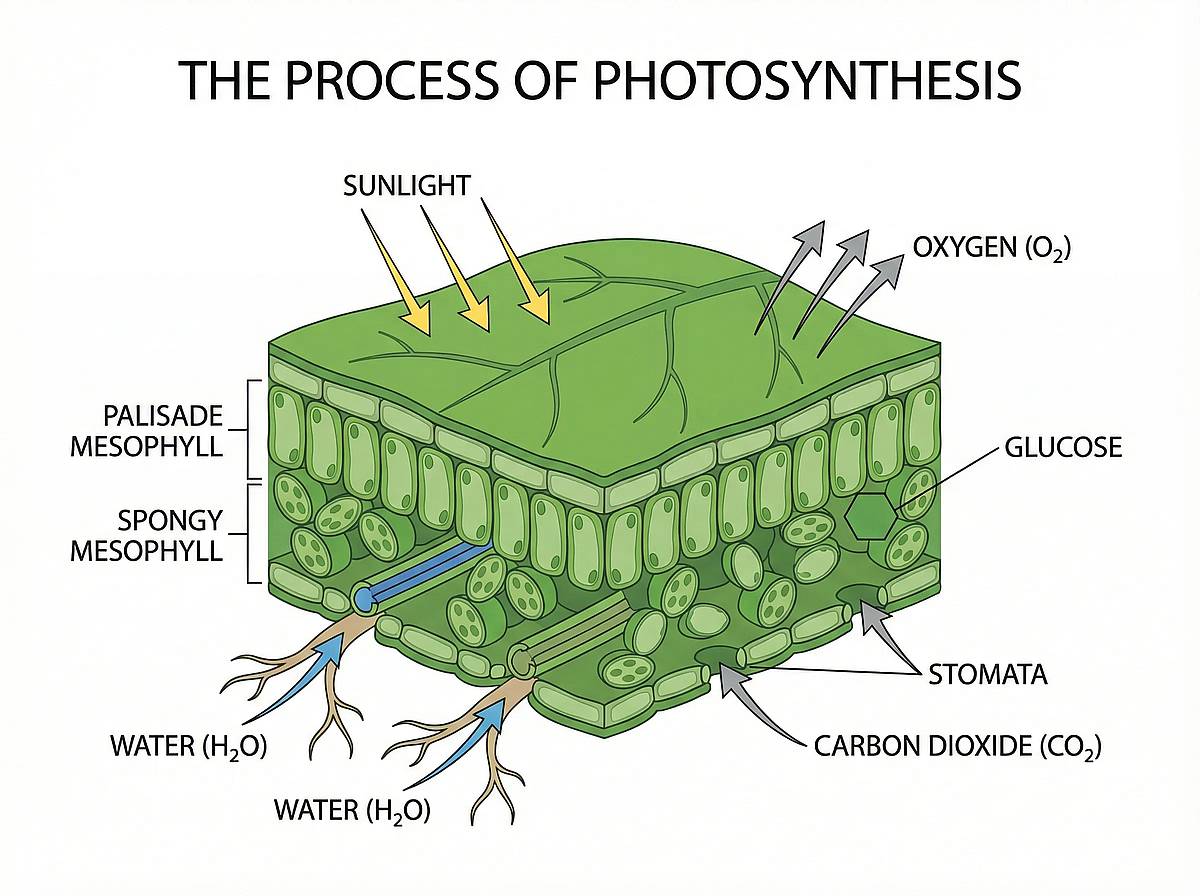
Photosynthesis Process
Energy conversion from sunlight to glucose
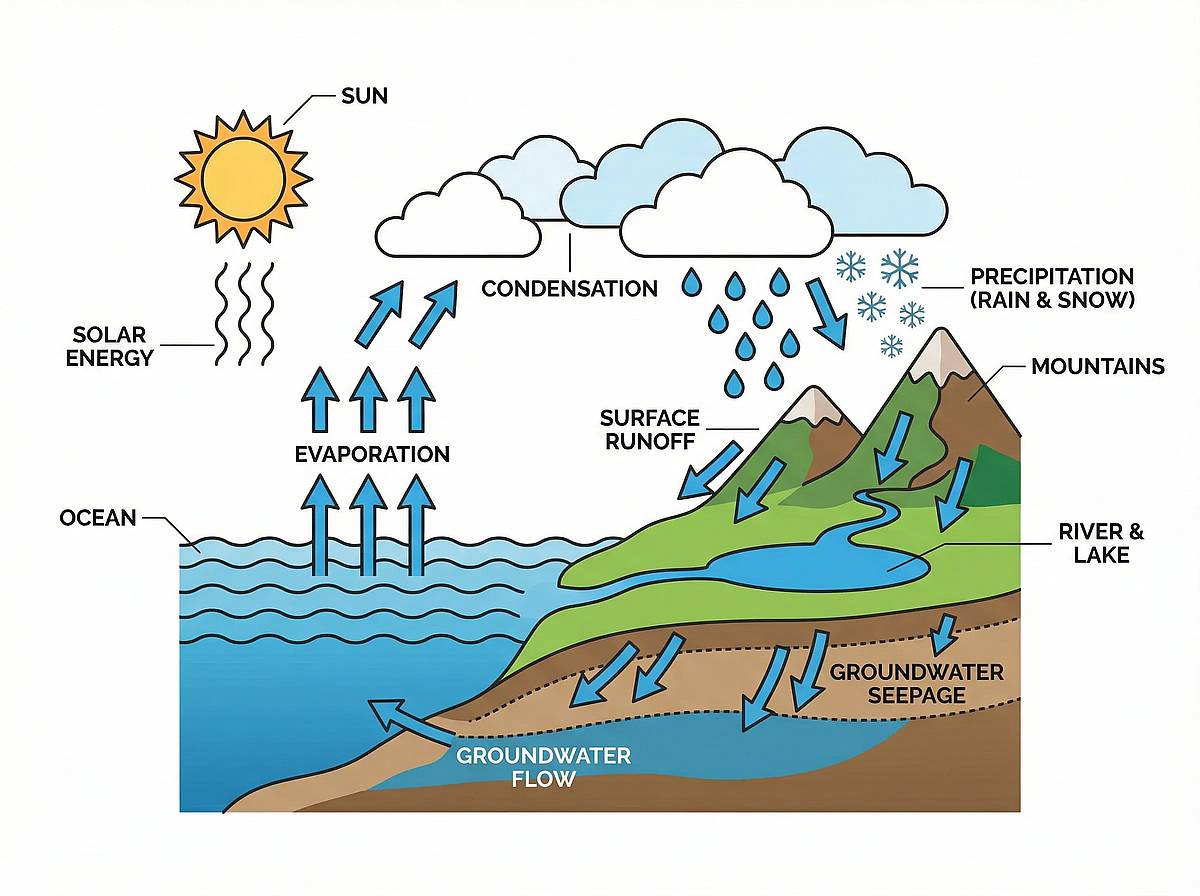
The Water Cycle
From ocean evaporation to groundwater return
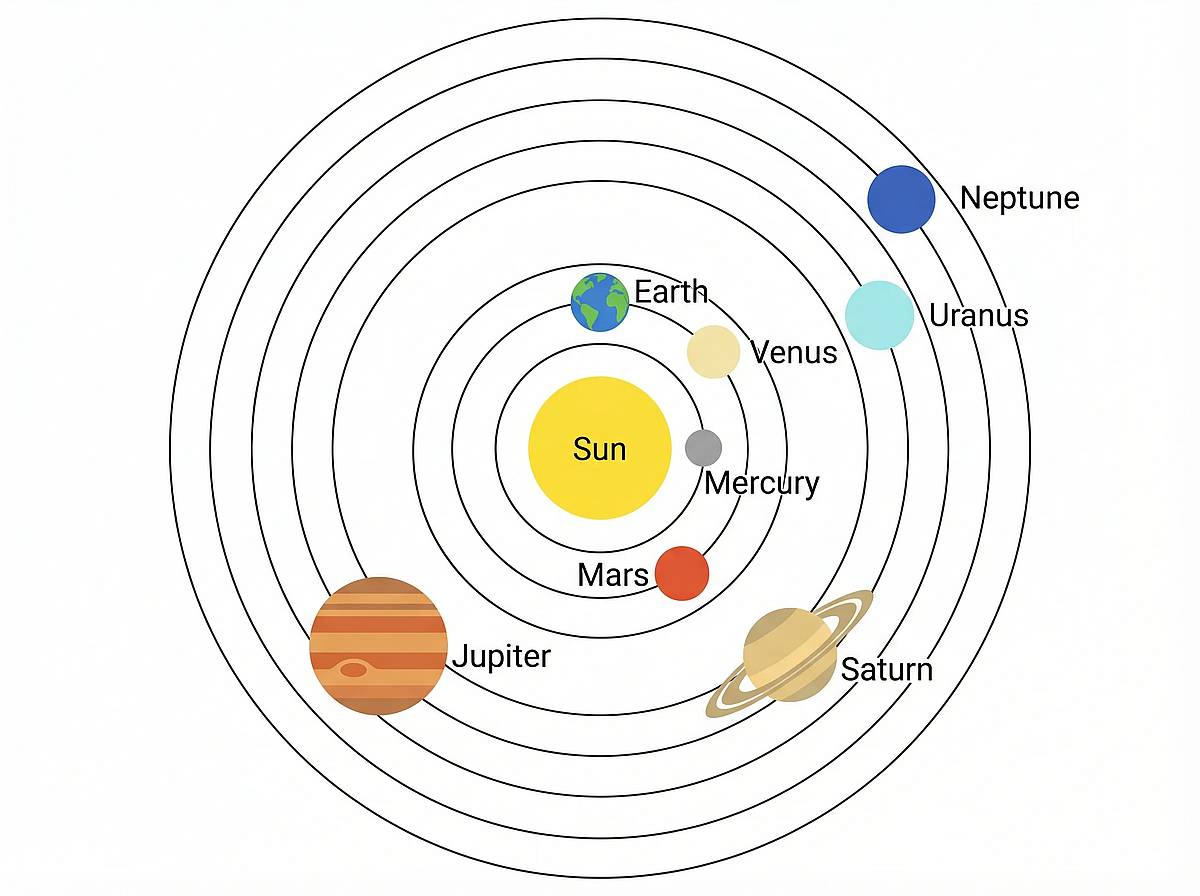
Solar System
Eight planets in orbital sequence
What Makes This AI Diagram Maker Different
Not Another Drag-and-Drop Tool
Most diagram tools give you a blank canvas and a toolbar. This one reads what you write and builds the diagram for you.
Reads Meaning, Not Just Words
Context-Aware AI Generation
Write "how climate change affects coral reef ecosystems" and the AI identifies the causal chain, feedback loops, and key actors — then arranges them in a diagram that actually communicates the logic.
Start free, upgrade when you need more
Every account gets free credits on sign-up. Need more? Pick a plan that matches your diagram volume — monthly, yearly, or lifetime.
How People Actually Use It
Real feedback from students, researchers, and instructors who switched from manual diagramming to AI.
Dr. Rachel Simmons
Postdoc, Stanford School of MedicineI needed a pathway diagram for a grant proposal due in two days. Drew it by hand, hated it, then described the same pathway here. Night and day difference.
Carlos Mendes
MBA Student, Columbia Business SchoolOur group project needed a competitive analysis framework. I typed our strategy notes into the AI diagram maker and the whole team agreed it was better than anything we'd have built in Lucidchart.
Prof. Yuki Tanaka
Biology Instructor, University of TorontoI teach three different bio courses. Being able to generate a custom cell diagram or ecosystem chart for each lecture — instead of reusing the same stock images — has changed how my students engage.
Dr. Rachel Simmons
Postdoc, Stanford School of MedicineI needed a pathway diagram for a grant proposal due in two days. Drew it by hand, hated it, then described the same pathway here. Night and day difference.
Carlos Mendes
MBA Student, Columbia Business SchoolOur group project needed a competitive analysis framework. I typed our strategy notes into the AI diagram maker and the whole team agreed it was better than anything we'd have built in Lucidchart.
Prof. Yuki Tanaka
Biology Instructor, University of TorontoI teach three different bio courses. Being able to generate a custom cell diagram or ecosystem chart for each lecture — instead of reusing the same stock images — has changed how my students engage.
Dr. Rachel Simmons
Postdoc, Stanford School of MedicineI needed a pathway diagram for a grant proposal due in two days. Drew it by hand, hated it, then described the same pathway here. Night and day difference.
Carlos Mendes
MBA Student, Columbia Business SchoolOur group project needed a competitive analysis framework. I typed our strategy notes into the AI diagram maker and the whole team agreed it was better than anything we'd have built in Lucidchart.
Prof. Yuki Tanaka
Biology Instructor, University of TorontoI teach three different bio courses. Being able to generate a custom cell diagram or ecosystem chart for each lecture — instead of reusing the same stock images — has changed how my students engage.
Dr. Rachel Simmons
Postdoc, Stanford School of MedicineI needed a pathway diagram for a grant proposal due in two days. Drew it by hand, hated it, then described the same pathway here. Night and day difference.
Carlos Mendes
MBA Student, Columbia Business SchoolOur group project needed a competitive analysis framework. I typed our strategy notes into the AI diagram maker and the whole team agreed it was better than anything we'd have built in Lucidchart.
Prof. Yuki Tanaka
Biology Instructor, University of TorontoI teach three different bio courses. Being able to generate a custom cell diagram or ecosystem chart for each lecture — instead of reusing the same stock images — has changed how my students engage.
AI Diagram Maker — Common Questions
FAQ
Your First AI Diagram, Free
Describe any topic. Get a professional diagram in 30 seconds. No credit card, no design skills, no commitment.