
Which CONSORT diagram template do you need?
Pick the template by how many arms your trial has, how many times you followed participants up, and which version your journal asks for:
| Your trial | Template on this page |
|---|---|
| Two parallel arms, one follow-up | Two-arm CONSORT 2025 template |
| Three arms (for example two doses and placebo) | Three-arm template |
| Four arms, or a 2x2 factorial trial drawn as four groups | Four-arm template |
| Follow-up at more than one time point | Template with 6- and 12-month follow-up |
| Journal or protocol still on CONSORT 2010 | CONSORT 2010 template |
| Five arms | Five-arm filled example |
CONSORT 2025 (published 14 April 2025) is the current version. Its flow diagram keeps the four stages of 2010 (enrolment, allocation, follow-up, analysis) but reorders the follow-up box and adds "for primary outcome" to the loss and analysis lines. The generator page has the box-by-box comparison.
Box wording follows the CONSORT 2025 flow diagram in Hopewell S, Chan AW, Collins GS, et al. CONSORT 2025 statement: updated guideline for reporting randomised trials. BMJ 2025;389:e081123.
How do you use a CONSORT diagram template?
There are two ways to use the templates below.
- Fill it in by hand. Download the image, print it for a protocol appendix or a teaching handout, and write the counts into the blank "(n = )" spaces.
- Generate it with your counts. Click "Open this template in the generator", replace the description with your participant-flow paragraph (assessed, excluded with reasons, randomized, then for each arm received, discontinued, lost and analyzed), and generate. Code lays out the boxes and sets each count in type.
When you generate, a text model reads your paragraph and decides which count goes in which box; code then draws the figure. Every count above zero on the figure appears somewhere in your text: a count the model worked out by itself, and that you never wrote, is removed and its box left blank. Which box a number lands in is still the model's reading, so check each box against your trial log. A box with a count but no reasons keeps "(give reasons)", because CONSORT 2025 item 22b asks for the reasons.
Blank CONSORT 2025 template for a two-arm trial
The standard two-arm parallel-group template: intervention and control, one follow-up, every count left blank.
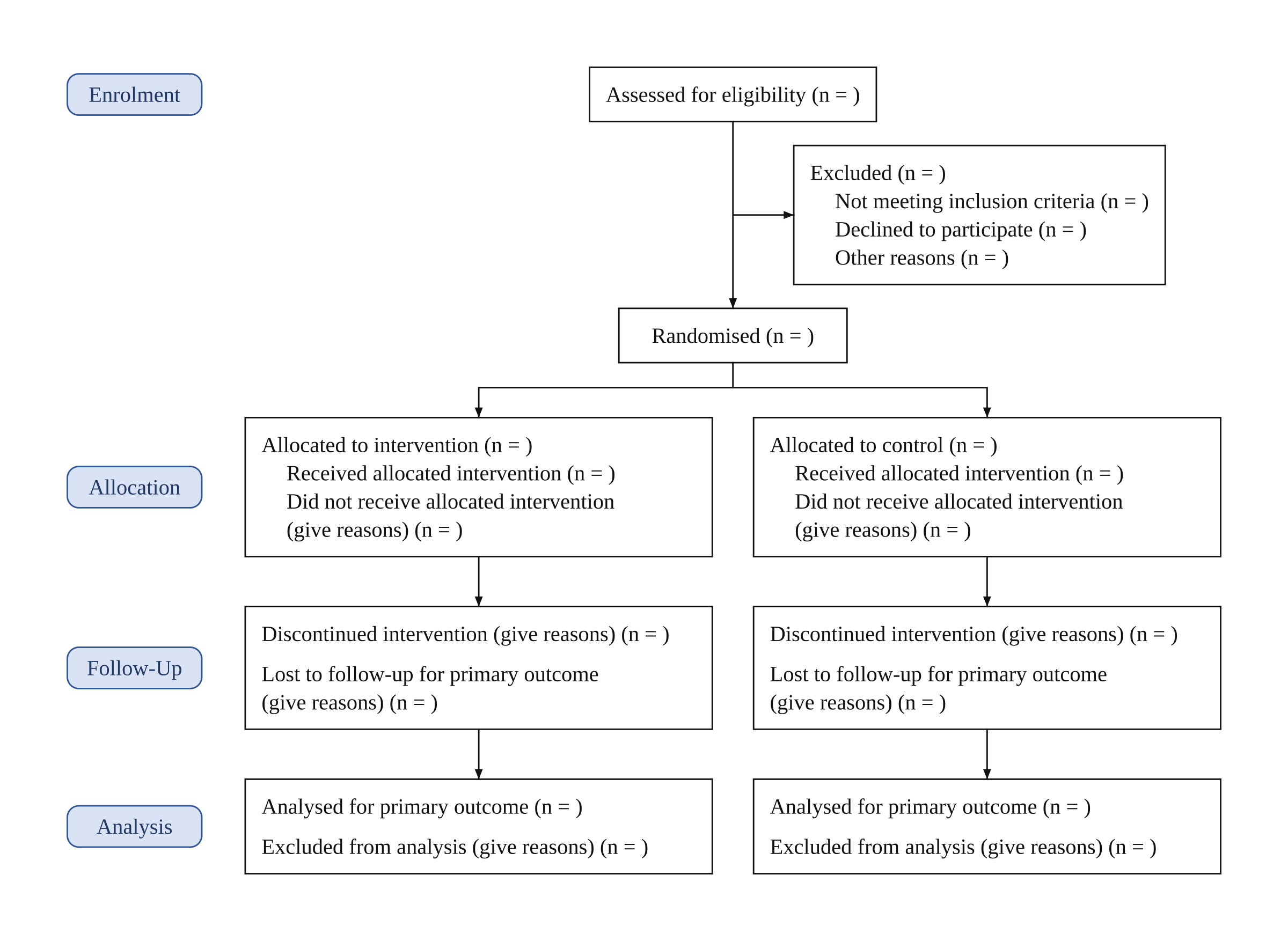
Description used: Blank CONSORT 2025 flow diagram template for a two-arm randomised trial, every count left empty to fill in by hand.
The Excluded box lists the template's three standard reasons (not meeting inclusion criteria, declined to participate, other reasons). Arms are labelled "intervention" and "control" until you name them. The labels use the British spelling of the official template (Enrolment, Randomised, Analysed); write randomized and analyzed in your description to switch to US spelling.
Open this template in the generator to change the arm names or fill in your counts.
CONSORT flow diagram template for 3 groups
Three parallel arms under one Randomised box, for dose-comparison trials or two active treatments against a control.
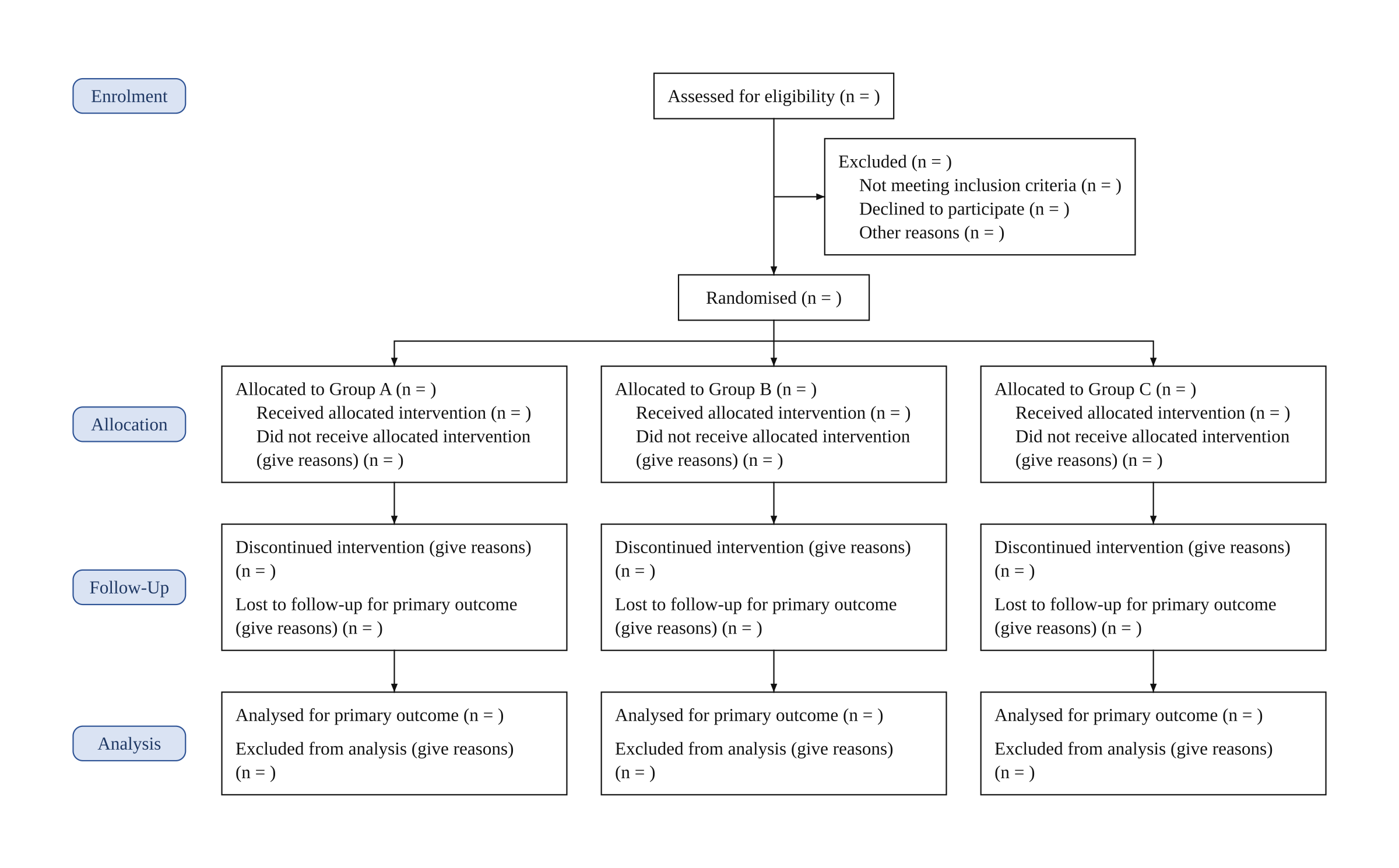
Description used: Blank CONSORT 2025 flow diagram template for a three-arm randomised trial. Name the arms Group A, Group B and Group C. Leave every count empty to fill in by hand.
Each arm gets its own column with the same four stages, so a reader can follow every arm from randomization to analysis. Rename Group A, B and C to your arm names in the description before you generate; the generator keeps drug names and doses as you write them (for example "Drug X 10 mg").
Open this template in the generator to change the arm names or fill in your counts.
CONSORT flow diagram template for 4 groups
Four parallel arms. A 2x2 factorial trial is often reported this way, with one column per combination of the two factors.
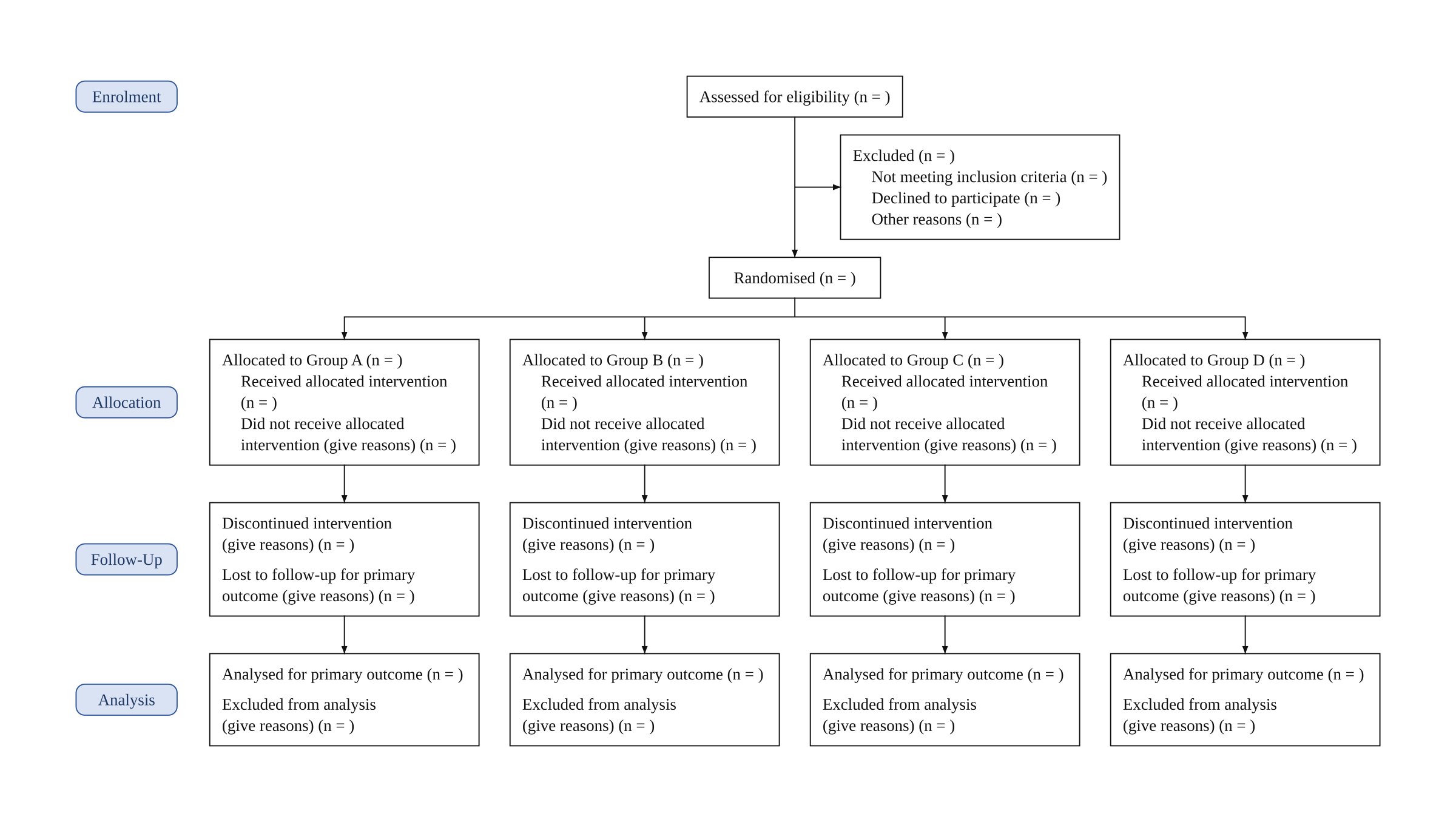
Description used: Blank CONSORT 2025 flow diagram template for a four-arm randomised trial. Name the arms Group A, Group B, Group C and Group D. Leave every count empty to fill in by hand.
With four columns the box text wraps onto more lines, so the figure is wider than it is tall. If your journal limits figure width, the PNG still reads at single-page width; the factorial example on the generator page shows four filled columns.
Open this template in the generator to change the arm names or fill in your counts.
CONSORT template with two follow-up visits
A two-arm template with a 6-month and a 12-month follow-up row, for trials that report losses at each visit.
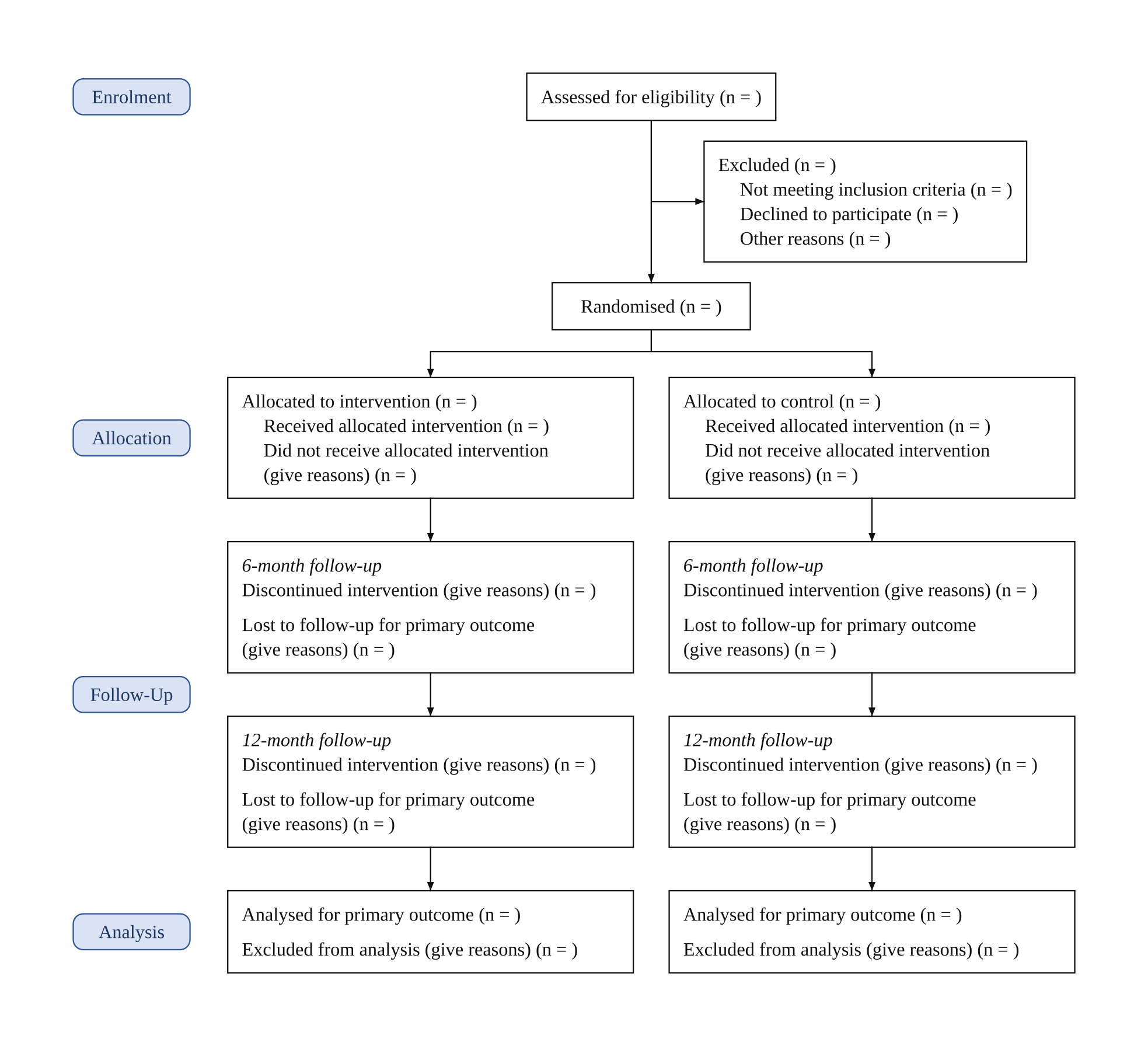
Description used: Blank CONSORT 2025 flow diagram template for a two-arm randomised trial with two follow-up visits, a 6-month follow-up and a 12-month follow-up. Leave every count empty to fill in by hand.
Each visit gets its own row with its own discontinued and lost counts, and every arm has the same number of rows. Name your own time points in the description (for example "8-week and 6-month follow-up") and the row labels change with them.
Open this template in the generator to change the arm names or fill in your counts.
CONSORT 2010 flow diagram template
For a journal, protocol or trial registry that still asks for the 2010 template.
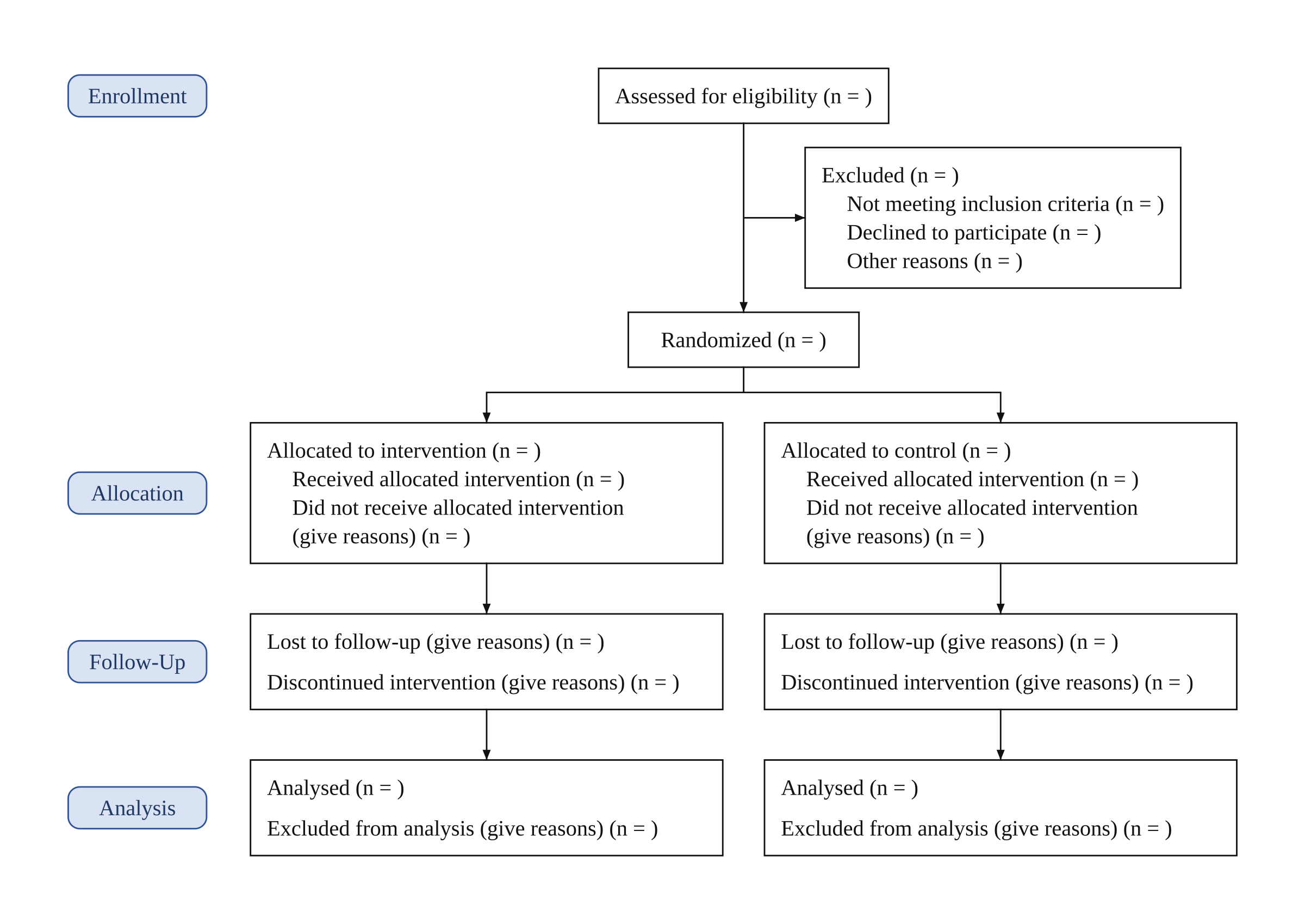
Description used: Blank CONSORT 2010 flow diagram template for a two-arm randomised trial, using the CONSORT 2010 wording and box order. Leave every count empty to fill in by hand.
Compared with the 2025 template above: the follow-up box lists "Lost to follow-up" before "Discontinued intervention", and neither the loss nor the analysis line says "for primary outcome". The mixed spelling (Enrollment and Randomized next to Analysed) is how the official 2010 template is written, and the generator copies it.
Open this template in the generator to change the arm names or fill in your counts.
Filled CONSORT diagram examples
The three examples below show the templates with real-looking counts. The trials are illustrative, not published studies. Each one shows a situation that blank templates leave open: a small pilot trial, participants excluded after analysis began, and a five-arm trial. Six more filled examples (a two-arm trial with reasons, a three-arm drug trial, two follow-up visits, a 2x2 factorial trial, a blank template and a black-and-white 2010 version) are on the CONSORT flow diagram generator page.
CONSORT diagram example: a pilot randomized trial
A pilot trial of a mindfulness app with 40 participants, written with US spelling.
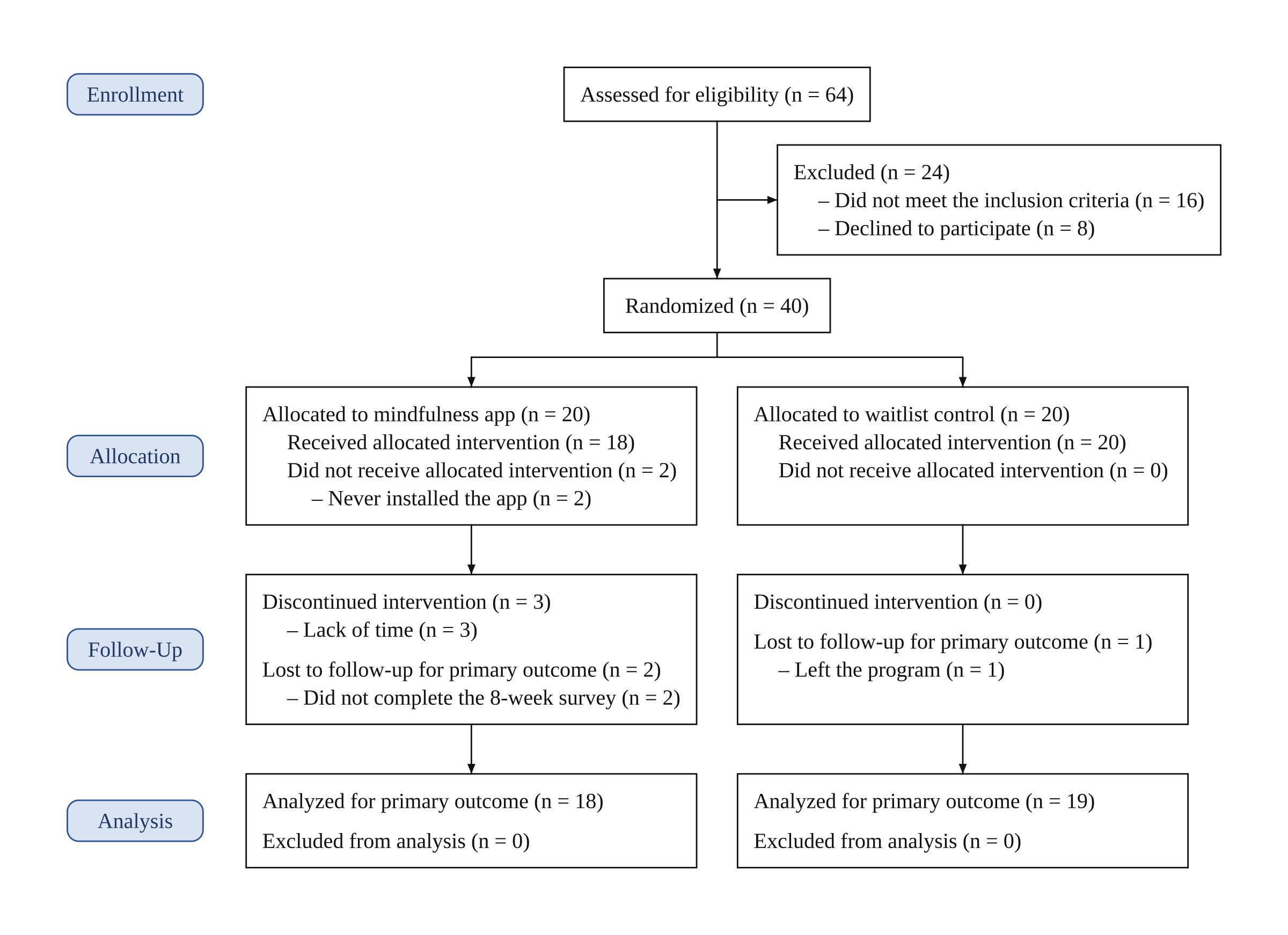
Description used: Pilot randomized trial of a mindfulness app for nursing students. 64 students were assessed for eligibility and 24 were excluded (16 did not meet the inclusion criteria, 8 declined to participate). 40 were randomized: 20 to the mindfulness app and 20 to a waitlist control. Mindfulness app: 18 received the allocated intervention and 2 did not (never installed the app); 3 discontinued the intervention (lack of time); 2 were lost to follow-up (did not complete the 8-week survey); 18 were analyzed. Waitlist control: all 20 received the allocated condition; none discontinued; 1 was lost to follow-up (left the program); 19 were analyzed. No one was excluded from the analysis.
Because the description says randomized and analyzed, every heading switched to US spelling (Enrollment, Randomized, Analyzed). The waitlist arm shows 0 for "did not receive" and "discontinued" because the description says all received it and none discontinued; the generator writes 0 only when your text says none or all. Pilot and feasibility trials have their own CONSORT extension, but the flow diagram takes the same shape.
Open this example in the generator and change the counts to yours.
CONSORT diagram example: participants excluded from the analysis
A two-arm physiotherapy trial in which four participants were excluded from the analysis after follow-up.
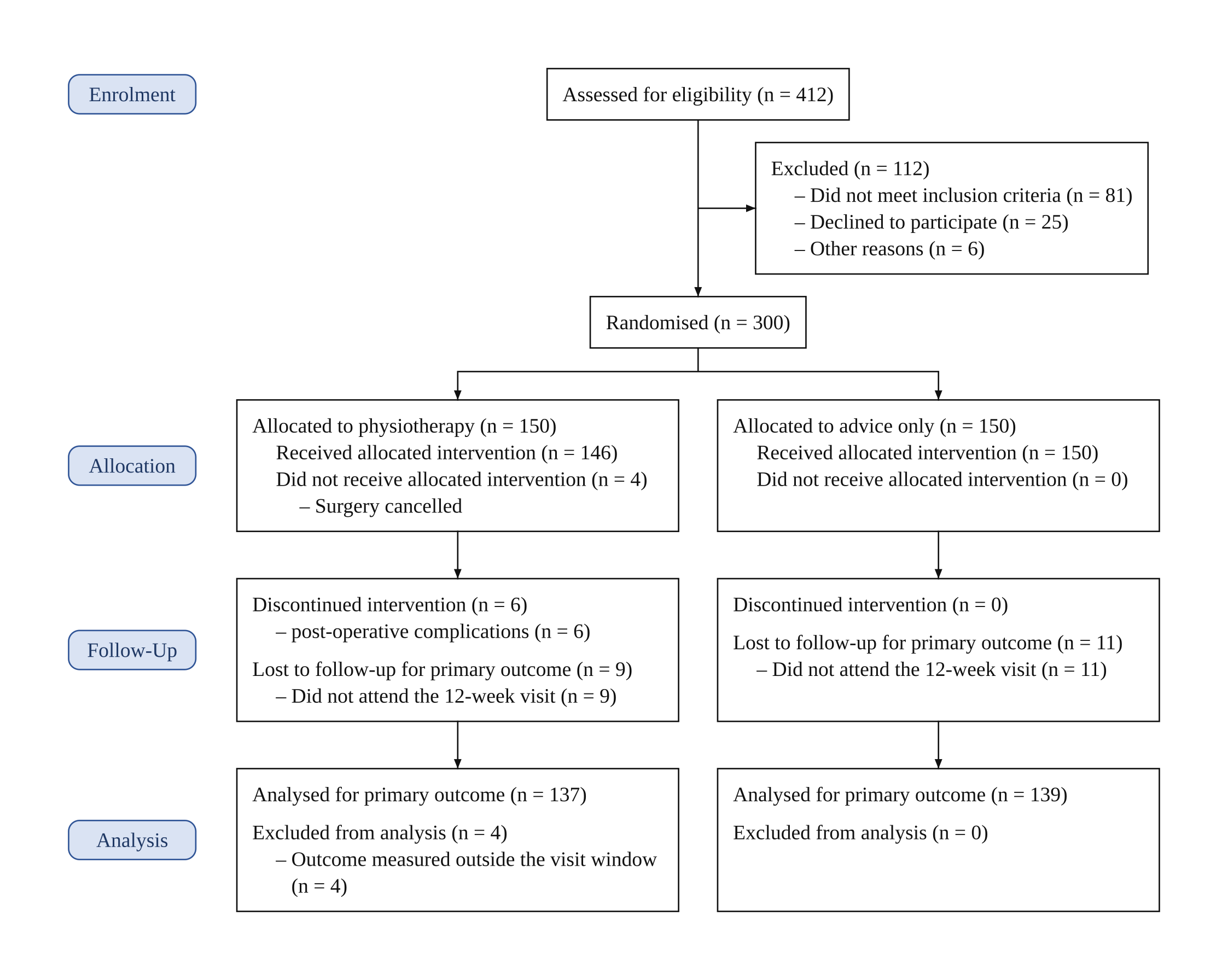
Description used: Two-arm randomised trial of a physiotherapy programme versus advice only after knee replacement. 412 patients assessed for eligibility, 112 excluded (did not meet inclusion criteria 81, declined to participate 25, other reasons 6). 300 randomised: 150 to physiotherapy and 150 to advice only. Physiotherapy: 146 received the allocated intervention, 4 did not (surgery cancelled); 6 discontinued the intervention (post-operative complications); 9 lost to follow-up (did not attend the 12-week visit); 137 analysed; 4 excluded from the analysis (outcome measured outside the visit window). Advice only: 150 received advice; none discontinued; 11 lost to follow-up (did not attend the 12-week visit); 139 analysed; none excluded from the analysis.
The physiotherapy arm has a count in "Excluded from analysis" with its reason, which reviewers look for when the analysed number is lower than allocated minus lost. Under "Did not receive allocated intervention" the reason (surgery cancelled) has no count of its own because the description gave none; the generator does not invent one. Say in your methods whether the analysis is intention-to-treat or per-protocol, as CONSORT 2025 item 21b asks.
Open this example in the generator and change the counts to yours.
CONSORT diagram example: five arms
A dose-finding trial with placebo and four doses, the largest number of arms the generator lays out with code.
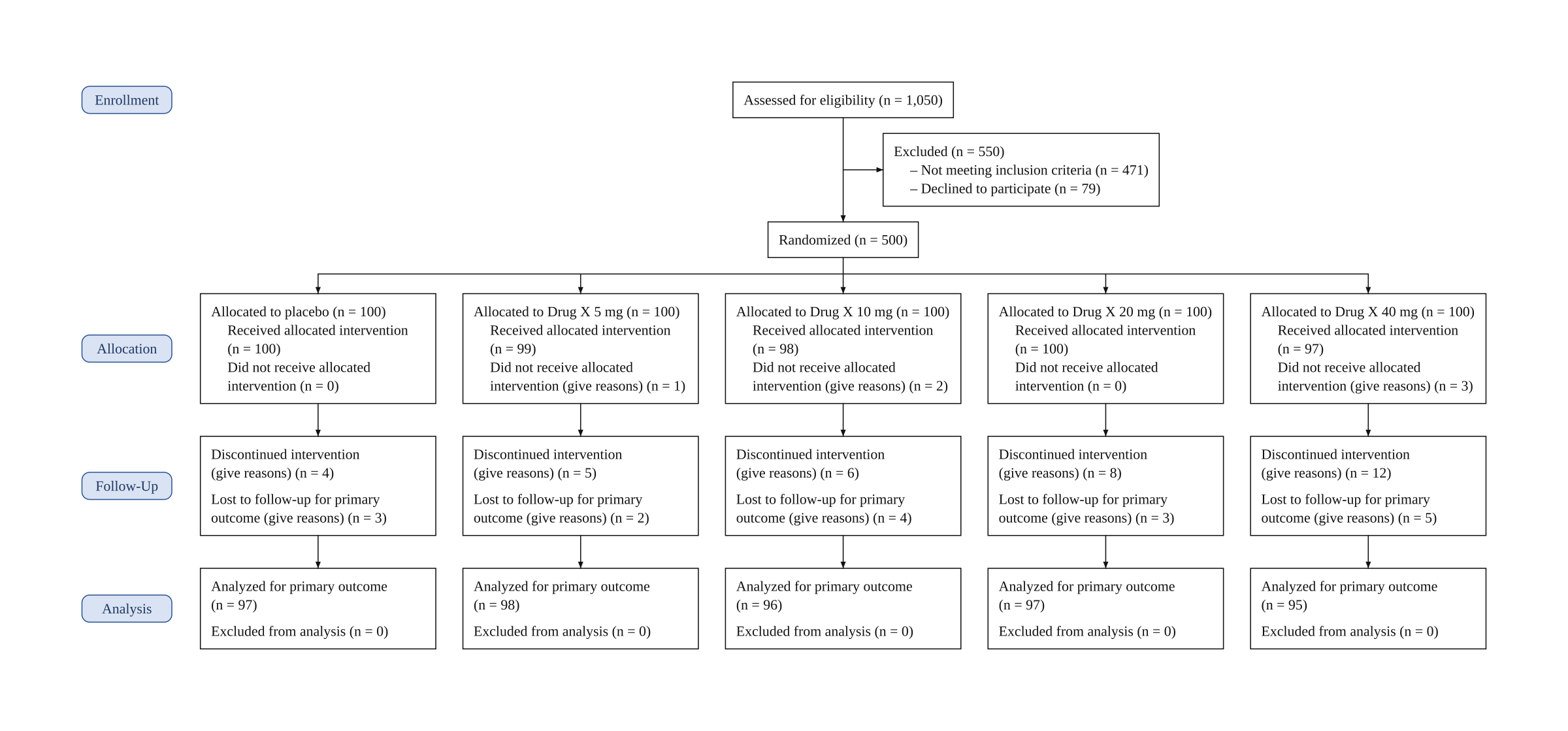
Description used: Five-arm dose-finding randomized trial. 1,050 patients assessed for eligibility, 550 excluded (not meeting inclusion criteria 471, declined to participate 79). 500 randomized, 100 to each group: placebo, Drug X 5 mg, Drug X 10 mg, Drug X 20 mg and Drug X 40 mg. Received the allocated intervention: 100, 99, 98, 100 and 97; did not receive it: 0, 1, 2, 0 and 3. Discontinued the intervention: 4, 5, 6, 8 and 12. Lost to follow-up: 3, 2, 4, 3 and 5. Analyzed: 97, 98, 96, 97 and 95; none excluded from the analysis.
With five arms the boxes are narrow, so labels wrap; download the 4K version on a paid plan if the figure goes full width in a journal. Trials with more than five arms are drawn by the image model instead, so check every number on those.
Open this example in the generator and change the counts to yours.
How do you make a CONSORT diagram in Word or PowerPoint?
The official CONSORT 2025 flow diagram is a Word file on consort-spirit.org, drawn for two arms. To use it:
- Download the Word template and type each count into its "(n = )" space.
- For a third or fourth arm, copy a whole arm column (the allocation, follow-up and analysis boxes with their arrows), paste it beside the others and connect it to the Randomised box.
- For a second follow-up visit, copy the follow-up box under each arm and relabel both with their time points.
In PowerPoint the same boxes are drawn with shapes and connectors; keep each arm in its own column so the arrows stay straight.
Vizcept does not produce a .docx or .pptx file. It gives you the finished diagram as an image you place in Word, Google Docs or PowerPoint (in Word, Insert > Pictures):
- Free: generate a diagram without an account and download a watermarked preview to check the layout.
- Paid plan or credit pack: download the PNG without a watermark, and an editable SVG in which every label and count is real text, so you can fix a word in Word, Illustrator or Inkscape without generating again. Credit packs are one-time payments, from $19.90 for 150 credits.
Microsoft 365 and Word 2019 or later place SVG files directly; how to insert an SVG into Word covers the steps and older versions.
Which trial designs do these templates cover?
The templates and the generator's code layout cover parallel-group randomized trials with two to five arms and one or more follow-up visits. Other randomized designs have their own CONSORT extension, each with an adapted flow diagram:
| Design | CONSORT extension | Drawn by the generator |
|---|---|---|
| Cluster randomized trial | Cluster trials (2012) | By the image model when clusters and participants are reported separately |
| Crossover trial | Randomised crossover trials (2019) | By the image model |
| Multi-arm parallel-group trial | Multi-arm trials (2019) | With code, up to five arms |
| Pilot or feasibility trial | Pilot and feasibility trials (2016) | With code, as a parallel-group trial |
The extensions are listed on the EQUATOR Network CONSORT page. Single-arm and non-randomized studies, and trials with more than five arms, also go to the image model, which draws the whole figure; check every number on it. Observational studies follow STROBE, which suggests a flow diagram but has no fixed CONSORT-style template, and systematic reviews use the PRISMA flow diagram.
What should you check before submitting a CONSORT diagram?
Run these checks on any CONSORT diagram, generated or typed by hand:
- Assessed minus excluded equals randomized.
- The allocated counts of all arms add up to randomized.
- In each arm, received plus did not receive equals allocated.
- Every box with a count above zero lists its reasons.
- The analyzed count matches the analysis population you describe in the methods.
The generator does not balance your numbers: if your counts do not add up, the figure shows them as you wrote them. The worked example on the generator page walks through these checks, and the accuracy page explains what code drawing does and does not guarantee.
CONSORT diagram template: frequently asked questions
What is a CONSORT diagram template?
It is the blank flow chart from the CONSORT statement that a randomized trial report fills in: assessed for eligibility, excluded, randomized, then for each arm allocated, followed up and analyzed. The blank templates on this page cover two, three and four arms.
Where can I get the CONSORT 2025 flow diagram template in Word?
The official Word template is on consort-spirit.org. Vizcept does not export .docx; it gives you a PNG and, on a paid plan or credit pack, an editable SVG that Microsoft 365 and Word 2019 or later can place directly.
Is there a CONSORT flow diagram template for 3 groups?
Yes. The three-arm template above has one column per group. Open it in the generator, rename the groups and add your counts, or download the blank image and fill it in by hand.
Is a CONSORT diagram only for randomized trials?
Yes. CONSORT is the reporting guideline for randomized trials. Observational studies report under STROBE, which suggests a flow diagram without a fixed template, so you can adapt the enrolment part of a CONSORT layout; the generator only lays out randomized parallel-group trials with code.
Can I make a CONSORT diagram from these templates for free?
You can generate one without an account and download a watermarked preview. A watermark-free PNG and an editable SVG come with a paid plan or a credit pack (one-time, from $19.90 for 150 credits). Free credit on sign-up is smaller in some countries.
What is the difference between the CONSORT 2010 and 2025 templates?
CONSORT 2025 lists discontinued intervention before lost to follow-up and adds "for primary outcome" to the loss and analysis lines; the four stages are the same. Compare the 2010 template with the 2025 one.
What is the CONSORT checklist, and how does it relate to the flow diagram?
The CONSORT 2025 checklist is the 30 items a randomized trial report should cover. The flow diagram answers the participant-flow items: 22a asks for the numbers randomly assigned, receiving the intended intervention and analysed in each group, and 22b for losses and exclusions after randomisation with reasons.
Turn a template into your trial's diagram
Paste your participant-flow paragraph; each count is placed in its CONSORT 2025 box and set in type.
