
Who is this for, and who should stay on BioRender?
This page is for researchers and graduate students who make a handful of schematic figures a month — workflows, study designs, conceptual frameworks, simple pathway sketches — and often pay for tools themselves.
Stay on BioRender if:
- you rely on its icon library: cells, organs, organisms and lab equipment drawn by illustrators;
- your lab shares figures, templates and folders, or your institution already pays for it;
- you are making a graphical abstract for an Elsevier journal. Elsevier's policy bars general-purpose AI image tools from graphical abstracts and encourages dedicated illustration tools (details).
How do the BioRender alternatives compare?
In short: free icon libraries cost nothing but time, Mind the Graph is the cheapest subscription, and Vizcept is the cheapest way to pay per figure — if you proofread what it draws. Stay on BioRender if its icon library is the reason you use it.
| Option | What it is | Cost (checked 19 Sep 2026) | Can you publish? | Best for |
|---|---|---|---|---|
| BioRender Free | Drag-and-drop editor with an icon library | $0: up to 3 figures and some free AI credits; high-resolution exports without a watermark need a paid plan | No — "No commercial use or publication" | Trying the editor |
| BioRender Individual (academic) | The same editor, unlimited figures | $35/month billed yearly, or $39 month to month; AI figure generation is an add-on from $5/month, billed yearly | Yes, academic publishing rights | Heavy users and labs that live in the icon library |
| Mind the Graph | Illustration library and editor; AI image generation on the paid plan | Free starter: unlimited creations using up to 4 of its illustrations; Researcher $99/year or $14/month | Yes on Researcher ("full publishing rights") | Infographics and posters from ready-made illustrations |
| Bioicons + Inkscape | About 2,800 open-source science icons, plus a free vector editor | Free | Yes, under each icon's license (CC0, CC BY, CC BY-SA, MIT or BSD); CC BY icons need credit | People happy to arrange icons themselves |
| Servier Medical Art | 3,000+ free medical illustrations | Free | Yes, under CC BY 4.0 — credit Servier | Anatomy and physiology visuals |
| PowerPoint or draw.io | General drawing tools | draw.io is free; PowerPoint comes with Microsoft 365 | Yes — you drew it | Simple boxes and arrows, if you have the time |
| Vizcept | Describe a figure in words; get PNG or SVG | Credit packs from $19.90 (30 figures at 2K, valid 365 days, never renew); monthly from $14.90 | Yes, on every plan; free downloads are watermarked previews | A few structured figures: frameworks, flowcharts, PRISMA, workflows |
Prices are the ones each vendor published on 19 September 2026; they change, so check before you buy.
If you are comparing AI-only tools rather than an icon editor, the FigureLabs comparison covers FigureLabs and SciDraw AI, what each one renews at, and which figures are laid out by code.
What does a figure cost if you make three a month?
Three figures a month is 36 a year. Here is what each option costs for that, using the published prices above.
| Option | Cost for a year | Cost per figure |
|---|---|---|
| BioRender Individual, academic, billed yearly | $420 | $11.67 |
| BioRender Individual, month to month | $468 | $13.00 |
| Mind the Graph Researcher, billed yearly | $99 | $2.75 |
| Vizcept 450-credit pack, one try per figure | $39.90 | $1.11 |
| Vizcept 450 + 150 credits, three tries per figure | $59.80 | $1.66 |
Count tries, not just figures: each Vizcept generation or regeneration uses credits (5 at 2K), while BioRender's paid plans include unlimited figures. Free tools cost time instead of money.
What changes if you switch to an AI figure tool?
- You describe the figure instead of dragging icons. That is faster for boxes-and-arrows figures and weaker for detailed anatomy.
- You proofread more. Image-model figures can misspell a label or flip an arrow; check every label before you submit (how Vizcept draws figures).
- Editing works differently. In Vizcept you mark the figure and describe the change, or open the SVG in Illustrator or Inkscape. The SVG is traced from the image, so it is not layered icon by icon as in BioRender.
- Journals' AI rules apply. Disclose the tool in the caption; the publisher policy table shows where each publisher wants it.
What does an AI-drawn figure look like, and what do you still check?
Here is an example from Vizcept's signaling pathway tool, drawn from a four-sentence description of the MAPK/ERK cascade — growth factor, receptor tyrosine kinase, GRB2 and SOS loading RAS with GTP, then RAF, MEK and ERK into the nucleus.
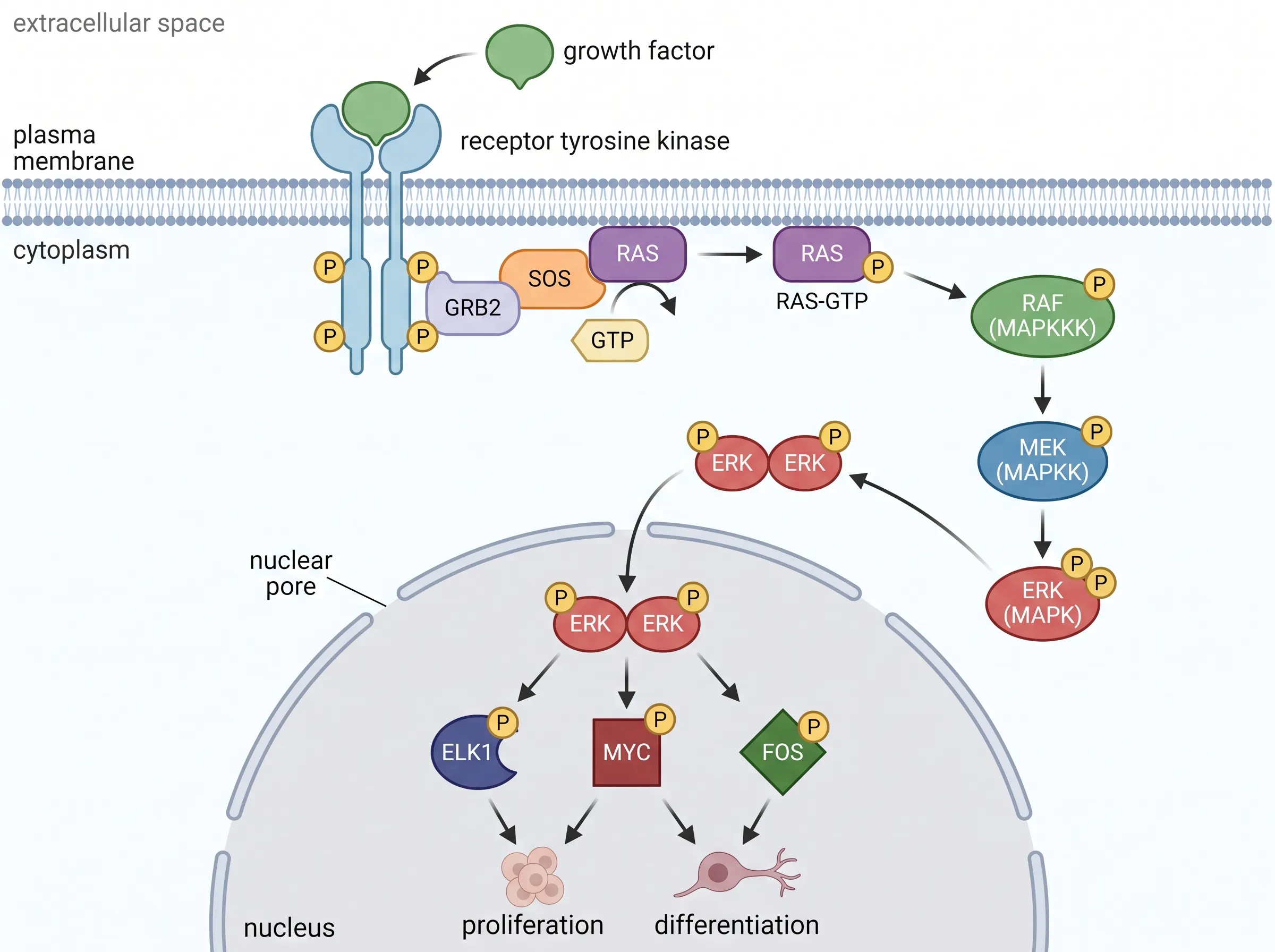
The cascade order, the compartments and the arrows into the nucleus match the description. But look at RAS: the figure puts a phosphate (P) on it, even though the description said RAS is activated by GTP loading, which is how RAS works. That is the kind of slip an image model makes and a reviewer catches, so read every label against your methods before a figure goes into a paper.
Where does Vizcept fit, and where doesn't it?
Good fit: figures that are mostly structure and text — conceptual frameworks, study-design flowcharts, PRISMA flow diagrams and experimental workflows — when you'd rather describe them than build them. You own every figure on every plan (publication rights), and a credit pack ends when you're done.
Poor fit: detailed anatomical or molecular illustration where an illustrator-drawn icon library matters; team workspaces; and graphical abstracts for Elsevier journals. If you do make a graphical abstract for another publisher, check its rules first.
BioRender alternative questions
What can I use instead of BioRender?
For free: Bioicons with Inkscape, Servier Medical Art, draw.io or PowerPoint. For a cheaper subscription: Mind the Graph, from $99 a year. For paying per figure: Vizcept credit packs, from $19.90 and valid 365 days. Stay on BioRender if you depend on its icon library.
Is there a free version of BioRender?
Yes, but BioRender's free plan allows up to 3 figures and does not allow publication or commercial use. Publishing rights come with the paid Individual plan, $35 a month billed yearly for academics.
Is BioRender considered AI?
BioRender is mainly a drag-and-drop editor with an icon library drawn by illustrators. It also sells an AI-assisted figure generation add-on, from $5 a month on an annual academic plan.
Can I publish figures I make with Vizcept?
Yes, on every plan — you own them. Free downloads are watermarked previews; paid plans and credit packs give the full-resolution file. Journals may still ask you to disclose the AI tool in the caption.
What is the best free BioRender alternative?
It depends on the figure. For cells and anatomy, Bioicons or Servier Medical Art with Inkscape (credit the CC BY images). For flowcharts and study designs, draw.io in the browser. For a few AI-drafted figures, Vizcept's first figure is free, and credit packs start at $19.90.
Is BioRender free for students?
BioRender's free plan is open to everyone, students included, but it allows only 3 figures and no publication. Students paying out of pocket get an extra discount on the paid plan with an academic email. Vizcept gives verified students 40% off subscriptions for 12 months.
Describe your figure and see the result
Your first figure is free, without an account. Credit packs start at $19.90 and never renew.
