Sentence Diagram Generator: Diagram Any English Sentence

Type or paste a sentence and get a Reed-Kellogg diagram in seconds. A language model reads the grammar; code sets every line and every word in a real font, so letters never come out garbled the way AI images often do.

Reed-Kellogg rulesSentences and phrasesBlank worksheet version

Sentence Diagram Generator

Your first diagram is free — no sign-up needed (2K with watermark)

Enter a sentence on the left to diagram your own

Diagram This Sentence in Three Steps

How the tool works

Paste the sentence from your worksheet, get the diagram back in a few seconds, then download it as an answer key or a blank practice copy.

1

Paste one sentence or phrase

Type or paste one English sentence: simple, compound, complex or compound-complex. Phrases and fragments work too. If you paste several sentences, normally only the first is diagrammed; to do a whole exercise at once, switch Mode to Worksheet. Add "blank worksheet" or "color-code the parts of speech" if you want those versions.

2

The grammar is read, then drawn by code

A language model decides what each word does: subject, verb, objects, modifiers, clauses. Code then places the words by Reed-Kellogg rules and sets them in a real font, so no letter is garbled. Most sentences come back in under 20 seconds.

3

Check it, then download

Download a PNG for slides and handouts or, on paid plans, an SVG with real text you can edit in Illustrator, Inkscape or Figma. If a phrase hangs from the wrong word, add a note such as "attach to the class to letter" and generate again.

What is a sentence diagram?

A sentence diagram is a picture of a sentence's grammar. Each word sits on a line, and the position of the line shows the word's job: subject, verb, object, modifier or clause.

The standard method in American grammar textbooks is the Reed-Kellogg diagram. Alonzo Reed and Brainerd Kellogg set it out in Higher Lessons in English (1877). It replaced an older style of drawing words in bubbles, used by Stephen W. Clark in the 1840s.

Sentence diagramming is still part of many middle-school ELA and homeschool grammar programs. It makes students decide what every word does, instead of just labeling parts of speech.

How to diagram a sentence (Reed-Kellogg in 5 steps)

To diagram a sentence, draw a baseline and split the subject from the verb with a vertical line. Put the direct object after a shorter line, hang the indirect object and prepositional phrases below the verb, then slant adjectives and adverbs under the words they modify.

Here is My grandmother gave the neighbors a warm apple pie on Sunday., built up one step at a time. Each picture is the tool's own output.

Step 1: Find the subject and the verb

Draw a horizontal baseline. Write the subject on the left and the verb on the right, and split them with a vertical line that crosses the baseline.

Step 1: Find the subject and the verb in a Reed-Kellogg diagram of 'My grandmother gave the neighbors a warm apple pie on Sunday.'

Step 2: Add the direct object

If the verb has a direct object, write it after the verb, behind a short vertical line that stops at the baseline.

Step 2: Add the direct object in a Reed-Kellogg diagram of 'My grandmother gave the neighbors a warm apple pie on Sunday.'

Step 3: Hang the indirect object under the verb

An indirect object (to whom or for whom) goes on a horizontal line below the verb, connected by a slanted line with nothing written on it.

Step 3: Hang the indirect object under the verb in a Reed-Kellogg diagram of 'My grandmother gave the neighbors a warm apple pie on Sunday.'

Step 4: Attach prepositional phrases

Write the preposition on a slanted line under the word the phrase modifies, and its object on a horizontal line at the bottom of the slant. "On Sunday" tells when, so it hangs from "gave".
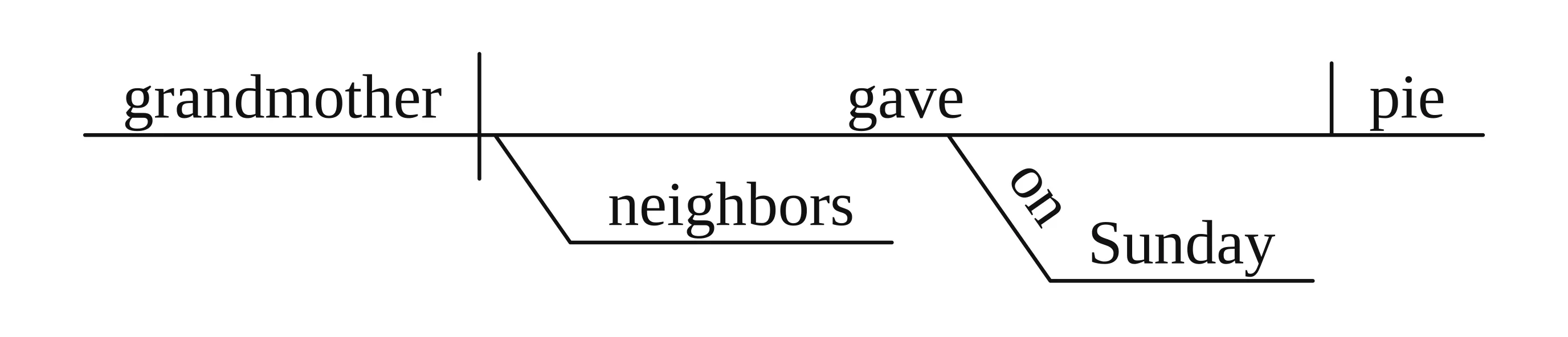
Step 4: Attach prepositional phrases in a Reed-Kellogg diagram of 'My grandmother gave the neighbors a warm apple pie on Sunday.'

Step 5: Slant the modifiers

Put adjectives, articles and possessives on slanted lines under the nouns they describe, and adverbs under the verbs, adjectives or adverbs they modify.
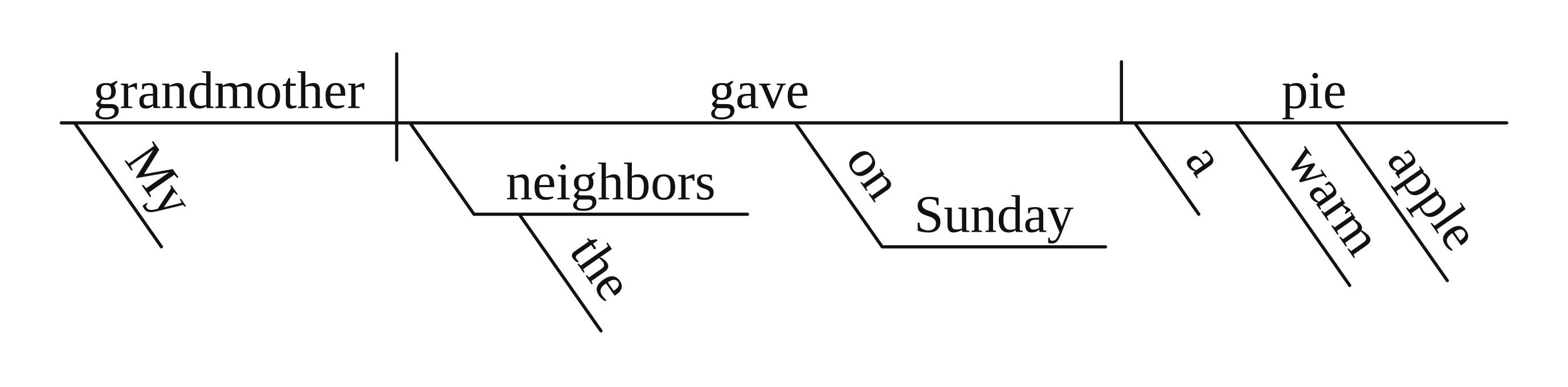
Step 5: Slant the modifiers in a Reed-Kellogg diagram of 'My grandmother gave the neighbors a warm apple pie on Sunday.'

For every other structure (linking verbs, clauses, questions, infinitives and gerunds), see our full guide on how to diagram a sentence, with a diagram and a cheat sheet for each rule.

The 5 basic sentence patterns, diagrammed

Most sentences in a grammar book follow one of five patterns. The pattern decides which line comes after the verb.

PatternExampleWhat follows the verb on the baseline
S-VThe baby slept.Nothing
S-V-DOMaria baked bread.Short vertical line, then the direct object
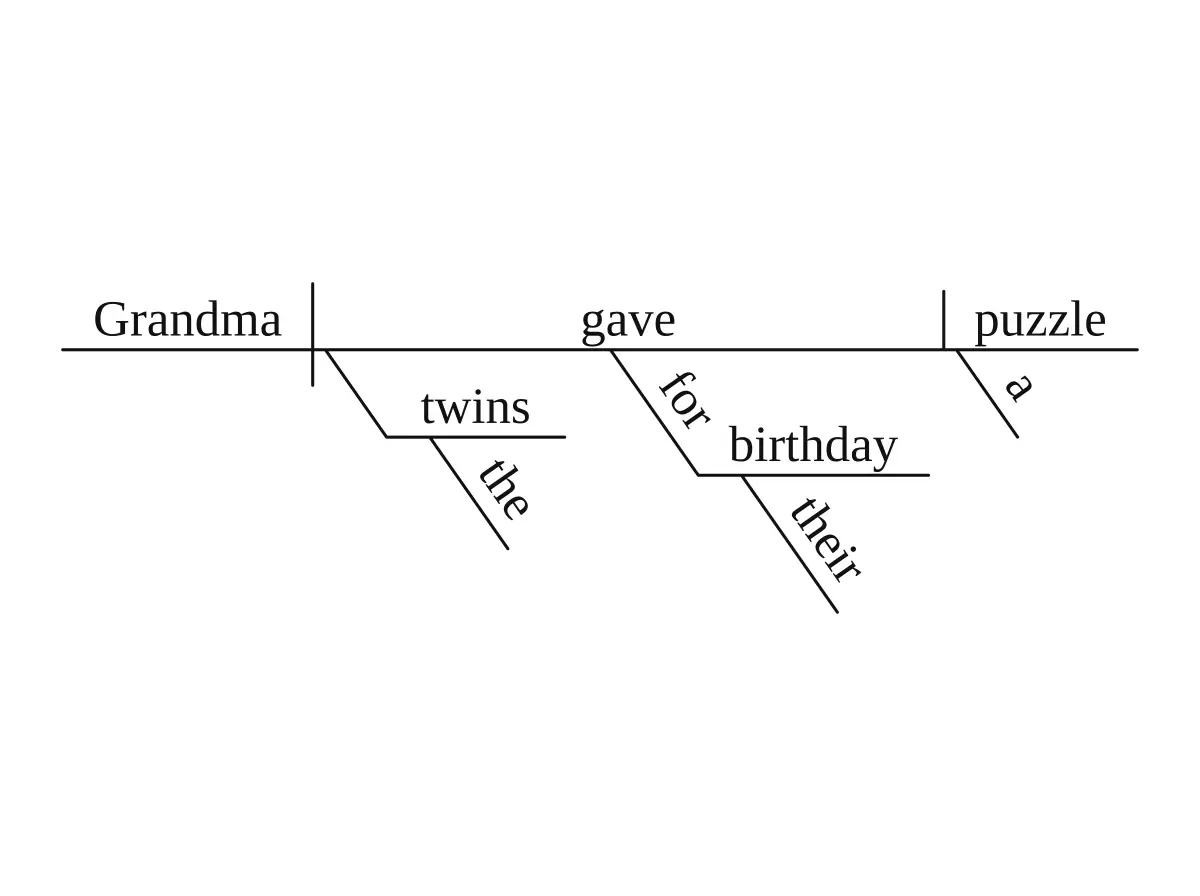
S-V-IO-DOGrandma gave the twins a puzzle.Direct object after a vertical line; indirect object on a line below the verb
S-LV-PNMy aunt is a pilot.Backslash, then the predicate noun
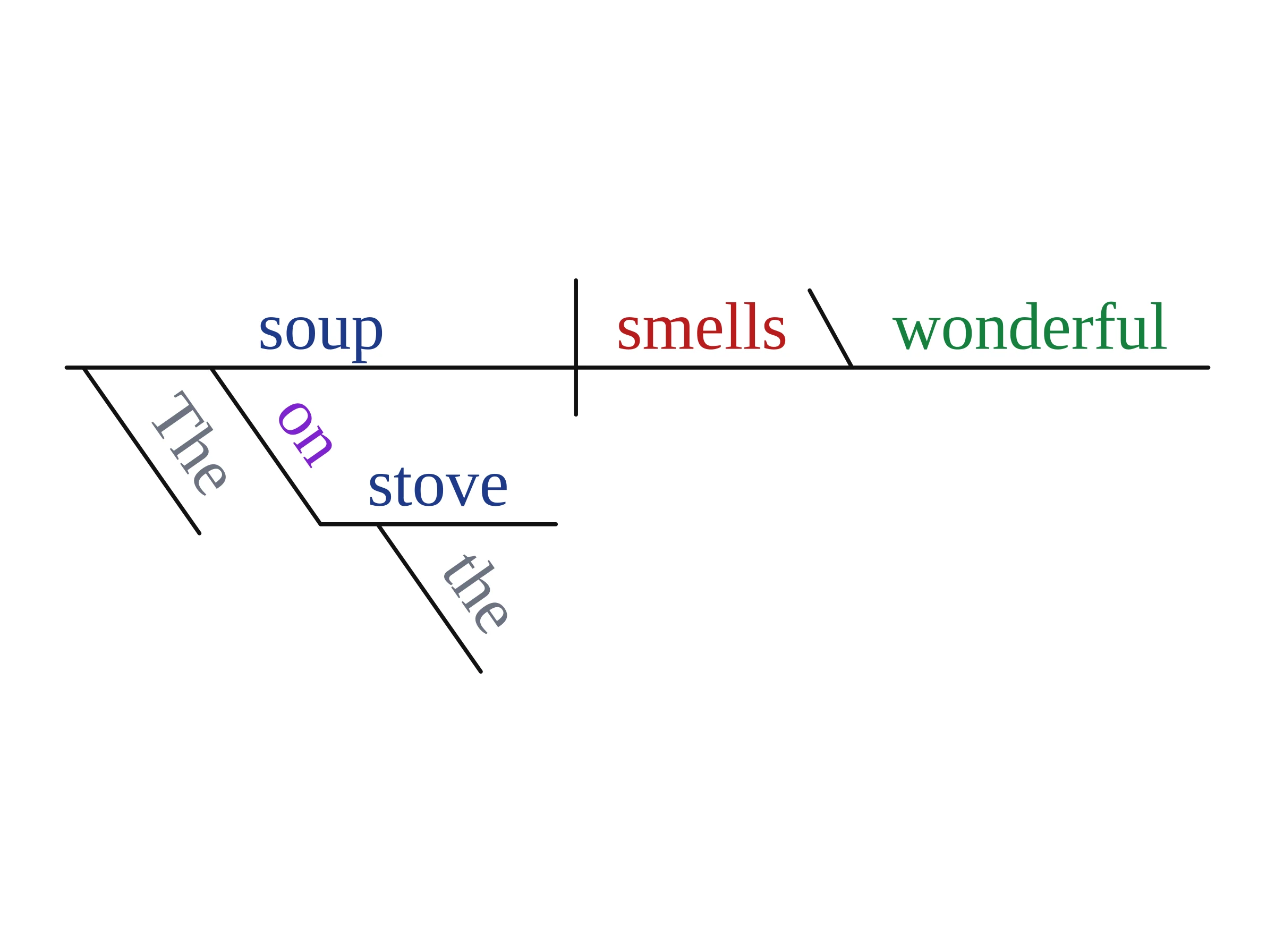
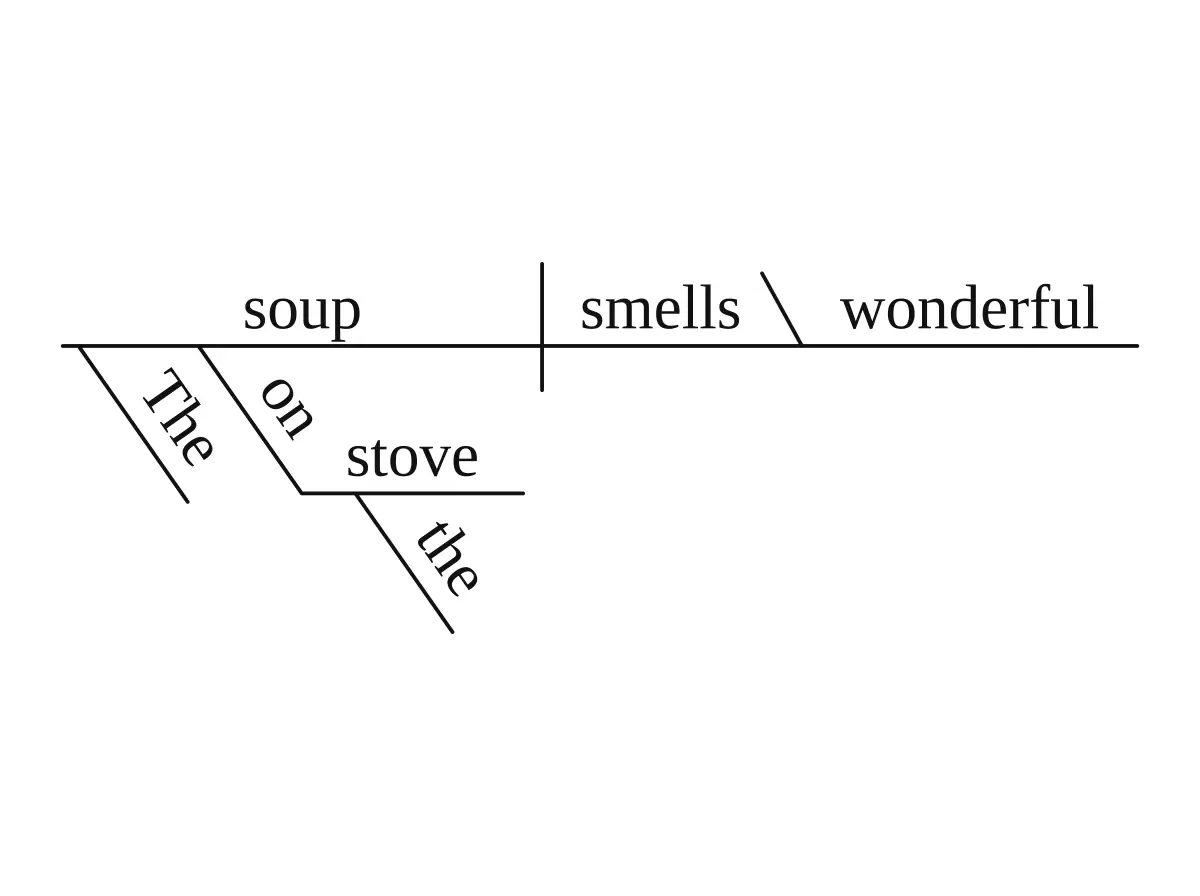
S-LV-PAThe soup smells wonderful.Backslash, then the predicate adjective

The backslash leans back toward the subject because a predicate noun or adjective describes the subject, not the verb.

Harder cases: clauses, questions, commands and phrases

  • Compound subjects and verbs. The line splits into a fork, one branch per item, with the conjunction on a dashed line between them.
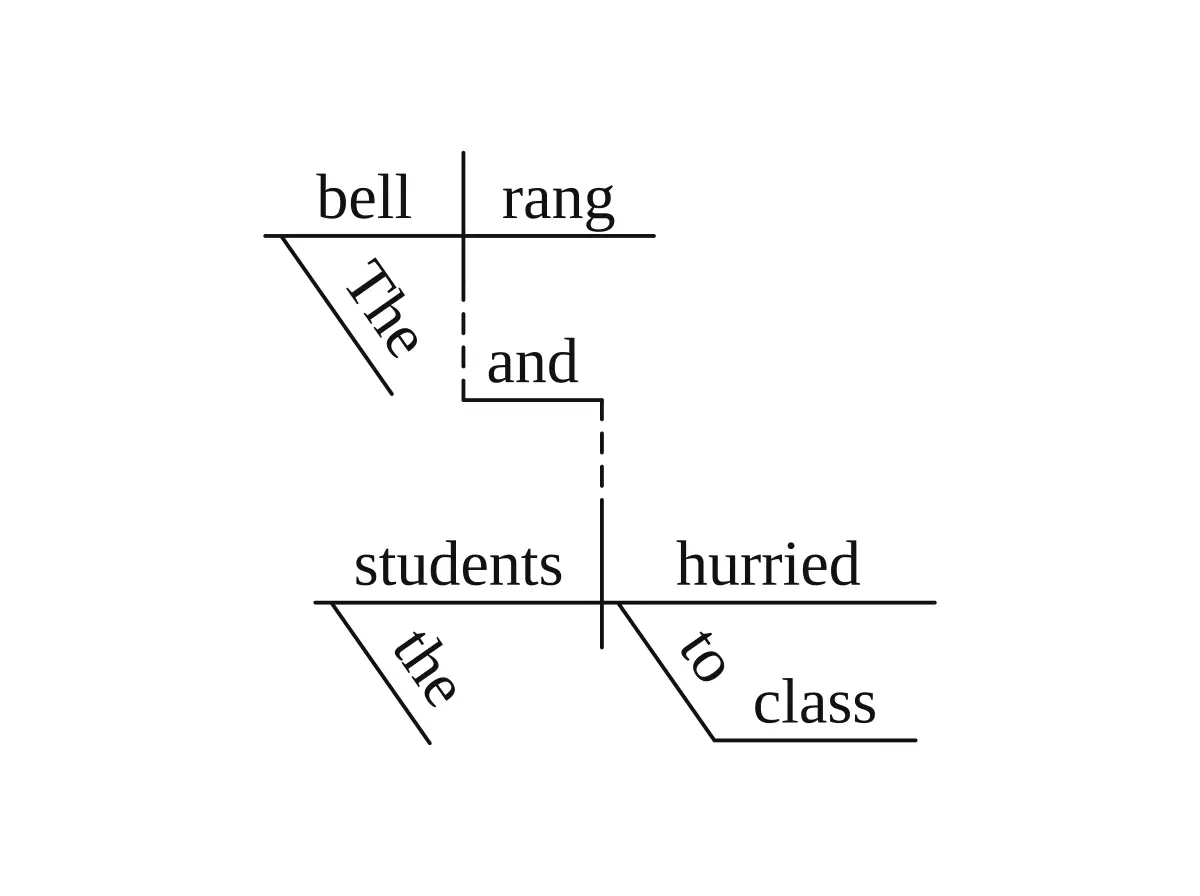
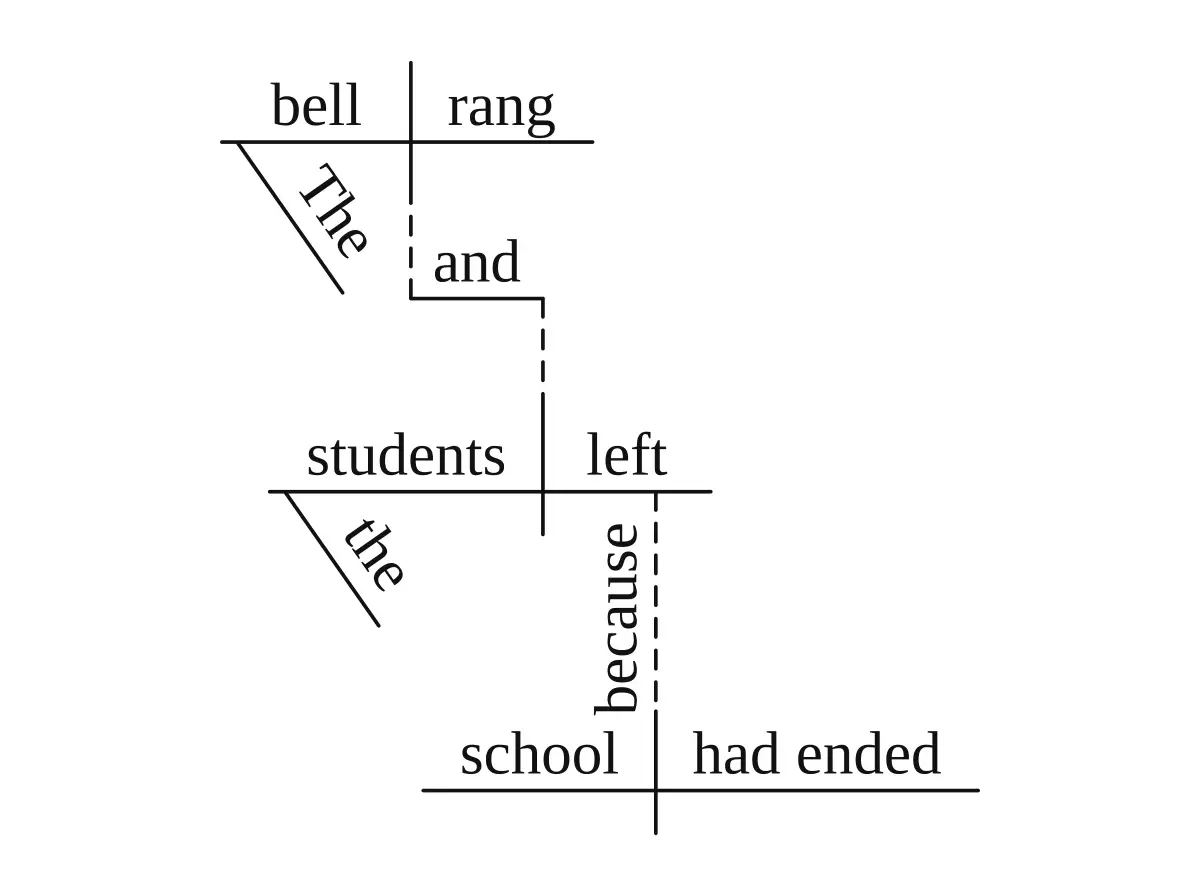
  • Compound sentences. Each independent clause gets its own baseline. A dashed line with a small step carries the conjunction (and, but, or) from one verb to the next.
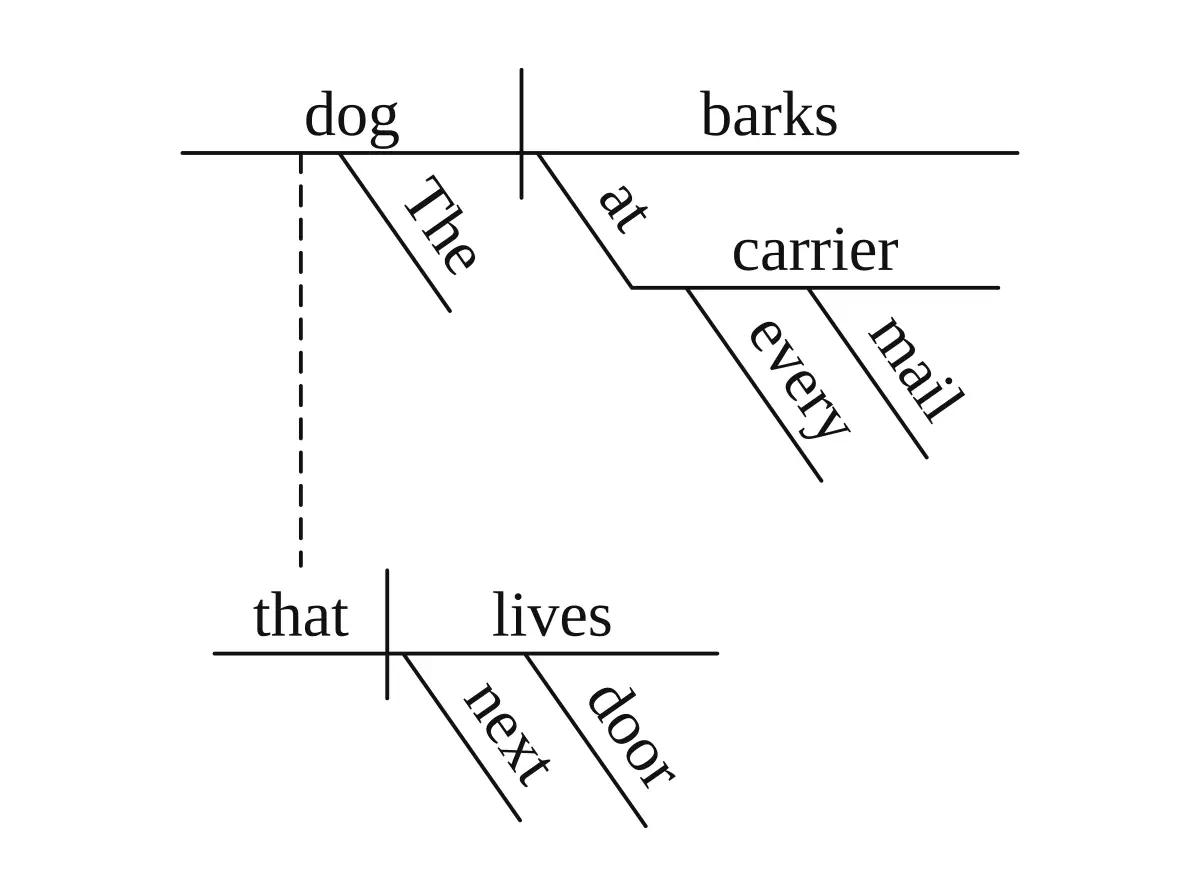
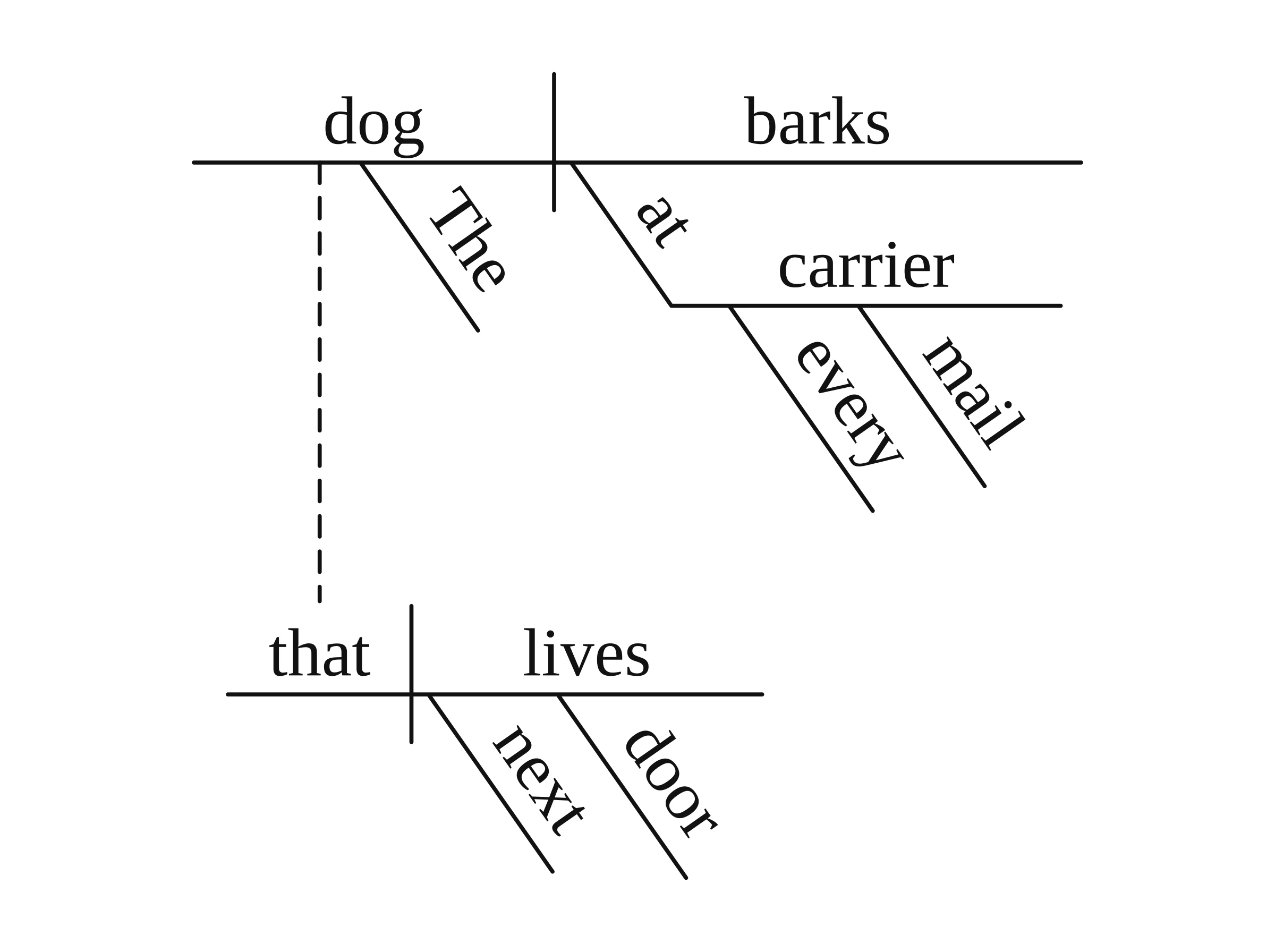
  • Adjective (relative) clauses. The clause goes on its own baseline below. A dashed line runs from the noun it describes to the relative pronoun (who, which, that).
  • Adverb clauses. Also on their own baseline below, joined to the verb they modify by a dashed line with the subordinating conjunction (because, when, if) written on it.
  • Noun clauses, gerunds and infinitives used as nouns. These stand on a pedestal (sometimes called a stilt) above the slot where a single noun would go.
  • Questions. Rewrite in statement order first: "Why did the committee reject the plan?" becomes subject committee, verb did reject.
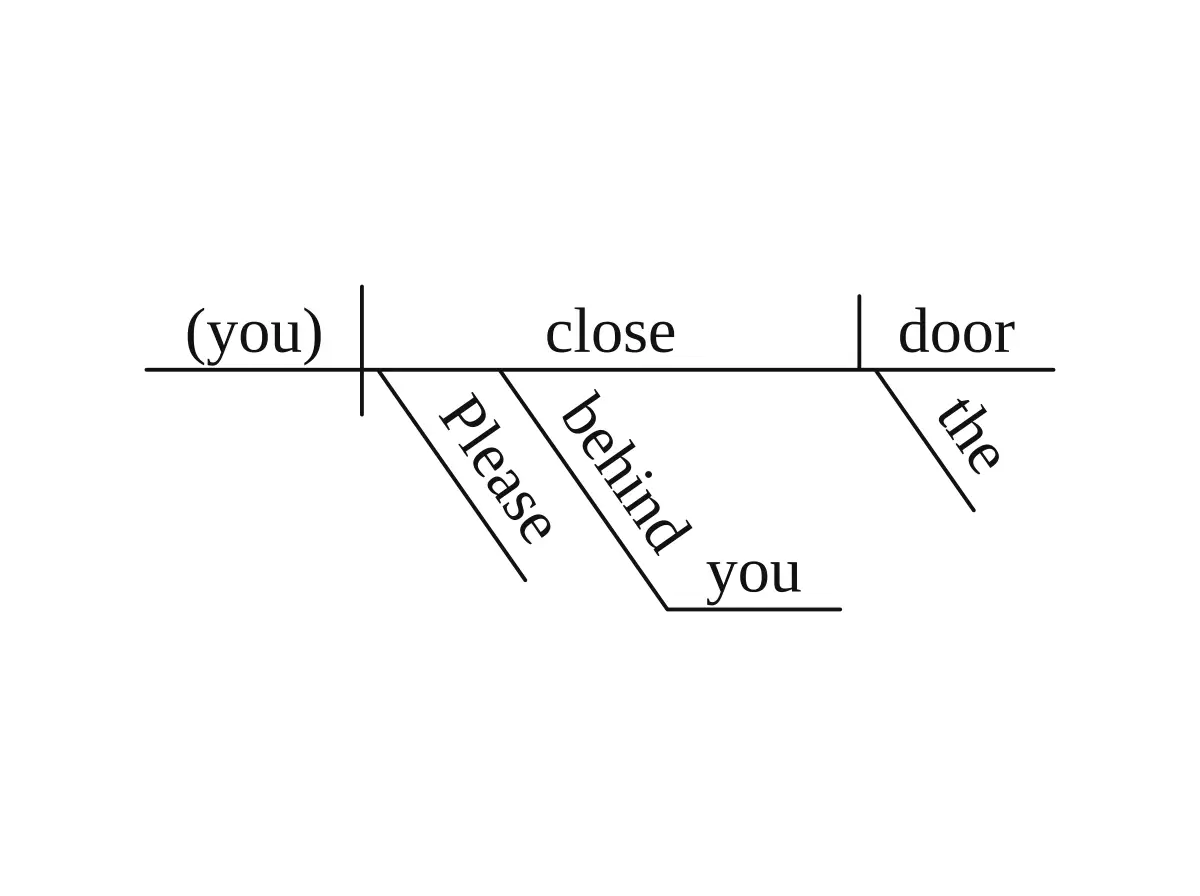
  • Commands. The subject is the understood (you), written in parentheses.
  • Phrases. A phrase with no subject and verb puts its main word on the baseline with no divider.

Reed-Kellogg diagram of 'The dog that lives next door barks at every mail carrier.' with the relative clause on its own baseline

Answer keys and blank practice worksheets

Teachers and parents use this tool mostly for exercise sentences, so it makes two versions of each diagram.

  1. Type the sentence as it is to get the labeled diagram. Use it as the answer key.
  2. Type blank worksheet: before the same sentence. You get every line with no words, and the sentence printed on top for students to fill in.
  3. Optional: type color-code the parts of speech: before the sentence for a colored version, handy for visual learners.

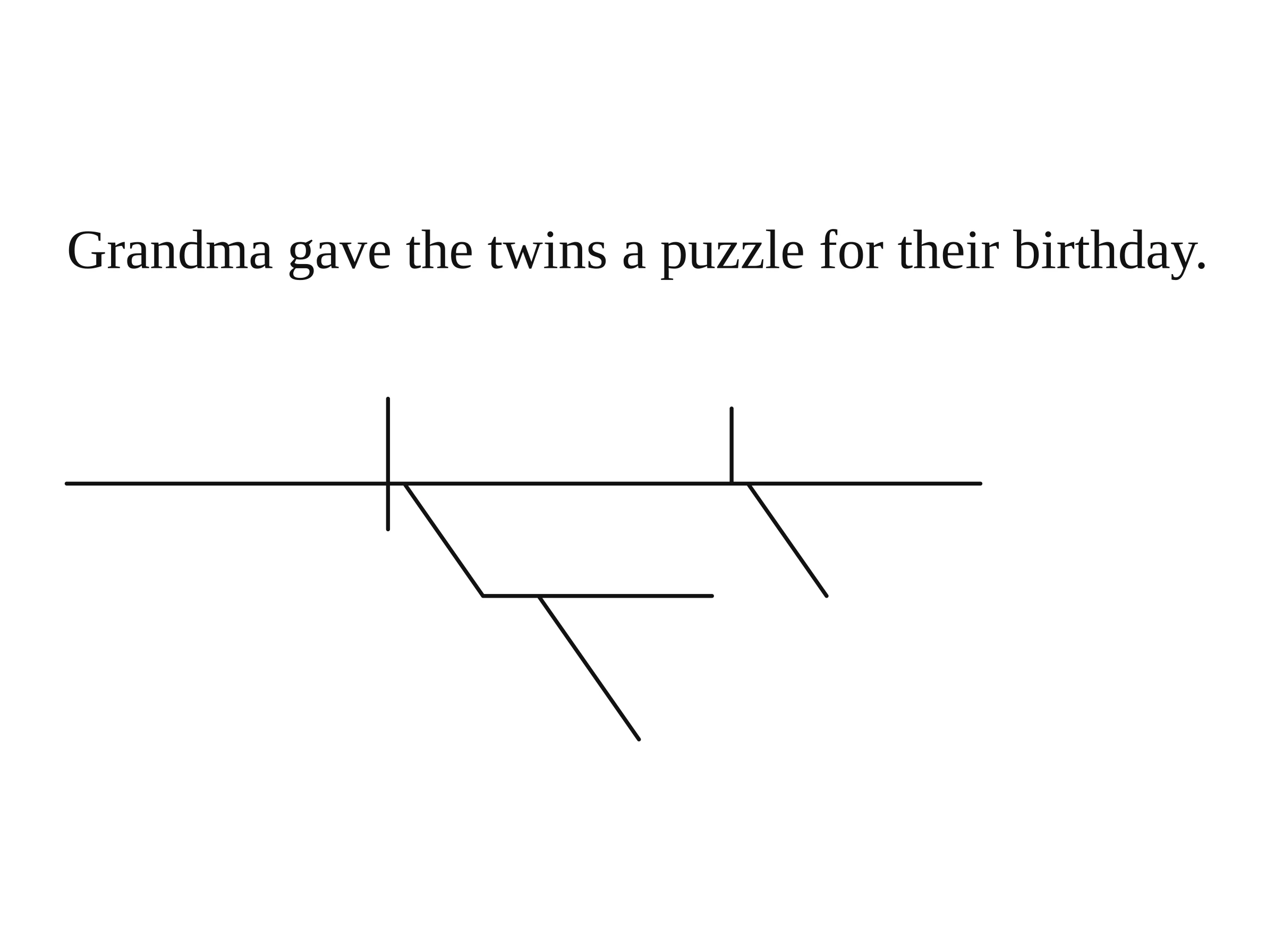
Blank Reed-Kellogg practice worksheet for 'Grandma gave the twins a puzzle for their birthday.'

Color-coded sentence diagram of 'The soup on the stove smells wonderful.' with each part of speech in its own color

One diagram covers one sentence. For a whole exercise, switch Mode to Worksheet: paste up to 20 sentences and get a practice worksheet with blank lines plus a matching answer key, both as PDFs. Samples and ready-made practice sets: sentence diagramming worksheets.

How accurate is it, and when should you double-check?

The drawing step cannot garble letters: code sets every word in a real font. A word can still be missing or on the wrong line when the grammar analysis gets the sentence wrong. Check these cases before you hand a diagram to students:

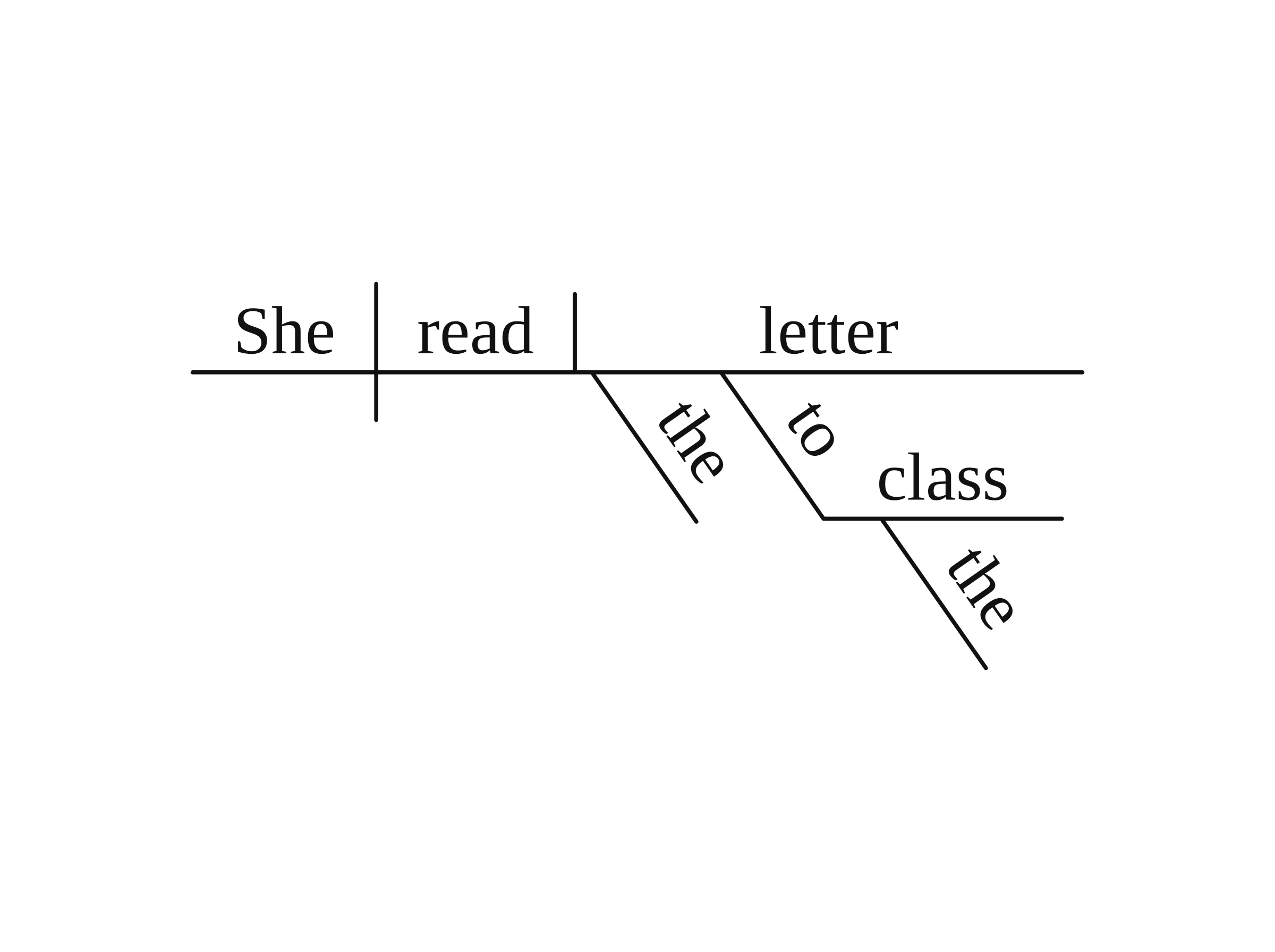
  • Prepositional phrases that could attach two ways. In "She read the letter to the class," does to the class go with read or letter? The tool picks one. If you want the other, add a note and generate again.
  • Compound infinitives. "Willing to compromise and adapt" is drawn as two separate infinitives, and the and between them is left out.
  • Pairs of modifiers such as "slowly and steadily" or "tired but happy": the diagram has no place for the and or but between them.
  • Infinitives without "to" ("made him cry", "let me go"): the diagram may show a to that is not in your sentence, where textbooks write (to).
  • Long literary or legal sentences with appositives and several nested clauses. The more layers, the more places a phrase can land on the wrong word.

Diagram of 'She read the letter to the class.' after adding a note to attach 'to the class' to 'letter'

Some diagrams are drawn by an image model instead of code: when you attach an image to your request, when the text contains characters the diagram font cannot draw (non-Latin scripts, emoji), and when the grammar step fails or takes longer than about 20 seconds. Those results take about a minute and are drawn freehand, so check their words and lines carefully. Our accuracy page explains which diagrams are drawn by code and which by an image model across all Vizcept tools.

Sentence diagram generator vs. ChatGPT vs. drawing by hand

This toolChatGPT imageBy hand or a drag-and-drop template
Who decides the grammarLanguage modelLanguage modelYou
Who draws the linesCode, by Reed-Kellogg rulesImage model, freehandYou
Letters never garbledYesNot guaranteedYes
Blank worksheet versionYesAsk and hopeRedraw it
Editable fileSVG with real text (paid plans)Flat imageDepends on the app
Time per sentenceUsually under 20 secondsVariesSeveral minutes

Drawing by hand is still the best way to learn. Use the tool to check your work or to make answer keys faster, not to skip the thinking.

Who Uses This Sentence Diagrammer

Teachers · Homeschool Parents · Students

Most diagrams made here are homework and lesson sentences: a warm-up for class, an answer key for a grammar workbook, or one line a student is stuck on.

Students and ESL Learners

Middle school, high school and college English

Stuck on one sentence in tonight's homework? Paste it and see where every word goes, then draw it yourself on paper. Useful for checking your own diagram before you hand it in.

  • Handles relative clauses, gerunds, infinitives and participles
  • Most sentences diagrammed in under 20 seconds
  • Diagram one sentence free without an account
Diagram Your Sentence

Grammar and ELA Teachers

Warm-ups, slides and answer keys

Make the labeled diagram for the projector and a blank copy for students from the same sentence. Every diagram uses the same line weights and font, so a week of warm-ups looks consistent.

  • Labeled answer key and blank worksheet from one sentence
  • PNG for Google Slides or print, editable SVG on paid plans
  • Color-coded parts of speech on request
Diagram a Sentence

Homeschool Parents and Tutors

Answer keys for workbook exercises

Working through a grammar book with diagramming exercises? Paste each exercise sentence to build your answer key, and use the blank version when your child practices.

  • Follows standard Reed-Kellogg conventions
  • Blank practice copy with the sentence printed on top
  • Add a note to fix how a phrase is attached
Make a Blank Practice Diagram

Example Sentence Diagrams

Six sentence types from grammar homework

Each diagram below is the tool's actual output for the plain sentence shown, with nothing edited afterwards. Click one to load the sentence and try it yourself.

Indirect Object

Indirect Object

Indirect object on a line under the verb, direct object after a short vertical line

Linking Verb + Predicate Adjective

Linking Verb + Predicate Adjective

Backslash before the predicate adjective; the prepositional phrase hangs under "soup"

Command (Imperative)

Command (Imperative)

Understood subject "(you)" in parentheses

Compound Sentence

Compound Sentence

Two baselines joined by a dashed step carrying "and"

Relative (Adjective) Clause

Relative (Adjective) Clause

The clause sits on its own baseline; a dashed line joins "dog" to "that"

Compound-Complex Sentence

Compound-Complex Sentence

Compound sentence plus an adverb clause dropped below "left"

What This Sentence Diagram Maker Gets Right

Built for grammar class, not for looks

A sentence diagram is only useful if every line is in the right place. These are the rules the tool follows and the versions it can produce.

Reed-Kellogg

Standard Reed-Kellogg Lines

Baseline, slants, pedestals

Subject and verb sit on a baseline split by a vertical line. A direct object follows a short vertical line that stops at the baseline. Modifiers slant under the word they describe. Adjective and adverb clauses drop to their own baseline below, tied back by a dashed line; noun clauses, gerunds and infinitives stand on a pedestal in the slot a single noun would take.

Wording

Your Words, Set in a Real Font

Never redrawn by an image model

Words are taken from your sentence and set in a real font by code, never redrawn by an image model, so letters are not garbled. The only additions are the ones Reed-Kellogg itself uses: the understood "(you)" in a command and the "to" of an infinitive. The accuracy section below lists the rare cases where a word lands on the wrong line.

Range

Sentences and Phrases

Simple to compound-complex

Simple, compound, complex and compound-complex sentences, questions (turned into statement order on the baseline), commands, and phrases without a verb such as "the house on the hill". One sentence per diagram.

Worksheets

Answer Key + Blank Copy

Same sentence, two versions

Add "blank worksheet" to get the same diagram with the words removed and the sentence printed above it, ready for students to fill in. Keep the labeled one as your answer key.

Color

Color-Coded Parts of Speech

On request

Add "color-code the parts of speech" and nouns, verbs, adjectives, adverbs, prepositions and conjunctions each get their own color. The default is black on white, which prints best.

Export

PNG and Editable SVG

For slides, documents and print

Download a 4K PNG for handouts and slides, or an SVG that keeps real text for editing in a vector program (both on paid plans). Free downloads are 2K PNG with a small watermark.

Start free, upgrade when you diagram every week

You can diagram one sentence free without an account. Signed in, each diagram uses 2 credits, so a 150-credit pack covers 75 sentences. Monthly and yearly plans and one-time credit packs cover a unit, a semester of warm-ups or a whole workbook.

Student or teacher? Apply for an education discount

Apply now

How English and ESL Teachers Actually Use It

Feedback from grammar teachers, ESL instructors, homeschooling parents and students who used to draw every Reed-Kellogg sentence diagram by hand.

Re

Rebecca Whitfield

7th Grade ELA Teacher, Asheville, NC

I run a 'Diagram of the Day' warm-up. Drawing each one by hand was taking 25 minutes a sentence. Now I generate the labeled version for the projector and a blank worksheet for the students in two clicks.

Si

Sister Catherine Walsh

Classical Homeschool Parent, Pittsburgh, PA

We follow the Memoria Press grammar program. The sentence diagram generator handles every sentence type in the curriculum and matches the textbook conventions — so my answer keys look exactly like the back of the book.

Ja

James Whitaker

Special-Education ELA Teacher, Birmingham, UK

My students need visual scaffolding for grammar. The blank-worksheet version of each diagram gives them a structure to fill in — they hit the right line without me redrawing 30 worksheets a week.

Re

Rebecca Whitfield

7th Grade ELA Teacher, Asheville, NC

I run a 'Diagram of the Day' warm-up. Drawing each one by hand was taking 25 minutes a sentence. Now I generate the labeled version for the projector and a blank worksheet for the students in two clicks.

Si

Sister Catherine Walsh

Classical Homeschool Parent, Pittsburgh, PA

We follow the Memoria Press grammar program. The sentence diagram generator handles every sentence type in the curriculum and matches the textbook conventions — so my answer keys look exactly like the back of the book.

Ja

James Whitaker

Special-Education ELA Teacher, Birmingham, UK

My students need visual scaffolding for grammar. The blank-worksheet version of each diagram gives them a structure to fill in — they hit the right line without me redrawing 30 worksheets a week.

Re

Rebecca Whitfield

7th Grade ELA Teacher, Asheville, NC

I run a 'Diagram of the Day' warm-up. Drawing each one by hand was taking 25 minutes a sentence. Now I generate the labeled version for the projector and a blank worksheet for the students in two clicks.

Si

Sister Catherine Walsh

Classical Homeschool Parent, Pittsburgh, PA

We follow the Memoria Press grammar program. The sentence diagram generator handles every sentence type in the curriculum and matches the textbook conventions — so my answer keys look exactly like the back of the book.

Ja

James Whitaker

Special-Education ELA Teacher, Birmingham, UK

My students need visual scaffolding for grammar. The blank-worksheet version of each diagram gives them a structure to fill in — they hit the right line without me redrawing 30 worksheets a week.

Re

Rebecca Whitfield

7th Grade ELA Teacher, Asheville, NC

I run a 'Diagram of the Day' warm-up. Drawing each one by hand was taking 25 minutes a sentence. Now I generate the labeled version for the projector and a blank worksheet for the students in two clicks.

Si

Sister Catherine Walsh

Classical Homeschool Parent, Pittsburgh, PA

We follow the Memoria Press grammar program. The sentence diagram generator handles every sentence type in the curriculum and matches the textbook conventions — so my answer keys look exactly like the back of the book.

Ja

James Whitaker

Special-Education ELA Teacher, Birmingham, UK

My students need visual scaffolding for grammar. The blank-worksheet version of each diagram gives them a structure to fill in — they hit the right line without me redrawing 30 worksheets a week.

Sentence Diagramming Questions

FAQ

A sentence diagram generator takes a sentence you type and draws its grammar as a diagram. This one draws Reed-Kellogg diagrams, the layout taught in American English classes: subject and verb on a baseline, modifiers on slanted lines, clauses on their own lines.

Yes. Phrases without a subject and verb, such as "under the old bridge" or "people coming out of bars", are drawn with the main word on the baseline and no subject-verb divider. Everything else hangs below it by the usual rules.

ChatGPT can explain a sentence's grammar in words, and some people ask it for a picture. An image model draws the lines freehand, so nothing guarantees they follow Reed-Kellogg rules. Here the language model only reads the grammar; code draws the diagram from that analysis.

There are phone apps, whiteboard templates where you drag the words onto lines yourself, and web tools like this one that draw the whole diagram from a typed sentence. This tool runs in the browser on a phone, tablet or computer, with nothing to install.

Yes. Questions are put in statement order on the baseline: "Did the dog bark?" becomes "dog | Did bark". Commands get the understood subject "(you)" in parentheses, as grammar books show it.

Yes. Diagram the sentence normally for the answer key, then add "blank worksheet" to the same sentence. The blank version keeps every line, removes the words and prints the sentence above the diagram.

Yes. Switch to Worksheet mode, paste up to 20 sentences, one per line, and you get a worksheet PDF and a matching answer key PDF. Each sentence uses 2 credits, charged only for sentences that get diagrammed. In single-sentence mode, only the first sentence of a paste is diagrammed.

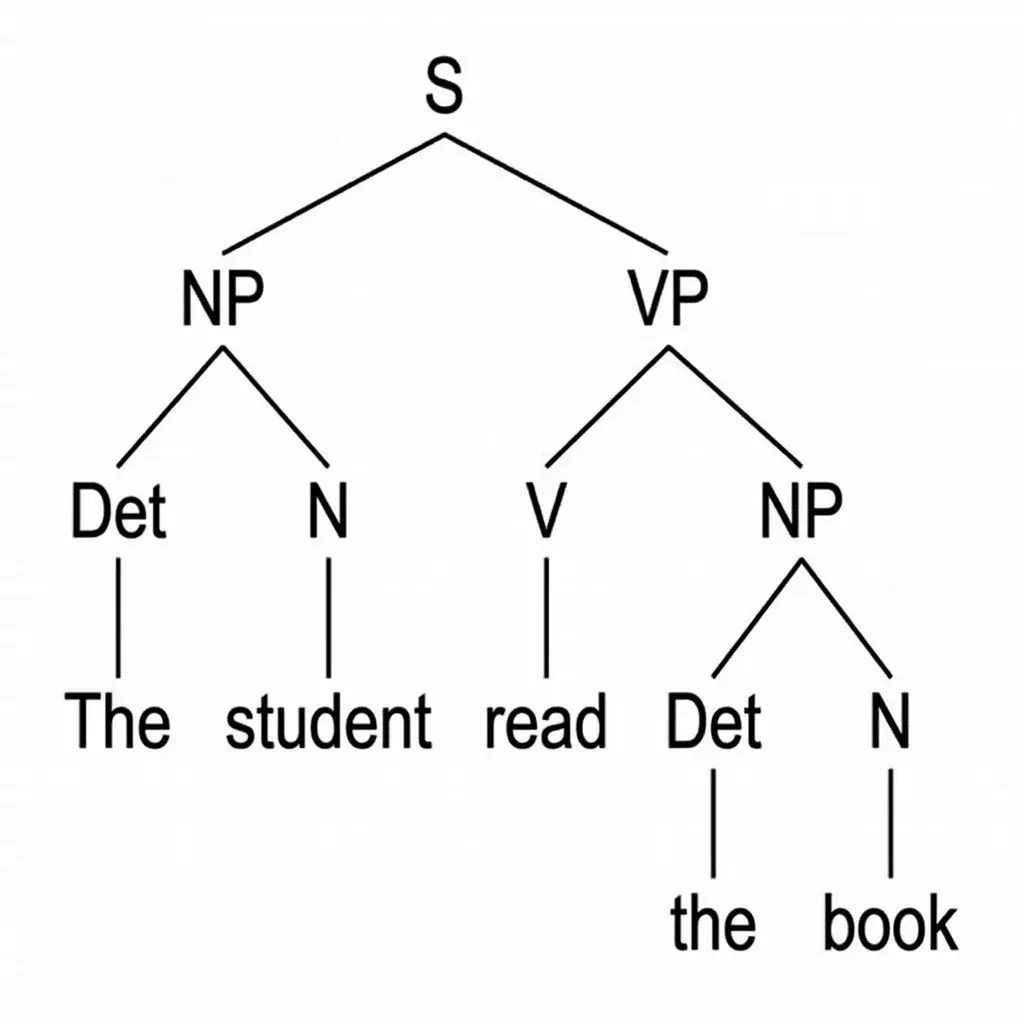
It is built for English grammar and the Reed-Kellogg method. Text in non-Latin scripts cannot be drawn by the diagram font and is sent to a slower image model instead. For linguistics-style trees in any language, use the [syntax tree generator](/tool/syntax-tree-generator).

The free version downloads a 2K PNG with a small watermark. Paid plans and credit packs download the 4K PNG without a watermark and an SVG with real, editable text. Worksheet mode exports a worksheet PDF and an answer key PDF; they are watermark-free on paid plans and credit packs.

You can diagram one sentence free without signing up. New accounts get starter credits, and signed in, each diagram uses 2 credits. Teachers and parents who diagram every week usually pick a monthly plan or a credit pack.

Yes. Type or paste one sentence and the tool draws the whole Reed-Kellogg diagram for you, usually in a few seconds. Check the result before you use it as an answer key: on long sentences a phrase can land under the wrong word.

Diagram Your Sentence Now

Paste one English sentence or phrase and get a Reed-Kellogg diagram in seconds. One diagram free, no account needed.

Unlock all tools

One subscription unlocks every Vizcept AI diagram tool — from free body diagrams and syntax trees to biology diagrams and more.

View pricing

Other tools you might like

Explore more AI diagram tools across subjects — from the same discipline and beyond.

Featured on Findly.tools