Syntax Tree Generator: Type a Sentence, Get a Labeled Tree

A syntax tree generator draws the phrase structure of a sentence as a labeled tree. Type the sentence, pick traditional, X-bar or Minimalist labels, and Vizcept analyses it and typesets the tree with code, labels set in a real font — no bracket notation needed. Download a PNG, or an editable SVG on paid plans.

Traditional, X-bar & MinimalistMovement traces & arrowsPNG, plus editable SVG on paid plans

Syntax Tree Generator

Tree Style

Your first diagram is free — no sign-up needed (2K with watermark)

Enter a sentence on the left to parse your own

What is a syntax tree?

A syntax tree — also called a syntactic tree, parse tree or phrase structure tree — is a diagram of how the words of a sentence group into phrases and clauses. Read it from the top down:

  • Root: the clause node — S in traditional and X-bar trees, CP and TP in Minimalist ones.
  • Phrase nodes: NP, VP, PP, AP and so on; each groups a head with the words that depend on it.
  • Head: the word that gives a phrase its category, such as the verb in a VP.
  • Terminals: the words of your sentence, left to right, along the bottom.
  • Traces: t_i marks where a moved phrase started; a dashed arrow shows the move.

In linguistics, syntax tree, parse tree and phrase structure tree usually mean the same diagram. In computer science they differ: a parse tree (concrete syntax tree) shows every grammar rule used to derive a string, while an abstract syntax tree (AST) keeps only the structure a compiler needs. This tool is built for the linguistics kind. It will also draw a parse tree for a simple arithmetic expression or grammar string, but it doesn't parse program code.

How do you draw a syntax tree step by step?

To draw a syntax tree, label each word with its category, group heads with their dependents into phrases from the bottom up, build the verb phrase, then join the subject and the verb phrase under the clause node.

  1. Label each word with its category: N, V, Det, P, Adj, Adv.
  2. Group each head with its dependents into phrases, bottom-up: Det + N → NP; P + NP → PP.
  3. Build the VP around the main verb and its objects.
  4. Join the subject NP and the VP under S (or TP in Minimalist trees).
  5. Test every phrase with substitution, movement and coordination, as in the checklist further down.

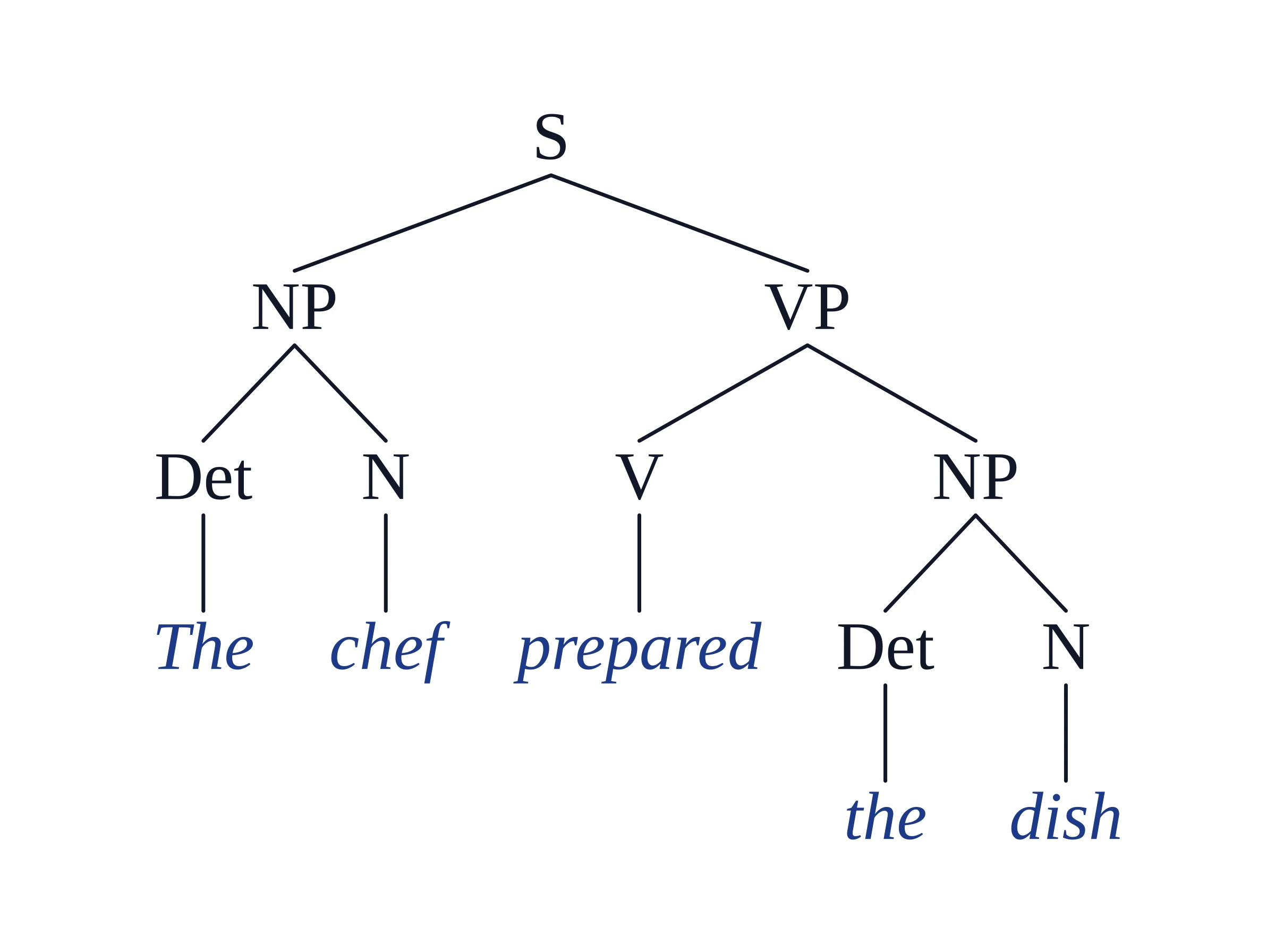
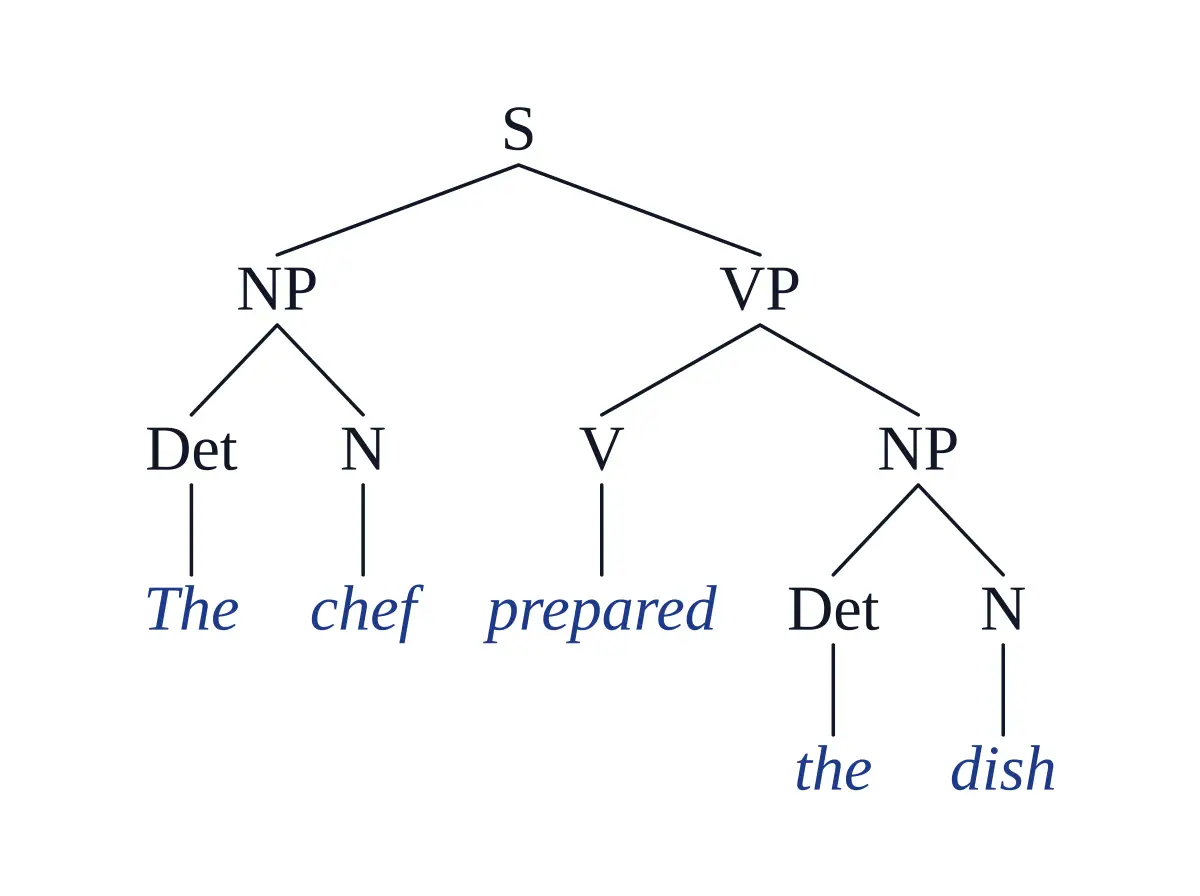
The chef prepared the dish comes out as:

[S [NP [Det The] [N chef]] [VP [V prepared] [NP [Det the] [N dish]]]]

Syntax tree of 'The chef prepared the dish' with S, NP, VP, Det, N and V

Draw a Syntax Tree Without Bracket Notation

No [S [NP ...]]. No qtree macros. No drag-and-drop.

Stop counting brackets in [S [NP The] [VP [V left]]]. Type the sentence you are analysing, choose a framework, and Vizcept returns a labeled tree — heads, phrases, bar levels and traces — typeset by code.

1

Type or Paste Your Sentence

Write the sentence in plain text and pick Traditional, X-bar or Minimalist in the Tree Style menu. Add notes if your course has its own conventions, for example "use DP" or "show the trace of the moved auxiliary".

2

Vizcept Analyses the Sentence

A language model labels every constituent (S, NP, VP, PP, CP, TP, DP…), finds heads and complements, and marks wh-, NP- and head movement with indexed traces when your framework uses them. Code then lays out and typesets the tree.

3

Check It, Then Download PNG or SVG

Read the tree against your own analysis, then download a PNG for homework and slides, or, on paid plans, an SVG with real, editable text for Illustrator, Inkscape or Figma.

Which framework should you pick: traditional, X-bar or Minimalist?

Pick the one your course or paper uses. The Tree Style menu sets the defaults below; specific instructions in the prompt ("use DP", "show the trace") are followed, and a framework you name on purpose in the prompt wins over the menu.

TraditionalX-barMinimalist
Clause rootSSCP and TP
Noun phrasesNP, with Det insideNP, with Det as specifier and N' levelsDP headed by D
Bar levelsNoneX' in every phraseT' and C' (D', V' when your course uses them)
MovementOnly if you askOnly if you askCoindexed traces, e.g. what… t_i
Typical courseIntro syntax, ESL grammarIntermediate syntax (Radford-style)Advanced syntax (Adger's Core Syntax)

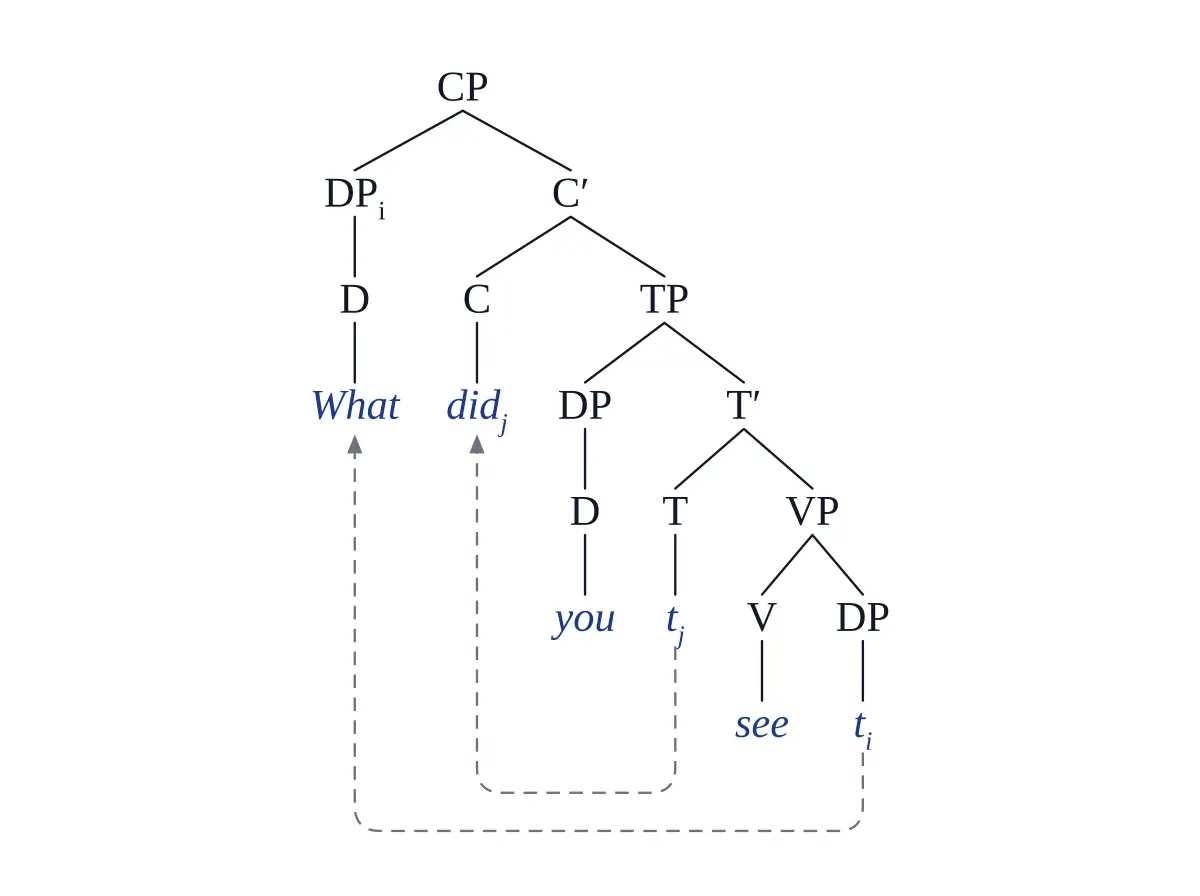
For example, "What did you see?" might come out as (this is the tree in the examples below):

[CP [DP_i [D What]] [C' [C did_j] [TP [DP [D you]] [T' [T t_j] [VP [V see] [DP t_i]]]]]]

— two movements, two traces, two dashed arrows in the drawing.

Using Carnie's Syntax: A Generative Introduction? Its trees combine X-bar levels with DP, TP and CP: pick X-bar and write "use DP, TP and CP" in the prompt.

How do you check a syntax tree before you hand it in?

Run the standard constituency tests on each phrase the tree claims:

  1. Substitution: can a pro-form (it, they, there, do so) replace the string?
  2. Movement: can you front it, or put it in a cleft ("It was ___ that…")?
  3. Coordination: can you join it to a similar string with "and"?
  4. Answer fragment: can it stand alone as the answer to a question?
  5. Word check: does every word of your sentence appear once, in order?
  6. Framework check: do the labels (NP or DP, S or TP) and bar levels match your course?

If a phrase fails the tests, tell the generator what to change — "the PP modifies the noun, not the verb" — and draw it again.

What can't the syntax tree generator do yet?

  • Right-to-left languages: Hebrew and Arabic are not laid out right-to-left yet.
  • Chinese, Japanese and Korean: these go to the image model instead of the code renderer, so proofread the characters.
  • LaTeX: paid plans can copy forest code or labeled brackets (Copy code); movement arrows are left out, so add them with \draw if you need them. You can also place the SVG in a LaTeX document.
  • Sketch or photo input: a tree you upload as a sketch or photo is redrawn by the image model, so proofread every label.
  • Contested analyses: where frameworks disagree, the model picks one. Say which analysis your course uses.

How Vizcept draws figures explains what the code guarantees and what it doesn't.

Which syntax tree tool should you use?

Pick the tool that matches what you already have. Each kind of syntax tree tool solves a different problem.

You already have…UseWhy
A sentence and a frameworkVizceptAnalyses the sentence and typesets the tree; PNG, editable SVG on paid plans
A labeled bracket string you wrote yourselfA bracket-notation tool such as mshang.ca's Syntax Tree Generator, jsSyntaxTree or RSyntaxTreeDraws exactly the brackets you type, as you type
A LaTeX paper or thesisThe forest or tikz-qtree packageNative LaTeX trees; Vizcept can copy forest code for you on paid plans
Phrase structure rules to testA rule-based tree solverLists every tree your rules allow

Syntax tree examples in bracket notation

Each example in the gallery below, with the labeled bracket string the tool produced for it. Paste any of them into a bracket-notation tool to compare.

ExampleLabeled brackets
Simple sentence[S [NP [Det The] [N chef]] [VP [V prepared] [NP [Det the] [N dish]]]]
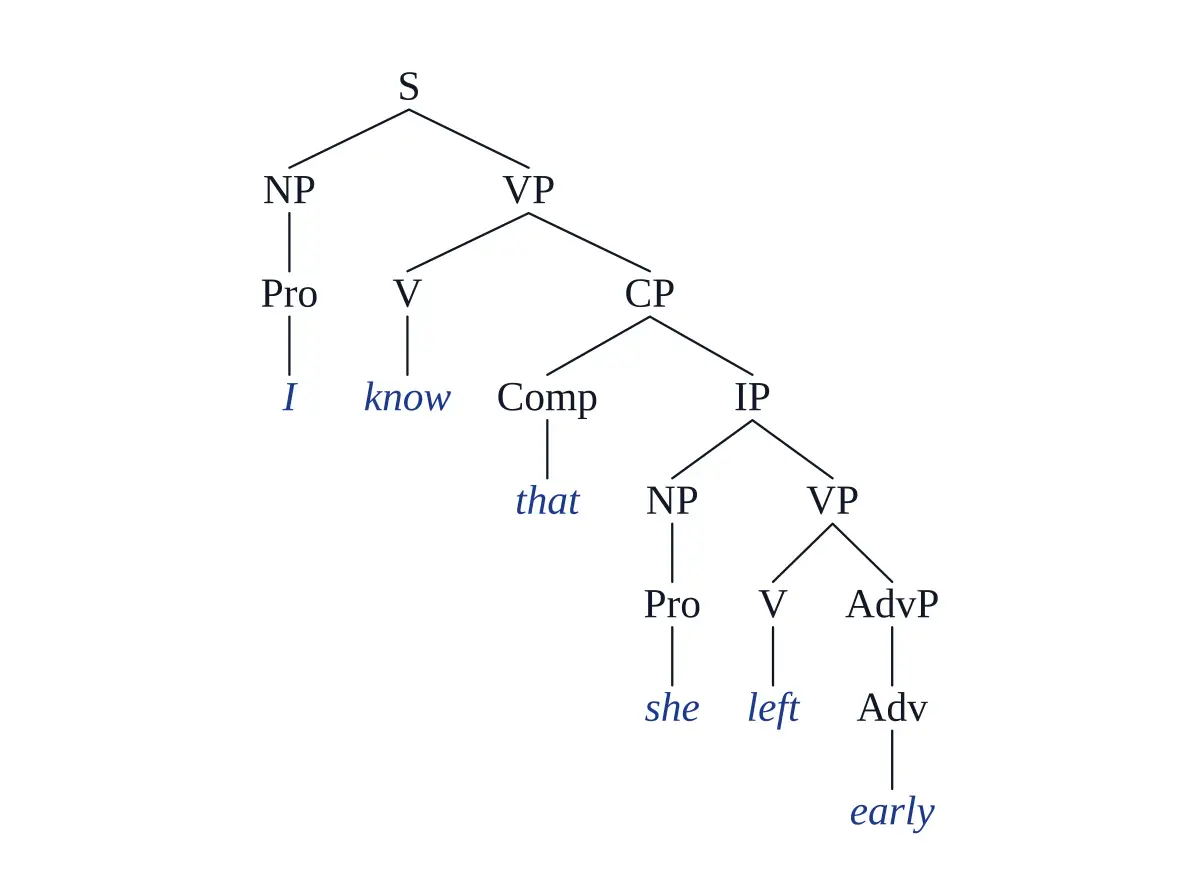
Embedded clause with that[S [NP [Pro I]] [VP [V know] [CP [Comp that] [IP [NP [Pro she]] [VP [V left] [AdvP [Adv early]]]]]]]
Wh-question with movement[CP [DP_i [D What]] [C' [C did_j] [TP [DP [D you]] [T' [T t_j] [VP [V see] [DP t_i]]]]]]
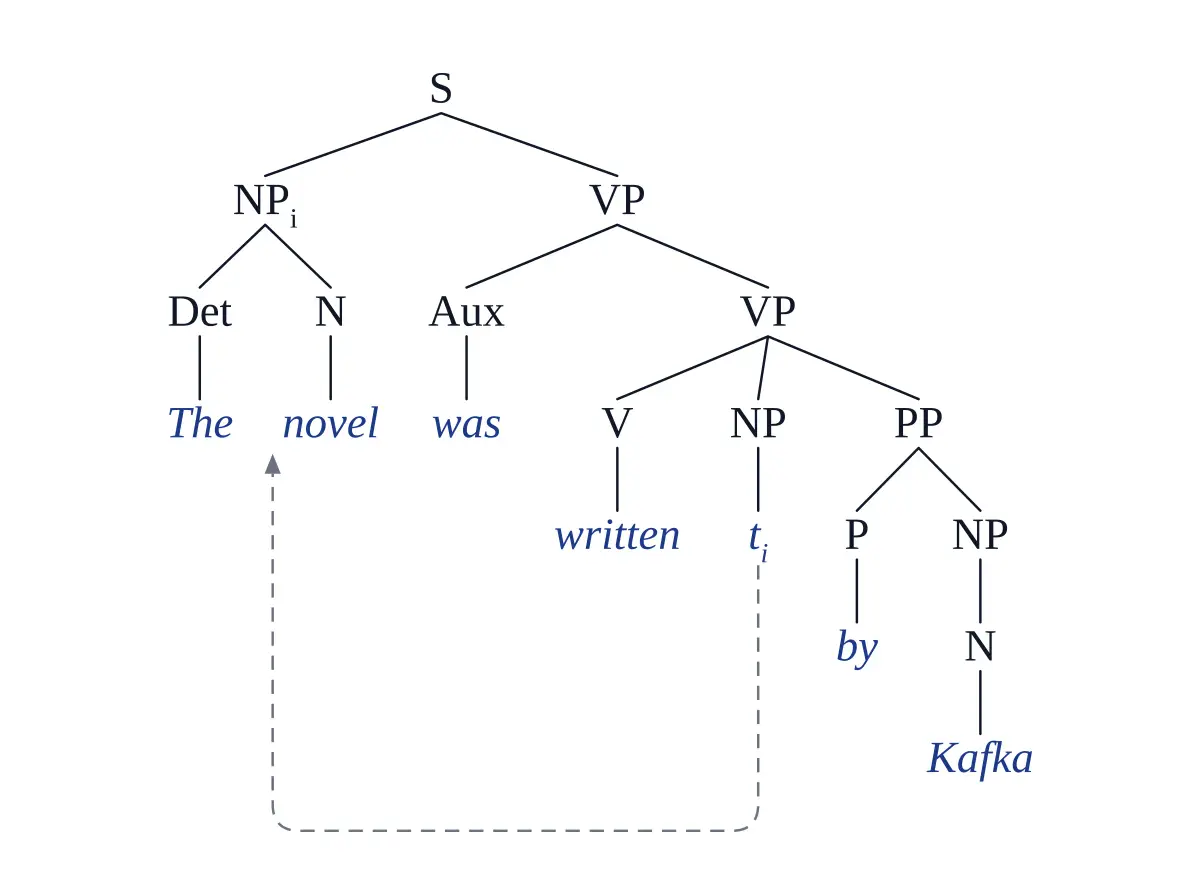
Passive with NP-movement[S [NP_i [Det The] [N novel]] [VP [Aux was] [VP [V written] [NP t_i] [PP [P by] [NP [N Kafka]]]]]]
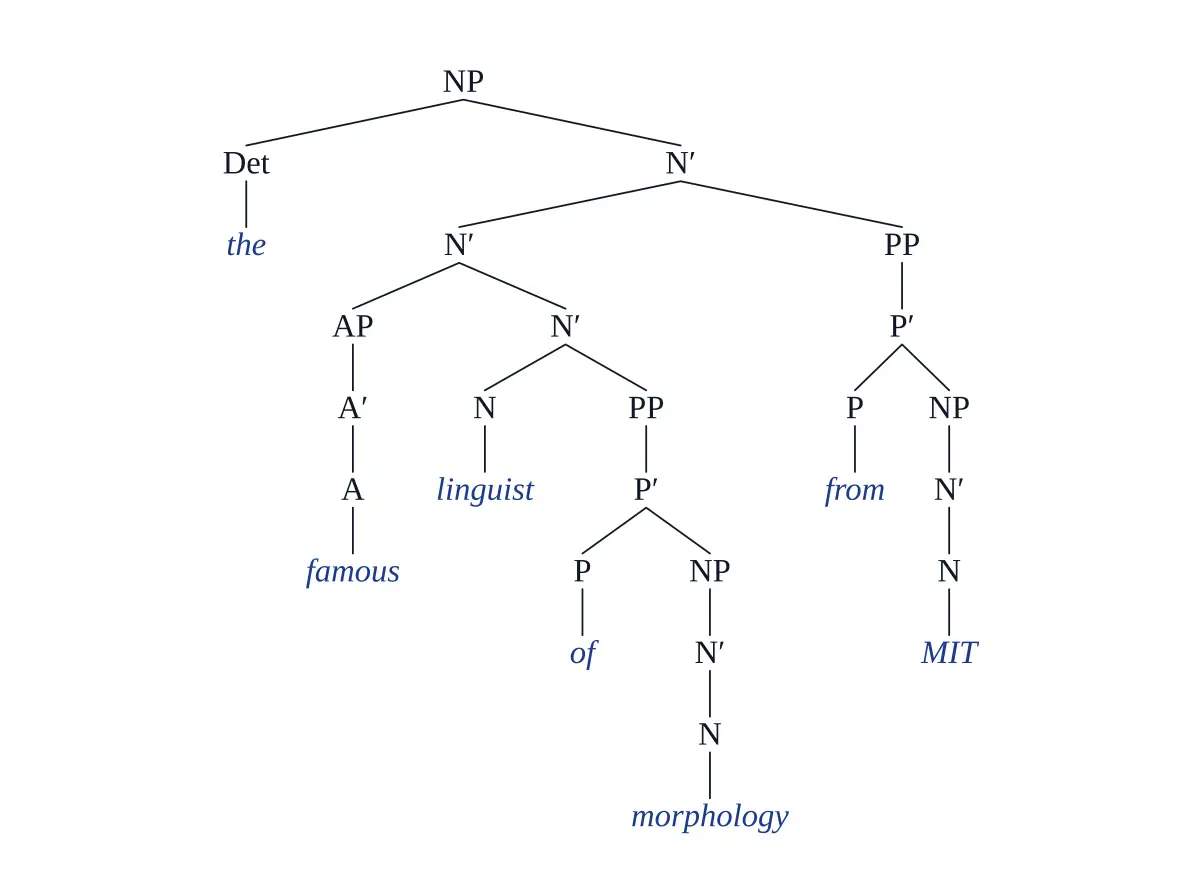
X-bar noun phrase[NP [Det the] [N' [N' [AP [A' [A famous]]] [N' [N linguist] [PP [P' [P of] [NP [N' [N morphology]]]]]]] [PP [P' [P from] [NP [N' [N MIT]]]]]]]
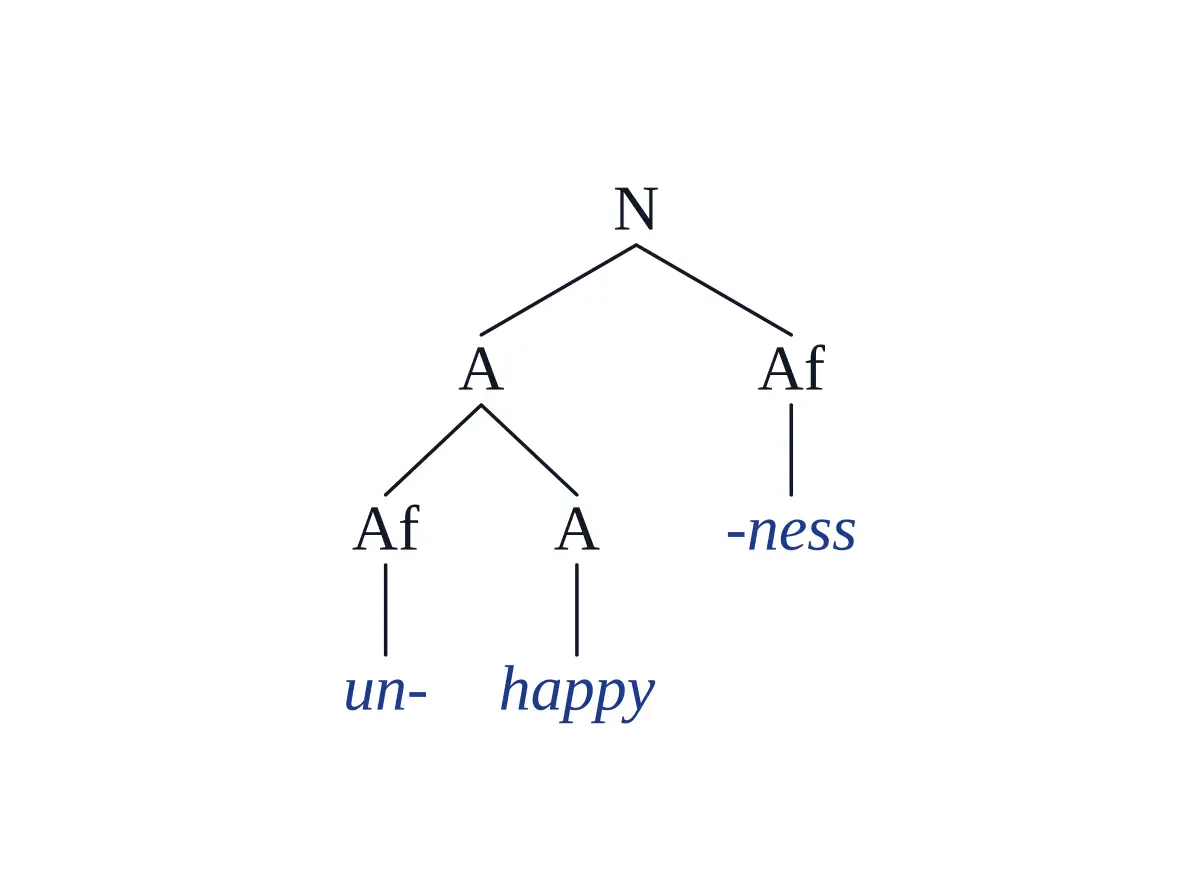
Morphology: unhappiness[N [A [Af un-] [A happy]] [Af -ness]]

One Syntax Tree Generator, Three Linguistics Workflows

Students · Researchers · Instructors

The same syntactic tree generator handles intro syntax problem sets, trees for papers and theses, and teaching materials — without rewriting bracket notation every time.

Linguistics Students

Intro Syntax to Graduate Seminar

You've worked out how the sentence parses; now draw it cleanly and check it. Type the sentence, pick your course's framework and compare the result with your own analysis.

  • Handles relative clauses, wh-movement and embedded CPs
  • Most trees ready in under 20 seconds
  • Free credits on sign-up — no payment details needed
Draw Your First Tree

Linguistics Researchers

Papers, theses and handouts

Consistent, clean trees for a paper or thesis, redrawn in seconds when a reviewer asks for a different analysis. On paid plans, download the SVG with real text and adjust it in your vector editor.

  • Indexed traces for NP-, wh- and head movement
  • Editable SVG with real text on paid plans
  • The same typesetting across every figure in your paper
Generate a Figure

Syntax Instructors

Undergraduate and graduate teaching

Make example trees for lectures, handouts and feedback in the framework your syllabus uses — traditional phrase structure, classic X-bar or Minimalist.

  • Example trees for slides and handouts
  • One consistent style across a whole problem set
  • Traditional, X-bar or Minimalist labels
Make Example Trees

Syntax Tree Examples: Six Sentences, Drawn

Real sentences, labeled syntax trees

Every tree below was generated from a plain-text sentence and a framework hint. Click any example to load the prompt and try it yourself.

SVO Sentence Parse Tree

SVO Sentence Parse Tree

Basic constituency tree for 'The chef prepared the dish'

Complex Sentence with Embedded CP

Complex Sentence with Embedded CP

Subordinate clause with complementizer 'that'

Wh-Movement Question Tree

Wh-Movement Question Tree

Wh-phrase raised from object to Spec-CP

Passive Voice Transformation Tree

Passive Voice Transformation Tree

NP-movement from complement to subject position

X-bar Theory NP Tree

X-bar Theory NP Tree

Specifier, head, complement, and adjunct in one NP

Morphological Tree for Word Derivation

Morphological Tree for Word Derivation

Prefix and suffix affixation on 'unhappiness'

What Makes This Syntax Tree Diagram Generator Different

Typeset by code, not painted by an image model

Most free syntax tree makers and parse tree generators make you type bracket notation, and most AI image tools paint the tree and garble the labels. Vizcept reads the sentence, then draws the tree with code.

Input

Reads the Sentence, Not Brackets

Plain-text input

Type the sentence in plain text. A language model works out constituents, heads, complements and adjuncts and returns the structure as labeled brackets, which code then draws. A single word gets a morphological tree.

Frameworks

Traditional, X-bar or Minimalist

Pick the one your course uses

Traditional phrase structure (S, NP, VP), classic X-bar with specifiers and X' levels, or Minimalist with TP, CP and DP. Specific instructions in your prompt ("use DP", "show the trace") are followed; to switch framework, pick it in the Tree Style menu.

Movement

Traces and Movement Arrows

Wh-, NP- and head movement

Moved constituents get an index and a trace in their base position (t_i, t_j), and the tree draws a dashed arrow from each coindexed trace to its antecedent — for questions, passives, raising and subject–auxiliary inversion.

Typesetting

Labels Typeset by Code, Not Painted

For sentences you type

When you type a sentence in a Latin-script language, Vizcept's layout code typesets the tree in a Times-compatible font, so every label is drawn exactly as the analysis wrote it and labels don't overlap. Before drawing, a check rejects any tree that adds words that aren't in your sentence; it doesn't catch a missing or reordered word, so read the leaves left to right. Sketches, photos and Chinese, Japanese or Korean text go to the image model instead, so proofread those.

Languages

Beyond English, With Honest Limits

Latin-script languages drawn with code

Spanish, German, French, Portuguese and other Latin-script languages are analysed in their own words and drawn with code. Chinese, Japanese and Korean go to the image model; right-to-left languages are not laid out right-to-left yet.

Export

PNG and Editable SVG

For homework, slides and papers

Download a PNG for homework and slides. Paid plans also get an SVG that keeps real, editable text for Illustrator, Inkscape or Figma; trees drawn by the image model (CJK text, sketches, annotation edits) come as traced outlines. Paid plans can also copy the tree as labeled brackets or as LaTeX forest code (Copy code, next to Download).

Start free; pay monthly or buy credits for a term

Your first tree is free without an account, and new accounts get free credits. For a semester of problem sets or a thesis, pick a monthly plan you can cancel any time, or a credit pack that never renews.

Student or teacher? Apply for an education discount

Apply now

How Linguists Actually Use It

Feedback from syntax students, linguistics researchers, and language instructors who stopped drawing parse trees by hand.

Dr

Dr. Emily Carter

Syntax Professor, UC Berkeley

I assign 40 parse trees a semester. Drawing the answer key used to take a full weekend. Now I paste each sentence in, check the output, and export as LaTeX for the handout.

Ra

Raj Khanna

Linguistics Major, University of Michigan

My intro syntax homework has ten sentences a week. I used to spend two hours drawing trees in Word. Now I get the tree, adjust if needed, and paste it straight into my PDF.

Dr

Dr. Hiroshi Tanaka

Postdoc, Sophia University

Most parse tree generators are English-only. This one handled my Japanese SOV structures correctly, including topic-marker ga/wa distinction. I used the SVGs in my workshop paper.

Syntax Tree Generator — Common Questions

FAQ

Yes. Choose X-bar in the Tree Style menu and every phrase gets an XP and an X' level, with a specifier where the phrase has one, following classic X-bar conventions as in Radford (1988). If your course uses DP or TP layers, pick Minimalist or say so in your prompt.

Yes for Latin-script languages such as Spanish, German, French and Portuguese: the analysis keeps the original words and the tree is drawn with code. Chinese, Japanese and Korean sentences are drawn by the image model instead, so proofread them. Right-to-left languages such as Hebrew and Arabic are not laid out right-to-left yet.

Yes. Enter a single word and you get its morphological structure — prefixes, roots and suffixes — for example [N [A un- [A happy]] -ness] for unhappiness.

Yes. Choose Minimalist, or ask for movement in your prompt, and moved constituents get an index with a trace (t_i) in their base position plus a dashed movement arrow. Null heads are written ∅. It works for wh-questions, passives, raising and subject–auxiliary inversion.

For sentences you type in a Latin-script language, the tree is typeset by code: every label in the analysis appears once and nothing overlaps. The analysis comes from a language model — reliable for common structures such as relative clauses, embedded CPs, wh-questions and passives, but check contested structures against your framework.

Yes, on paid plans: click Copy code next to Download and choose LaTeX (forest). You get one forest environment per tree, with subscripts, primes, triangles (roof) and ∅ already escaped; load the package with \usepackage[linguistics]{forest}. Movement arrows are not included. The same menu copies plain labeled brackets for qtree-style or online bracket tools. Trees drawn by the image model (CJK text, sketches) have no code to copy.

Yes. Describe the change and generate again — for example "attach the PP to the VP". On paid plans you can also download the SVG and edit labels and branches in Illustrator, Inkscape or Figma; text in code-drawn trees stays editable.

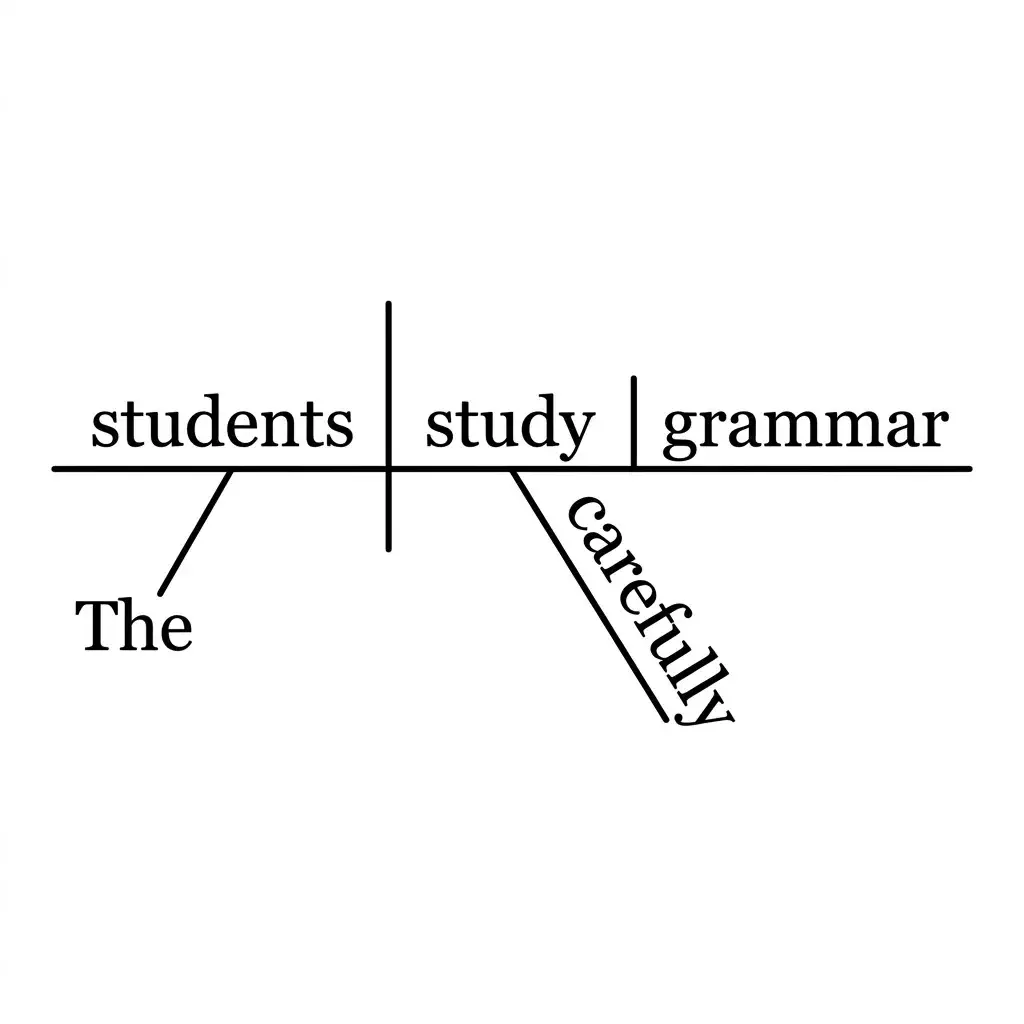
A sentence tree diagram (linguistics style) shows hierarchical phrase structure — how words group into phrases and phrases into clauses. A traditional Reed-Kellogg sentence diagram shows grammatical relations on a horizontal baseline. This tool generates the linguistics-style syntax tree, not the Reed-Kellogg format.

It depends on your course's rules, so ask your instructor. Used to check an analysis you worked out yourself, or to draw a tree you already understand, it is like using a calculator to check arithmetic. Don't hand in a generated tree as your own analysis if your course forbids AI tools.

Cite it as software. In APA style: Vizcept. (2026). Syntax tree generator [Web application]. https://vizcept.com/tool/syntax-tree-generator. In BibTeX, use @misc with author, title, year and url, plus note = {Accessed YYYY-MM-DD}. Check whether your department also wants AI use declared.

Your first tree is free without an account, and new accounts get free credits. Signed in, a tree uses 2 credits, so a 150-credit pack covers 75 trees. After that, choose a monthly or yearly plan, or a one-time credit pack that never renews.

Phrase structure trees come from Noam Chomsky's *Syntactic Structures* (1957). X-bar theory followed in Chomsky's "Remarks on Nominalization" (1970) and Ray Jackendoff's *X-bar Syntax* (1977); the Minimalist Program dates from Chomsky's 1995 book of that name.

Your First Syntax Tree, Free

Type a sentence, pick a framework and get a labeled tree in seconds. No bracket notation, no drawing software, no credit card.

Unlock all tools

One subscription unlocks every Vizcept AI diagram tool — from free body diagrams and syntax trees to biology diagrams and more.

View pricing

Other tools you might like

Explore more AI diagram tools across subjects — from the same discipline and beyond.

Featured on Findly.tools