
What does the worksheet look like?
Here is a real four-sentence worksheet made with the worksheet maker, and its answer key. The worksheet keeps every line of each diagram (baselines, dividers, slants, the forked line for the compound subject) and leaves out the words; students write each word on the line where it belongs.
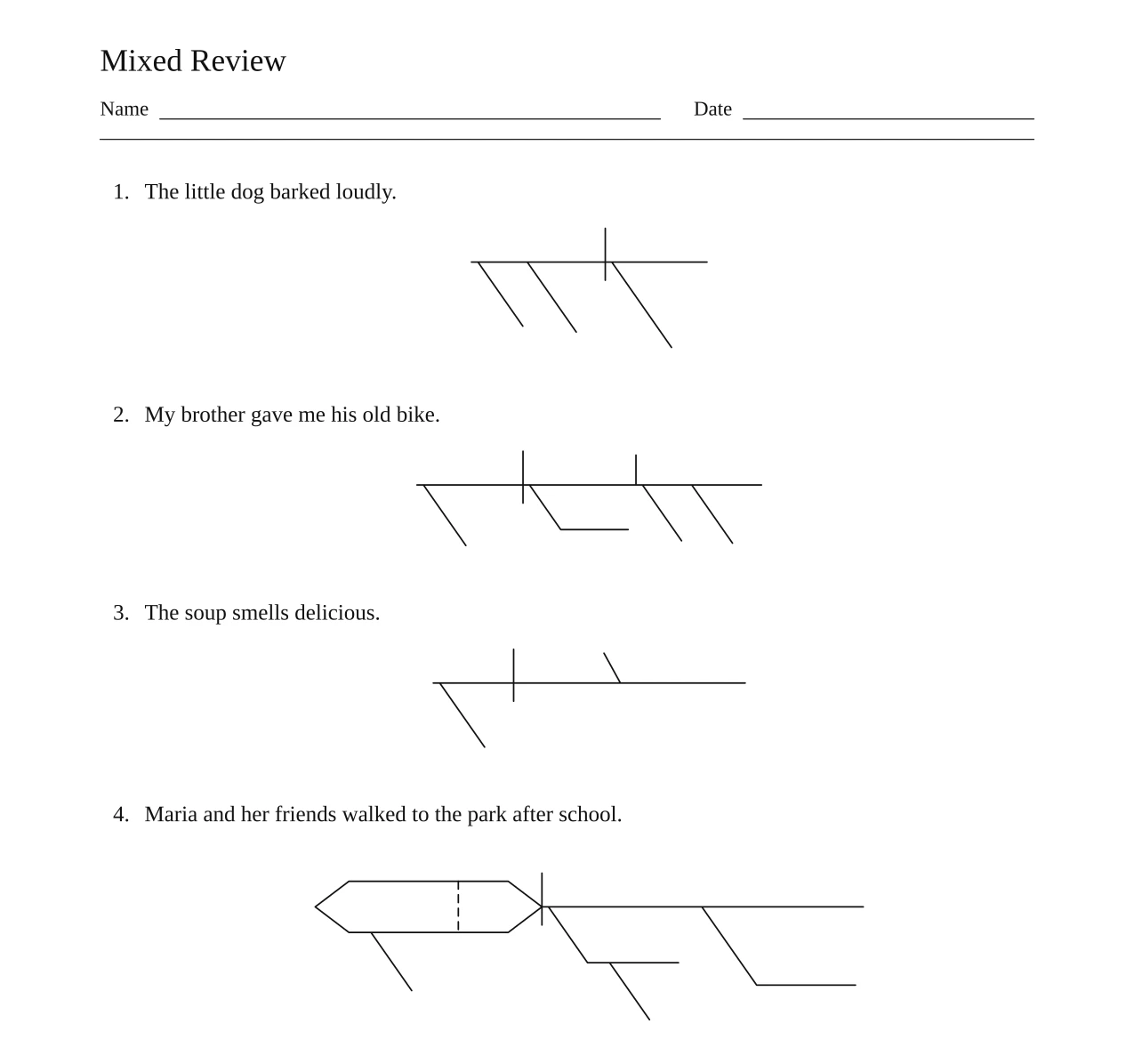
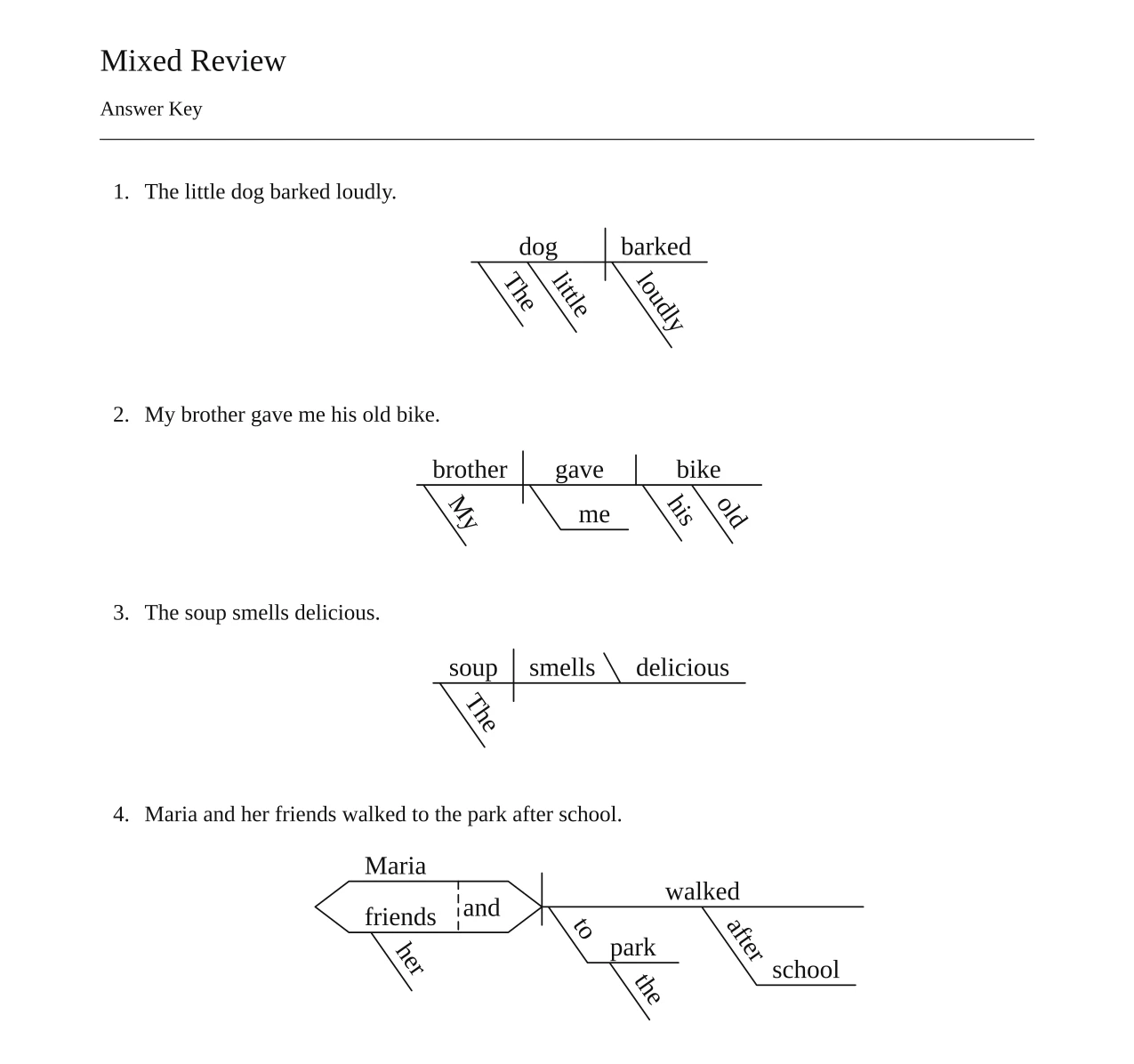
Download both pages to print: worksheet (PDF) · answer key (PDF) · open these four sentences in the worksheet maker
Because the blank lines already show the shape of each diagram, the worksheet works as a scaffold: a student can see that sentence 2 has an indirect object and sentence 4 a compound subject before writing a word. For a harder test, have students diagram on plain paper and use only the answer key to check.
New to diagramming yourself? To diagram a sentence, find the verb and its subject, put them on a baseline split by a vertical line, add the object or complement, then hang modifiers on slanted lines under the words they describe. The full rules, with examples: how to diagram a sentence.
How do you make a sentence diagramming worksheet?
Paste your sentences into the generator in Worksheet mode, pick a title and paper size, create the worksheet, check the answer key, and download both PDFs. The steps:
- Open the sentence diagram generator in Worksheet mode (the link switches it for you; otherwise pick Mode → Worksheet in the settings).
- Paste your sentences, one per line, up to 20. Numbers and bullets at the start of a line are removed, and a line with two sentences is split at the end punctuation, so you can paste an exercise straight from a textbook or document.
- Add a title if you want one (for example Unit 4: Prepositional Phrases) and choose Letter or A4.
- Select Create worksheet. Each sentence is diagrammed separately, and you can watch the count go up.
- Look through the answer key before printing (see how accurate the answer key is). Sentences that could not be diagrammed are listed separately and left out of both PDFs.
- Download the worksheet PDF and the answer key PDF.
Free sentence diagramming worksheets by skill
Each set below is six sentences on one skill, with a free printable worksheet and answer key (Letter size) made with the worksheet maker. The last link opens the maker with the set already pasted in, so you can swap sentences, add your own (up to 20) or switch to A4.
Set 1: Subjects, Verbs and Modifiers
Grades 3–5. Every sentence stays on one baseline; the only extras are adjectives, articles and adverbs on slants.
- Birds sing.
- The baby laughed.
- Our old car runs smoothly.
- The tiny puppy slept peacefully.
- Tall trees swayed gently.
- My little sister giggled loudly.
Print this set: worksheet (PDF) · answer key (PDF) · open it in the worksheet maker
Set 2: Direct and Indirect Objects
Grades 4–6. Students decide whether the noun after the verb is the thing acted on (direct object) or the one receiving it (indirect object, on the line under the verb).
- Sam kicked the ball.
- The chef cooked a delicious meal.
- Grandma sent me a letter.
- The teacher gave the class a quiz.
- We bought our mother flowers.
- Dad told us a funny story.
Print this set: worksheet (PDF) · answer key (PDF) · open it in the worksheet maker
Set 3: Linking Verbs
Grades 4–6. Predicate nouns and predicate adjectives sit behind a backslash that leans toward the subject.
- The sky is blue.
- My uncle is a firefighter.
- The bread smells fresh.
- Those cookies taste sweet.
- Emma became the team captain.
- The music sounds loud.
Print this set: worksheet (PDF) · answer key (PDF) · open it in the worksheet maker
Set 4: Prepositional Phrases
Grades 5–7. The question to ask for each phrase is which word it describes: a noun (adjective phrase) or the verb (adverb phrase).
- The cat slept on the couch.
- We walked to the store after lunch.
- The book on the table is mine.
- A bird with blue feathers landed in our yard.
- During the storm, the lights flickered.
- The girl in the red coat waved at us.
Print this set: worksheet (PDF) · answer key (PDF) · open it in the worksheet maker
Set 5: Compound Subjects, Verbs and Sentences
Grades 5–7. Forked baselines for compound parts; two stacked baselines joined by a dashed step for compound sentences.
- Tom and Jerry ran.
- The kids laughed and played.
- Mom and Dad cooked and cleaned.
- I like apples, but my brother likes pears.
- The rain stopped, and the sun appeared.
- The puppy jumped and barked.
Print this set: worksheet (PDF) · answer key (PDF) · open it in the worksheet maker
Set 6: Adjective, Adverb and Noun Clauses
Grades 7–9. Each clause gets its own baseline; noun clauses stand on a pedestal. These are the sentences to check most carefully in the answer key.
- The boy who won the race smiled.
- We left early because the roads were icy.
- I know that you are tired.
- When the bell rang, the students left.
- The book that I borrowed was great.
- That the store was closed surprised us.
Print this set: worksheet (PDF) · answer key (PDF) · open it in the worksheet maker
Set 7: Helping Verbs and Questions
Grades 4–6. Helping verbs stay on the baseline with the main verb. For a question, students first turn it into a statement (Ben can swim) to find the subject; where is an adverb under the verb.
- The team has practiced hard.
- She will call you tomorrow.
- The students were reading quietly.
- Did you finish your book?
- Where are you going?
- Can Ben swim?
Print this set: worksheet (PDF) · answer key (PDF) · open it in the worksheet maker
Set 8: Interjections, Direct Address and Commands
Grades 4–6. Interjections (wow, oh) and nouns of direct address (Lily, class) float on a line above the subject; commands take the understood subject (you).
- Wow, that was fast!
- Sit down.
- Lily, close the door.
- Oh, I forgot my key.
- Class, open your books.
- Please pass the salt.
Print this set: worksheet (PDF) · answer key (PDF) · open it in the worksheet maker
Set 9: Gerunds, Participles and Infinitives
Grades 7–9. A gerund or infinitive used as a noun stands on a pedestal; a participle bends under the noun it describes. Check these carefully in the answer key too.
- Swimming is fun.
- I like to read.
- The barking dog woke the baby.
- Running quickly, the boy caught the bus.
- Her dream is to become a doctor.
- We enjoy playing chess.
Print this set: worksheet (PDF) · answer key (PDF) · open it in the worksheet maker
How accurate is the answer key?
The words in each diagram are typeset by code from a grammatical analysis, so the letters are never garbled the way text in AI-drawn images can be. The analysis itself comes from a language model, and it can be wrong: the most common slip is attaching a modifier or prepositional phrase to the wrong word, and long sentences with several clauses can lose a word. Short sentences like the sets above usually come out as expected, but read each diagram in the answer key before you hand the worksheet out.
If a diagram looks wrong, reword the sentence and create the worksheet again. A sentence that has no English sentence or phrase in it, uses characters the diagram font cannot draw (such as Chinese or Japanese), or cannot be analysed is skipped, shown in a list, and not charged. More on how Vizcept draws diagrams and where to double-check: accuracy.
How to write sentences that make good diagramming practice
- One skill per set. A set on indirect objects is easier to teach and grade when every sentence has one.
- Short for younger grades. Under about 10 words for grades 3–5; save multi-clause sentences for grades 7 and up.
- Avoid sentences with two readings. I saw the man with the telescope can hang with the telescope from saw or from man; students (and the model) will disagree, and both answers are defensible.
- Watch phrasal verbs and idioms. Give up, look after and put up with are diagrammed differently in different textbooks. Leave them out unless you are teaching them.
- Write complete sentences with end punctuation. Imperatives are fine (the subject is shown as (you)), and so are questions.
- Match your textbook's conventions. Some programs put not on the baseline or treat possessive nouns differently; check the answer key against the rules your students learned. The rules this tool follows are laid out in how to diagram a sentence, with a one-page cheat sheet.
What does a worksheet cost?
Each sentence costs 2 credits, charged only for sentences that get diagrammed, so a 10-sentence worksheet uses up to 20 credits. The on-screen preview of your worksheet is watermarked; the clean, printable PDFs come with a paid plan or a credit pack. (The sample and the practice sets on this page are ready-made PDFs you can download and print for free.)
| Option | Credits | Worksheet sentences |
|---|---|---|
| Basic plan, $14.90 a month | 300 a month | up to 150 |
| Credit pack, $19.90 one-time (no subscription) | 150, valid 365 days | up to 75 |
Other plans and packs are on the pricing page. Teachers can apply for a 20% education discount and students for 40%.
Can I make one diagram at a time instead?
Yes. Switch the tool back to Single sentence mode to diagram one sentence as an image, with options to color the words by part of speech or print a blank practice version of that one diagram. That suits a board warm-up or a slide; the worksheet mode is for a page of practice with a key.
Frequently asked questions
Is there an app that makes sentence diagramming worksheets from my own sentences?
Yes. The Vizcept sentence diagram generator has a Worksheet mode: paste up to 20 sentences and it produces a practice worksheet with blank diagram lines and a matching answer key, both as PDFs. It runs in the browser, so there is nothing to install.
How many sentences can one worksheet have?
Up to 20. For a longer unit, split it into two worksheets; each keeps its own numbering from 1.
Can I print on A4 paper?
Yes. Choose Letter or A4 before you create the worksheet; both PDFs use the paper size you picked.
Do the worksheet and answer key match page for page?
Yes. Both are laid out from the same diagrams, so sentence numbers and page breaks are identical: page 2 of the answer key checks page 2 of the worksheet.
Is this good for homeschool?
It fits the usual homeschool routine of a short daily set: paste the sentences from your grammar book's lesson, print the worksheet, and keep the answer key for checking. Look over the key first, since a sentence can occasionally be diagrammed differently from your curriculum's rules.
Can I edit a diagram in the answer key?
Not inside the PDF. If a diagram is wrong or follows a different convention from your textbook, reword the sentence (or split it into two) and create the worksheet again.
Is sentence diagramming still taught?
Yes, though not everywhere. Many grammar programs, homeschool curricula and classical schools still teach it, while other classrooms teach grammar without diagrams. Teachers who use it like that a diagram shows each word's job, and a worksheet with a matching answer key keeps checking quick.
Make a worksheet from your sentences
Paste up to 20 sentences, get a practice worksheet and a matching answer key.

