
ConceptViz alternative at a glance: pricing, free plans and exports
ConceptViz (conceptviz.app) is an AI agent for diagrams, illustrations and charts, with 320 tool pages across science, teaching and research. Vizcept is an AI figure generator that typesets sentence diagrams, syntax trees, conceptual frameworks and CONSORT diagrams by code.
Vizcept's cheapest plan is $14.90 a month for 300 credits; ConceptViz's is $29.90 a month for 45 image credits. Both sell one-time credit packs.
| Vizcept | ConceptViz | |
|---|---|---|
| Cheapest monthly plan | $14.90 a month (BASIC, 300 credits) | $29.90 a month (Standard, 45 image credits) |
| Same plan, billed yearly | $106.80 a year ($8.90 a month) | $249.90 a year ($20.83 a month); $149 for the first year until 5 November 2026 |
| One-time packs | $19.90 for 150 credits, valid 365 days | $4.99 for 8 image credits up to $49.90 for 155; credits never expire (bonus credits until 5 November 2026) |
| Free to start | First figure without an account; 5 credits on sign-up, valid 30 days; watermarked downloads | 2 image credits, valid 7 days; Precise sentence and CONSORT diagrams are free with fair-use limits once you have a free account |
| Tool pages | 15 | 320 |
| Figures drawn by code (not by an image model) | Sentence diagrams, syntax trees, conceptual frameworks, CONSORT | Sentence diagrams and CONSORT (Precise mode), charts from your numbers |
| Editable exports | SVG on paid plans; worksheet PDFs; LaTeX forest code for syntax trees | SVG (2 credits per export); PPTX on Pro and Max (4 credits) |
A Vizcept code-typeset figure uses 2 credits when you are signed in; an image-model figure uses 5 credits at 2K or 8 at 4K. On ConceptViz a 2K image uses 1 image credit.
Vizcept is our product. Every ConceptViz figure here was read from its pricing page and tool pages on 18 October 2026; prices change, so check before you buy.
When is Vizcept the better choice? 4 things ConceptViz doesn't do (October 2026)
Each point was checked against ConceptViz's own tool pages on 18 October 2026. If that changes, we will update this list.
1/ Turn 20 sentences into a diagram worksheet and answer key
Paste up to 20 sentences and get two PDFs: a worksheet with the empty Reed–Kellogg lines for each sentence and a matching answer key, page for page (sample and free sets). ConceptViz's sentence diagram generator takes one sentence at a time; its separate AI worksheet generator makes text worksheets with answer keys, not diagram lines.
2/ Draw syntax trees by code, with editable SVG and LaTeX
The syntax tree generator typesets X-bar and minimalist trees with traces and movement arrows, so node labels are spelled exactly; paid plans download editable SVG or copy the labeled bracket string and LaTeX forest code. ConceptViz's syntax tree generator is an AI image tool that exports an image.
3/ Typeset conceptual frameworks with hypothesis labels
The conceptual framework generator reads your variables and hypotheses, then code places the boxes, arrows, moderators and H1–Hn labels, so construct names stay exactly as you wrote them. ConceptViz's conceptual framework page offers no exact or SVG mode; the AI lays out the figure.
4/ Read a CONSORT 2025 diagram from your paragraph
Paste the participant-flow paragraph from your manuscript and the CONSORT generator fills the CONSORT 2025 template (or the 2010 wording), two to five arms, with counts copied only from your text. ConceptViz's free Precise CONSORT mode draws the 2010 template from counts you type into a form.
We also publish how often our sentence diagrams match the textbook: on 50 sentences from Reed and Kellogg's own book, 20 matched line for line, 13 differed only in a modern convention, and 17 had a word or phrase on the wrong line (full test).
Which draws sentence diagrams more accurately, Vizcept or ConceptViz?
We typed the same 10 sentences into both tools on 18 October 2026, once each, with no notes, and changed nothing in the output. Five are the sample sentences ConceptViz offers on its own page, two match ConceptViz's example images, and three cover skills teachers ask about (indirect objects, gerunds, noun clauses). ConceptViz was run in its free Precise mode, which typesets the diagram by code the way Vizcept does (it needs a free account; none of the 10 used any credits). We judged each diagram by modern Reed–Kellogg conventions, the ones laid out on how to diagram a sentence.
| # | Sentence | ConceptViz Precise | Vizcept |
|---|---|---|---|
| 1 | The cake was eaten by the children at the party. | ✓ (at the party under the verb) | ✓ (at the party under children) |
| 2 | The book on the table belongs to my friend from college. | ✗ friend from college on one line; from college not diagrammed | ✓ |
| 3 | The curious student quickly solved the difficult physics problem after class. | ✓ | ✓ |
| 4 | Because the weather changed suddenly, the hikers returned to camp before sunset. | ✓ | ✓ |
| 5 | Maria finished the report, and James presented the findings to the client. | ✓ | ✓ |
| 6 | The book that you recommended last week has already changed my perspective on history. | ✗ that written on the dashed line instead of as the clause's object | ✓ |
| 7 | Why did the committee reject the proposal despite the strong evidence? | ✓ | ✓ |
| 8 | Grandma gave the twins a puzzle for their birthday. | ✗ indirect object twins written on the baseline | ✓ |
| 9 | Swimming in the lake is my favorite summer activity. | Older convention: gerund straight on the baseline, no pedestal | ✓ |
| 10 | I hope that you can come. | ✗ the words "noun clause" written in the object slot | ✓ |
| Total | 5 right, 1 older convention, 4 wrong | 10 right |
Ten sentences, one run each, is a small test, and Vizcept is not error-free: on 50 longer sentences from Reed and Kellogg's own book it put a word or phrase on the wrong line in 17 (full test). Four of the pairs, unedited:
Sentence 2: "The book on the table belongs to my friend from college."
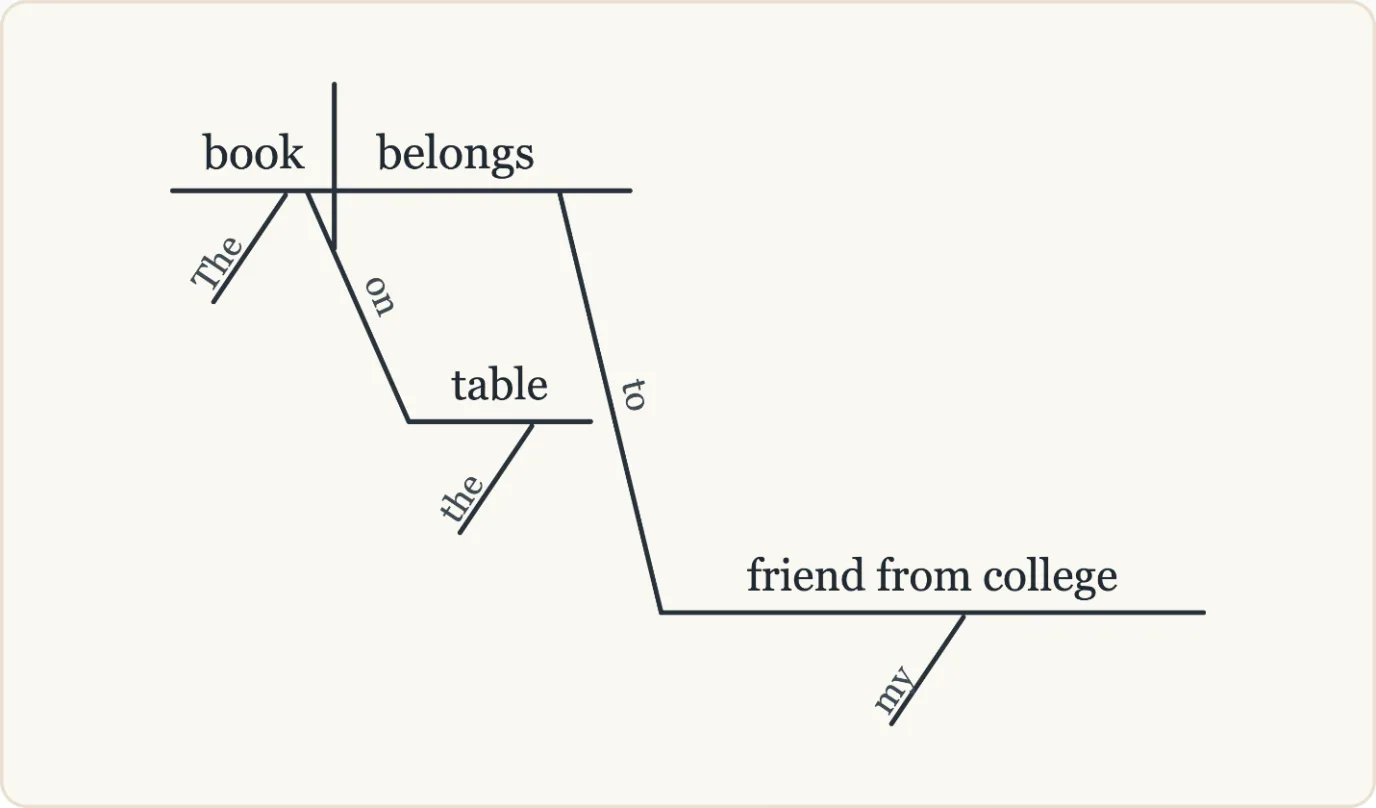
ConceptViz Precise: "friend from college" is written on one line, so the prepositional phrase "from college" is not diagrammed.
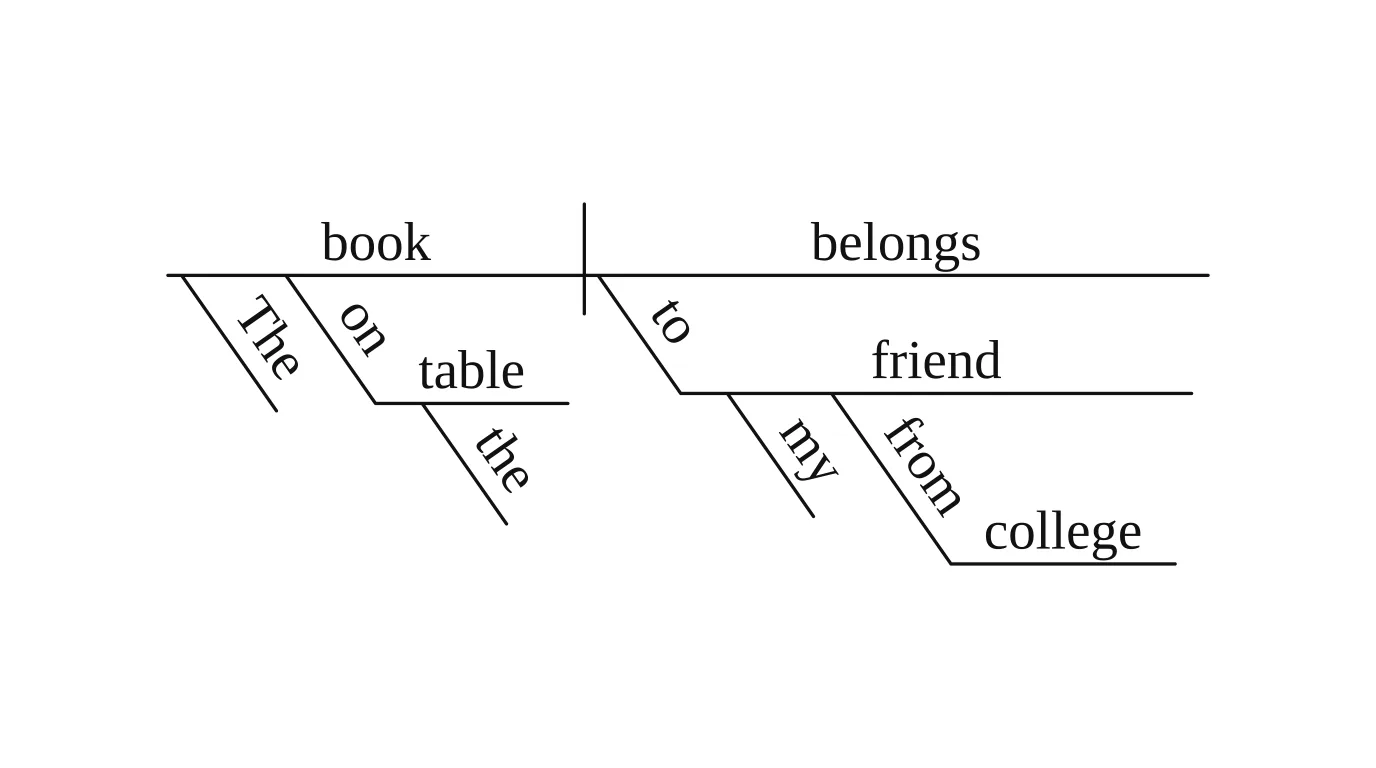
Vizcept: "from college" gets its own prepositional line under "friend".
Sentence 8: "Grandma gave the twins a puzzle for their birthday."
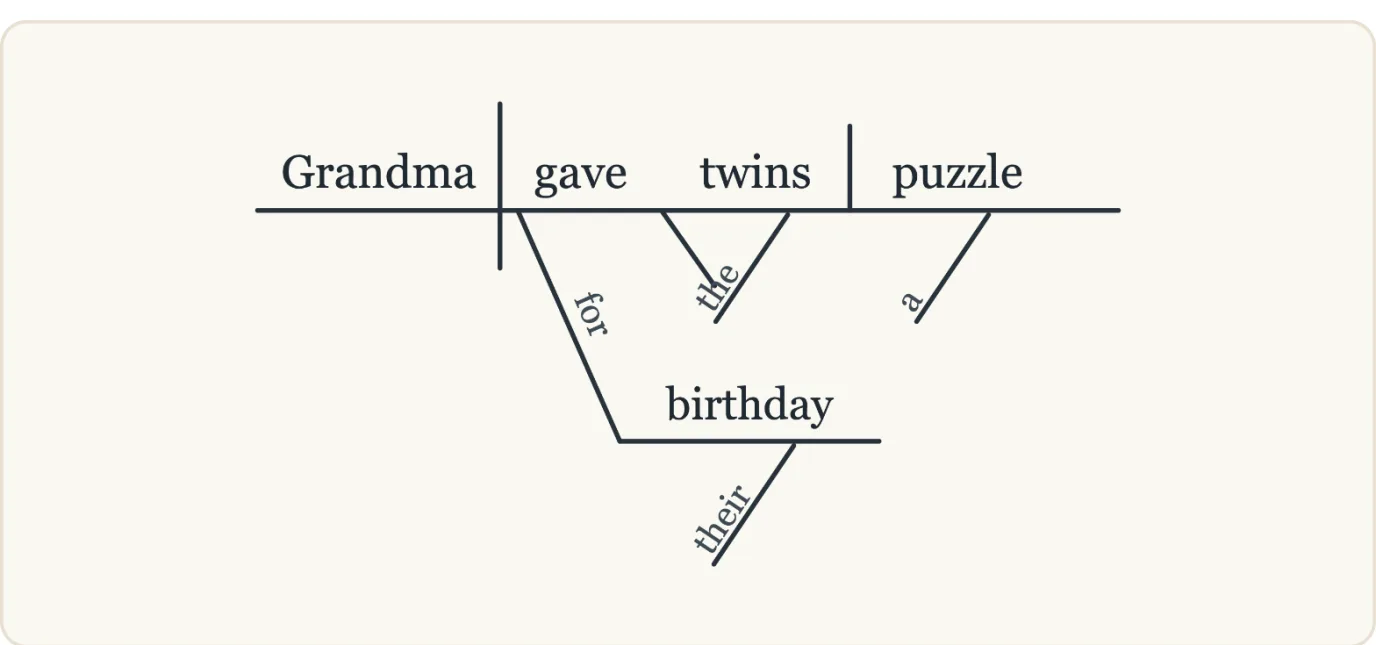
ConceptViz Precise: the indirect object "twins" sits on the baseline beside the verb.
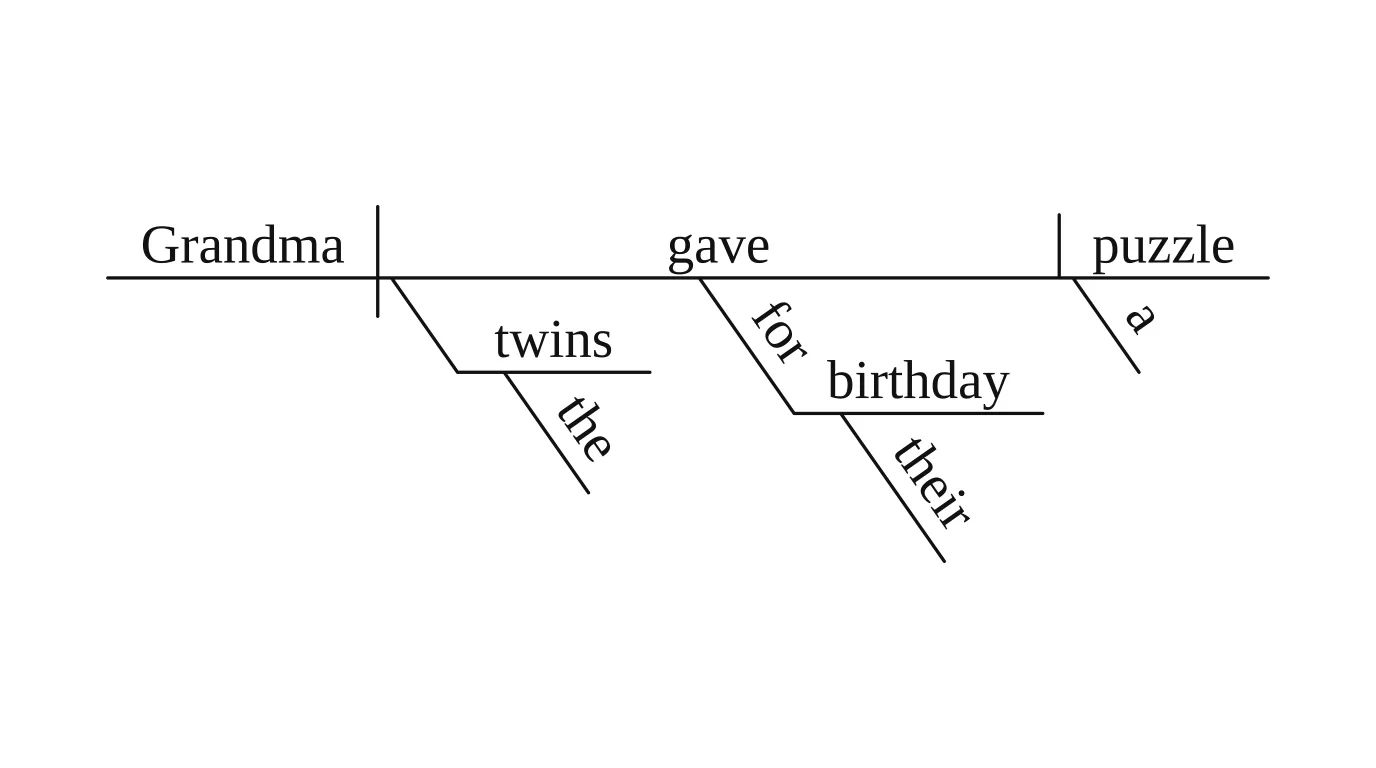
Vizcept: "twins" on its own line under the verb, the way grammar books draw an indirect object.
Sentence 10: "I hope that you can come."
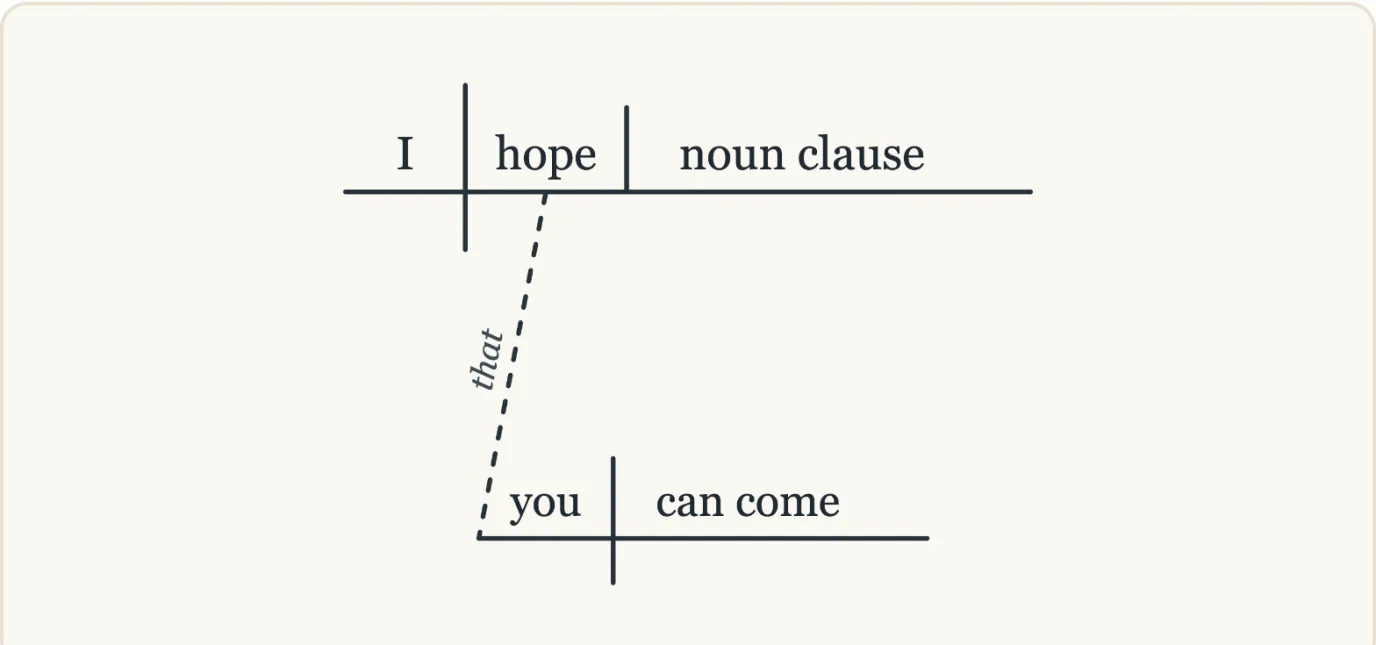
ConceptViz Precise: the object slot shows the label "noun clause" instead of the clause itself.
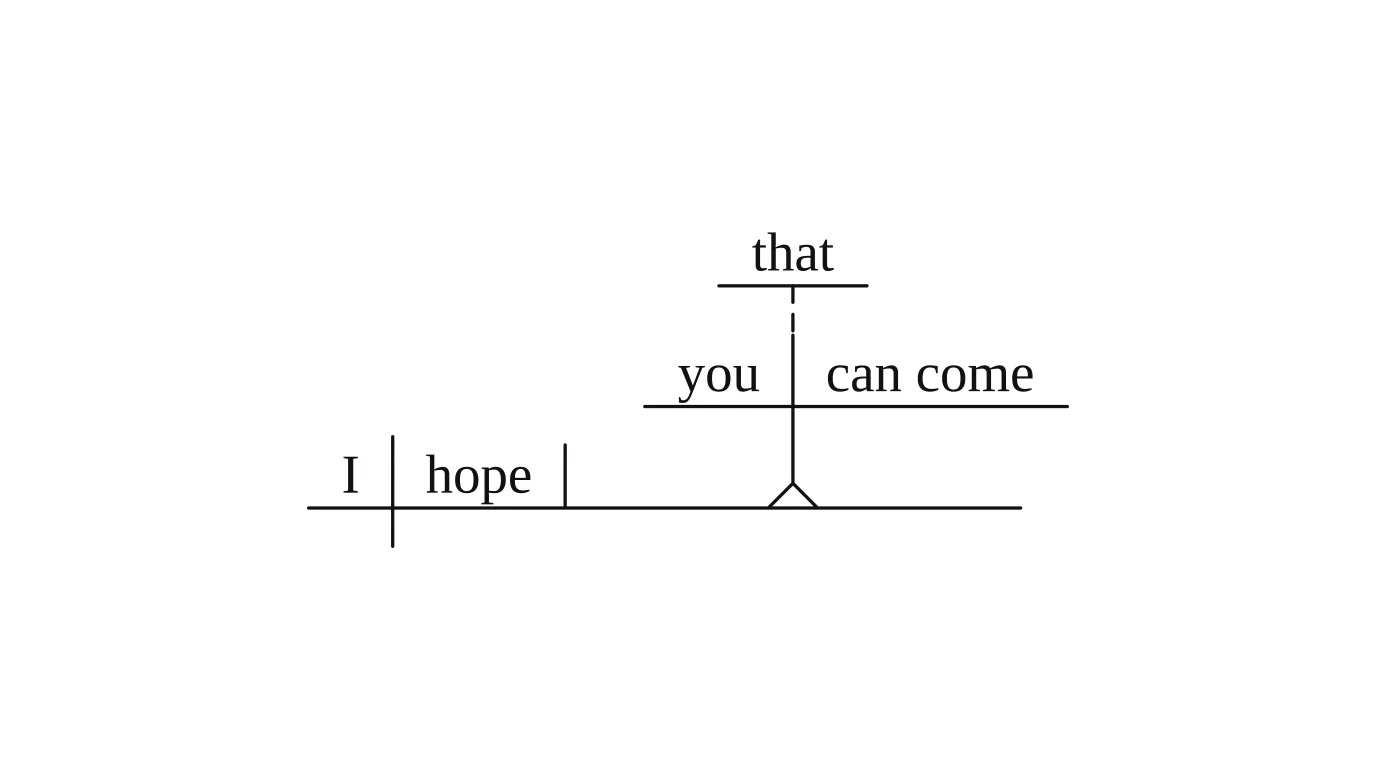
Vizcept: the noun clause stands on a pedestal in the object position, with "that" above it.
Sentence 1: "The cake was eaten by the children at the party." (a tie)
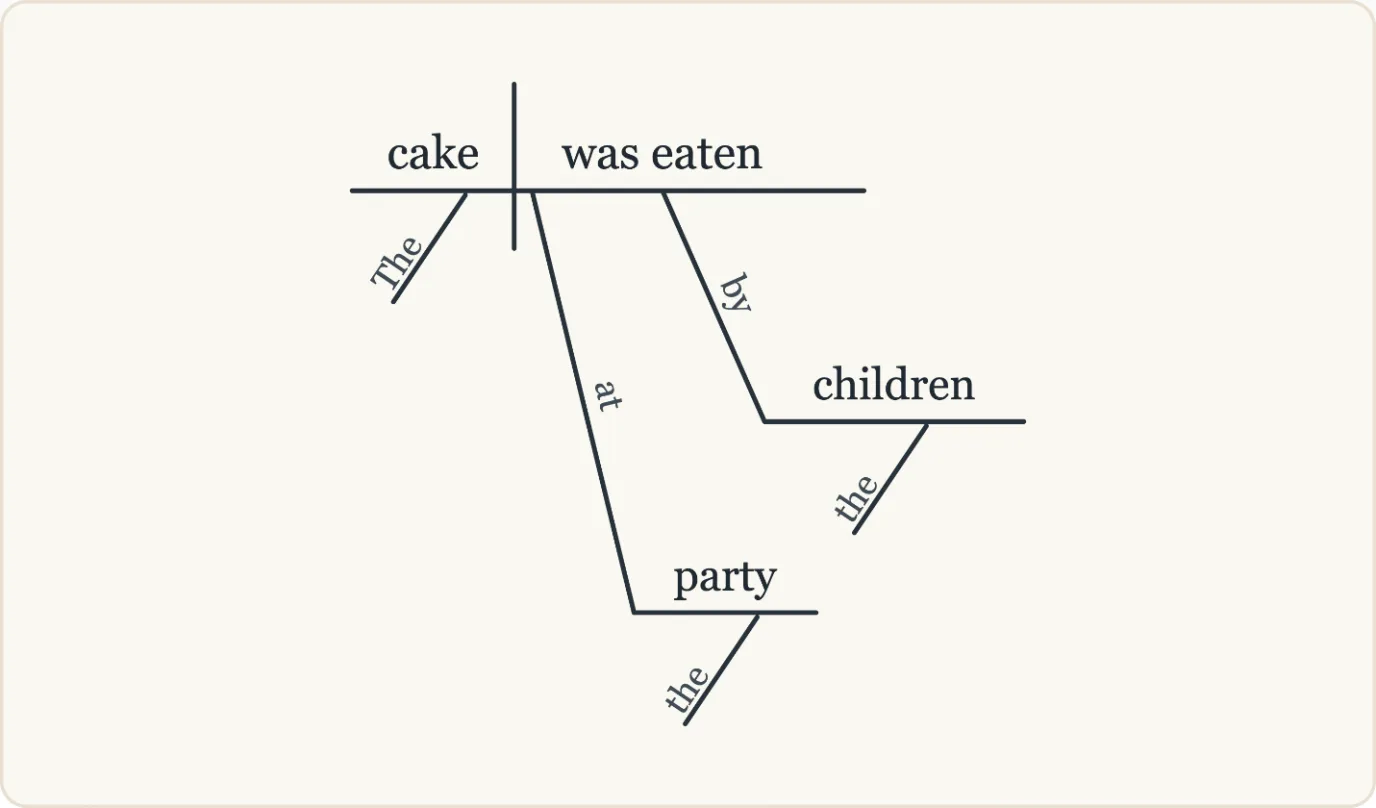
ConceptViz Precise: "at the party" hangs from the verb (where the eating happened).
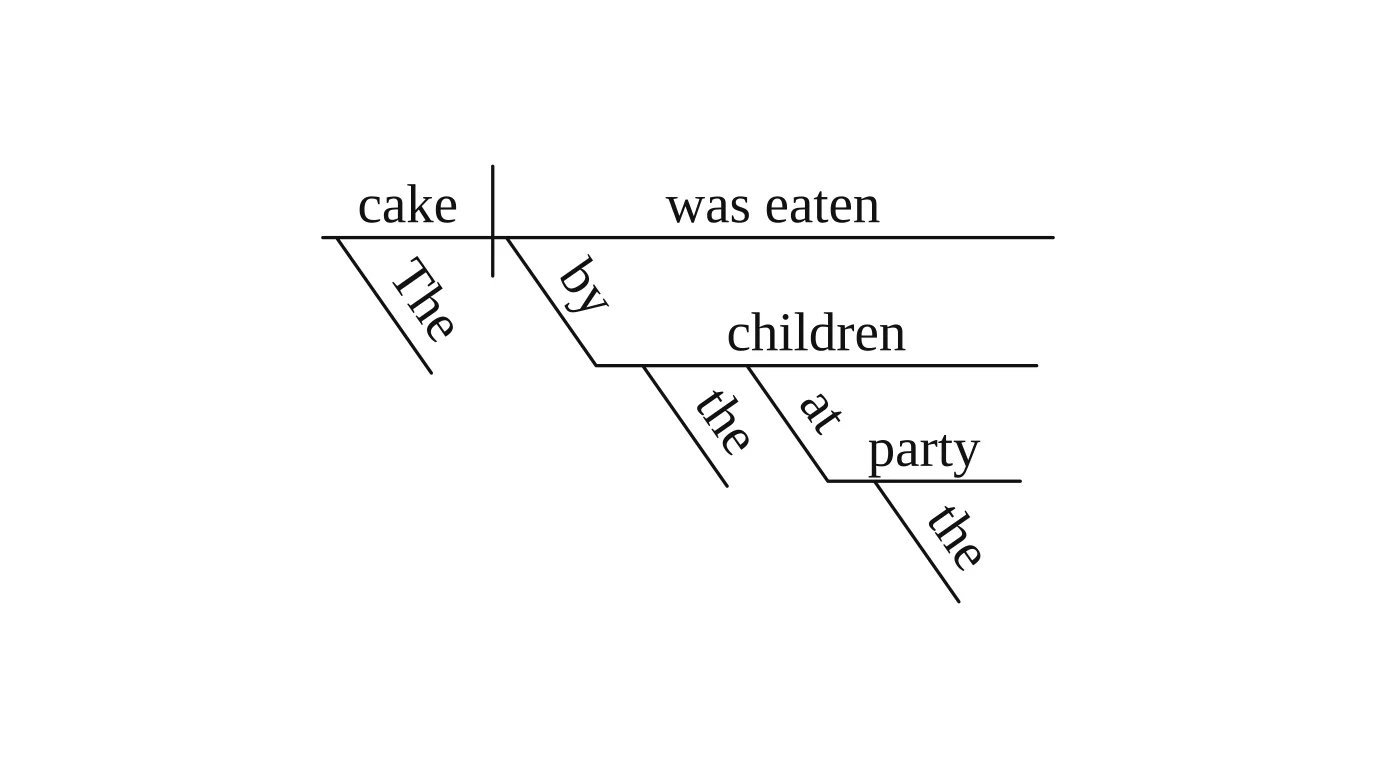
Vizcept: "at the party" hangs from "children" (which children). Both readings are defensible; to get the other one, add a note such as "attach at the party to eaten".
Try your own hardest sentence in both before you decide.
Vizcept vs ConceptViz: feature by feature
Vizcept typesets grammar and thesis figures by code; ConceptViz covers more science illustrations and adds a conversational agent, PPTX export and an API. The table compares 14 features as of 18 October 2026.
| Feature | Vizcept | ConceptViz |
|---|---|---|
| Reed–Kellogg sentence diagrams | ✓ code-typeset | ✓ Precise mode (code) and AI illustration |
| Diagram worksheet + answer key PDFs (up to 20 sentences) | ✓ | — |
| Part-of-speech colors / blank practice diagram | ✓ | POS labels in examples |
| Syntax trees | ✓ code-typeset, SVG, LaTeX forest | ✓ AI image |
| Conceptual frameworks with H labels | ✓ code-typeset | ✓ AI layout |
| CONSORT flow diagram | ✓ 2025 and 2010, from a paragraph | ✓ 2010, from a form (free Precise mode) |
| PRISMA flow diagram | ✓ image model | ✓ |
| School science illustrations (cells, cycles, anatomy) | A few tools | ✓ dozens of tools |
| Conversational agent that plans a set of figures | — | ✓ |
| Data charts from your numbers | — | ✓ |
| PPTX export | — | ✓ Pro and Max |
| API | — | ✓ Max |
| One-time credit packs | ✓ $19.90 / 150, valid 365 days | ✓ from $4.99, never expire |
| Student / teacher discount | 40% / 20% off subscriptions for 12 months | 40% education code |
What does a grammar unit cost on each?
Take one unit: three worksheets of 20 sentences each, 60 diagrams with answer keys.
- Vizcept: 60 diagrams × 2 credits = 120 credits, inside one $19.90 pack (150 credits, valid 365 days), or a month of BASIC at $14.90. You get the worksheets and answer keys as printable PDFs.
- ConceptViz: Precise diagrams are free with fair-use limits once you have a free account (our test diagrams used no credits), one sentence at a time, so the diagrams themselves can cost nothing; you would arrange them into a worksheet and key yourself. Its AI illustration mode uses 1 image credit per 2K image: 60 credits is roughly the 55-credit pack at $19.90 (65 with its bonus until 5 November 2026).
If you only need the occasional single diagram and don't mind the layout work, ConceptViz's free Precise mode is the cheaper route. If you print worksheets every week, the worksheet mode saves the layout time.
When is ConceptViz the better choice?
- You teach science across topics. ConceptViz has about 320 tool pages, mostly biology, chemistry, physics and earth science for U.S. classrooms. Vizcept covers a handful of those.
- You want to talk a figure through. Its agent shows a plan, draws a version, keeps the old one, and on Pro can plan up to six related figures from a document.
- You need slides or an API. PPTX export (Pro and Max) and an image API (Max) are not available on Vizcept.
- You make single sentence diagrams now and then. Its Precise mode is free with fair-use limits once you have a free account.
- You want credits that never expire. ConceptViz packs don't expire; Vizcept packs last 365 days.
Switching from ConceptViz
- Your existing figures stay yours. ConceptViz's license lets paid accounts use figures commercially; nothing needs to move. Vizcept doesn't import ConceptViz files, so re-create a figure by pasting the same sentence or description.
- Check conventions once. Paste two or three sentences you already diagrammed and compare; the rules Vizcept follows are on how to diagram a sentence.
- Watermarks. Vizcept's free downloads are watermarked; ConceptViz's license says free-account diagrams carry its watermark, while its homepage says agent-trial figures don't. Clean files come with a paid plan or pack on both.
- Teachers: Vizcept for teachers shows how single diagrams and worksheets fit a grammar unit. Thesis writers: Vizcept for PhD students.
Questions about Vizcept and ConceptViz
Is ConceptViz free?
Partly. New accounts get 2 image credits valid for 7 days, and its Precise sentence and CONSORT diagrams are free with fair-use limits once you have an account. Plans start at $29.90 a month or $249.90 a year, and image packs at $4.99 (checked 18 October 2026).
What is the best ConceptViz alternative for sentence diagrams?
For worksheets, Vizcept: it turns up to 20 sentences into a diagram worksheet and matching answer key PDF, which ConceptViz's sentence tool doesn't do. In our 10-sentence test on 18 October 2026, Vizcept drew all 10 by modern conventions and ConceptViz's free Precise mode drew 5, with 4 errors. For an occasional single diagram, ConceptViz's Precise mode is free with fair-use limits once you have an account.
Is there a free ConceptViz alternative?
Vizcept lets you make your first figure without an account and gives 5 credits on sign-up, valid 30 days; free downloads carry a watermark. For single sentence diagrams, ConceptViz's Precise mode is free with fair-use limits after sign-in. Clean files need a paid plan or pack on either.
Is Vizcept cheaper than ConceptViz?
The monthly plans are: $14.90 for 300 credits against $29.90 for 45 image credits. One-time packs are close: $19.90 buys 150 Vizcept credits (75 code-typeset diagrams) or 55 ConceptViz image credits (65 with its bonus until 5 November 2026). Free tiers differ in what they cover, so compare on the figure you actually make.
Does ConceptViz draw syntax trees?
Yes, as an AI-generated image you can export. Vizcept typesets syntax trees by code and adds editable SVG, the labeled bracket string and LaTeX forest code on paid plans.
Can I use both?
Yes. A common split is ConceptViz for science illustrations and Vizcept for grammar worksheets, syntax trees and thesis frameworks. You own what you make on Vizcept on every plan.
Which AI tool is best for creating scientific diagrams?
It depends on the figure. For sentence diagrams, syntax trees, conceptual frameworks and CONSORT diagrams where every label must match your text, use a tool that typesets them by code, such as Vizcept. For school science illustrations like cells and cycles, ConceptViz has more ready-made tools. For detailed biomedical illustrations built from an icon library, BioRender is the usual choice.
Try your hardest sentence
Your first diagram needs no account. Credit packs start at $19.90 and never renew.
