
Who is this for?
This page is for people who teach Reed–Kellogg sentence diagramming and have to produce diagrams and answer keys every week:
- middle-school ELA and grammar teachers (roughly grades 3–8) building practice for a unit;
- homeschool parents working through a grammar program with diagramming exercises, who need an answer key they can trust at the kitchen table;
- tutors and co-op teachers who want a fresh set of sentences for each student.
What these jobs have in common: the sentences come from your book or your own lesson, there are many of them, and every diagram has to be right before a student sees it.
It is not the right tool if your course uses tree diagrams instead of Reed–Kellogg lines, if you need a full grammar curriculum with lessons and grading, or if you want students to submit diagrams for automatic marking — see what it doesn't do.
How do teachers use sentence diagramming across a grammar unit?
One tool, two modes. Single sentence mode draws one diagram as an image; Worksheet mode turns up to 20 sentences into a worksheet PDF and an answer key PDF. A typical unit on, say, prepositional phrases:
| When | What you make | Mode |
|---|---|---|
| Introducing the skill | One diagram of a model sentence for the board or a slide, with the parts of speech in color so students see which word each phrase hangs from | Single sentence — add "color-code the parts of speech" to the sentence |
| Guided practice | The same sentence as empty lines, for students to fill in together | Single sentence — add "blank worksheet" |
| Independent practice | Your textbook's exercise (or your own sentences) as a numbered worksheet with an answer key | Worksheet — paste the sentences, one per line |
| Review or quiz | A new set of sentences on the same skill, mixed with earlier skills | Worksheet |
The step-by-step for Worksheet mode, five free printable sets by skill (subjects and verbs, objects, linking verbs, prepositional phrases, compounds) and advice on writing sentences that diagram cleanly are on the worksheet maker page. If you are brushing up on the rules yourself first, how to diagram a sentence goes through every part with examples, and compound and complex sentences covers the multi-clause cases students find hardest.
What do the sentence diagrams, worksheets and answer keys look like?
All four images below are real output from the sentence diagram generator, not edited by hand.
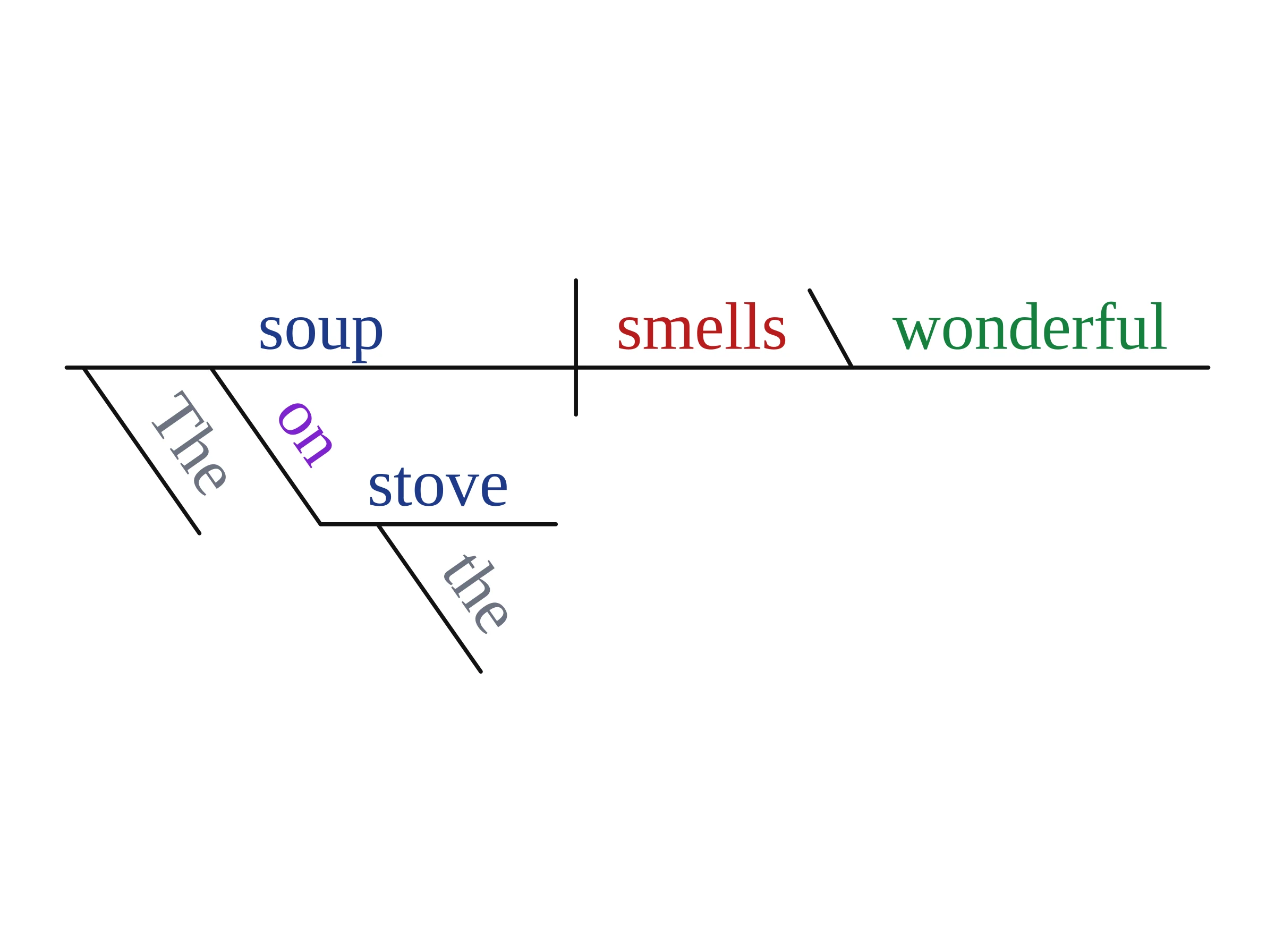
For the board: color by part of speech. We typed "The soup on the stove smells wonderful." and asked for color-coded parts of speech. The prepositional phrase hangs from soup, the noun it describes, and the linking verb smells points back to the subject through the predicate adjective.
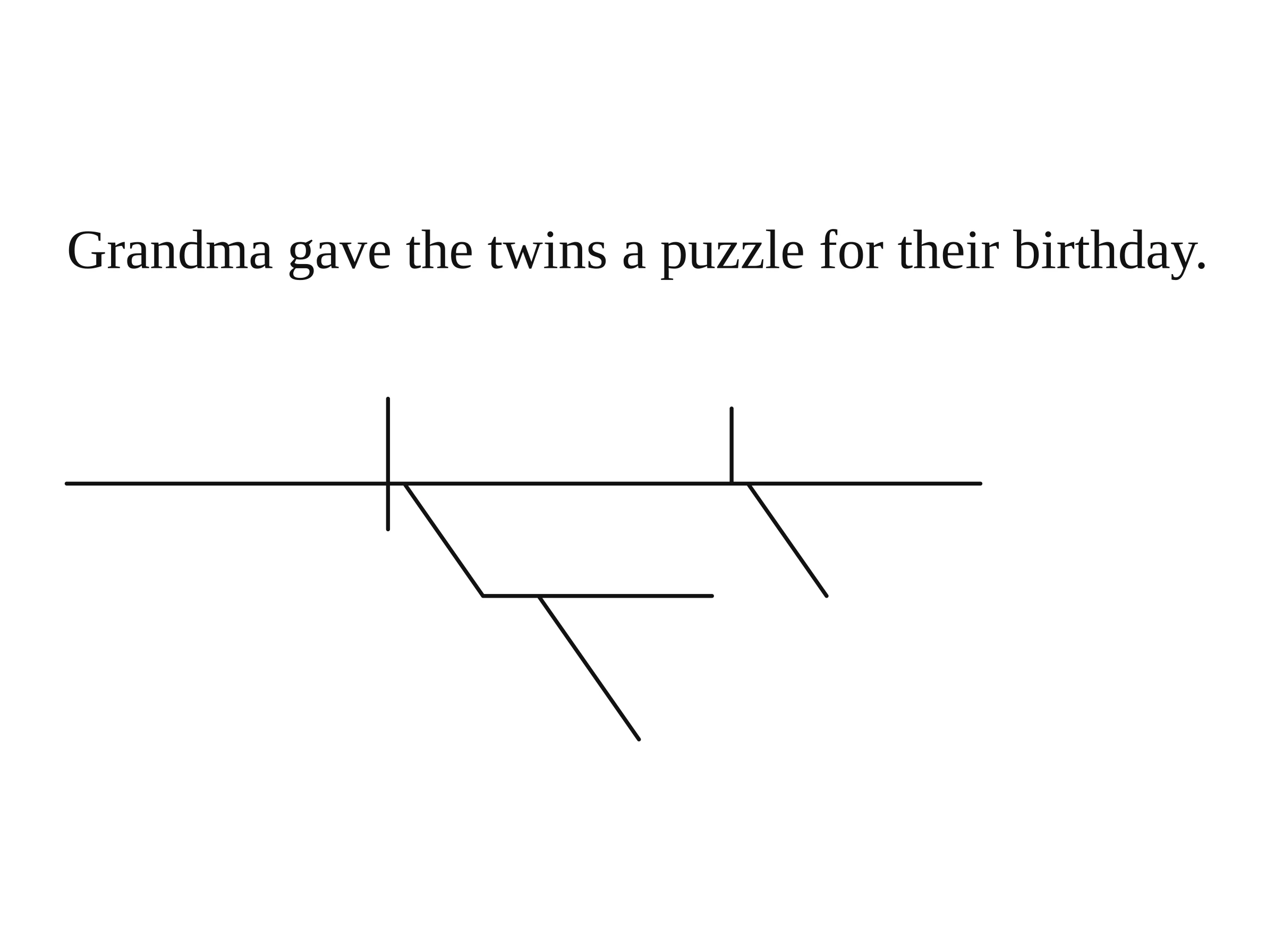
For guided practice: one blank diagram. "Grandma gave the twins a puzzle for their birthday." drawn as empty lines, so students can see there is an indirect object before they write a word.
For independent practice: a worksheet and its answer key. Four sentences pasted into Worksheet mode. Numbering and page breaks match, so page 2 of the key checks page 2 of the worksheet.
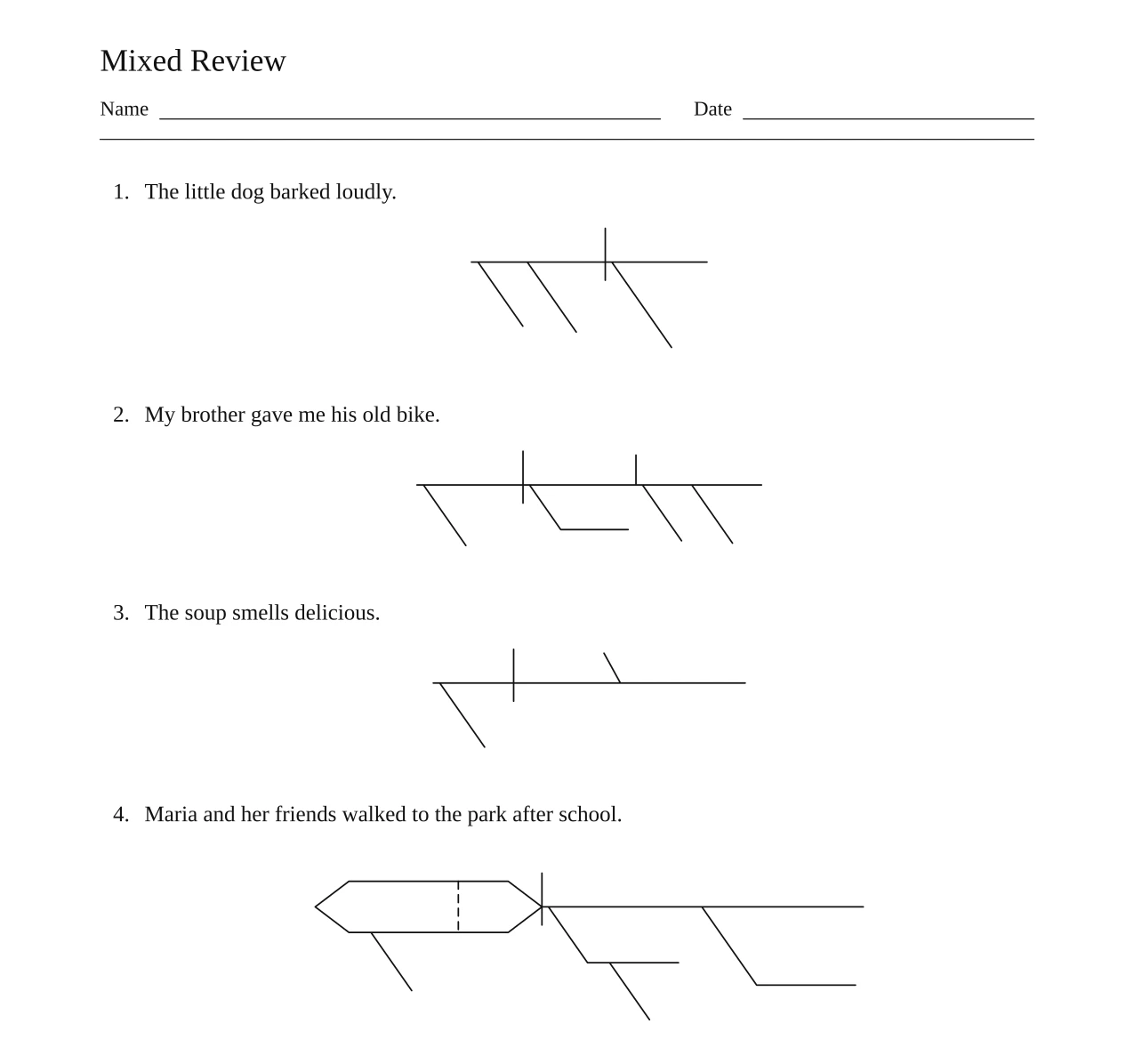
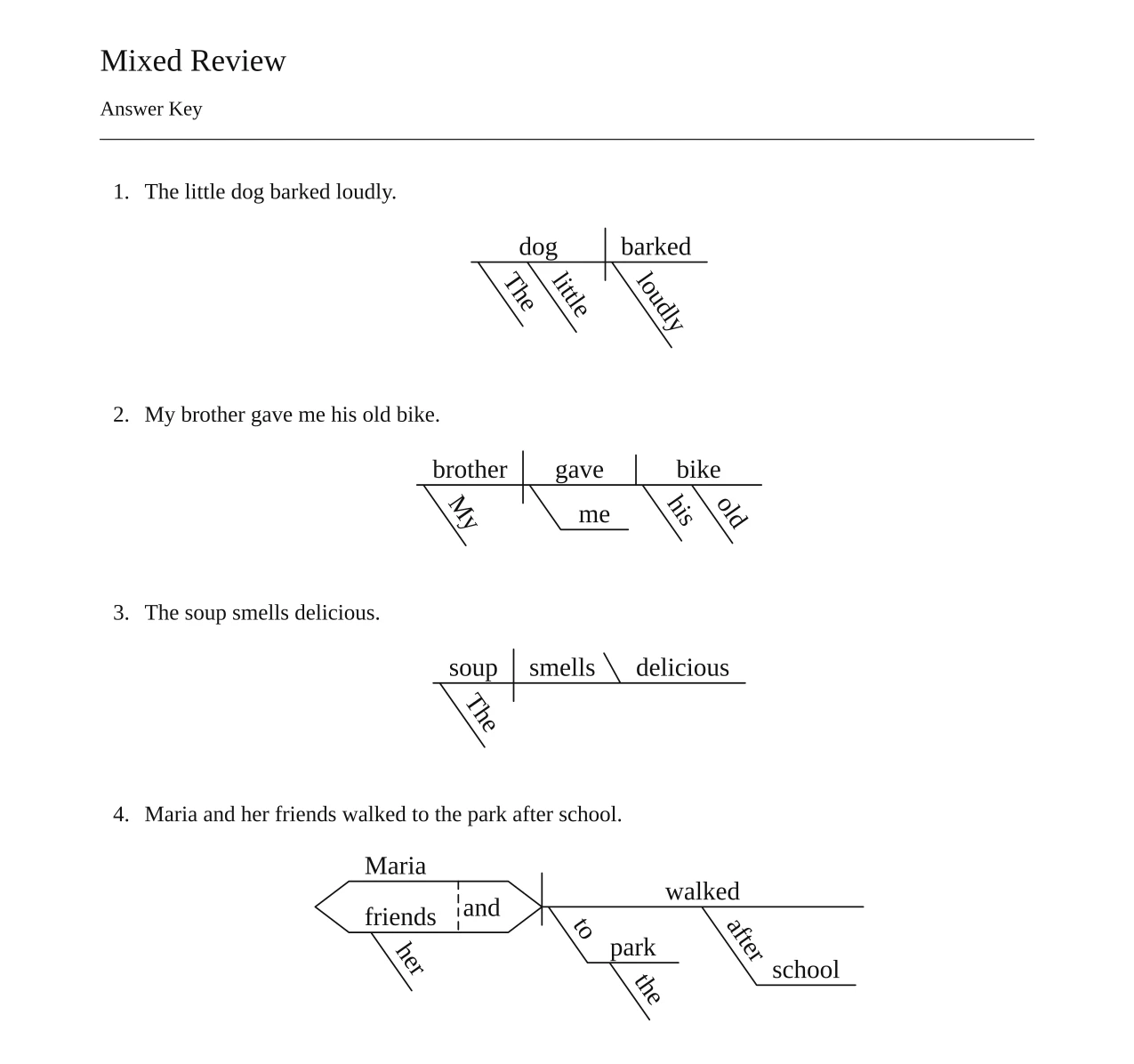
Print this pair for free: worksheet (PDF) · answer key (PDF).
How do you try it before paying?
Open the sentence diagram generator, type one sentence from tomorrow's lesson, and generate. Your first diagram needs no account and usually comes back in under half a minute. Compare it with the diagram in your teacher's edition; if it matches the way your program draws things, sign up and try a worksheet. The free practice sets by skill are ready-made PDFs you can print today without any credits.
Will the sentence diagrams match my textbook?
Mostly, but not always, because grammar programs disagree on details. Vizcept follows the conventions most current American grammar books use; the full rule set is on how to diagram a sentence. If you teach from a program such as The Good and the Beautiful, Well-Trained Mind's How to Diagram Any Sentence or Grammar Revolution's Get Smart, paste one sentence from this week's lesson and compare the result with your teacher's edition before making a full worksheet. These conventions cause most of the mismatches with older or stricter textbooks:
- Gerunds and noun clauses go on a pedestal (a stand above the line), not straight on the baseline.
- Objective complements follow the modern order: made Victoria \ queen, not the older made queen | Victoria.
- Expletive there and it are set apart from the baseline, with the real subject on it.
- Phrasal verbs such as put aside stay together on the verb line; some books split the particle off as an adverb.
- Questions are put in statement order (Did the dog bark? becomes dog | Did bark), and commands show the understood subject as (you).
- Some programs put not on the baseline or treat possessive nouns differently.
If your program does one of these differently, either tell students the answer key follows the modern convention, or leave those sentences out of the set. Adding a one-line note to a sentence (for example "attach only to in the atmosphere") sometimes changes the result, but not reliably.
How accurate is the answer key?
The words are placed by code, so every letter is legible and spelled the way you typed it. The grammar reading behind them comes from a language model, and it can be wrong. To measure how often, we ran 50 sentences that Reed and Kellogg diagrammed themselves in Higher Lessons in English (1877) and its 1889 Key through the tool once each, with no notes, and compared every line with the printed diagram:
- 20 of 50 matched the book line for line;
- 13 differed only in a convention that later textbooks changed (the kinds listed above);
- 17 put a word or phrase on the wrong line or left a word out (2 of the 50 dropped a word). Run again with a one-line note, 9 of those 17 came out right.
Those are 19th-century sentences, many of them long and literary. Short practice sentences like the free sets are simpler, but we have not measured their rate separately, so treat the numbers above as the honest baseline. The most common slip is a prepositional phrase or modifier hanging from the wrong word, and a single dropped word can still get through. Read every diagram in the answer key before you hand the worksheet out. The full sentence-by-sentence test is on the sentence diagram generator page, and accuracy explains how all Vizcept tools are checked.
What does it cost for a school year?
Clean, printable PDFs and watermark-free images are paid, because running the models costs money. When you are signed in, each diagram uses 2 credits, in either mode; a worksheet is charged only for the sentences that get diagrammed, so a full 20-sentence worksheet uses up to 40 credits.
| What you need | Option | Price |
|---|---|---|
| A few worksheets for one unit, plus board diagrams | Standard Pack, 150 credits (up to 75 diagrams, e.g. three 20-sentence worksheets and 15 single diagrams) | $19.90 once, valid 365 days, never renews |
| A worksheet or two every week through the year | 450-credit pack (up to 225 diagrams) | $39.90 once, valid 365 days |
| Heavy use during the school year | BASIC plan, 300 credits a month (up to 150 diagrams, or seven 20-sentence worksheets) | $14.90 a month; cancel any time |
Teachers can apply for a 20% discount on subscriptions for 12 months (education discount); the discount does not apply to credit packs. Before you pay: your first diagram needs no account, signing up gives 5 credits and daily check-ins add more, and free downloads are watermarked. Free credits expire after 30 days. All plans and packs are on the pricing page.
What doesn't Vizcept do for a classroom?
These are the gaps teachers most often ask about:
- It doesn't grade student work. There is no way for students to submit their diagrams; the answer key is for you to check against.
- No class or school accounts. Plans and credit packs are for one person; there is no roster, student login or LMS integration.
- Some structures can't be drawn the book's way. One modifier shared by several nouns (anxious wives, sisters, and mothers) hangs from the first noun only, and compound modifiers joined by and are drawn as separate slants without the dotted connector.
- English only. Sentences with characters the diagram font cannot draw, such as Chinese or Japanese, are skipped in a worksheet and not charged.
- No tree diagrams in this tool. It draws Reed–Kellogg lines only.
- It doesn't replace your judgment on ambiguous sentences. I saw the man with the telescope has two defensible diagrams; the tool picks one.
Questions from teachers and homeschool parents
Can I make an answer key for the exercises in my grammar book?
Yes. Paste the exercise sentences into Worksheet mode, up to 20 at a time; numbers and bullets at the start of a line are removed. You get the worksheet and the answer key as two PDFs. Check each diagram in the key against your book's conventions before using it.
Is Vizcept free for teachers?
Partly. Clean PDFs, watermark-free images and SVG are paid, because running the models costs money. Credit packs start at $19.90 and never renew; plans start at $14.90 a month, and teachers can apply for 20% off subscriptions for 12 months. Your first diagram is free without an account, sign-up gives 5 credits, and free downloads are watermarked; free credits expire after 30 days. The practice sets on the worksheet page are free to print.
Does it work for homeschool?
Yes. Homeschool parents use it to build answer keys for workbook exercises and to make extra practice on the skill a child is stuck on. It runs in the browser on a computer, tablet or phone, with nothing to install, and a credit pack is a one-time payment that never renews.
What grade levels is it suitable for?
Any level that uses Reed–Kellogg diagrams. The free practice sets are marked from grades 3–5 (subjects, verbs and modifiers) to grades 5–7 (prepositional phrases and compounds). Keep sentences under about 10 words for younger students; longer multi-clause sentences are more likely to need a correction in the answer key.
Is sentence diagramming still worth teaching?
Opinions differ. Studies of writing instruction since the 1980s have found that grammar drills taught on their own do little to improve students' writing, and many schools dropped diagramming. Teachers and homeschool parents who keep it use short, regular sets alongside students' own writing, so a diagram shows why a sentence is a fragment or where a modifier belongs.
Can I edit a diagram if the answer key is wrong?
You can't move words inside the PDF. Reword the sentence or add a short note, and create the diagram or worksheet again. On paid plans, single diagrams can also be downloaded as SVG and edited in a drawing program.
Can I use the worksheets with my students?
Yes. You own the diagrams and worksheets you make, on every plan, and can print and share them with your class. Paid plans and credit packs remove the watermark.
Turn tomorrow's exercise into a worksheet
Paste up to 20 sentences, check the answer key, and print both. Credit packs start at $19.90 and never renew.
