
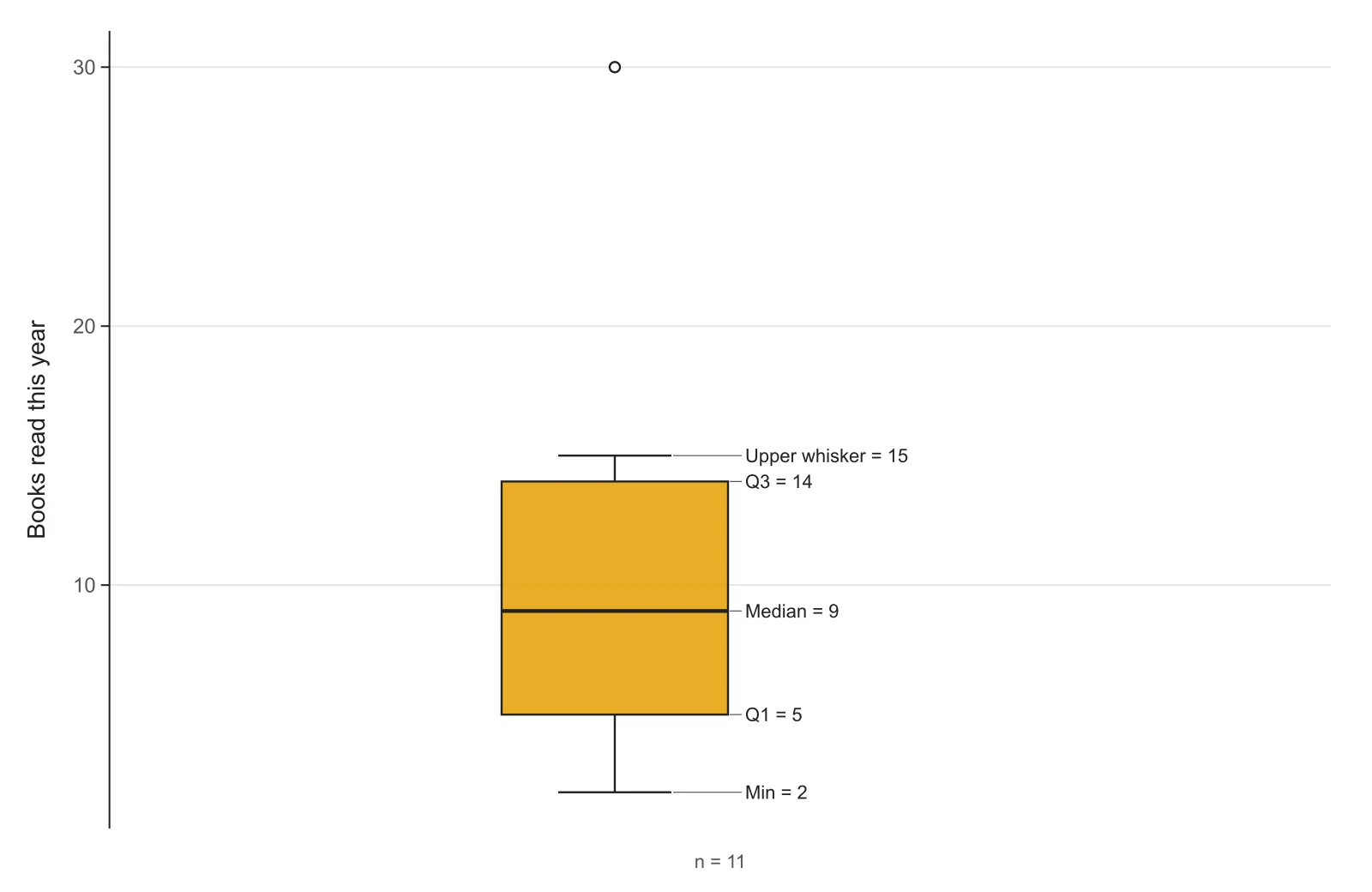
Labeled box plot
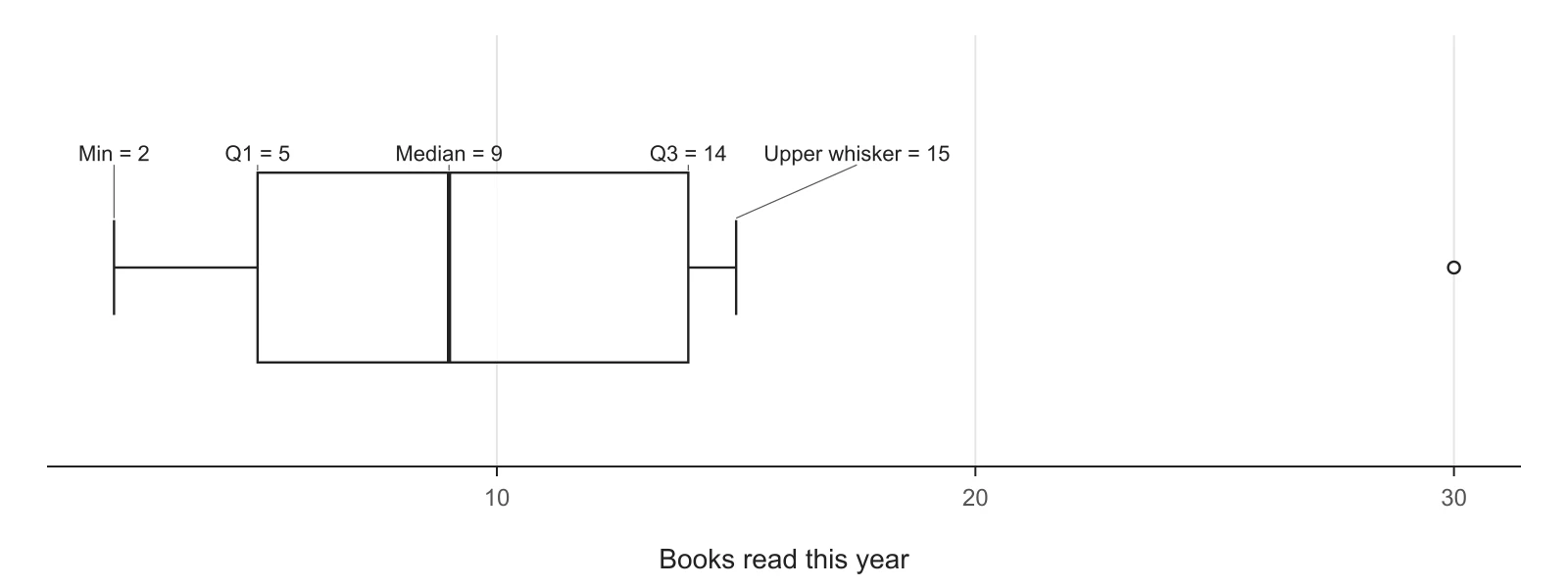
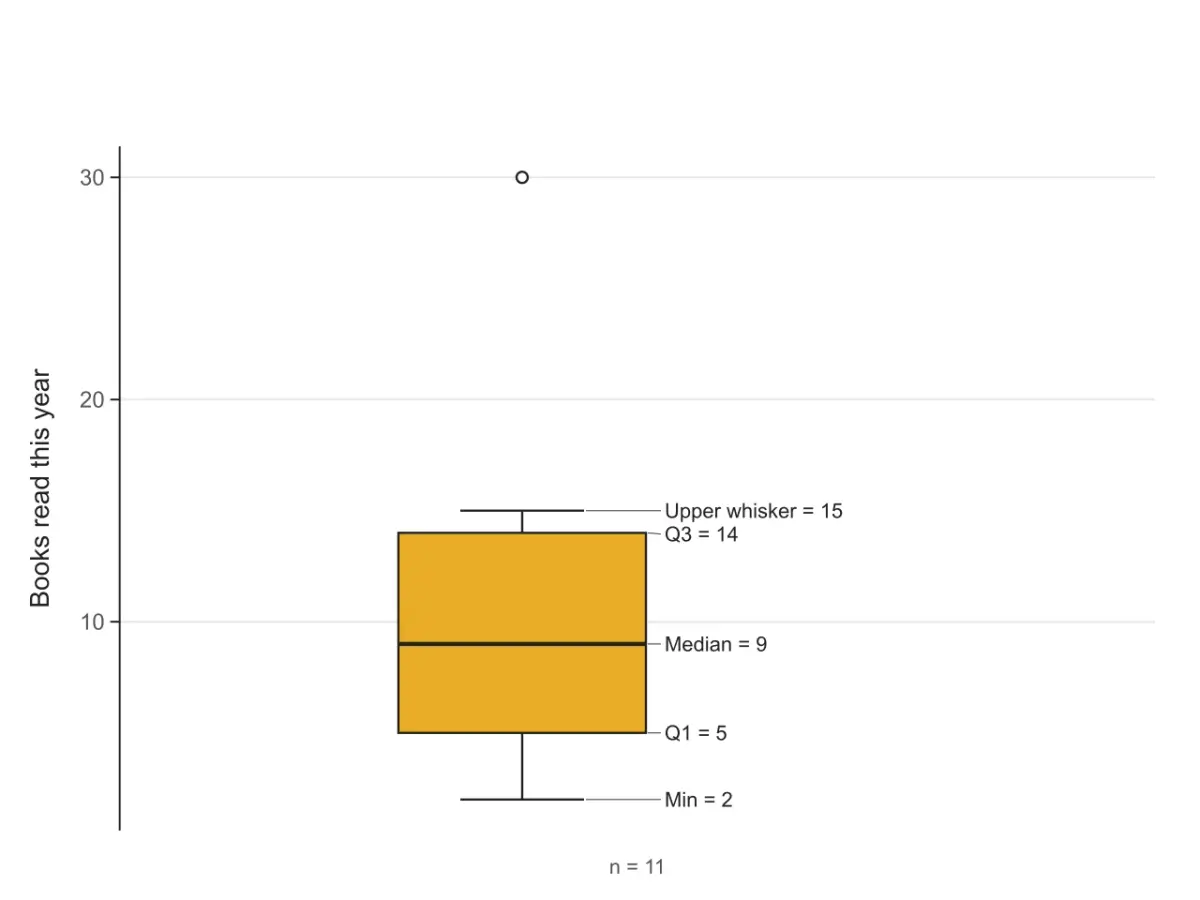
Eleven values in one column, with the five numbers written next to the box. The point at 30 lies beyond the upper fence, so the whisker stops at 15 and 30 is drawn as an outlier.
Paste your numbers and get a box and whisker plot with the five-number summary and outliers, using the same quartile method as your textbook, TI-84 or Excel.
1 group · 11 values · read as a single group
Median of each half; the median itself is left out when n is odd. Matches the TI-83/84 and hand calculation in most courses.
| Group | n | Min | Q1 | Median | Q3 | Max | IQR | Mean | Outliers |
|---|---|---|---|---|---|---|---|---|---|
| — | 11 | 2 | 5 | 9 | 14 | 30 | 9 | 10.6364 | 30 |
The plot is computed on this page as you type. When you download it, the data and settings are saved to your history so you can reopen and edit the plot later.
Each figure below is what this box plot maker draws from the sample data in the tool, unedited. The datasets are made up for demonstration. Open one in the tool to see its numbers and change any setting.
Eleven values in one column, with the five numbers written next to the box. The point at 30 lies beyond the upper fence, so the whisker stops at 15 and 30 is drawn as an outlier.
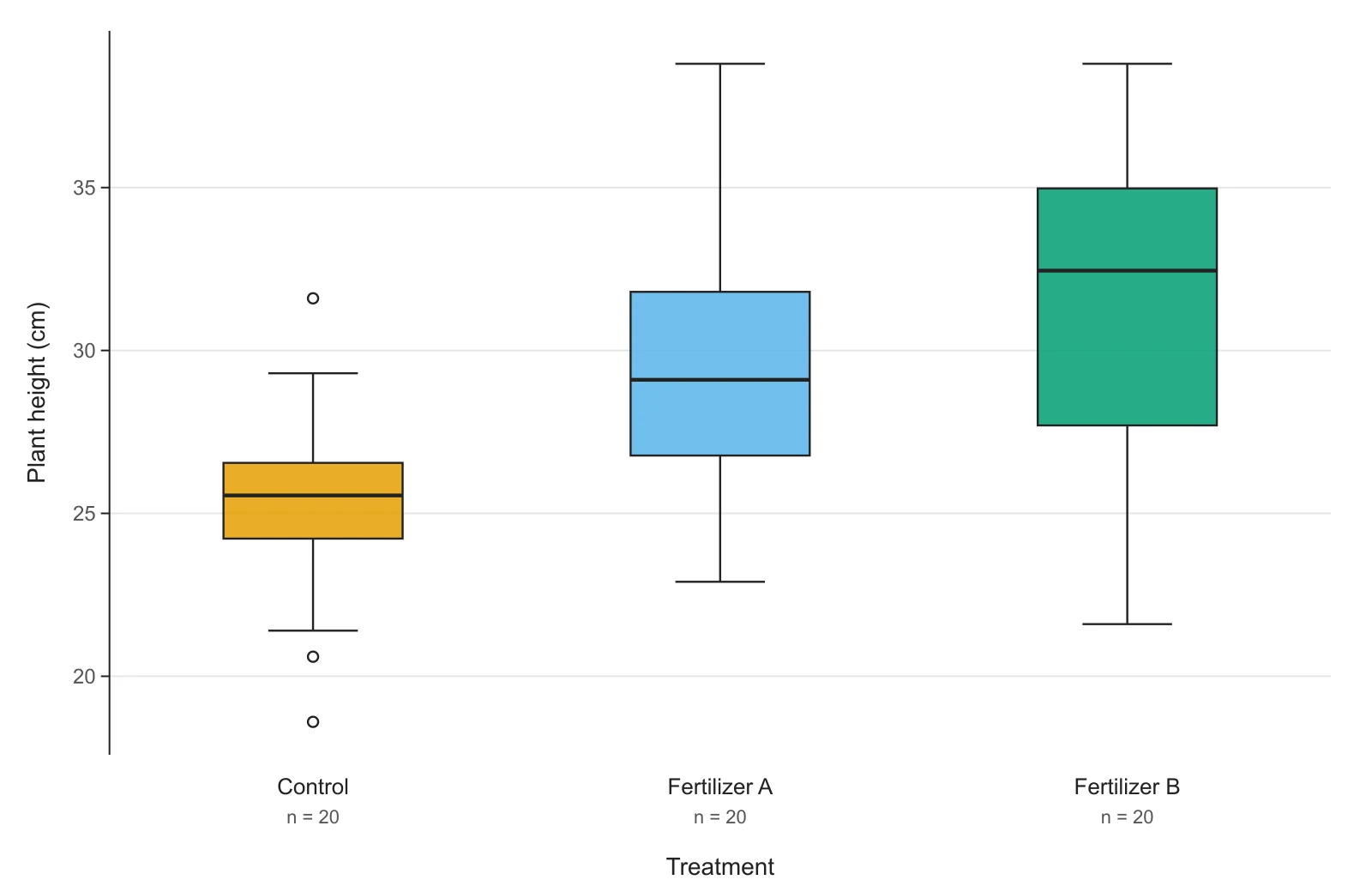
Plant height under three treatments, one column per group. Comparing the medians (thick lines) and the box heights (spread of the middle 50%) is the quickest way to compare groups.
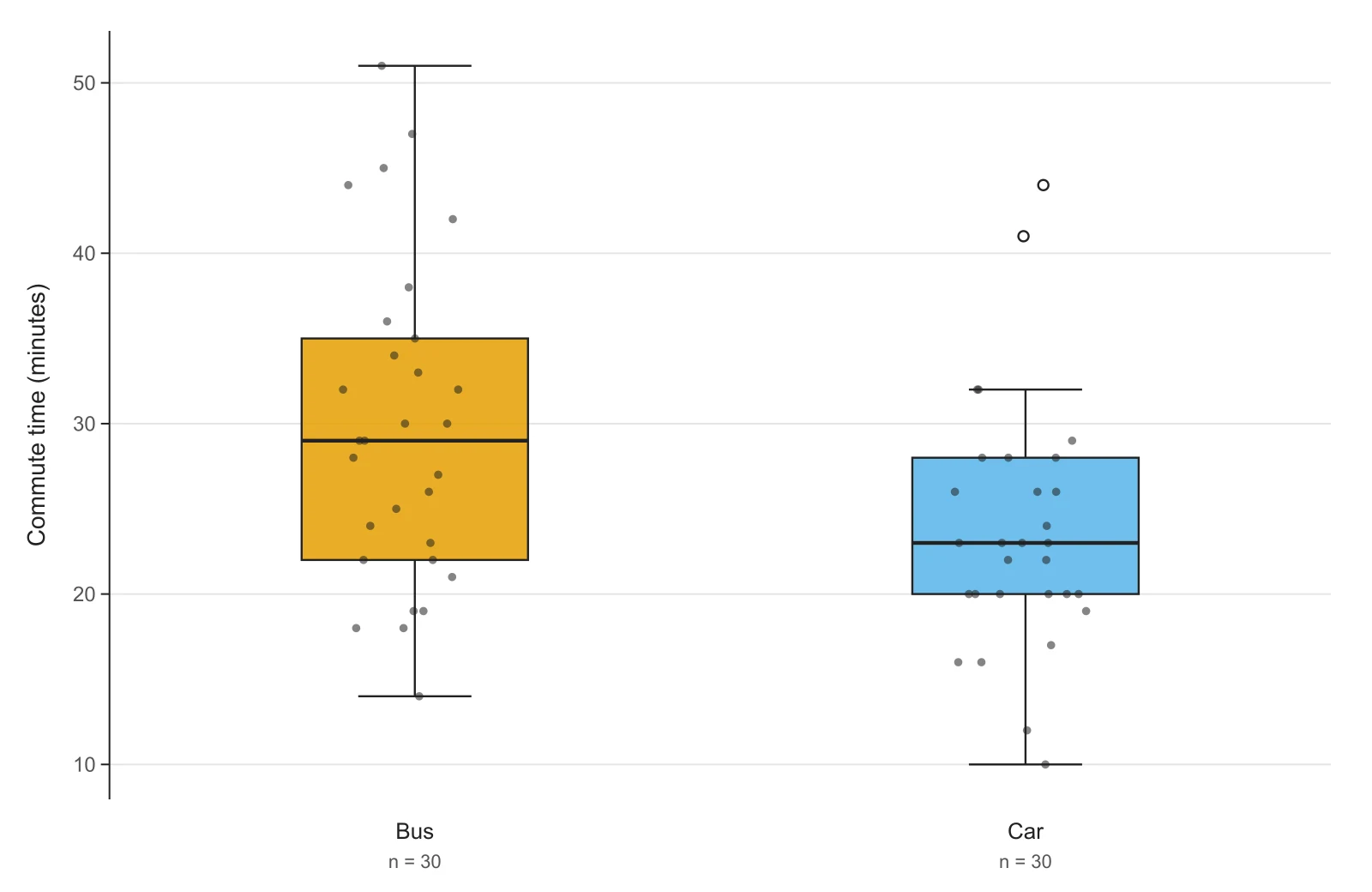
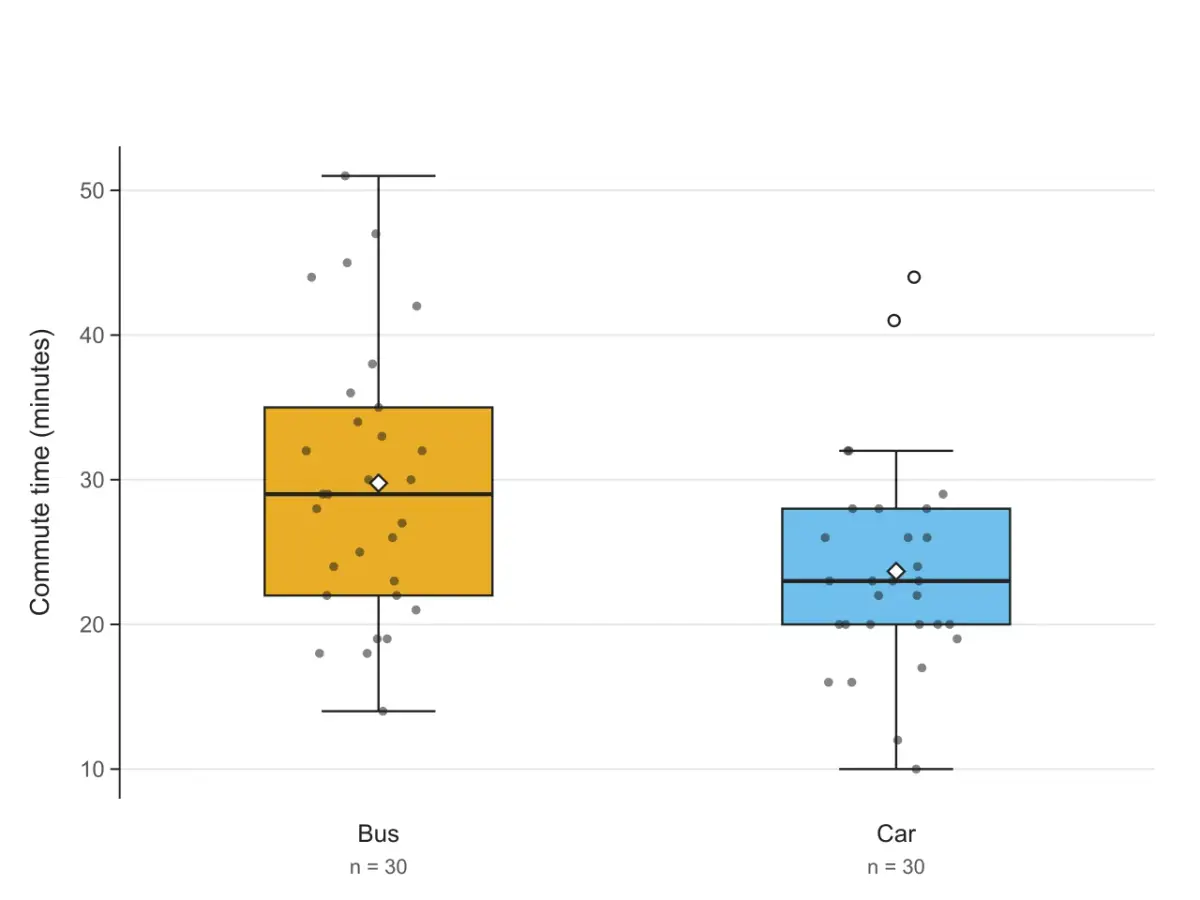
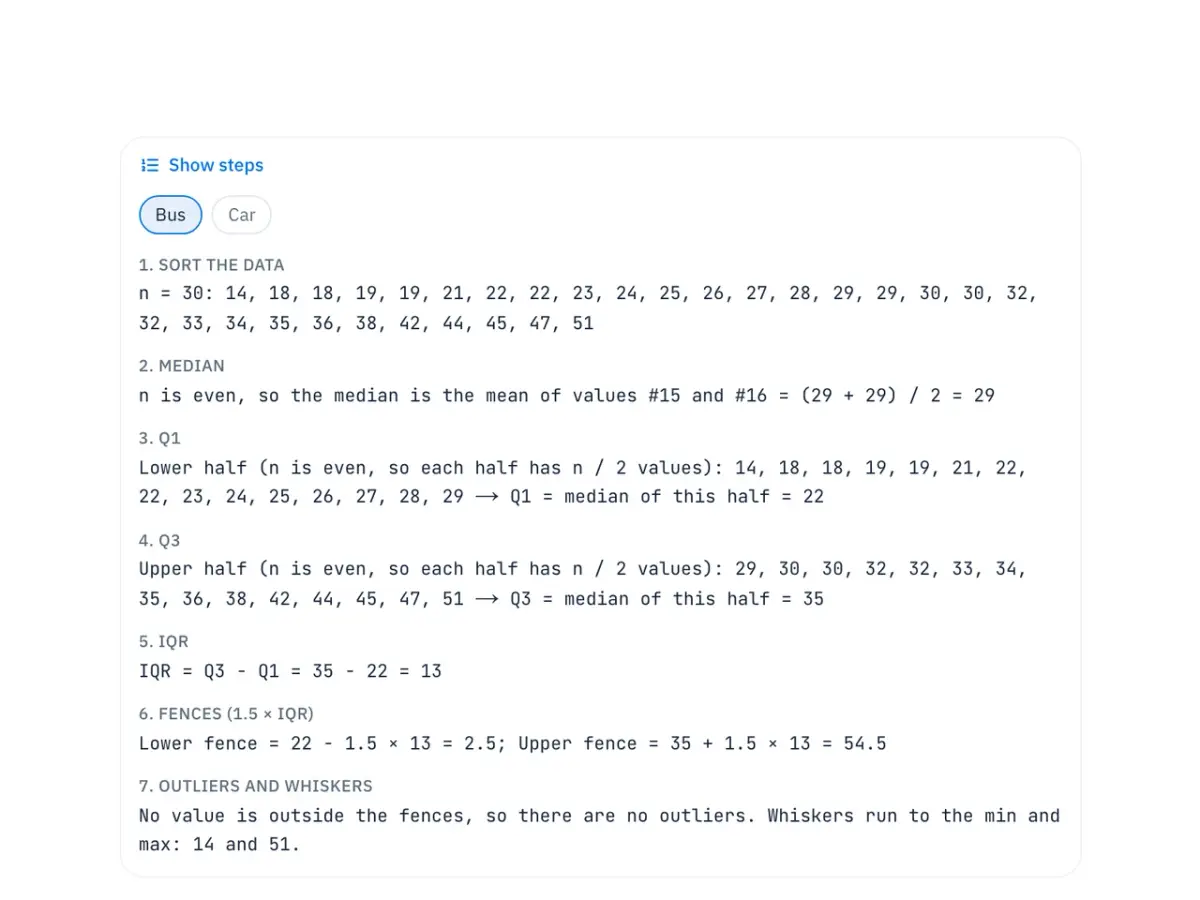
Commute times by bus and by car with every value shown as a dot. Points beyond 1.5 × IQR from the box are drawn as open circles.
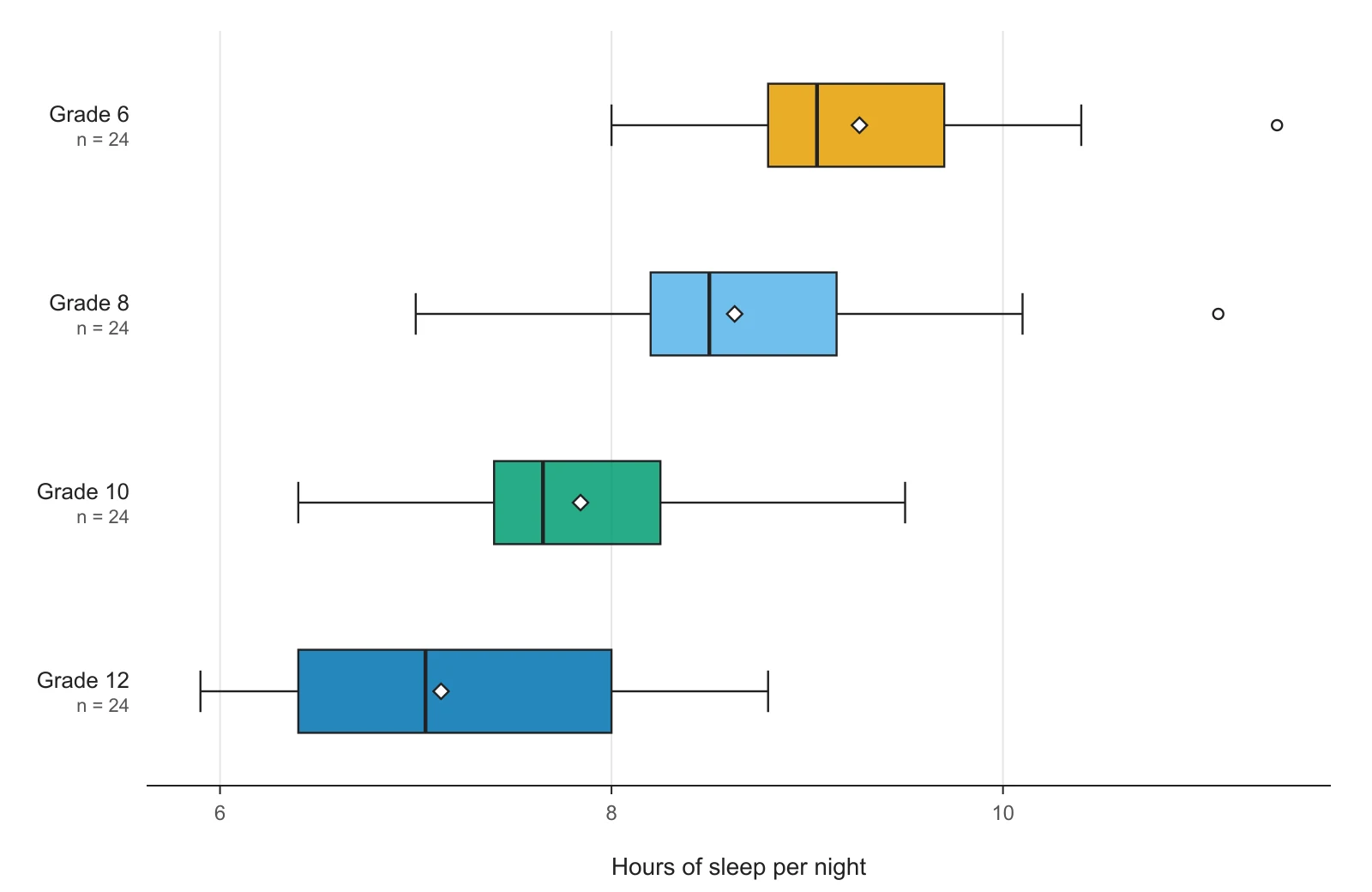
Hours of sleep for four grades, drawn sideways on a number line, the way many textbooks draw box and whisker plots. The diamond marks each group's mean.
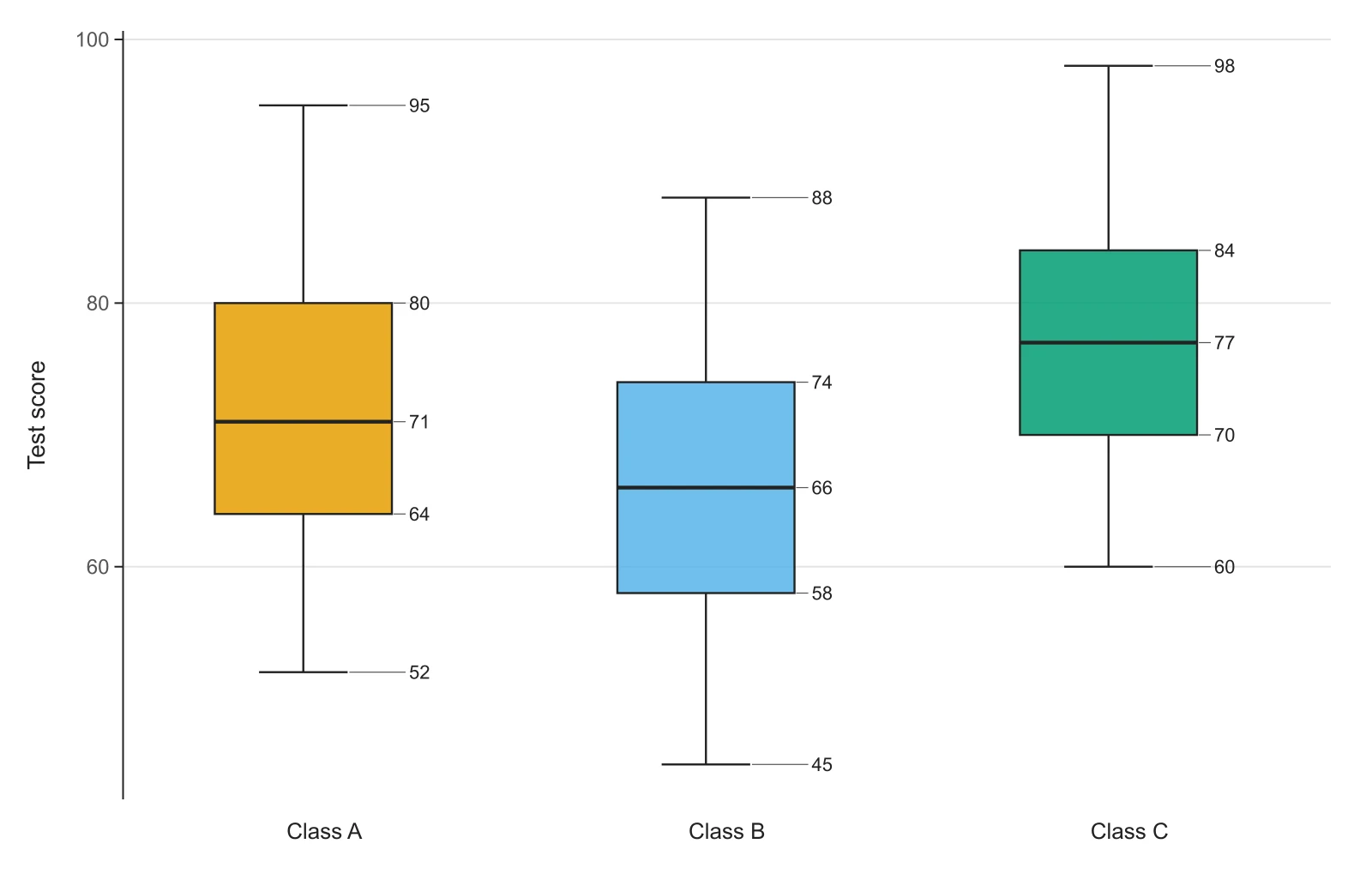
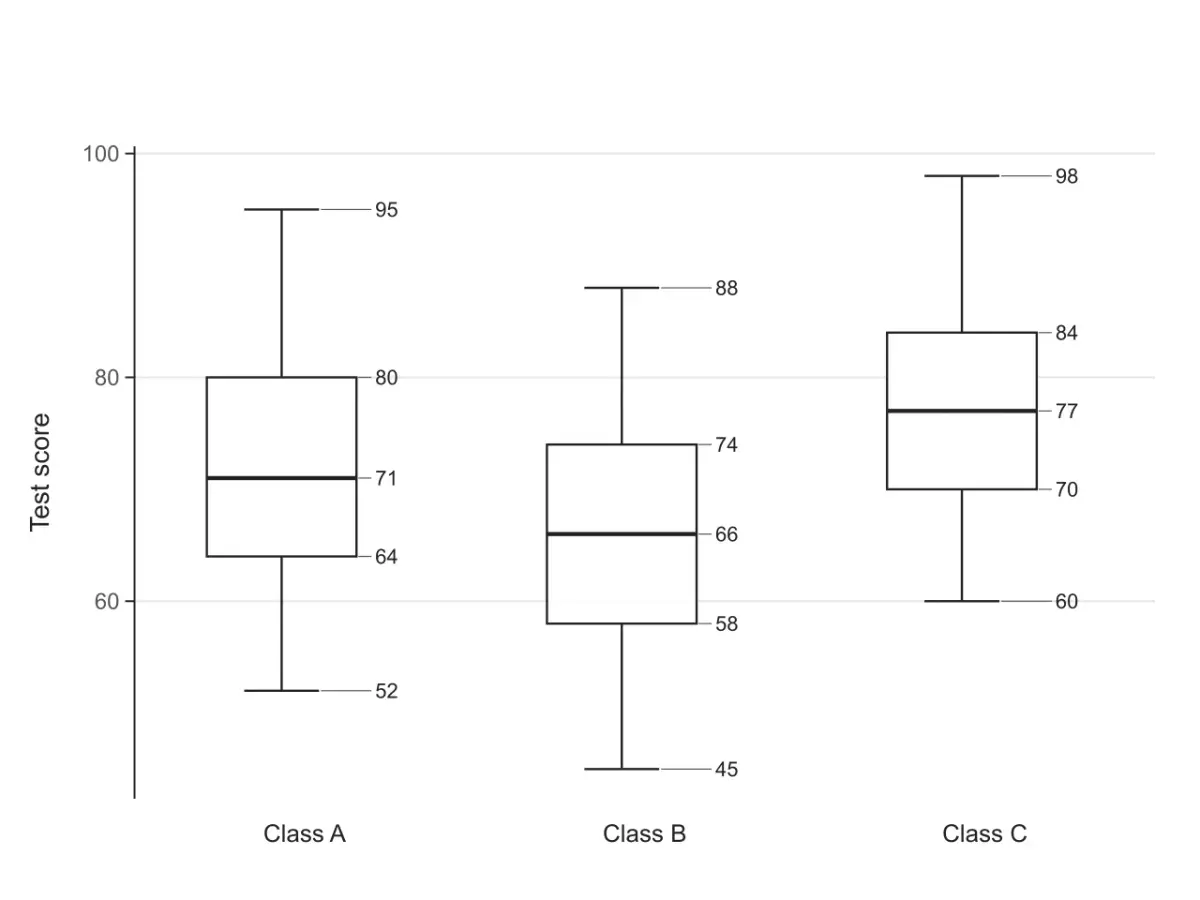
Three classes given only as min, Q1, median, Q3 and max, typed one line per class. With no raw data, each whisker runs to the min or max.
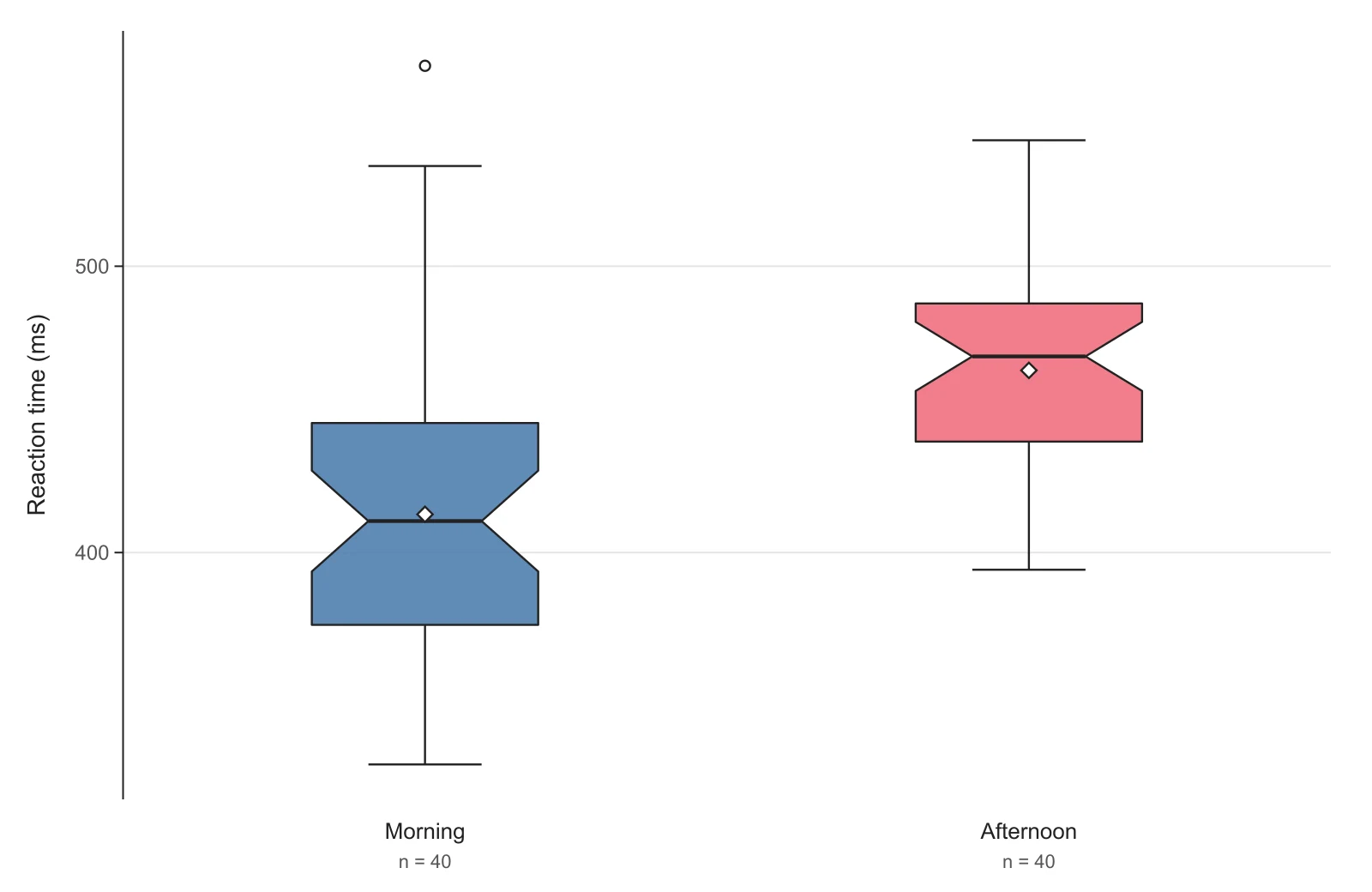
Reaction times for a morning and an afternoon session. The notches around the medians do not overlap, a rough sign that the medians differ.
A box plot (box and whisker plot) is a chart that shows how a set of numbers is spread out using five values, the five-number summary: the minimum, the first quartile (Q1), the median, the third quartile (Q3) and the maximum. The box runs from Q1 to Q3 and holds the middle 50% of the data, the line inside it is the median, and the whiskers reach out to the smallest and largest values that are not outliers.
John Tukey introduced it in Exploratory Data Analysis (1977). Box plot, box and whisker plot, box-and-whisker diagram and box chart all mean the same thing. It is the standard way to compare several groups at a glance, from class test scores to measurements in a lab report.
To make a box plot, sort the data, find the median, find Q1 and Q3 as the medians of the lower and upper halves, check for outliers with the 1.5 × IQR rule, then draw the box and whiskers on a number line. Here are the five steps on one small dataset: the number of books 11 students read this year.
Data12, 2, 9, 30, 5, 14, 7, 11, 4, 15, 8
12, 2, 9, 30, 5, 14, 7, 11, 4, 15, 8 sorted from smallest to largest is 2, 4, 5, 7, 8, 9, 11, 12, 14, 15, 30. The minimum is 2 and the maximum is 30.
There are 11 values, so the median is the 6th one: 9. With an even count, the median is the average of the two middle values.
Leave the median out and split the rest into two halves. Lower half: 2, 4, 5, 7, 8, so Q1 = 5. Upper half: 11, 12, 14, 15, 30, so Q3 = 14. This is the TI-84 and textbook method; software that uses a different method can give slightly different quartiles (see the table below).
IQR = Q3 − Q1 = 14 − 5 = 9. The fences are Q1 − 1.5 × 9 = −8.5 and Q3 + 1.5 × 9 = 27.5. 30 is above 27.5, so it is an outlier. The upper whisker stops at the largest value inside the fence, 15.
Draw a number line that covers 2 to 30. Draw a box from 5 to 14 with a line at 9, a whisker from 2 to 5 and another from 14 to 15, and a separate dot at 30. If your teacher does not mark outliers, run the upper whisker all the way to 30 instead (choose Whiskers: Min to max in the tool).
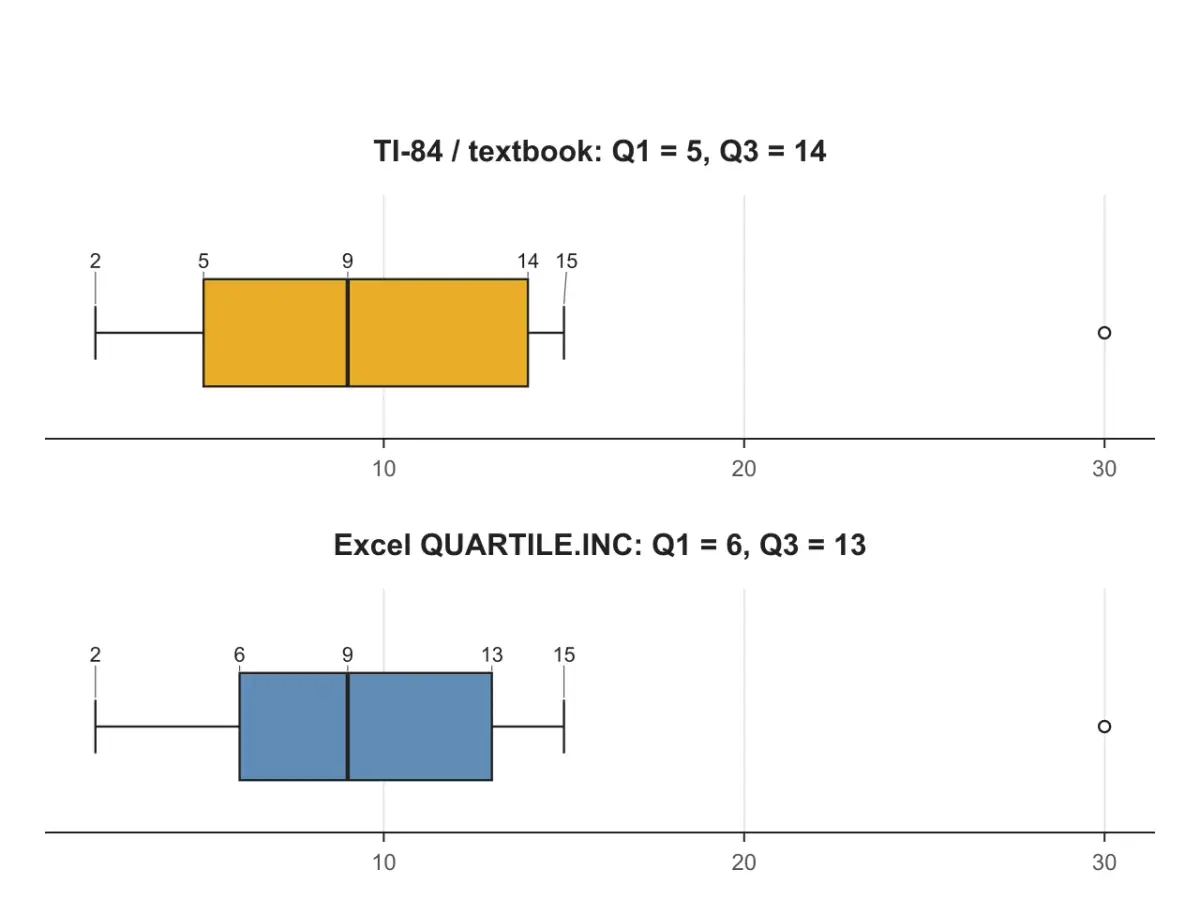
There is more than one accepted way to compute quartiles, and calculators and spreadsheets do not all use the same one. The median, minimum and maximum always agree; Q1 and Q3 can differ, and with them the IQR, the fences and which points count as outliers. Here is the 11-value dataset from the steps above under each method, computed by this tool:
| Quartile method in the tool | Same result as | Q1 | Q3 | IQR |
|---|---|---|---|---|
| TI-84 / textbook | TI-83/84 1-Var Stats; hand calculation in most school courses | 5 | 14 | 9 |
| Tukey hinges | R boxplot() and fivenum() (Tukey's hinges) | 6 | 13 | 7 |
| Excel INC / R / Python | Excel QUARTILE.INC, Google Sheets QUARTILE, R quantile(), NumPy, ggplot2 | 6 | 13 | 7 |
| Excel EXC / Minitab | Excel QUARTILE.EXC, Minitab | 5 | 14 | 9 |
Pick the method your class or field uses under Quartile method; the summary table under the plot names the method it used, so you can state it in your report. With an even number of values the first two methods always agree, and the differences shrink as the dataset gets larger.
Three steps in your browser
The plot redraws as you type, so you can try a setting and see the effect straight away.
Paste a list of numbers, columns copied from Excel or Google Sheets (one group per column, names in the first row), or open a CSV file. Only have the five-number summary? Switch to 5-number summary and type min, Q1, median, Q3 and max for each group. Numbers buried in a paragraph or a PDF? Paste them into Describe with AI.
Choose the quartile method your class or software uses, whether whiskers stop at 1.5 × IQR or run to the min and max, and whether to label the five numbers on the plot. Add data points, the mean or notches, set the orientation, and type an axis label and title.
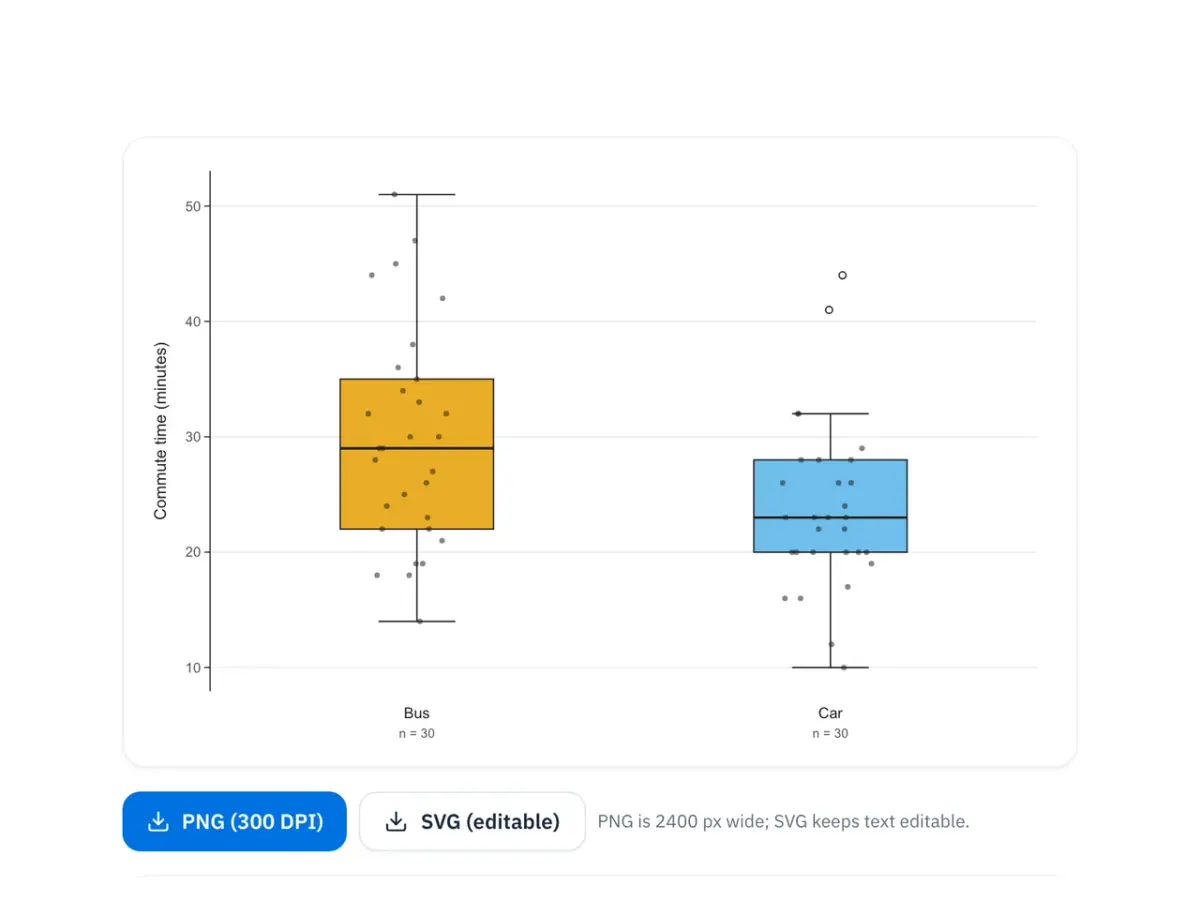
Download a 300 DPI PNG for Google Docs, Word or slides, or an SVG whose text stays editable. Copy the five-number summary table (with IQR, fences and outliers), or open Show steps to check each calculation against your own working.
Read one box plot from the middle out:
To compare groups, look at the medians first (which group is typically higher), then the box lengths (which group is more spread out), then the whiskers and outliers. If the boxes barely overlap, the groups clearly differ; if they overlap a lot, the difference in medians may be small compared with the spread. A box plot does not show how many values each group has or whether the data have two peaks, so report n, and switch to the violin plot maker when the shape of the distribution matters.
Raw values, one observation per cell, in any of these layouts:
| Layout | Looks like | Use when |
|---|---|---|
| A single list | 12, 2, 9, 30, 5 or one number per line | One set of numbers, as in most textbook exercises |
| One column per group | Bus, Car in row 1, values below | You copied columns out of Excel or Google Sheets |
| Group + value | group, value per row, e.g. Car, 22 | Data exported from R, Python, SPSS or a form |
Tabs (what spreadsheets copy), commas, semicolons and spaces all work, columns can have different lengths, and cells such as NA are skipped and counted under the box.
A five-number summary, when that is all you have: switch to the 5-number summary tab and type one group per line, for example Class A: 52, 64, 71, 80, 95 in the order min, Q1, median, Q3, max. A table copied with the header group, min, q1, median, q3, max works too. With only five numbers the tool cannot know the outliers, the mean or n, so it draws whiskers to the min and max.
boxplot(value ~ group, data = df) uses Tukey's hinges; ggplot(df, aes(group, value)) + geom_boxplot() uses quantile() type 7.matplotlib.pyplot.boxplot and seaborn.boxplot use NumPy's linear percentiles, the same as Excel INC / R / Python here.If you already work in R or Python, code is the reproducible route. Use this page when you need the figure now, want the five-number summary checked against your own working, or need a box plot from a five-number summary that spreadsheets cannot plot directly.
A notch narrows the box around the median. Its height is the median ± 1.58 × IQR / √n (McGill, Tukey and Larsen, 1978), the same formula as R's boxplot(notch = TRUE). If the notches of two boxes do not overlap, that is rough evidence that their medians differ. It is a visual guide, not a significance test, and the notch is only meaningful with a reasonable number of values per group: for small groups it can stick out past the box, so the tool clips it at Q1 and Q3.
Whoever reads your figure, a teacher, a lab supervisor or a reviewer, will look for the same things:
Commute time (minutes), not Time.A caption you can adapt: “Box plots of commute time by mode of transport. Boxes show the median and interquartile range; whiskers extend to the most extreme values within 1.5 × IQR; open circles are outliers. n = 30 per group.”
Built for answers you can check
Every box is computed on this page from your numbers with the method you pick. AI only reads your text into numbers when you ask it to; nothing is drawn by an image model, so every quartile, fence and whisker comes from the values in the data box.
 Methods
Match your calculator or software
TI-84 / textbook, Tukey hinges, Excel QUARTILE.INC and Excel QUARTILE.EXC. Switch and watch Q1, Q3 and the outliers update.
 Labels
Values or Q1 = … style
Write the min, Q1, median, Q3 and max (or the whisker ends) next to each box, spaced so labels never overlap.
 Input
InputLists, columns, CSV or 5 numbers
Paste a single list, columns from Excel, group-and-value rows, or just the five-number summary for each group.
 Outliers
Plus points, mean and notches
Show outliers as open circles or run whiskers to the extremes, and add jittered data points, the mean or notched boxes.
 Export
Docs, slides, posters
The SVG keeps real text, so labels stay editable in PowerPoint, Illustrator or Inkscape. The PNG carries 300 DPI and sits at the right size in Word and Google Docs.
 Steps
StepsCheck it against your own notes
Open Show steps to see your data sorted, how the median, Q1 and Q3 are found with the method you picked, the IQR, the 1.5 × IQR fences and which values are outliers.
FAQ
Paste your numbers, pick your quartile method, download an editable SVG or a 300 DPI PNG. Free, and drawn in your browser.
Explore more AI diagram tools across subjects — from the same discipline and beyond.
 New
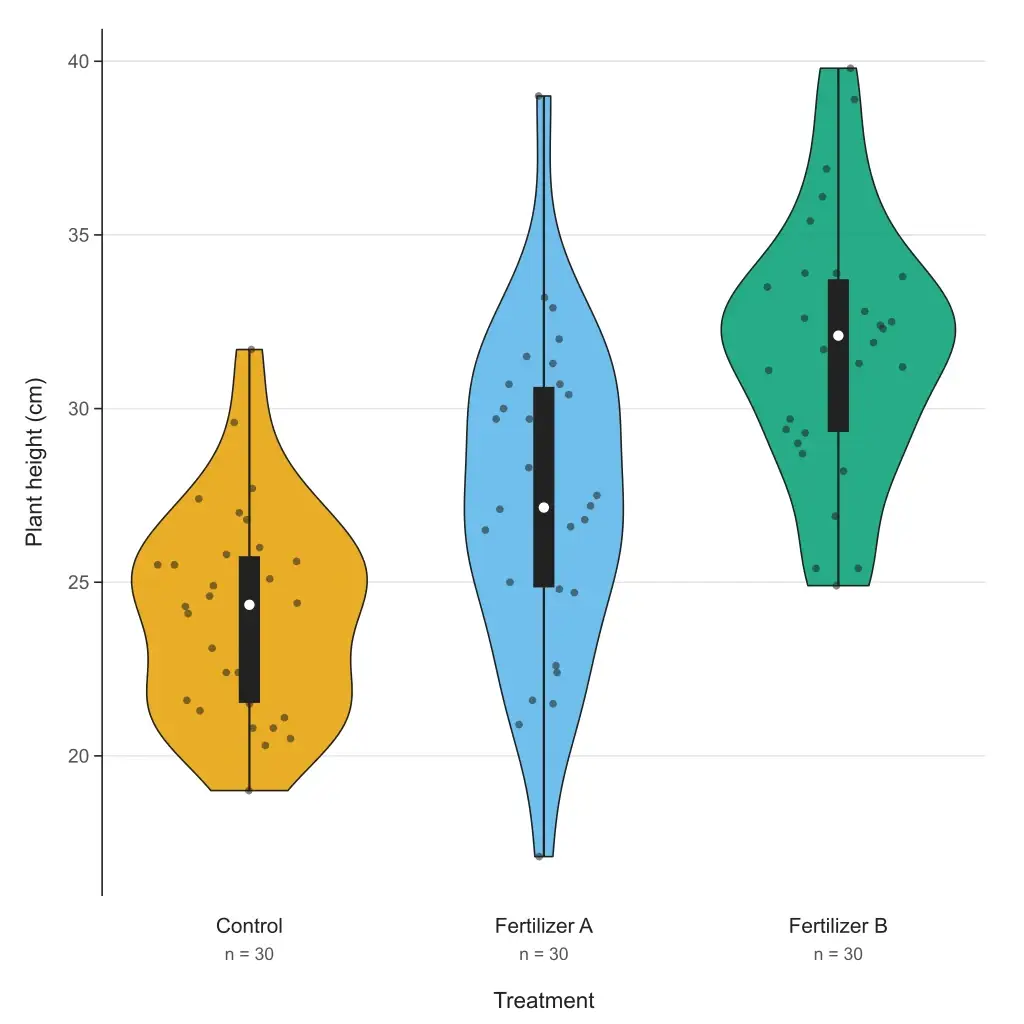
NewPaste your data and get a violin plot in your browser — grouped or single, box or quartiles inside, adjustable bandwidth, editable SVG and 300 DPI PNG. Free to paste and download; or describe your data and let AI fill it in.
 New
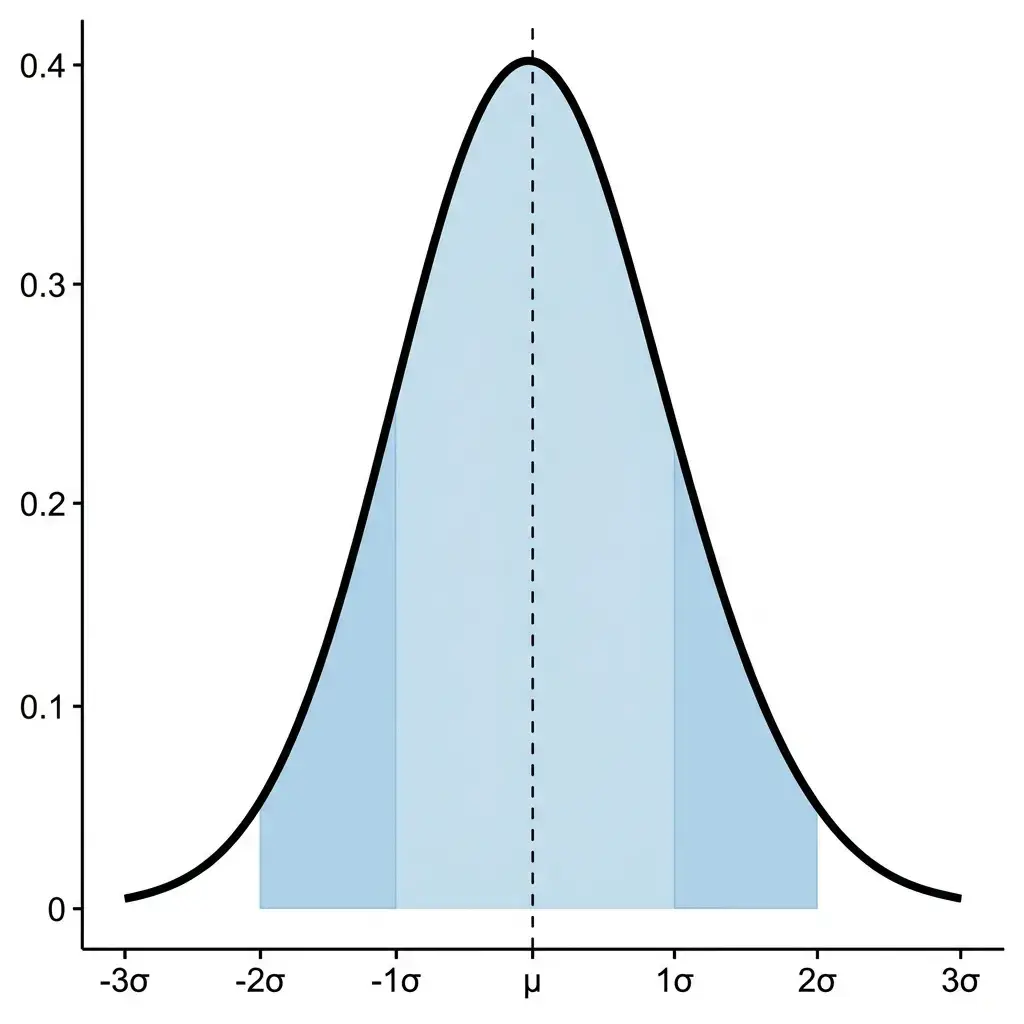
NewDescribe your distribution parameters in plain language and get a publication-ready normal distribution graph with shading, labels, and annotations.
 New
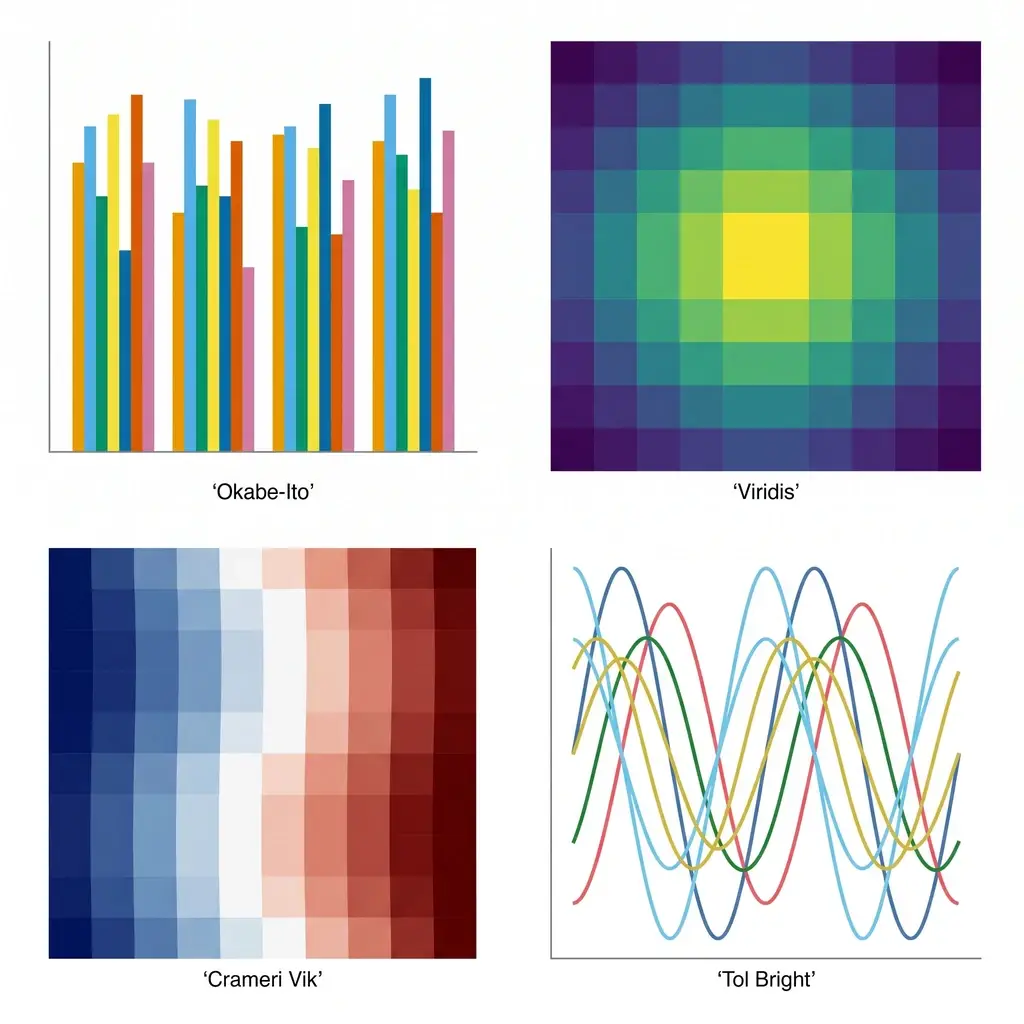
NewGenerate colorblind-safe color palettes for scientific figures — Okabe-Ito, Viridis, Cividis, Crameri Vik, and more — with one-click hex, Python, R, and CSS for journal-ready charts.
 New
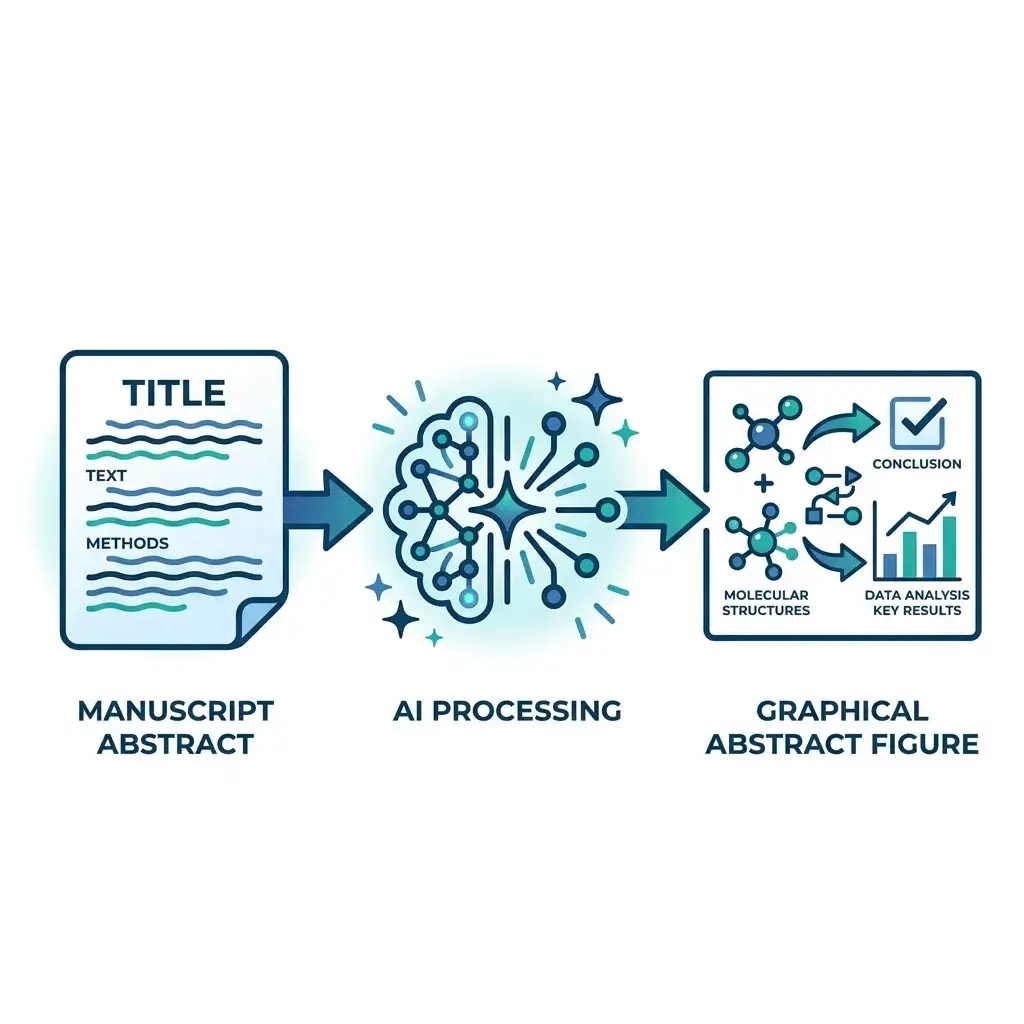
NewPaste your manuscript abstract — get a journal-ready graphical abstract in Elsevier, Cell Press, Wiley, or ACS dimensions in under a minute.
