
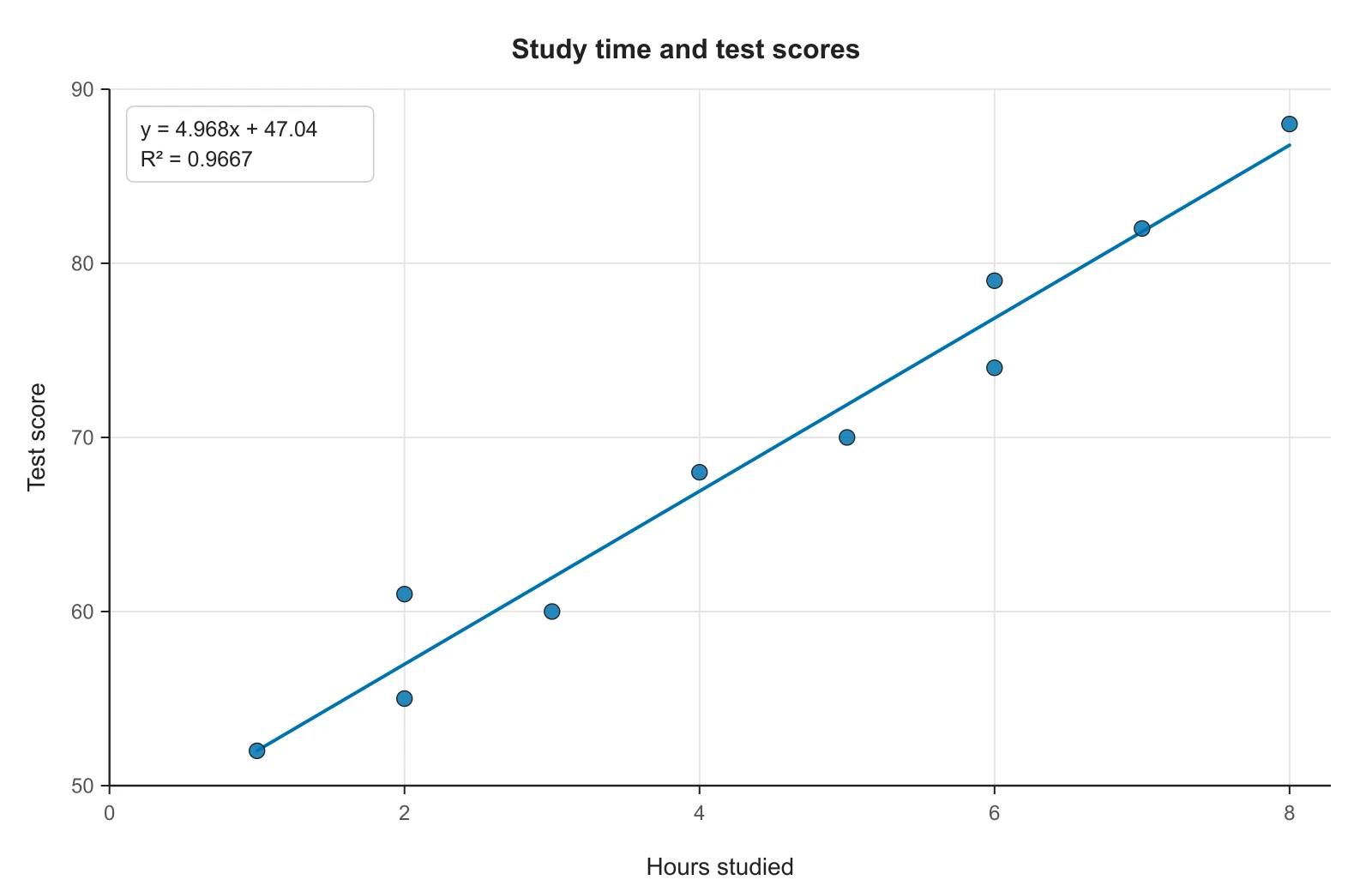
Scatter plot with line of best fit
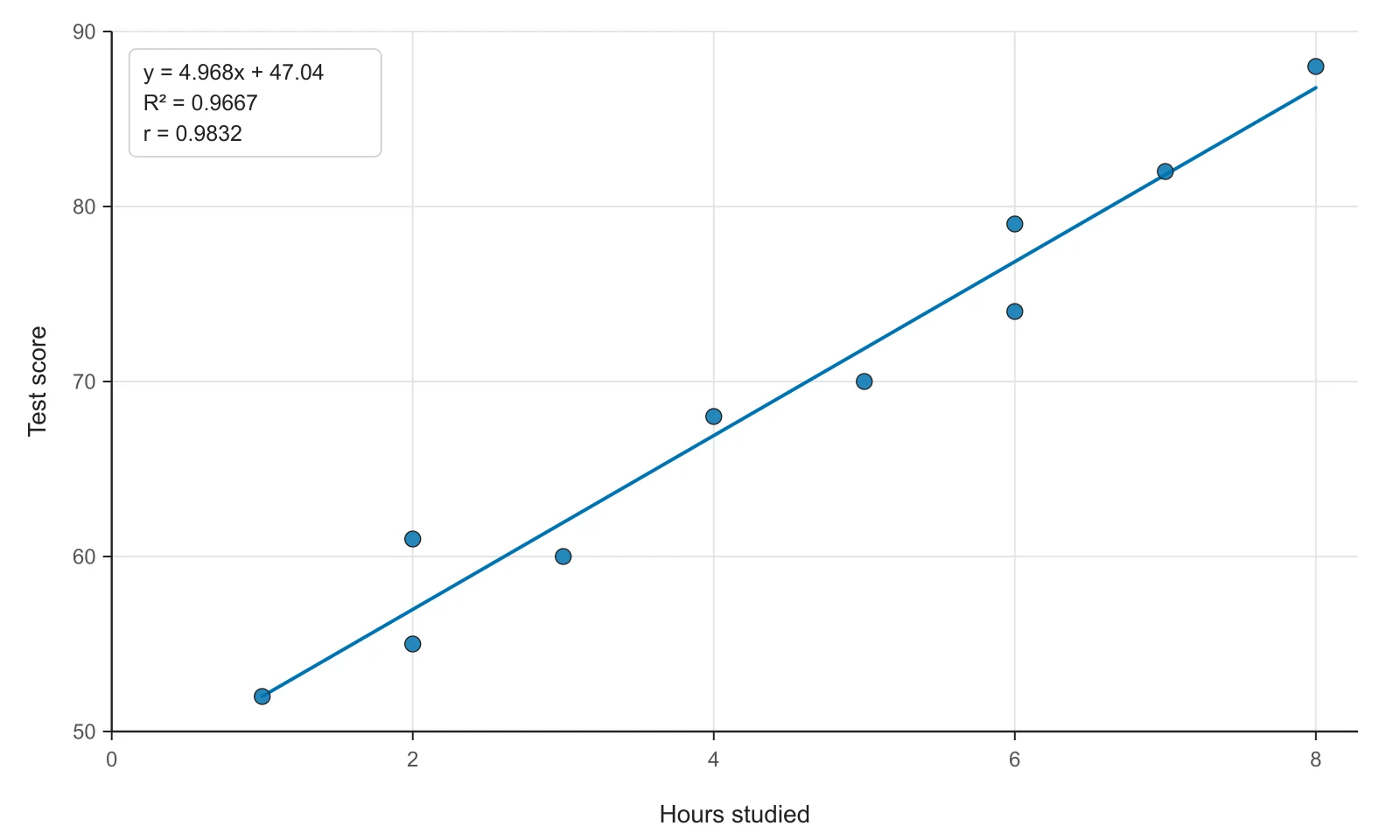
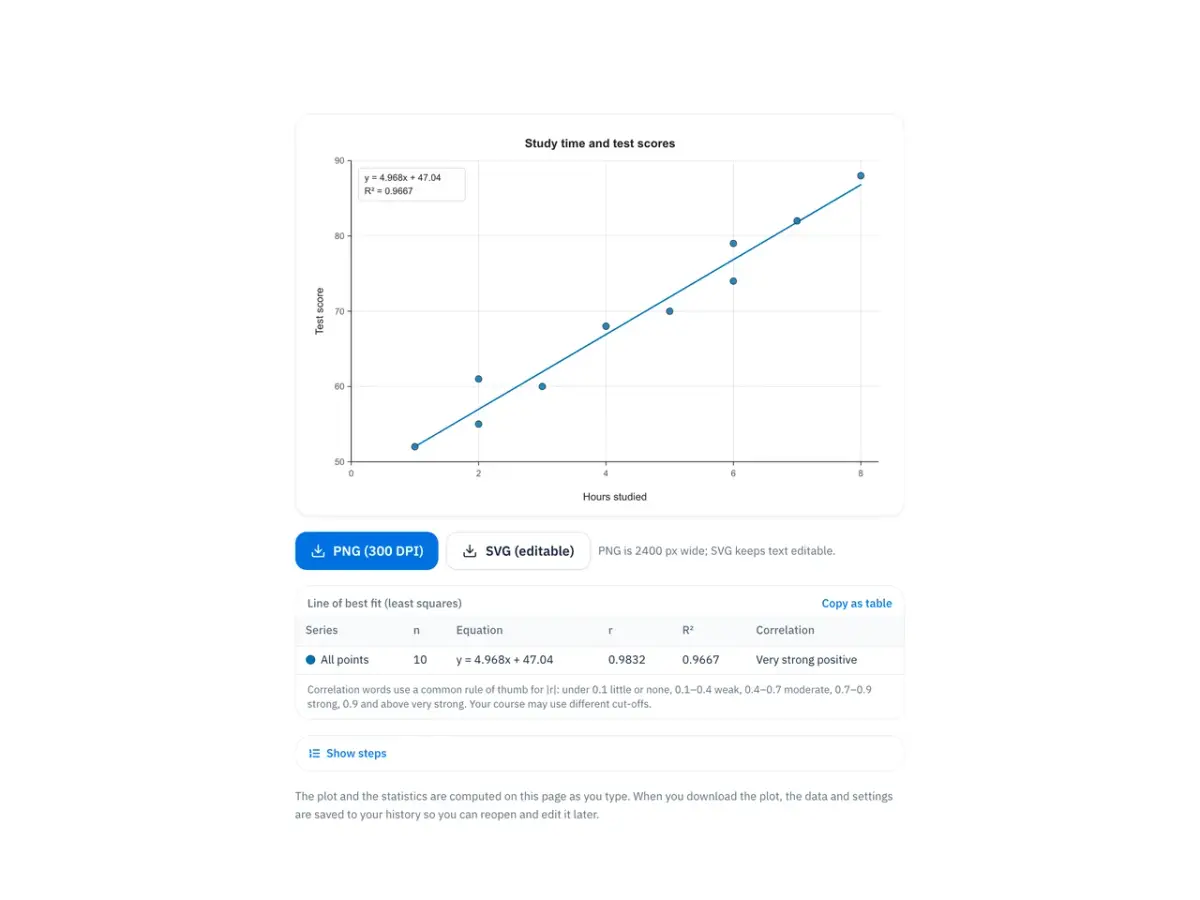
Hours studied and test scores for 10 students, with the least-squares line, its equation and R². This is the dataset worked by hand in the sections below.
Paste x and y values and get a scatter plot with the line of best fit, its equation, r and R².
1 series · 10 points · read as x and y columns
| Series | n | Equation | r | R² | Correlation |
|---|---|---|---|---|---|
| All points | 10 | y = 4.968x + 47.04 | 0.9832 | 0.9667 | Very strong positive |
Correlation words use a common rule of thumb for |r|: under 0.1 little or none, 0.1–0.4 weak, 0.4–0.7 moderate, 0.7–0.9 strong, 0.9 and above very strong. Your course may use different cut-offs.
| x | y | x − x̄ | y − ȳ | (x − x̄)(y − ȳ) | (x − x̄)² | (y − ȳ)² |
|---|---|---|---|---|---|---|
| 1 | 52 | -3.4 | -16.9 | 57.46 | 11.56 | 285.61 |
| 2 | 55 | -2.4 | -13.9 | 33.36 | 5.76 | 193.21 |
| 2 | 61 | -2.4 | -7.9 | 18.96 | 5.76 | 62.41 |
| 3 | 60 | -1.4 | -8.9 | 12.46 | 1.96 | 79.21 |
| 4 | 68 | -0.4 | -0.9 | 0.36 | 0.16 | 0.81 |
| 5 | 70 | 0.6 | 1.1 | 0.66 | 0.36 | 1.21 |
| 6 | 74 | 1.6 | 5.1 | 8.16 | 2.56 | 26.01 |
| 6 | 79 | 1.6 | 10.1 | 16.16 | 2.56 | 102.01 |
| 7 | 82 | 2.6 | 13.1 | 34.06 | 6.76 | 171.61 |
| 8 | 88 | 3.6 | 19.1 | 68.76 | 12.96 | 364.81 |
| 44 | 689 | 0 | 0 | 250.4 | 50.4 | 1286.9 |
The plot and the statistics are computed on this page as you type. When you download the plot, the data and settings are saved to your history so you can reopen and edit it later. Text you submit to Describe with AI is sent to a language model to be read.
Each figure below is what this scatter plot maker draws from the sample data in the tool, unedited. The car data come from R's mtcars dataset and set III from Anscombe's quartet; the other datasets are made up for demonstration. Open one in the tool to see its numbers and change any setting.
Hours studied and test scores for 10 students, with the least-squares line, its equation and R². This is the dataset worked by hand in the sections below.
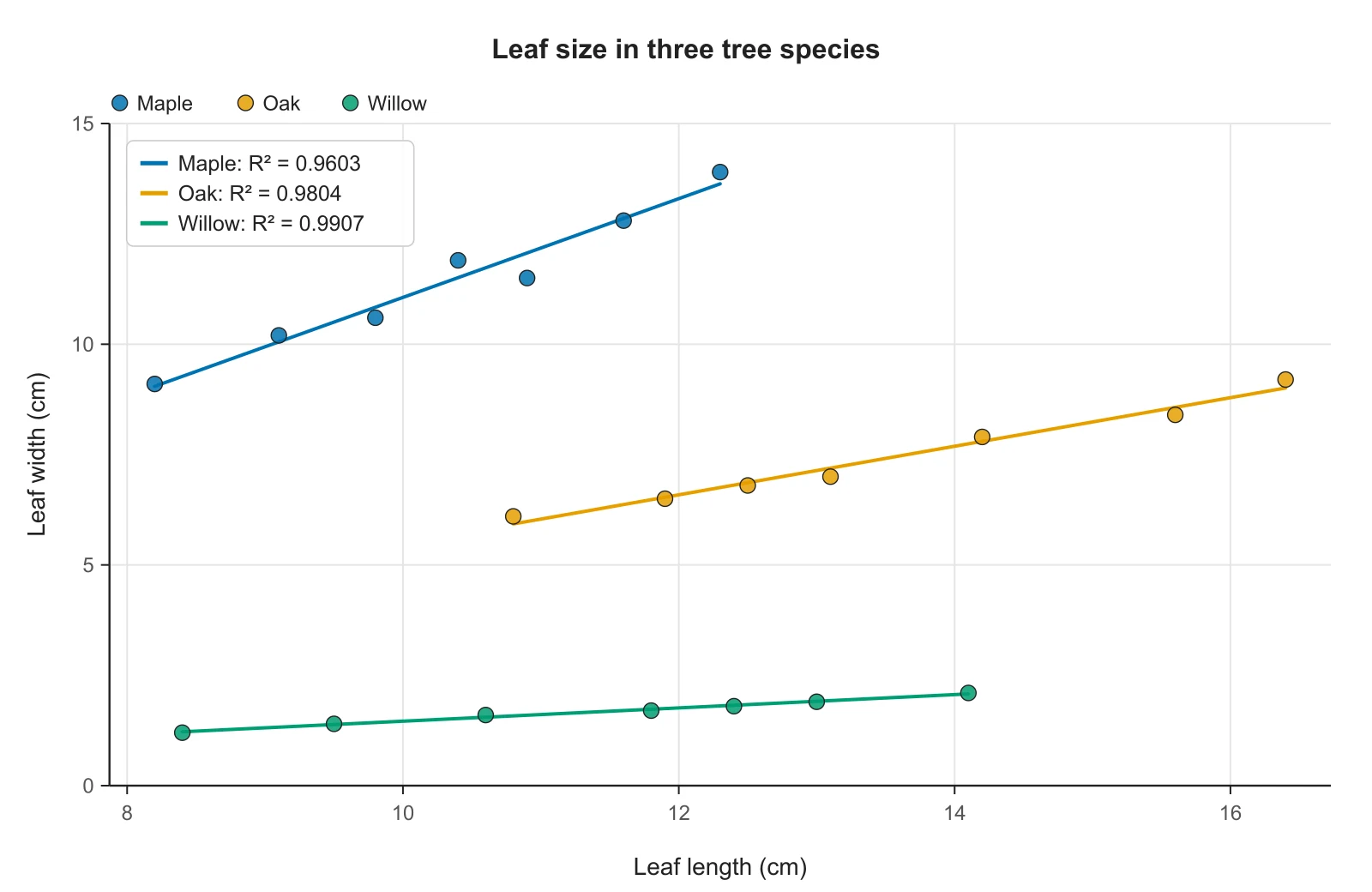
Leaf length and width for three tree species, read from a column that names each leaf's species. Each group gets its own color and its own line, so you can compare the slopes.
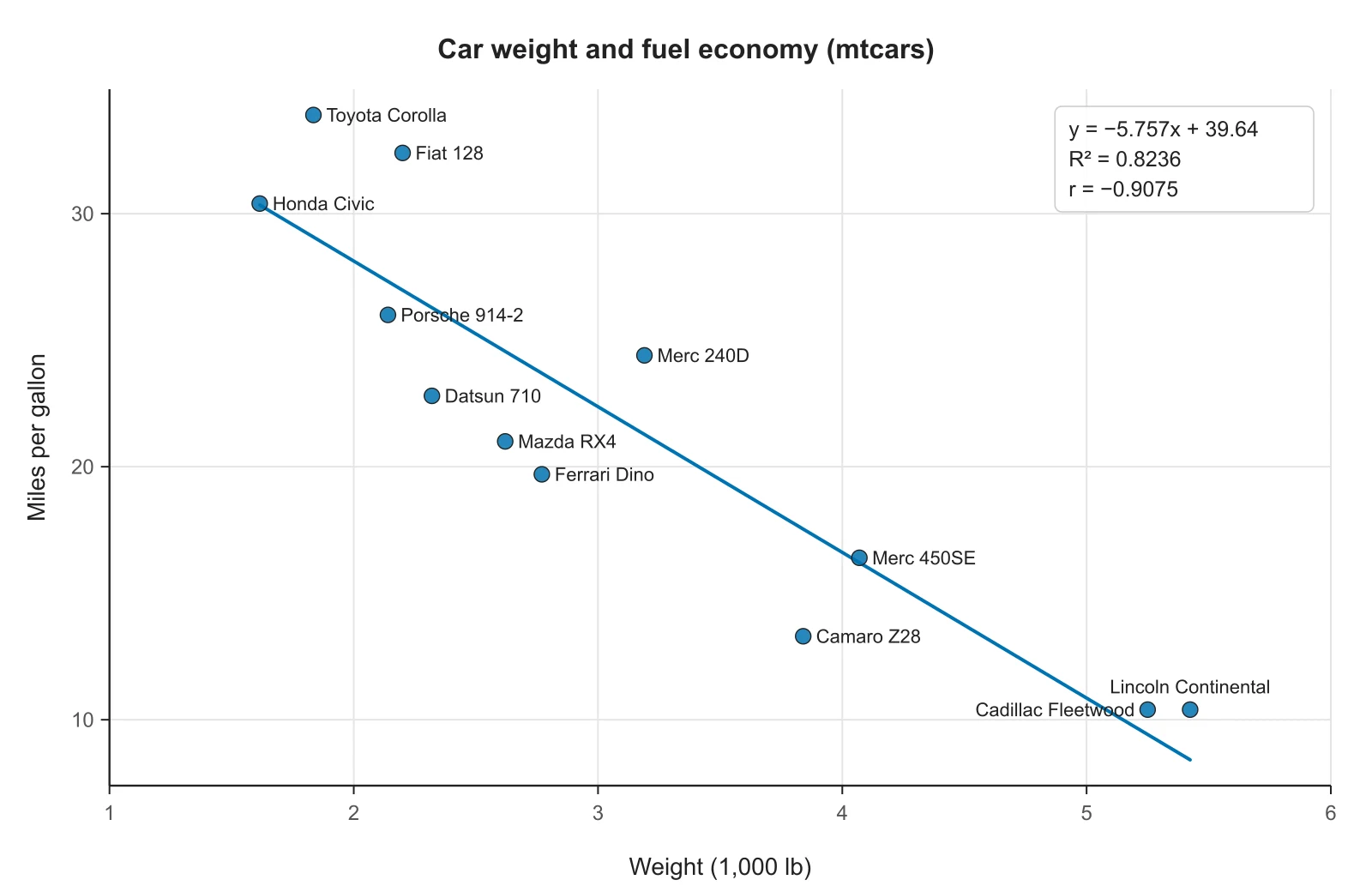
Weight and fuel economy for 12 of the 32 cars in R's mtcars dataset. A text column with a different name on every row becomes the point labels, placed so they avoid each other.
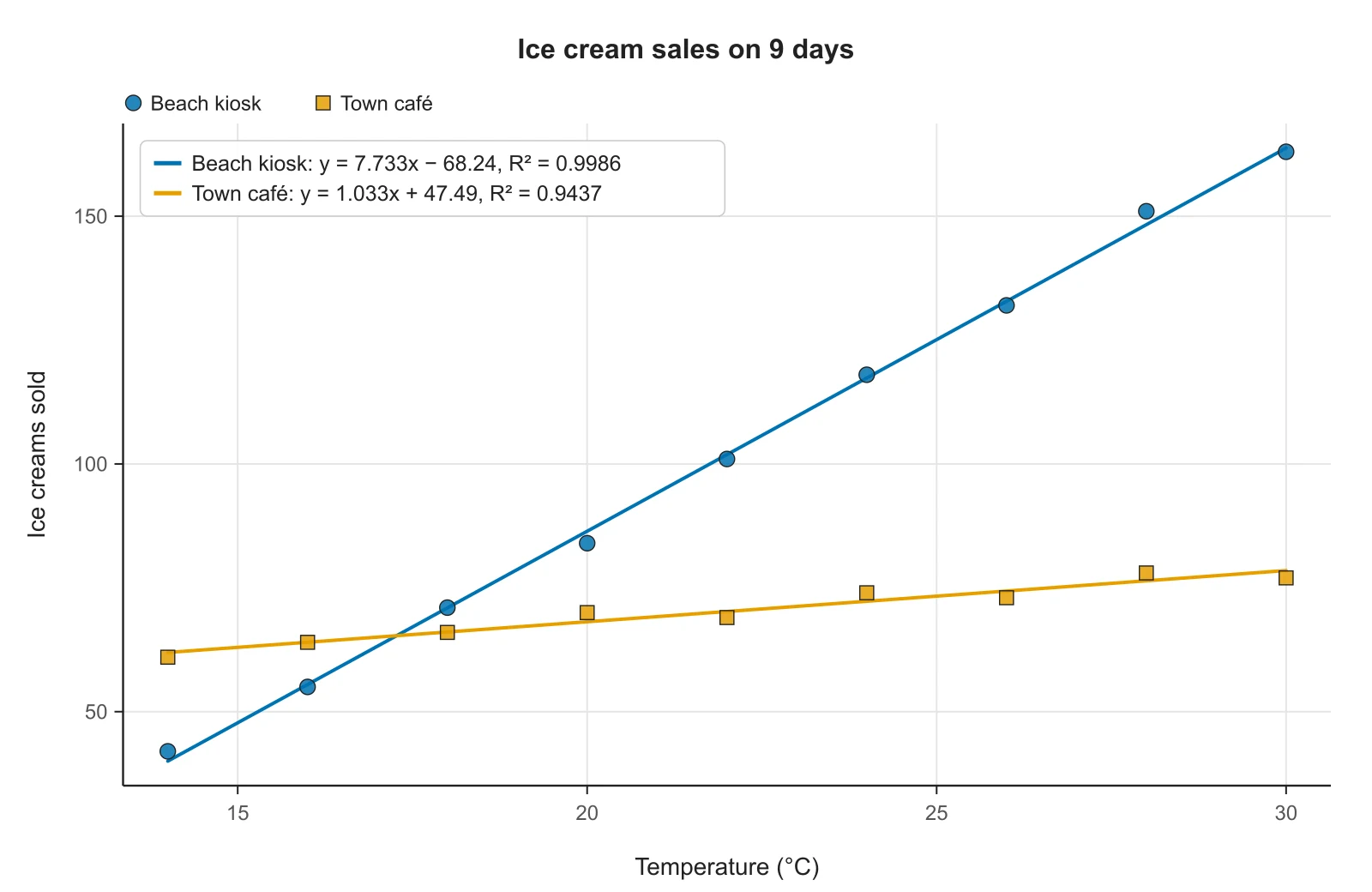
One temperature column and two sales columns. Each y column becomes a series with its own marker shape, so the plot still reads in black and white.
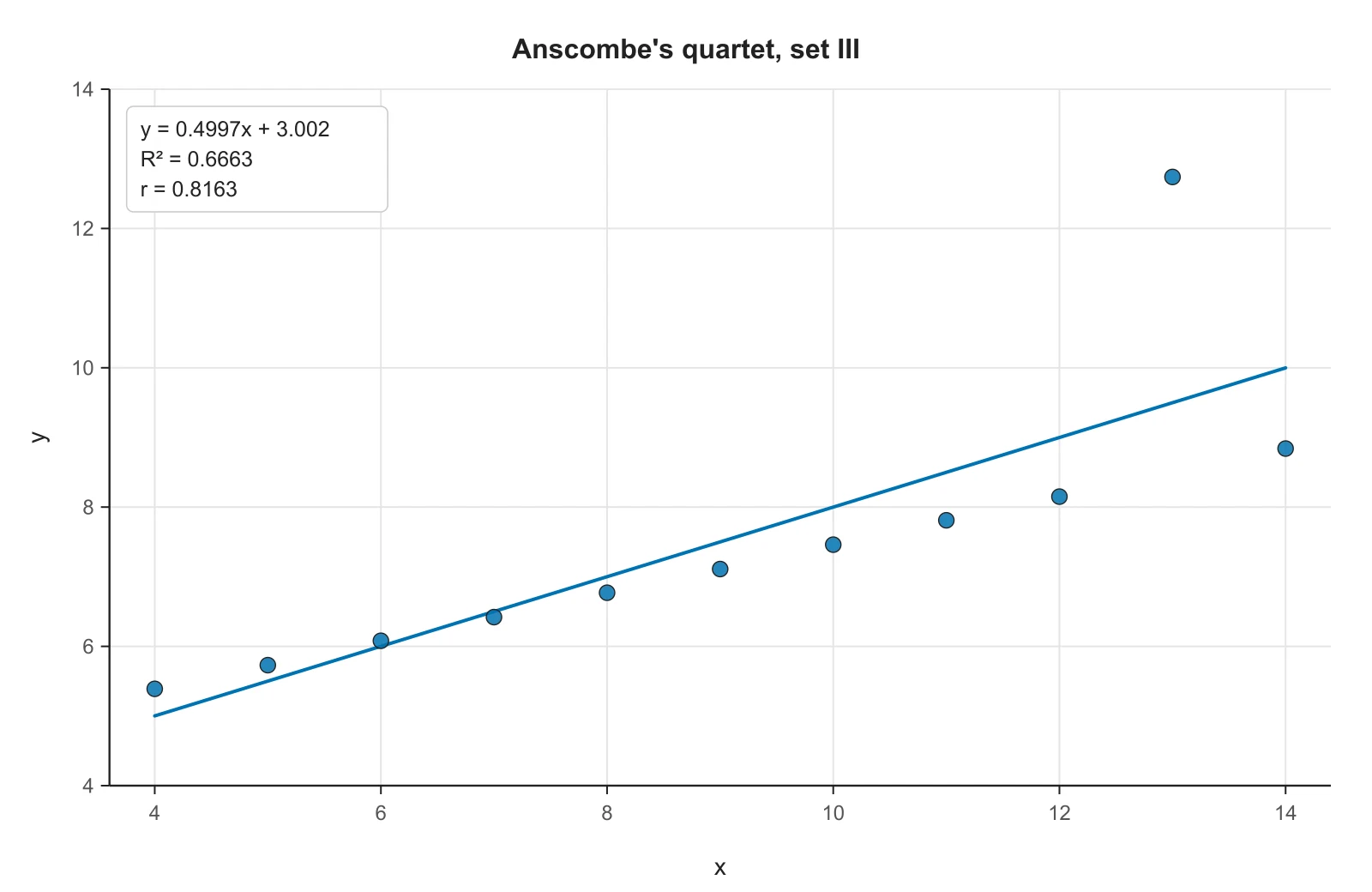
Set III of Anscombe's quartet. Ten points lie almost exactly on one line; the eleventh pulls the least-squares line up and lowers r to 0.8163. Plot your data before trusting r.
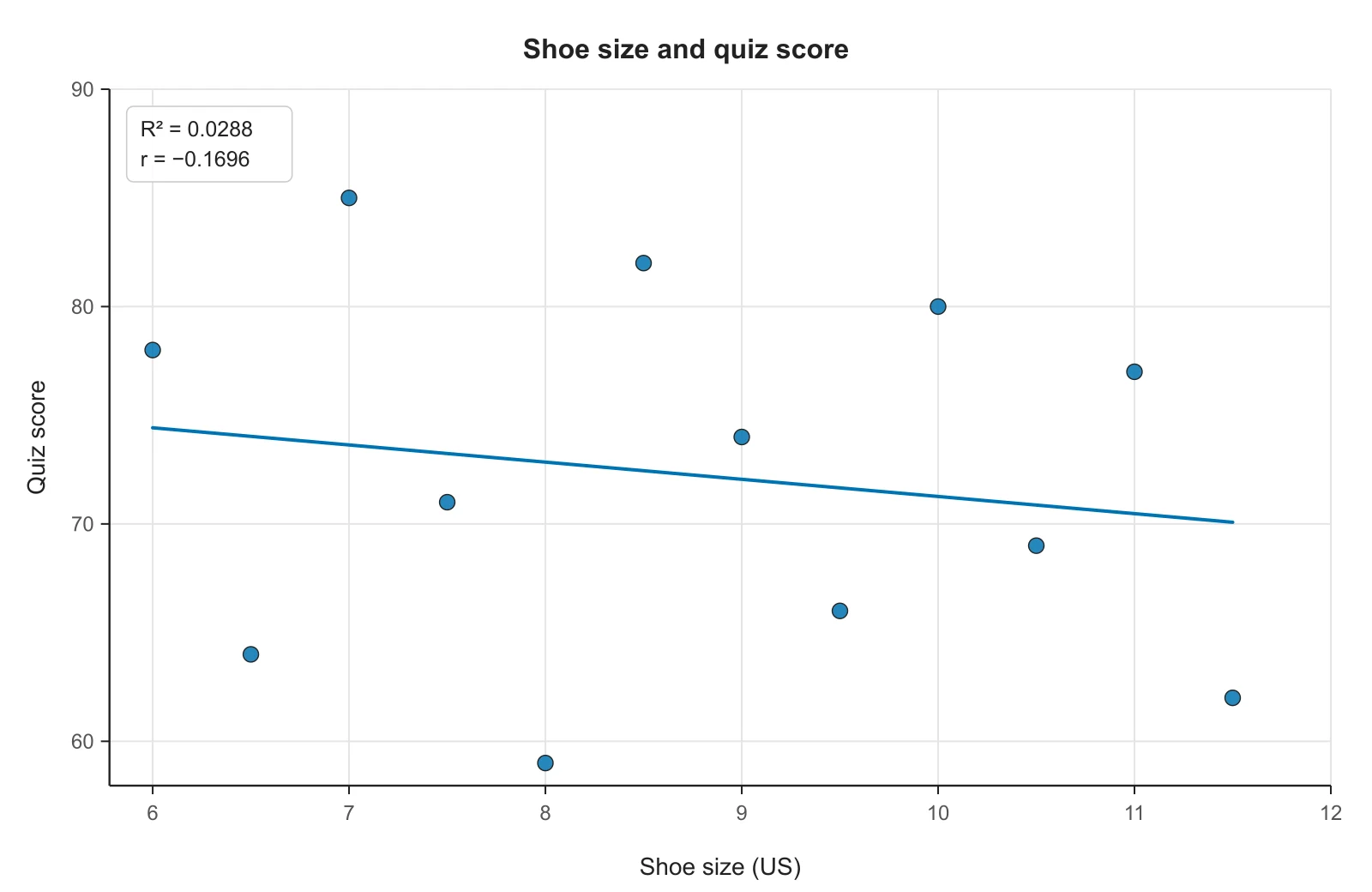
Shoe size and quiz score for 12 students. The points form a shapeless cloud and r is −0.17, close to zero, so the line explains almost none of the variation.
A scatter plot is a graph that shows the relationship between two numeric variables, with one point for each pair of values. It is also called a scatter graph, scatter diagram, scattergram or XY chart. Each observation is one point: its x value sets how far along the horizontal axis it sits, and its y value how high it sits. The x axis usually holds the explanatory variable (the one you change or that comes first) and the y axis the response.
The pattern of the points shows whether the two variables are related: the direction (do they rise together or move in opposite directions), the strength (how tightly the points follow a line), the form (straight or curved) and any outliers. A line of best fit, also called a trend line or regression line, summarizes a straight-line pattern with an equation, y = mx + b, that you can use to describe the relationship and make predictions.
To make a scatter plot, put one variable on each axis, scale both axes to cover your data, plot one point for each pair of values, then describe the pattern and add a line of best fit. Here are the five steps on one small dataset: the hours 10 students studied and the score each one got on a test.
| Hours studied (x) | 1 | 2 | 2 | 3 | 4 | 5 | 6 | 6 | 7 | 8 |
|---|---|---|---|---|---|---|---|---|---|---|
| Test score (y) | 52 | 55 | 61 | 60 | 68 | 70 | 74 | 79 | 82 | 88 |
Put the explanatory variable on the x axis and the response on the y axis. Study time may affect the score, not the other way round, so hours studied goes on x and test score on y. Label each axis with the variable name and its units.
Each axis must cover its smallest to largest value with even steps: hours run from 1 to 8, so mark the x axis 0 to 8 in steps of 1 or 2; scores run from 52 to 88, so mark the y axis from 50 to 90 in steps of 10. The axes do not have to start at 0; if one does not, many teachers ask for a zigzag break near the origin.
For the first student, go across to 1 on the x axis and up to 52, and draw a dot at (1, 52). Repeat for all 10 pairs. Two students studied 2 hours, so there are two dots above x = 2. Do not join the dots: a scatter plot shows separate observations, not a sequence.
Read the cloud of points from left to right. Here the scores rise as hours rise (positive direction), the points follow a straight path (linear form) and they stay close to it (strong). No point sits far from the others, so there are no clear outliers.
Draw a straight line through the middle of the points with about as many points above it as below, or calculate it exactly with least squares (worked in the next section). For this data the line is y = 4.968x + 47.04, so a student who studies 5 hours would be predicted to score about 4.968 × 5 + 47.04 ≈ 72.
The line of best fit that Excel, Google Sheets, the TI-84, Desmos and this tool draw is the least-squares regression line: of all straight lines, it is the one that makes the sum of the squared vertical distances from the points to the line as small as possible. Its slope and intercept come from two formulas:
where x̄ and ȳ are the means of x and y. Here is the study-time data from the steps above, computed by this tool:
| x | y | x − x̄ | y − ȳ | (x − x̄)(y − ȳ) | (x − x̄)² |
|---|---|---|---|---|---|
| 1 | 52 | -3.4 | -16.9 | 57.46 | 11.56 |
| 2 | 55 | -2.4 | -13.9 | 33.36 | 5.76 |
| 2 | 61 | -2.4 | -7.9 | 18.96 | 5.76 |
| 3 | 60 | -1.4 | -8.9 | 12.46 | 1.96 |
| 4 | 68 | -0.4 | -0.9 | 0.36 | 0.16 |
| 5 | 70 | 0.6 | 1.1 | 0.66 | 0.36 |
| 6 | 74 | 1.6 | 5.1 | 8.16 | 2.56 |
| 6 | 79 | 1.6 | 10.1 | 16.16 | 2.56 |
| 7 | 82 | 2.6 | 13.1 | 34.06 | 6.76 |
| 8 | 88 | 3.6 | 19.1 | 68.76 | 12.96 |
| 44 | 689 | Sums | 250.4 | 50.4 | |
So the line of best fit is y = 4.968x + 47.04. The slope says each extra hour of study goes with about 5 more points on the test, on average. The intercept, 47.04, is the predicted score for 0 hours; it sits outside the data (the fewest hours studied was 1), so treat it as the place the line crosses the axis rather than a real prediction.
r = 0.9832 measures how closely the points follow the line, from −1 to 1, and R² = 0.9667 says the line accounts for about 97% of the variation in scores. Open Show steps under the table in the tool to get this same working for your own data, with every row and sum, and to predict y for any x.
Three steps in your browser
The plot and the line of best fit redraw as you type, so you can try a setting and see the effect straight away.
Copy two columns from Excel or Google Sheets (x first, then y, with names in the first row if you have them) and paste, or open a CSV file. For two sets of data, add more y columns or a group column; a text column with a different name on every row becomes point labels. Numbers buried in a paragraph or a PDF? Paste them into Describe with AI.
Turn on the line of best fit (one per series or one for all points) and choose what to show on the plot: the equation, R² and r. Type a title and axis labels, start the axes at 0 if your teacher asks for it, and pick colors or marker shapes.
Download a 300 DPI PNG for Google Docs, Word or slides, or an SVG whose text stays editable. Copy the table of equations, r and R², or open Show steps to check the slope and intercept against your own working.
Describe a scatter plot by four things:
Two cautions apply to every scatter plot. Correlation is not causation: ice cream sales and sunburn rise together because both follow the weather. And look before you trust r: Anscombe's four datasets share the same r, 0.816, and the same line, yet look completely different when plotted. If you have one measurement per subject in several groups rather than two measurements per subject, compare the groups with a box plot instead.
r, the Pearson correlation coefficient, runs from −1 to 1. Its sign gives the direction of the relationship and its size the strength. R², the coefficient of determination, runs from 0 to 1 and is the share of the variation in y that the line accounts for. For a straight line fitted to one x variable, R² is simply r squared: r = 0.9 gives R² = 0.81.
Report r when the question is how strongly two variables are related, and R² when the question is how well the line predicts y. R² loses the sign, so with R² alone readers cannot tell a rising line from a falling one; the equation's slope tells them. This tool shows both, along with a correlation word (weak, moderate, strong) based on a common rule of thumb.
Paste numbers in any of these layouts:
| Layout | Looks like | Use when |
|---|---|---|
| x and y columns | Hours, Score in row 1, pairs below | One set of paired data, as in most class exercises |
| One x column, several y columns | Temperature, Kiosk, Café | Two or more sets of data measured at the same x values |
| Group column | species, length, width per row | Data exported from R, Python, SPSS or a form |
| Label column | car, weight, mpg with a different name per row | You want the name written next to each point |
| Ordered pairs | (1, 52), (2, 55), (3, 61) | Copied from a worksheet or textbook |
| Rows | Hours, 1, 2, 3 and Score, 52, 55, 61 on two lines | The table in your worksheet runs sideways |
Tabs (what spreadsheets copy), commas, semicolons and spaces all work. Rows with a missing x or y are left out, and cells such as NA are skipped and counted under the box. The first column of numbers is always used as x.
y1 ~ mx1 + b to get m, b, r and R².ggplot(df, aes(x, y)) + geom_point() + geom_smooth(method = "lm"), with summary(lm(y ~ x, data = df)) for the numbers.plt.scatter(x, y) in matplotlib, with numpy.polyfit(x, y, 1) or scipy.stats.linregress(x, y) for the line.All of these fit the line by least squares, so on the same data they give the same slope, intercept, r and R² as this tool, up to rounding. Use this page when you need the figure now, want the working shown, or want labeled points and several groups without building the chart by hand.
This tool fits straight lines only. If your points bend (growth that speeds up, a curve that levels off, a U shape), a straight line will miss the pattern and r will understate how related the variables are. For a curve of best fit, use Desmos (y1 ~ a·x1² + b·x1 + c or y1 ~ a·b^x1), Excel's Exponential, Logarithmic, Polynomial or Power trendlines, or geom_smooth() in R. A scatter plot from this tool, with the line turned off, is still a good way to see the shape first.
Whoever reads your figure, a teacher, a lab supervisor or a reviewer, will look for the same things:
Weight (1,000 lb), not Weight.A caption you can adapt: “Scatter plot of test score against hours studied for 10 students. The line is the least-squares fit, y = 4.968x + 47.04 (R² = 0.967).”
Built for numbers you can check
Every point, line and statistic is computed on this page from the values in the data box. AI only reads your text into numbers when you ask it to; nothing is drawn by an image model, so the line on the plot is exactly the one in the table.
 Line
LineLeast squares, like Excel and the TI-84
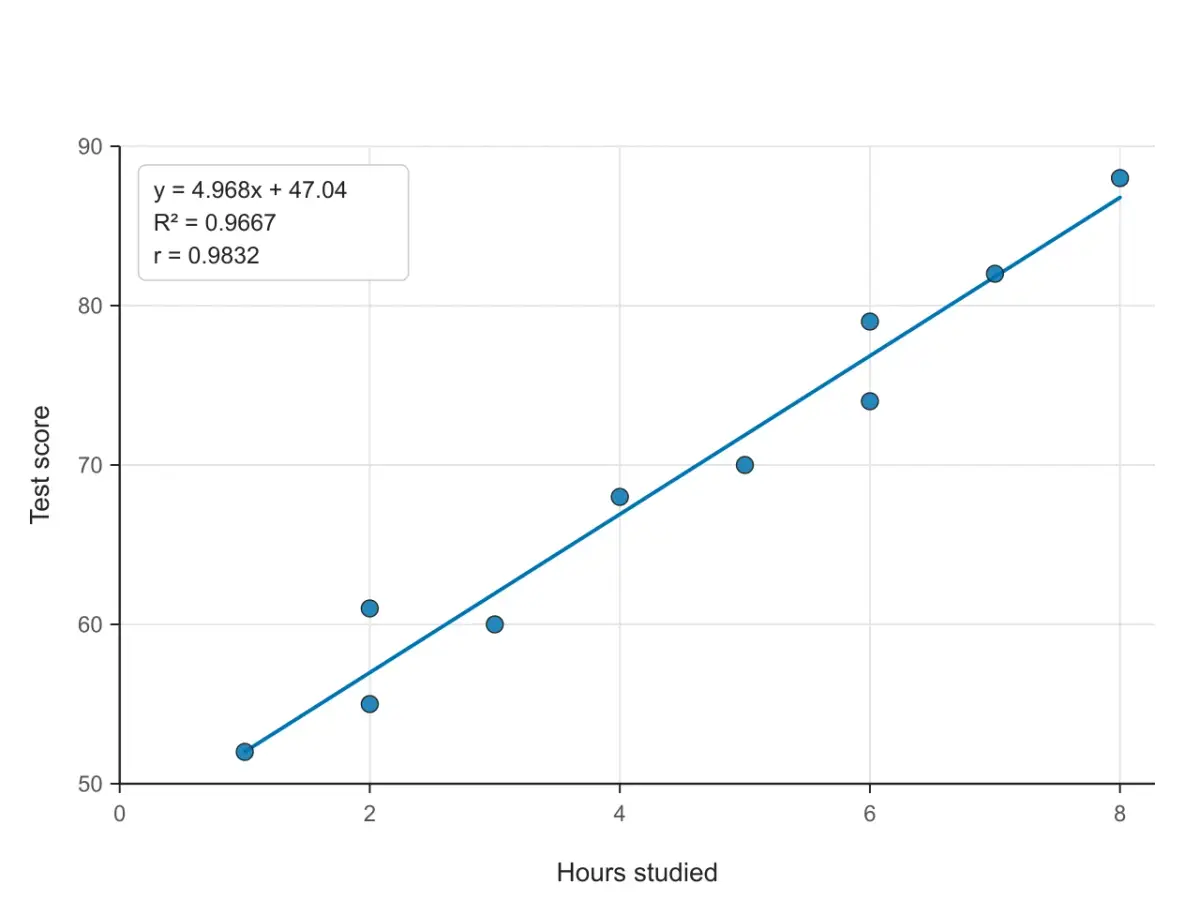
Turn on the line and choose what to write on the plot: y = mx + b, R² and the correlation coefficient r. The box moves to the emptiest corner.
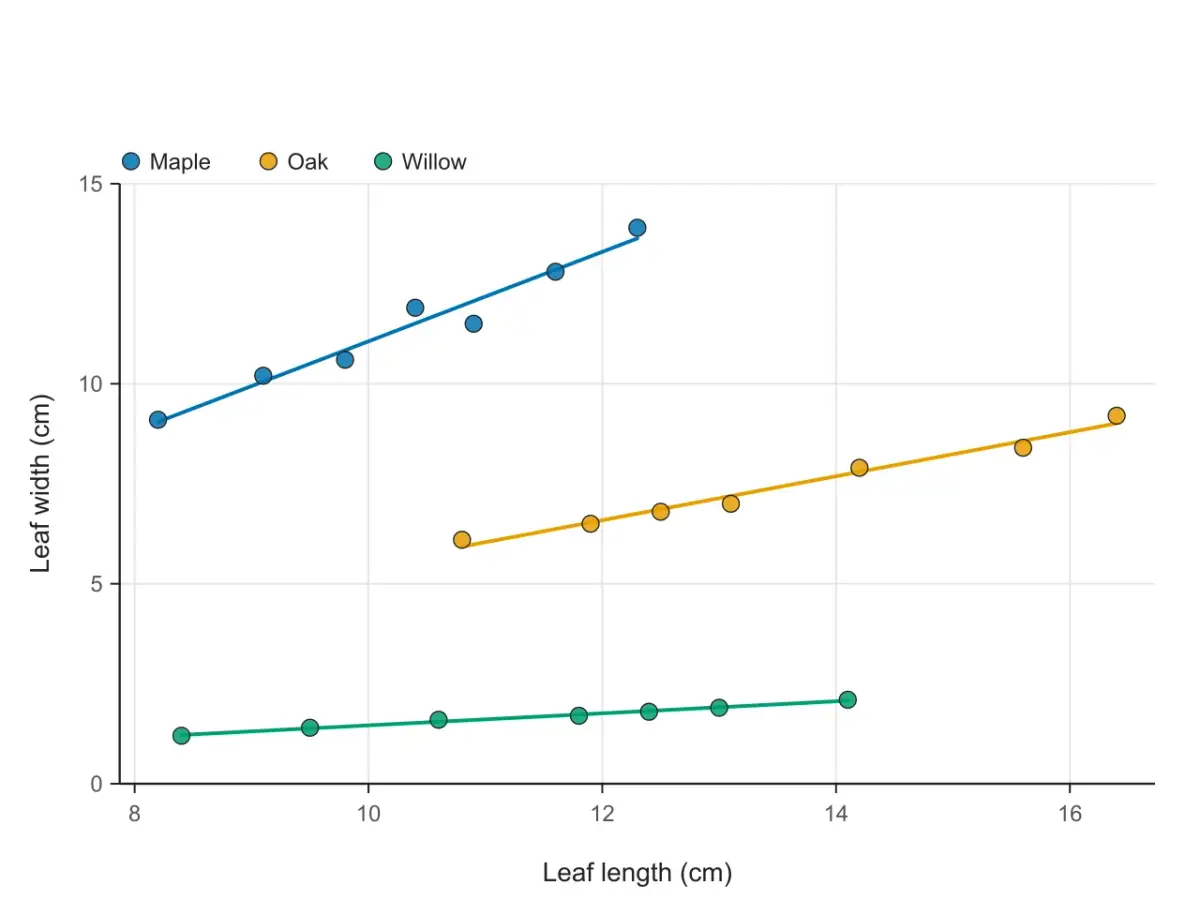 Groups
A color and a line for each
A group column or extra y columns become separate series, each with its own color, line and equation, or one line for all points.
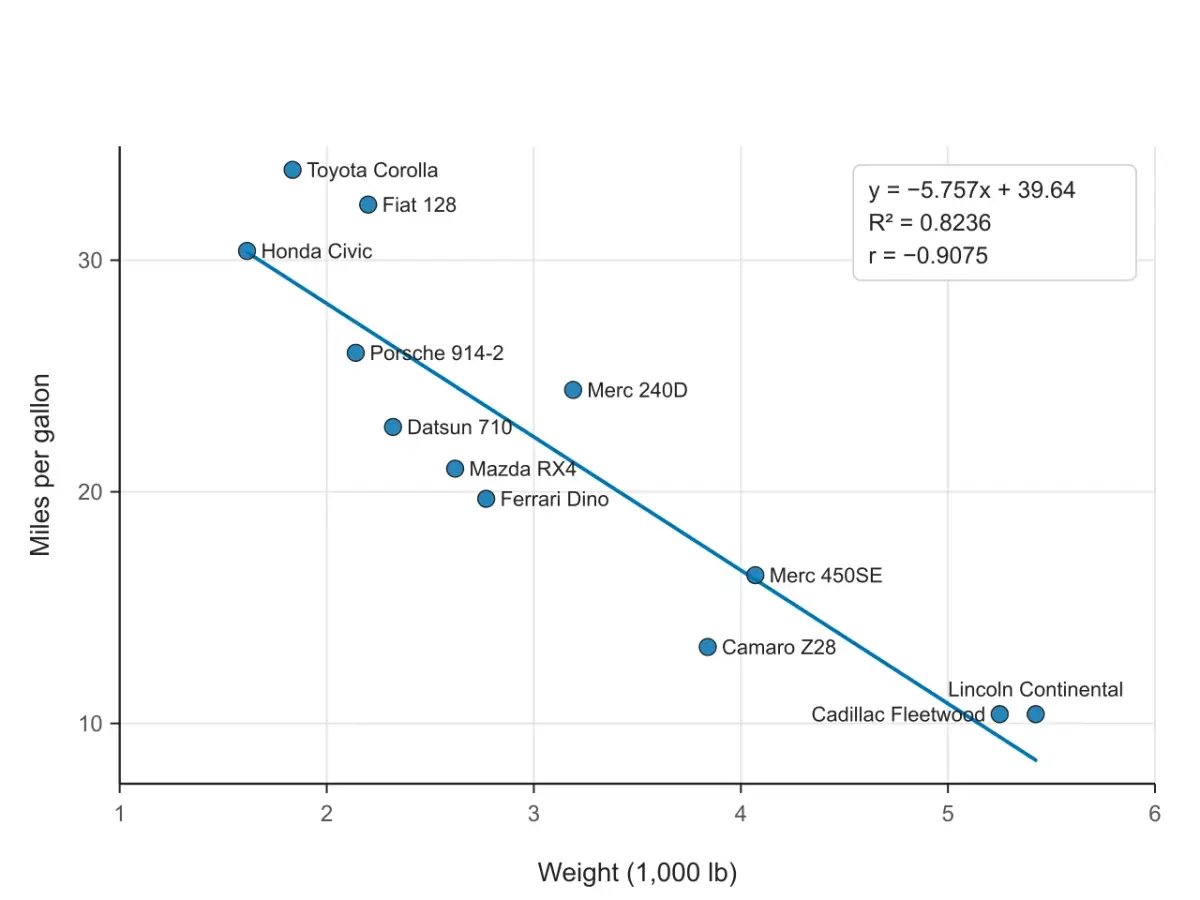 Labels
From a name column
A text column with a different name on every row is written beside each point, placed to avoid the other labels and points.
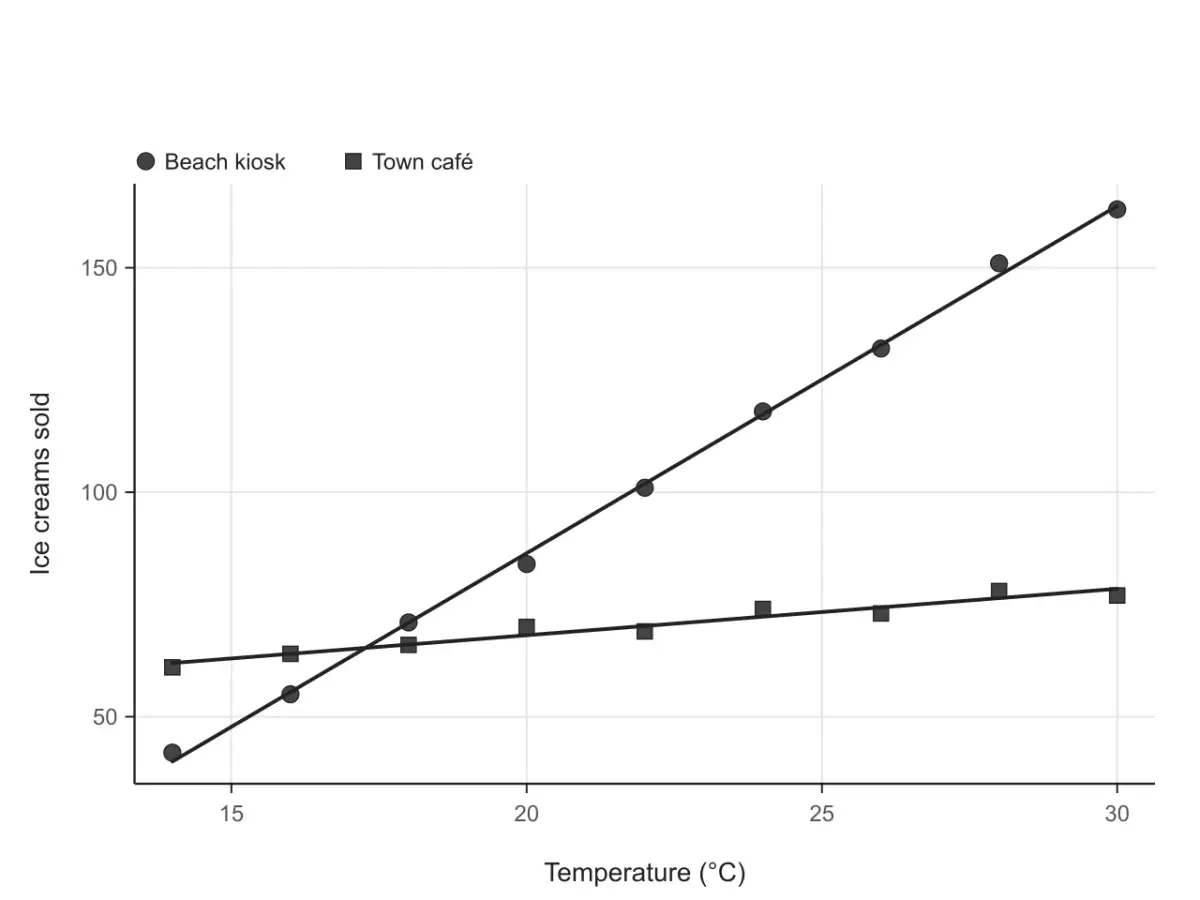 Print
PrintCircles, squares, triangles
Give each series its own marker shape, or switch to black points, so the plot still reads on a printed worksheet or in a grayscale journal.
 Export
Docs, slides, posters
The SVG keeps real text, so labels stay editable in PowerPoint, Illustrator or Inkscape. The PNG carries 300 DPI and sits at the right size in Word and Google Docs.
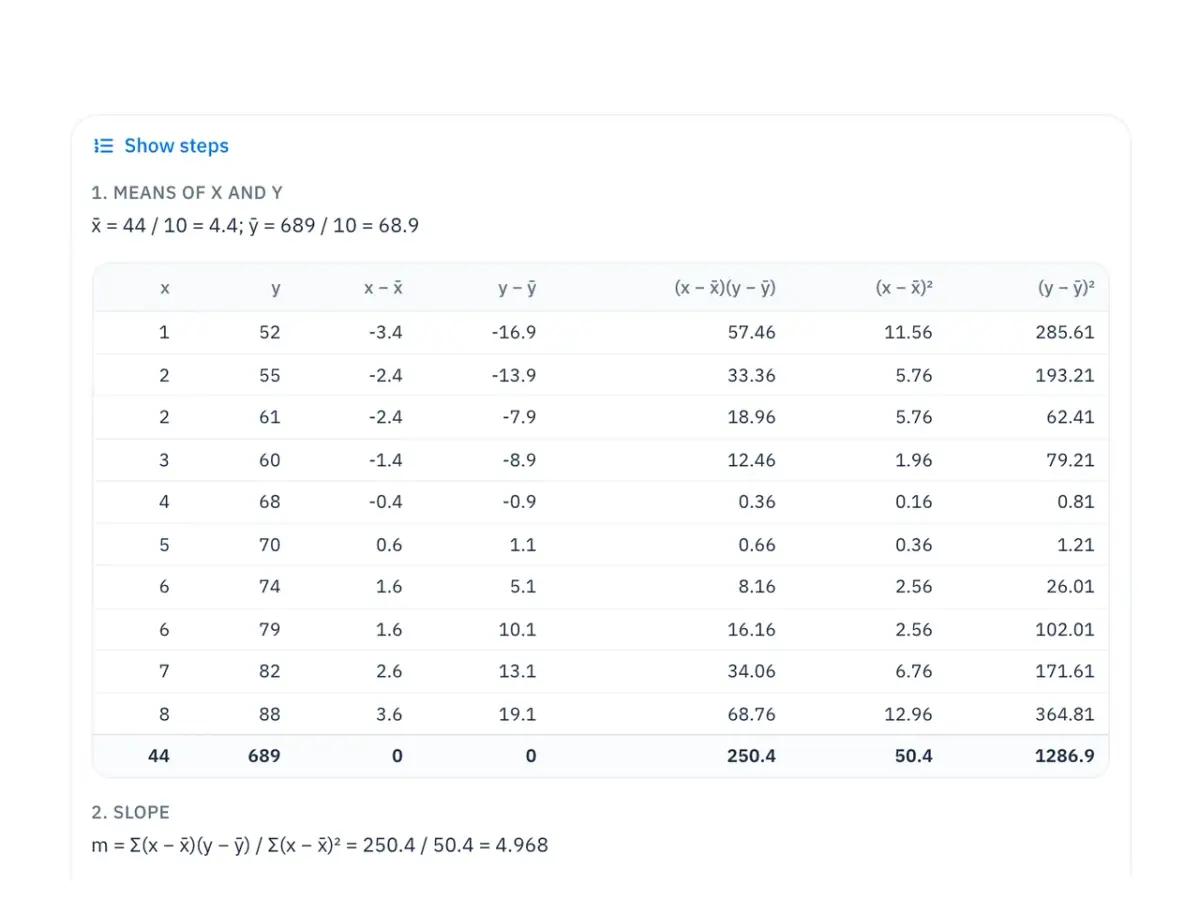 Steps
StepsCheck it against your own notes
Open Show steps to see the means, a table of x − x̄, y − ȳ and their products, the slope, intercept, r and R², and predict y for any x.
FAQ
Paste your x and y values, add the line of best fit, download an editable SVG or a 300 DPI PNG. Free, and drawn in your browser.
Explore more AI diagram tools across subjects — from the same discipline and beyond.
 New
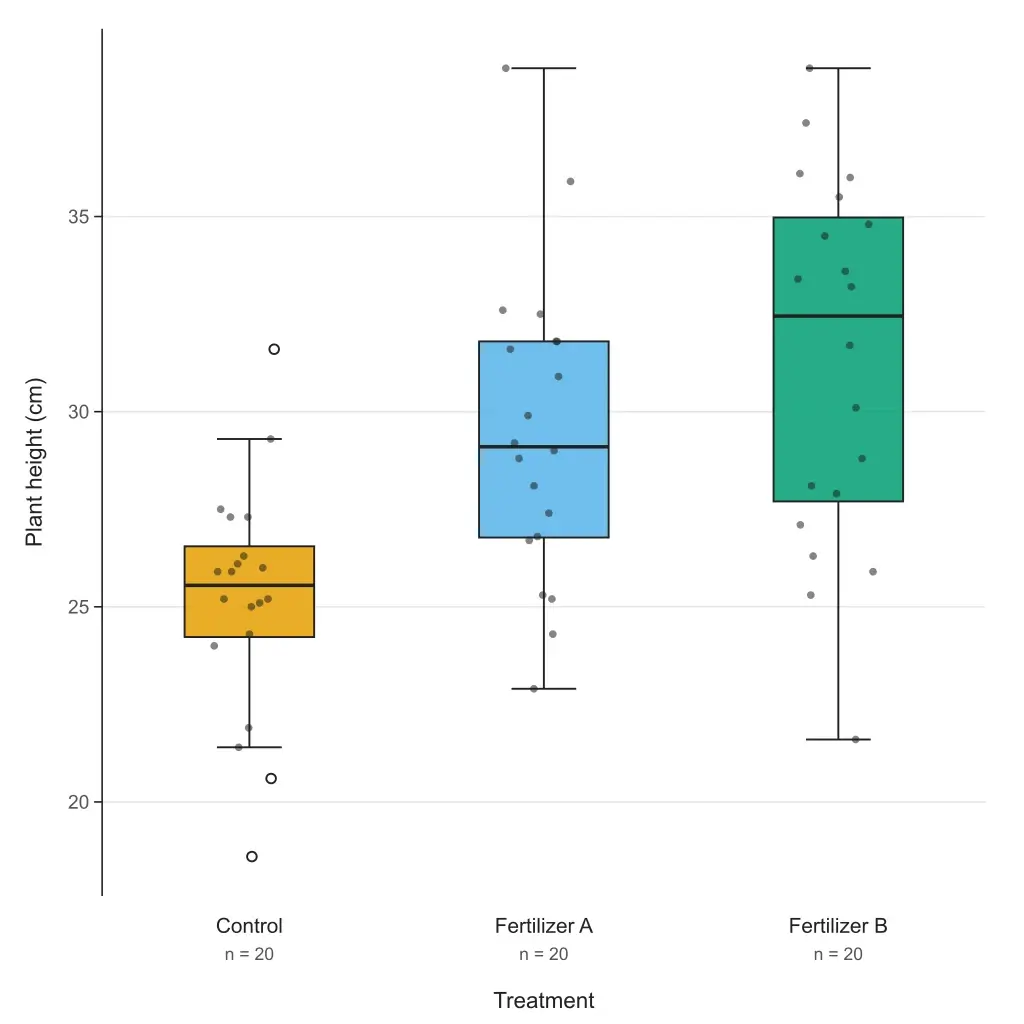
NewPaste your data or a five-number summary and get a box and whisker plot with quartiles, outliers and labels. Choose the TI-84, Excel or R quartile method; export editable SVG or 300 DPI PNG. Free to paste and download.
 New
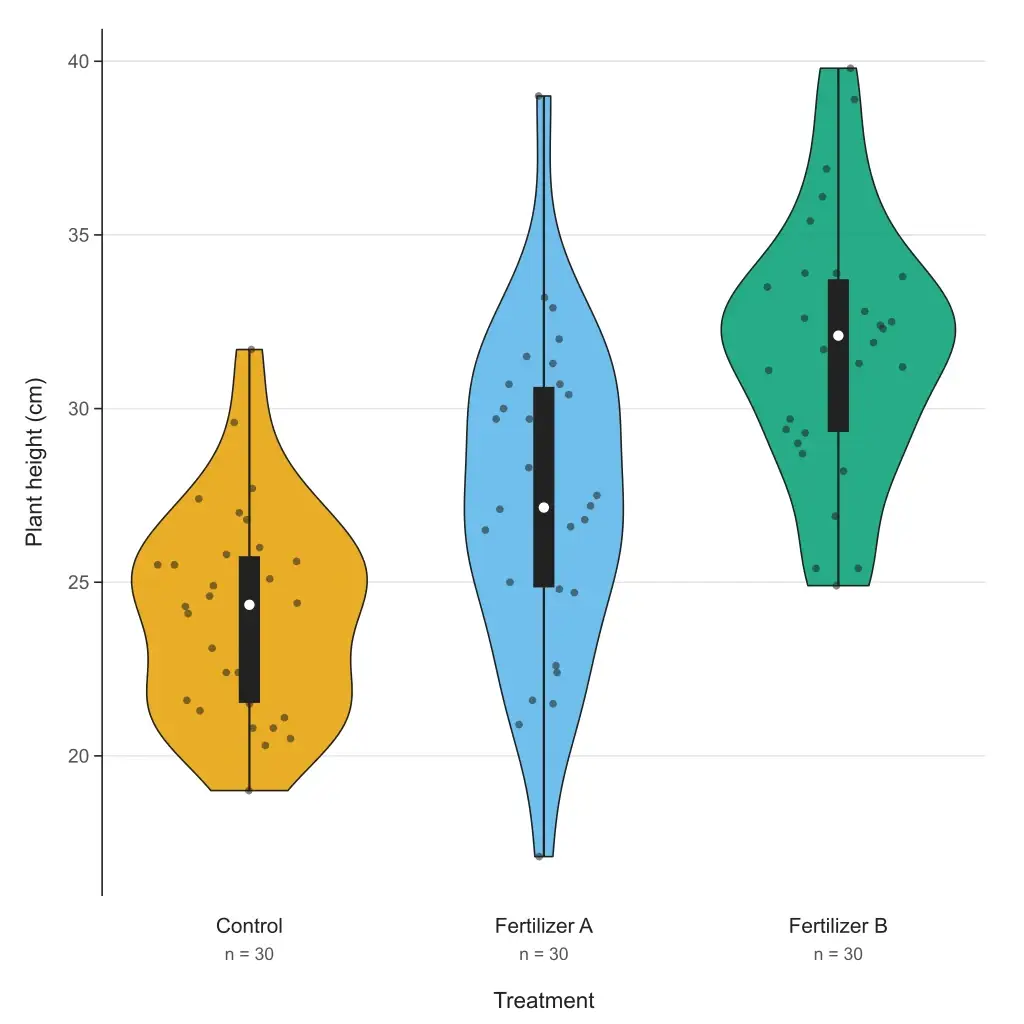
NewPaste your data and get a violin plot in your browser — grouped or single, box or quartiles inside, adjustable bandwidth, editable SVG and 300 DPI PNG. Free to paste and download; or describe your data and let AI fill it in.
 New
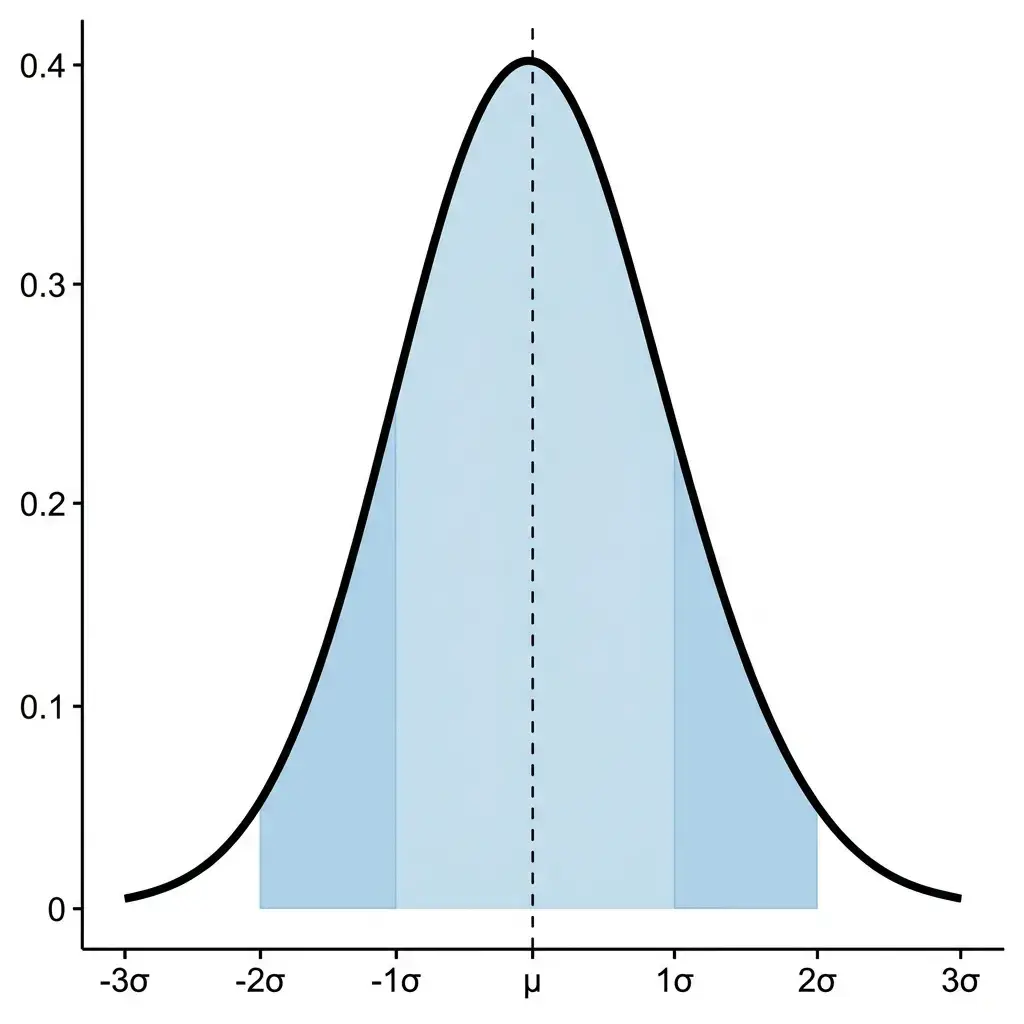
NewDescribe your distribution parameters in plain language and get a publication-ready normal distribution graph with shading, labels, and annotations.
 New
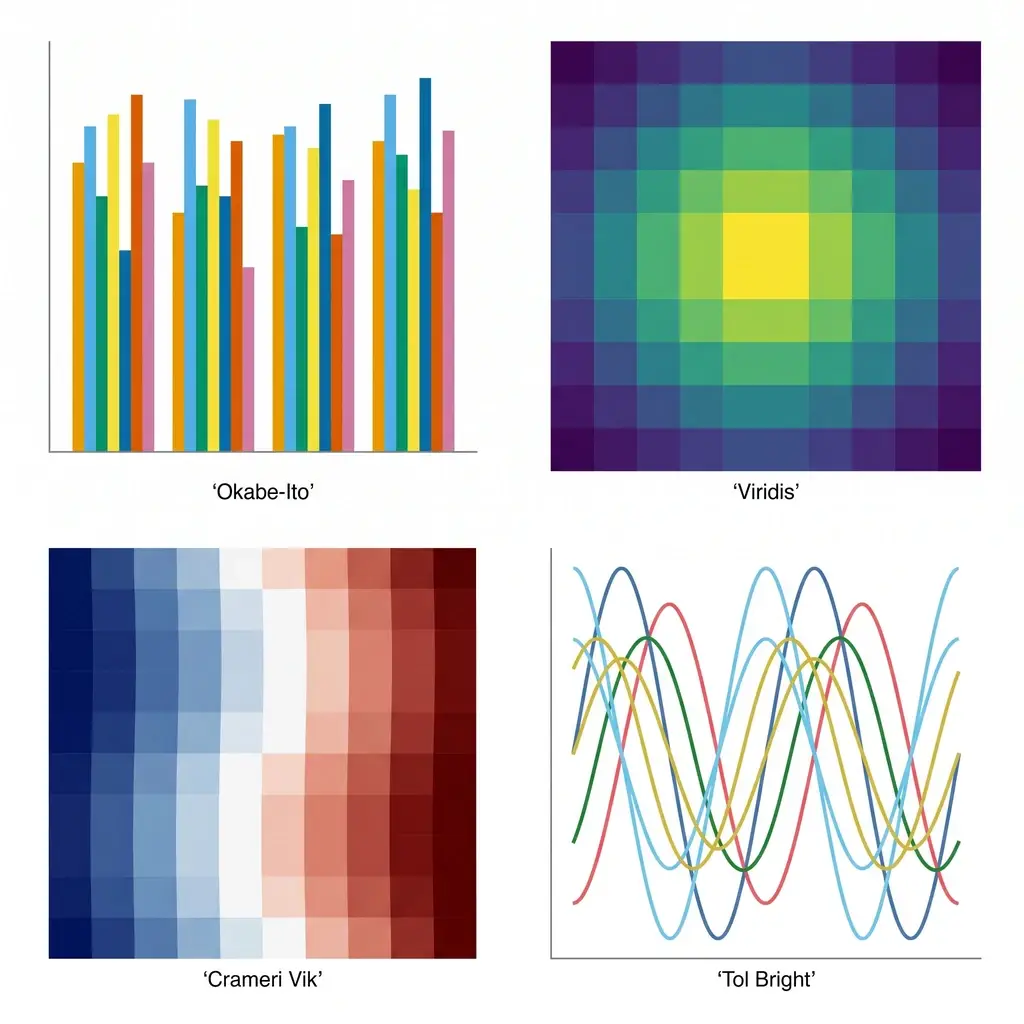
NewGenerate colorblind-safe color palettes for scientific figures — Okabe-Ito, Viridis, Cividis, Crameri Vik, and more — with one-click hex, Python, R, and CSS for journal-ready charts.
