
mshang alternative at a glance: input, price and exports
The Syntax Tree Generator at mshang.ca is a free web app, open source on GitHub since 2011, that turns labeled bracket notation into a tree image as you type. Vizcept's syntax tree generator works from the other end: you type the sentence, a language model analyses it, and code typesets the tree.
The real difference is who writes the brackets. On mshang you do; on Vizcept the model does, and you check its analysis.
| Vizcept | mshang Syntax Tree Generator | |
|---|---|---|
| What you type | A sentence (or your own bracket string or LaTeX forest code) | Labeled bracket notation only |
| Framework | Traditional, X-bar or Minimalist menu; notes such as "use DP" | Whatever your brackets say |
| Price | 2 credits per tree when signed in; packs from $19.90 for 150 credits (75 trees), plans from $14.90 a month | Free |
| Free use | First tree without an account; 5 credits on sign-up, valid 30 days; watermarked downloads | Everything, no account, no watermark |
| Downloads | PNG at 2K (4K on paid plans); editable SVG, bracket string and LaTeX forest code on paid plans | PNG saved from the browser ("Save image as") |
| Movement arrows, triangles | ✓ | ✓ (marked up by hand) |
| Works offline | — | ✓ (downloadable .zip) |
| Code | Closed | Open source (MIT licence) on GitHub |
Vizcept is our product. Every mshang detail here comes from the app page, its README and wiki on GitHub, checked on 24 October 2026.
When is Vizcept the better choice? 5 things mshang doesn't do (October 2026)
Each point was checked against mshang's app page, README, wiki and source code on 24 October 2026.
1/ Start from the sentence, not the brackets
Type The novel was written by Kafka and say what you want shown; Vizcept writes the analysis and draws it. mshang's help text says "Use labelled bracket notation": the app draws the structure you give it and does not analyse sentences. That saves the bracket writing, and it also means you must check the model's analysis: it can attach a phrase differently from your textbook.
2/ Pick a framework instead of hand-writing bar levels
The Tree Style menu switches between traditional phrase structure (S, NP, VP), classic X-bar with specifiers and X' levels, and Minimalist trees with CP, TP and DP. On mshang an X-bar noun phrase such as the famous linguist of morphology from MIT is 142 characters of brackets you type and balance yourself.
3/ Download an editable SVG
Paid plans download the tree as SVG with real text, so you can change a label in Illustrator, Inkscape or Word. mshang's source saves only a PNG of its canvas; at default settings our wh-question tree below saved as a 222 × 287-pixel image.
4/ Copy LaTeX forest code
Paid plans copy the tree as forest code (with \usepackage[linguistics]{forest}) or as a labeled bracket string. Movement arrows are not included in the forest code; add them with \draw. mshang has no LaTeX export.
5/ Revise the tree in words
In the workspace you can write "move the PP under the VP" or "use DP instead of NP"; the structure is changed and the tree is typeset again, for 2 credits when signed in. On mshang you edit the brackets, which is instant and free if you are fluent in them.
Same tree, two tools: what do you have to type?
We took two trees from Vizcept's syntax tree examples, generated on 25 September 2026 from a one-line request, and typed the same structure into mshang on 24 October 2026 with its default settings. Neither image was edited.
Wh-question: "What did you see?"
On Vizcept we typed: Parse tree for the question 'What did you see?' showing wh-movement from object position to Spec-CP with indexed trace t_i and subject-auxiliary inversion to C.
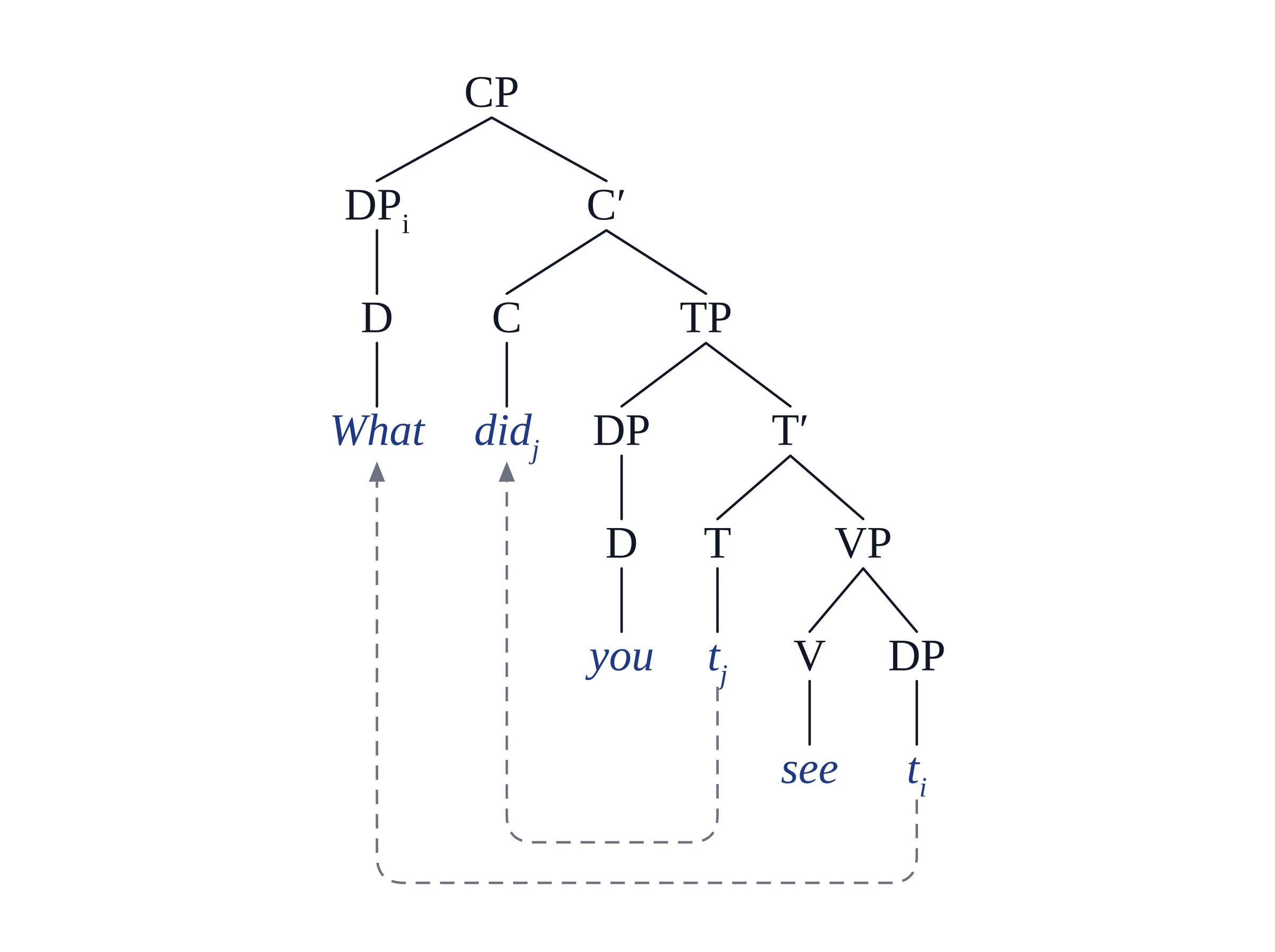
Vizcept: CP, TP and DP layers, two indexed traces and two dashed movement arrows, from the request above.
On mshang we typed these 90 characters:
[CP [DP_1 [D What]] [C' [C_2 did] [TP [DP [D you]] [T' [T t<2>] [VP [V see] [DP t<1>]]]]]]
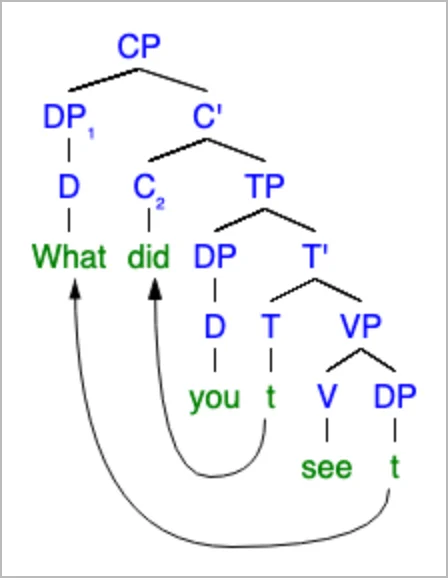
mshang, default settings: the same structure, with color on and curved movement lines (open this tree on mshang.ca).
Passive: "The novel was written by Kafka."
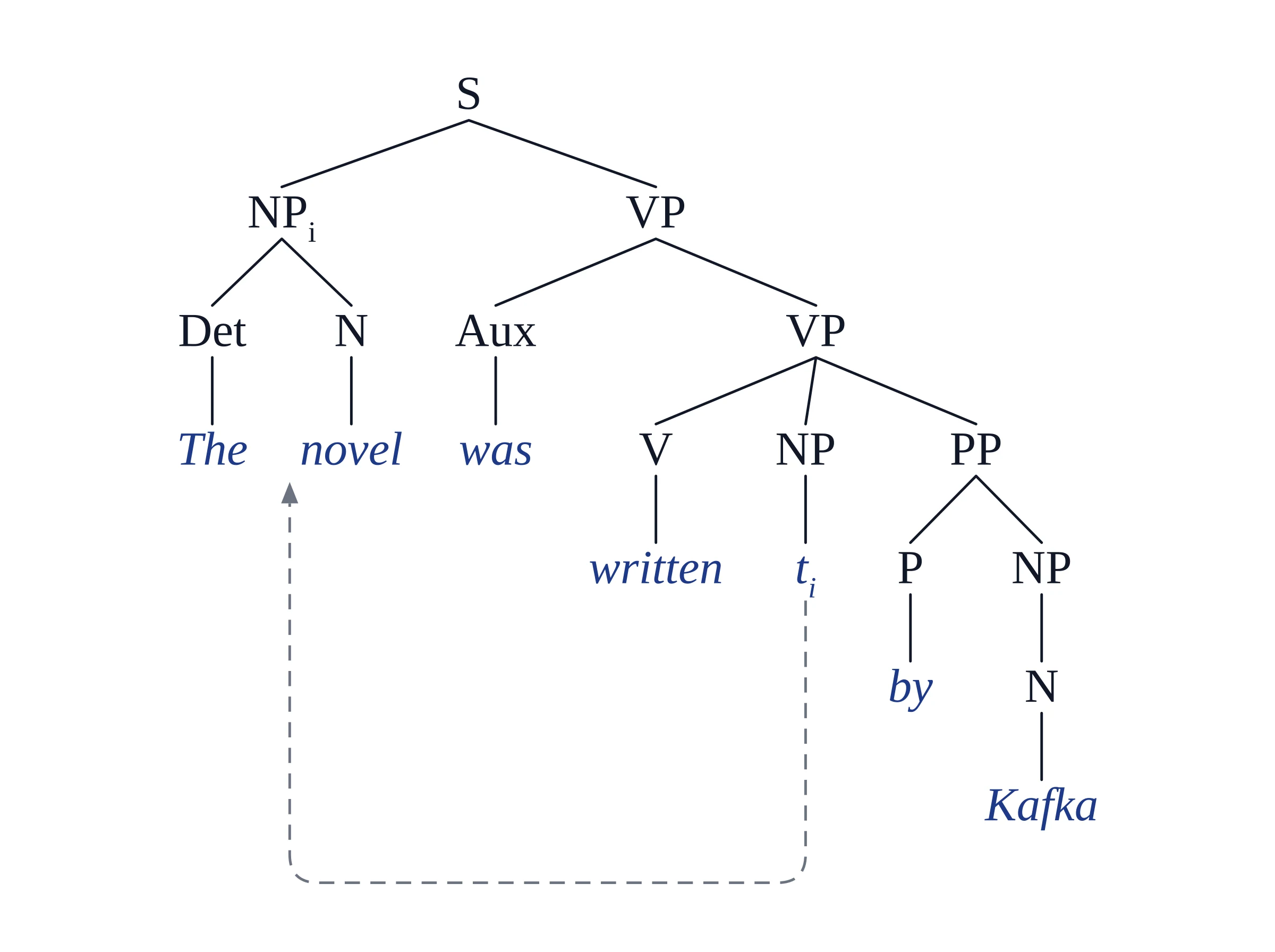
Vizcept, from a request naming the sentence, NP-movement and the by-phrase.
On mshang, 99 characters:
[S [NP_1 [Det The] [N novel]] [VP [Aux was] [VP [V written] [NP t<1>] [PP [P by] [NP [N Kafka]]]]]]
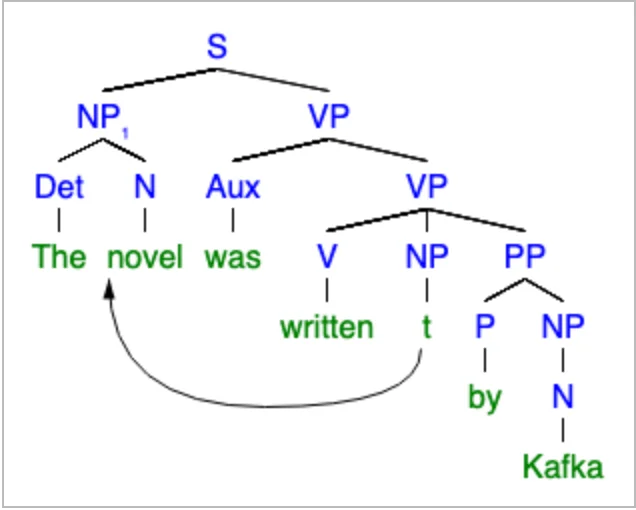
mshang, default settings: the same structure with one curved movement line.
The trees match because the structure is the same. What differs is the work: on mshang you decide the analysis and type every bracket; on Vizcept you describe the analysis and check what comes back.
How do Vizcept and mshang compare, feature by feature?
mshang is a single-purpose bracket renderer; Vizcept is a paid figure tool whose syntax trees are one of several code-typeset figure types. The table compares 12 features as of 24 October 2026.
| Feature | Vizcept | mshang |
|---|---|---|
| Input | Sentence, bracket string or LaTeX forest code | Bracket string |
| Sentence analysis | ✓ language model, framework menu | — |
| Live preview while typing | — (a tree takes a few seconds) | ✓ |
| Closes missing brackets for you | — | ✓ attempts to |
| Triangles for unanalysed phrases | ✓ | ✓ |
| Movement arrows | ✓ dashed, routed under the tree | ✓ curved, from tags you add |
| Subscripts (DP_i, t_i) | ✓ | ✓ numeric tags |
| Fonts and colors | Serif typeset, labels and words in two colors | Serif / sans / monospace, bold, italic, 8–16 pt, color on or off |
| Shareable link with the tree in the URL | — | ✓ |
| Editable SVG | ✓ paid | — |
| LaTeX forest code | ✓ paid | — |
| Chinese, Japanese, Korean text | Redrawn by the image model; proofread | ✓ any script your browser can show |
What does a syntax problem set cost on each?
Take a typical problem set: 10 sentences to draw as trees.
- mshang: $0. You write and balance about 90 to 150 characters of brackets per tree, and save each image from the browser.
- Vizcept: 10 trees × 2 credits = 20 credits. Sign-up and daily check-in credits can cover that over about a week, but free downloads are watermarked. Clean PNG, SVG and LaTeX code come with a pack ($19.90 for 150 credits, valid 365 days, so about 75 trees) or a plan ($14.90 a month for 300 credits).
If you can already write the brackets and only need a picture, mshang costs nothing. If writing the analysis is the hard part, or you need SVG or LaTeX for a paper or thesis, Vizcept saves the time you would spend on brackets.
When is mshang the better choice?
- You already have the bracket string. It draws exactly what you type, live, so there is no model analysis to check. Our own tool guide sends people with a finished bracket string to bracket tools like it.
- You are learning to write trees yourself. Typing the brackets is the exercise, and the live preview shows each mistake as you make it.
- You want it free with no account. Everything works without signing up, and downloads carry no watermark.
- You work offline or need the code. The app can be downloaded as a .zip and runs from
index.html; the source is MIT-licensed on GitHub. - You share trees as links. The Link button puts the whole tree in the URL, handy for sending a tree to a classmate or instructor.
- Your sentence is in Chinese, Japanese or Korean. mshang draws any script your browser can show; Vizcept sends these to the image model, so characters need proofreading.
How do I move my mshang trees to Vizcept?
- Paste your old brackets. If the whole input is one labeled bracket tree, Vizcept draws it as written, without asking the model to re-analyse it. Triangles marked with
^carry over. - Rewrite movement tails. mshang marks the end of a movement as
t<1>; Vizcept reads coindexed traces, so change it tot_1and keep the_1on the moved phrase. That one change turned the wh-question string above into the tree below.
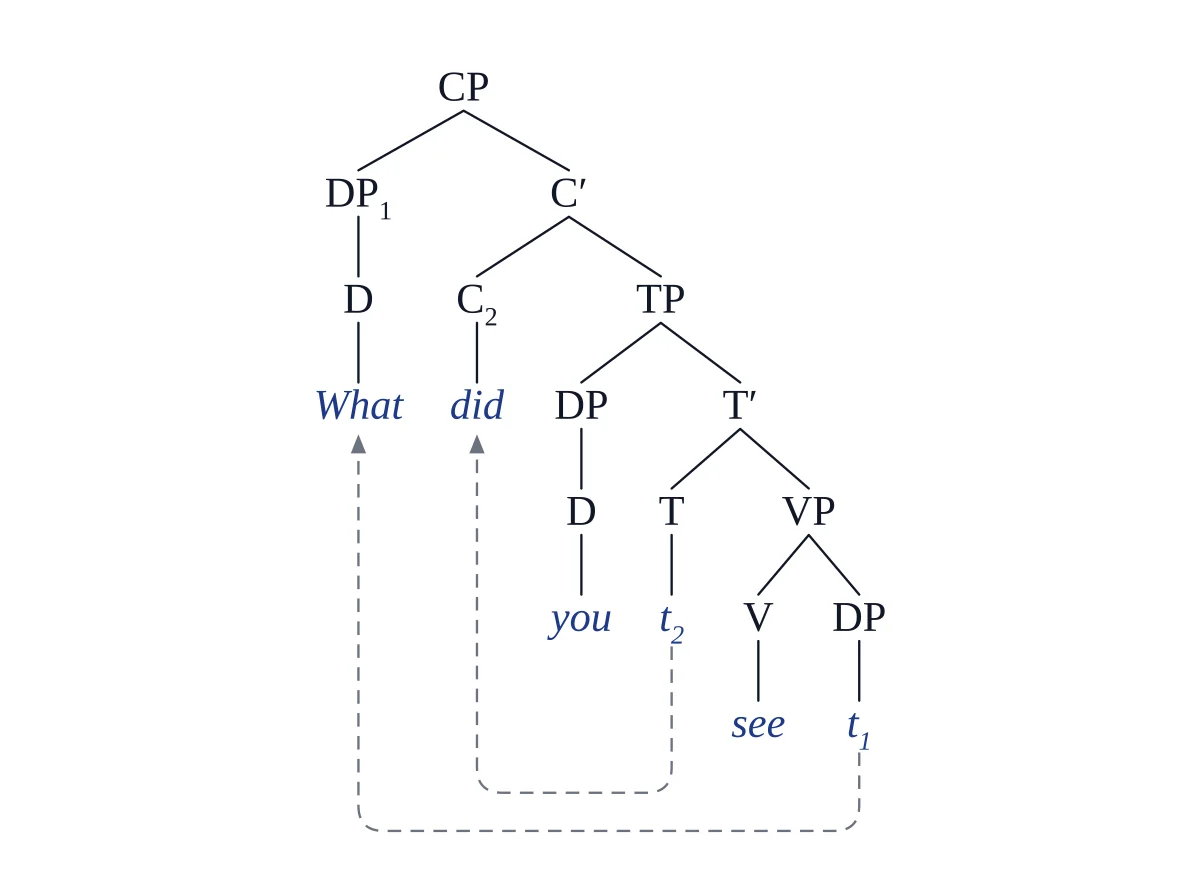
Vizcept, drawing our mshang string as written after the trace edit; no model call.
- Know the limits. Right-to-left languages are not laid out right-to-left yet, and a sketch or photo of a tree is redrawn by the image model. How Vizcept draws figures explains what the code guarantees.
Questions about Vizcept and the mshang syntax tree generator
Is the mshang syntax tree generator free?
Yes. The Syntax Tree Generator at mshang.ca is free, needs no account, adds no watermark, and its source is MIT-licensed on GitHub. Vizcept charges 2 credits per syntax tree when you are signed in, after a free first tree and 5 sign-up credits.
Can mshang make a syntax tree from a sentence?
No. mshang draws labeled bracket notation, such as [S [NP Alice] [VP [V sleeps]]], and does not analyse plain sentences. Vizcept takes the sentence and a framework (Traditional, X-bar or Minimalist) and writes the brackets for you; check its analysis against your course.
How do I save an mshang syntax tree?
Right-click the tree and choose "Save image as" to get a PNG, or use the Link button to copy a URL that redraws the tree. There is no SVG or LaTeX export. Vizcept's paid plans add editable SVG, LaTeX forest code and the bracket string.
Can I paste mshang brackets into Vizcept?
Yes. A whole bracket tree is drawn as written, with no model call, and ^ triangles carry over. Change mshang's movement tails such as t<1> to t_1 so Vizcept draws the arrows.
What is the best alternative to the mshang syntax tree generator?
It depends on what you start from. With a sentence and no brackets, an analysing tool such as Vizcept saves the bracket writing. With brackets you wrote yourself, free bracket tools such as jsSyntaxTree (ironcreek.net) and RSyntaxTree draw them in different styles. If you would rather not type brackets at all, drag-and-drop builders such as Fixie's Syntax Tree Builder let you place nodes by hand.
Try the sentence you are stuck on
Your first tree needs no account. Credit packs start at $19.90 and never renew.
