
Who is this for?
This page is for people who have to produce constituency trees on a deadline:
- undergraduates in an intro or intermediate syntax course with a weekly problem set;
- morphology students who need word-structure trees such as un-happy-ness;
- graduate students writing a qualifying paper, thesis chapter or handout with dozens of trees in one consistent style;
- teaching assistants making example trees for sections and feedback.
What these jobs share: you already know (or are learning) the analysis, the drawing is the slow part, and every tree has to follow the framework your course uses.
It is not the right tool if you need dependency trees (arcs between words, as in spaCy or Universal Dependencies), a parse tree or abstract syntax tree for a programming-language or compilers class, trees laid out right-to-left for Hebrew or Arabic, or if your course does not allow AI tools at all — see what it doesn't do.
How do linguistics students use a syntax tree generator during a course?
The useful pattern is the same in every course: work the tree out yourself first, then generate and compare. Where the two trees differ is exactly the place to look again, in your notes or with your instructor.
| When | What you do | How |
|---|---|---|
| Weekly problem set | Draw your answer on paper, then generate the same sentence and compare attachment, labels and movement | Type the sentence; pick your course's framework in the Tree Style menu |
| Learning a new framework | See the same kind of sentence in Traditional, X-bar and Minimalist style, so the extra bar levels and DP / TP layers make sense | Switch the Tree Style menu and generate again |
| Studying movement | Check where a wh-phrase, a passive subject or a raised auxiliary starts and lands | Add "show the trace" or "show wh-movement" to the sentence |
| Exam review | Take sentences from the textbook, draw them blind, then check | One sentence per tree |
| Morphology | Draw the structure of a derived word | Type a single word, such as unhappiness |
| Thesis chapter or handout | Keep every tree in one style and redraw quickly when an analysis changes | Download SVG or copy LaTeX forest code (paid plans) |
If your course gives you its own conventions ("use DP for noun phrases", "no X′ for heads without a specifier"), write them after the sentence. Notes in the request are followed; the framework itself is set in the Tree Style menu.
Which framework does your syntax course use?
Most courses follow one textbook family. Pick the Tree Style that matches it before you generate:
| Tree Style | What the tree looks like | Typical course material |
|---|---|---|
| Traditional | Phrase-structure trees with S, NP, VP and flat multi-branching | Intro textbooks such as Yule or O'Grady |
| X-bar | Every phrase has a specifier, a head and a complement, layered through X′ levels | Classic X-bar as in Radford (1988) and other intermediate textbooks |
| Minimalist | TP and CP clauses, DP nominals, binary branching and coindexed traces | Advanced courses using books such as Adger (2003) |
The labels you will see in the example trees below:
| Label | What it marks |
|---|---|
| S | The sentence, in Traditional trees |
| CP, C | Complementizer phrase and its head: where wh-phrases and inverted auxiliaries land |
| TP, T | Tense phrase and its head: the clause in Minimalist trees |
| DP, D / Det | Determiner phrase and determiner |
| NP, N′, N | Noun phrase, its bar level, and the noun |
| VP, AP, PP | Verb, adjective and preposition phrases (heads V, A, P) |
| Aux | Auxiliary verb, in Traditional trees |
| Af | Affix, in morphology trees |
| t₁ / t_i | Trace: the starting position of a moved phrase, with the same index |
Your course may use other names for the same nodes (IP for TP, S′ for CP); say so in the request. If your instructor mixes conventions (for example X-bar with DP), pick the closest style and say the difference in the request. Compare the first tree with one from your lecture slides before you draw a whole problem set.
What do the generated syntax trees look like?
The four trees below are real output from the syntax tree generator, generated on 25 September 2026 from the one-line requests shown. None was edited by hand.
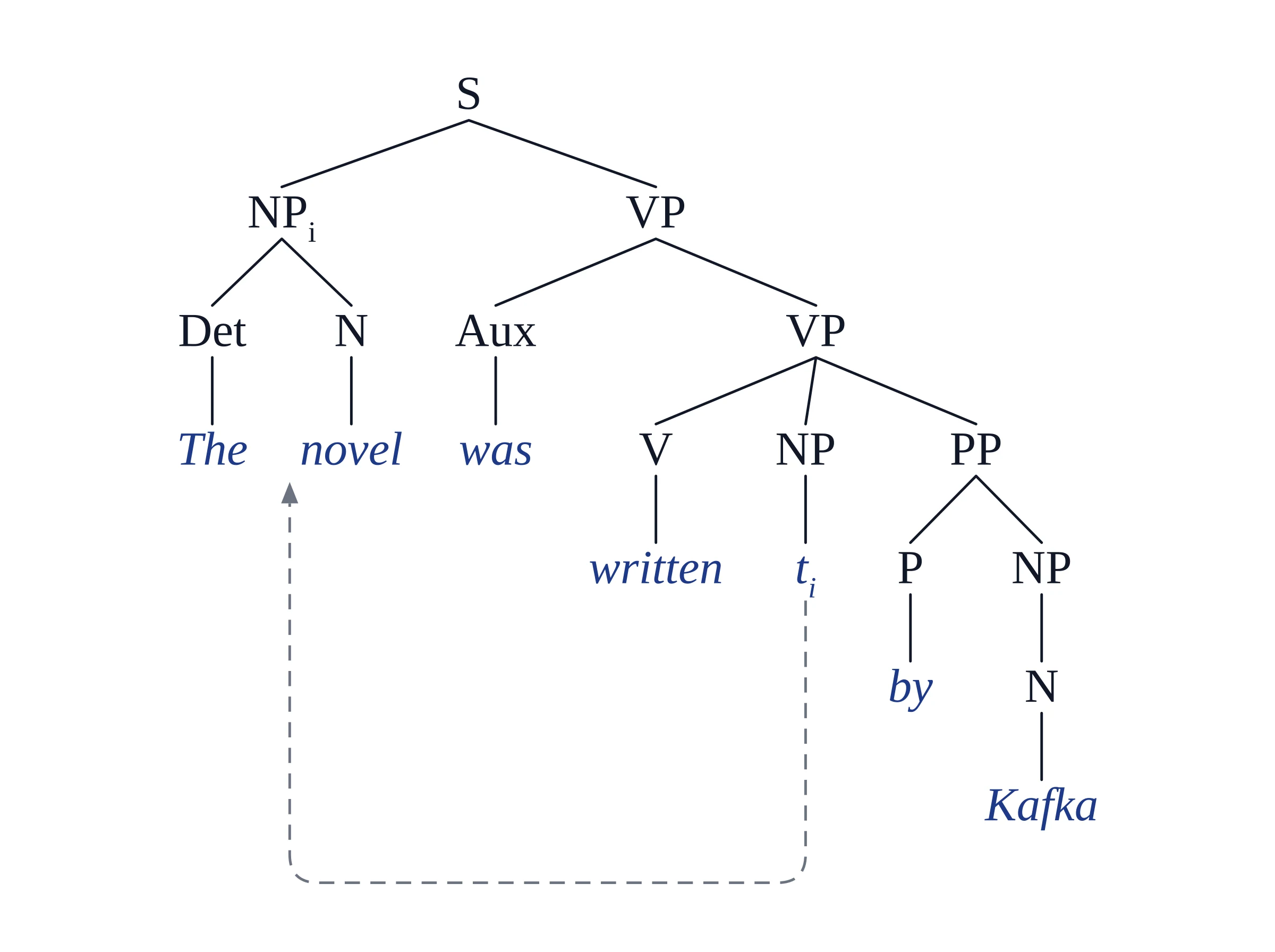
Phrase-structure tree: a passive with NP-movement
Request: Syntactic tree diagram for the passive sentence 'The novel was written by Kafka' showing NP-movement with trace t_i in VP complement position and by-phrase as PP adjunct.
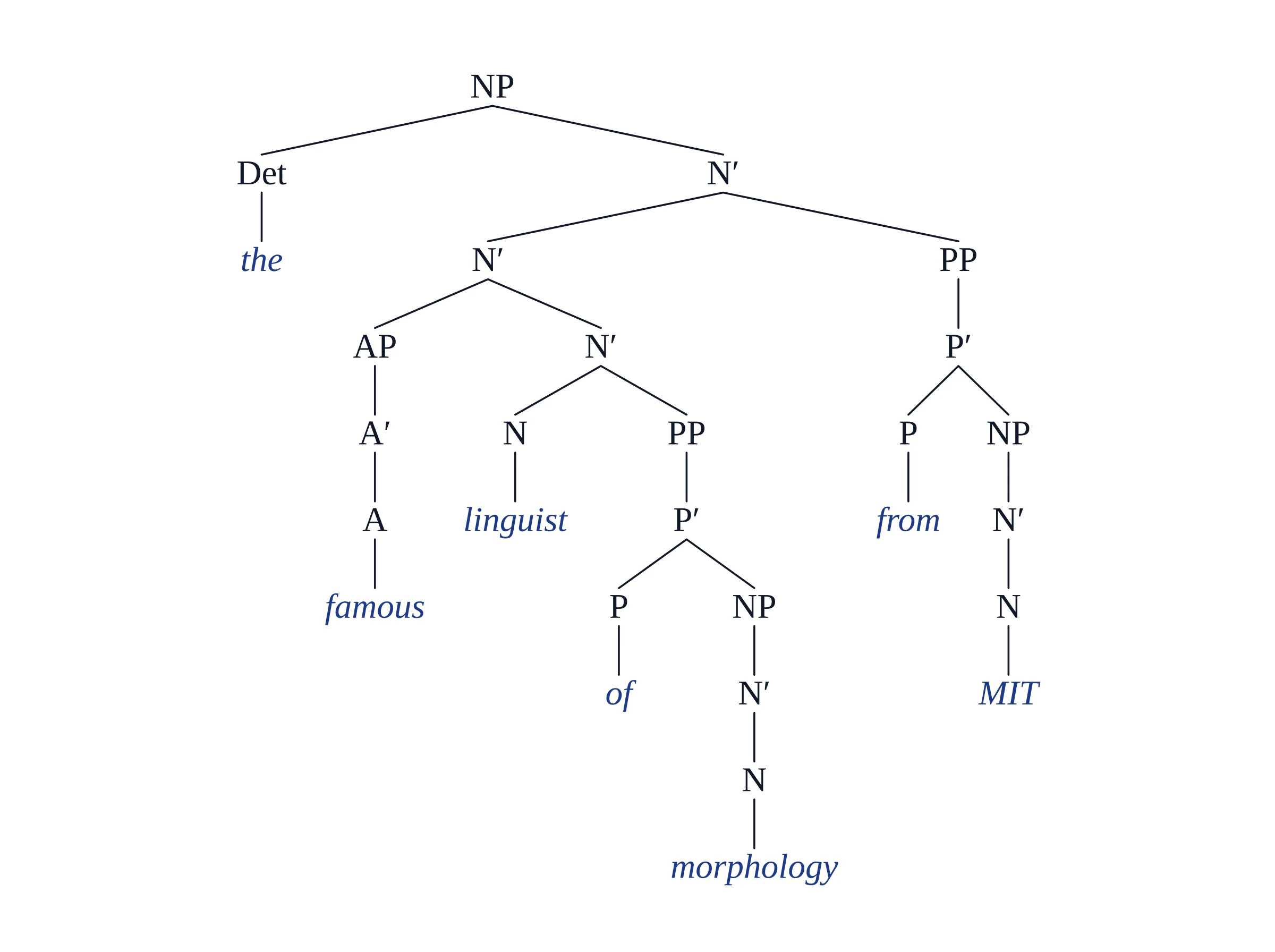
X-bar tree: a noun phrase with a complement and adjuncts
Request: X-bar theory tree of the noun phrase 'the famous linguist of morphology from MIT' with specifier (Det 'the'), adjunct AP, head N', complement PP 'of morphology', and adjunct PP 'from MIT'. The complement of morphology is the sister of the head N; the adjuncts famous and from MIT each add an N′ level.
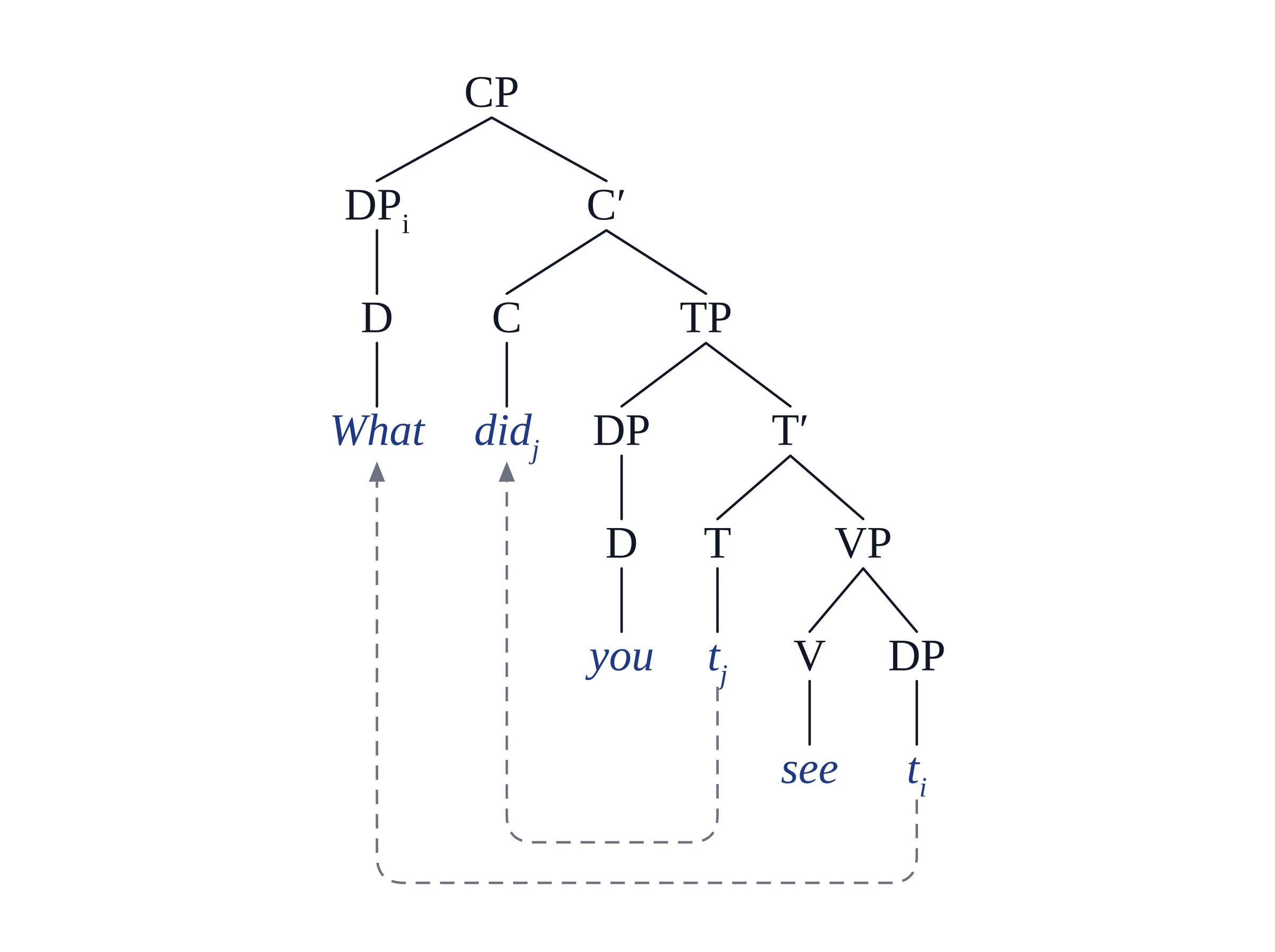
CP / TP / DP tree: a wh-question with traces
Request: Parse tree for the question 'What did you see?' showing wh-movement from object position to Spec-CP with indexed trace t_i and subject-auxiliary inversion to C.
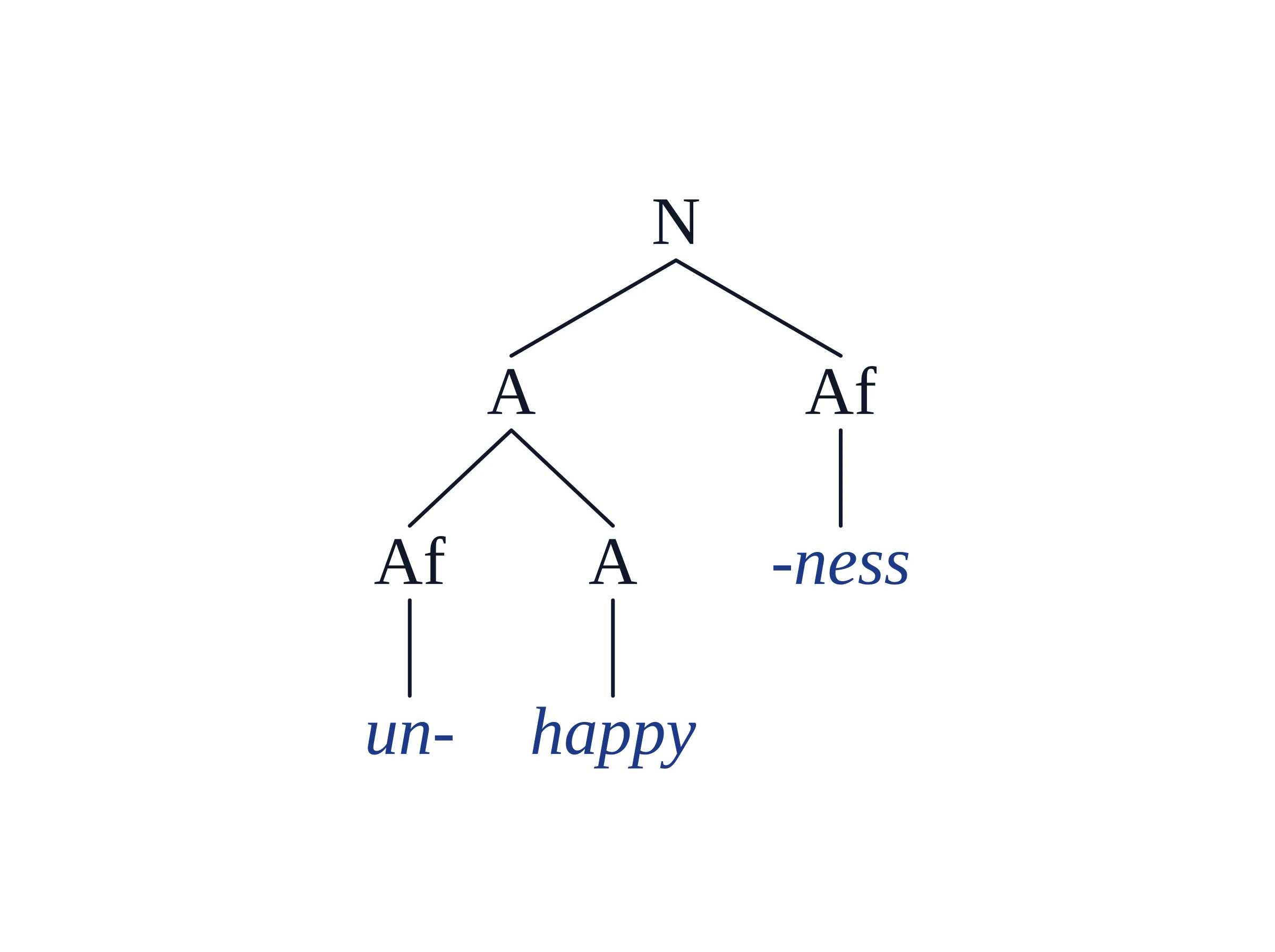
Morphology tree: unhappiness
Request (shortened): Morphological tree for the English word 'unhappiness', asking for the bracketing [N [A un- [A happy]] -ness].
The requests above are long because they were written as examples. In practice, the sentence plus the framework menu is enough; add a note only when you want something specific shown.
How do you check if your syntax tree is correct?
Check a syntax tree in four passes: the leaves, the constituents, the attachments and the framework's rules. The same four steps work for a tree you drew and for a generated one:
- Read the leaves left to right. They should spell your sentence exactly.
- Test the constituents you are unsure about: can the string be replaced by a pronoun or do so, moved to the front, or coordinated with a phrase of the same type? If not, it probably shouldn't be one node.
- Check attachment of every PP and adverb: does it modify the verb or the noun next to it? This is where generated trees and student trees most often differ.
- Check the framework's rules: binary branching in X-bar and Minimalist trees, a bar level for every head, and a trace in the base position of every moved phrase.
Students ask on r/asklinguistics how to know whether a tree is right; no generator can tell you whether its own analysis is, so here is what Vizcept guarantees and what it doesn't:
- Guaranteed by code: the tree is typeset in a real font with no overlapping labels, and a check rejects any tree that adds words that are not in your sentence.
- Not guaranteed: the analysis itself. It comes from a language model. It handles common structures such as relative clauses, embedded CPs, wh-questions and passives well in our examples, but it can attach a phrase to a different node than your textbook, choose one reading of an ambiguous sentence, or leave out or reorder a word (the word check does not catch those). We have not measured an error rate for syntax trees sentence by sentence, so we don't quote one.
If the tree is wrong, say so in words — "attach the PP to the VP" — and generate again. How Vizcept draws figures explains the split between the model and the code in more detail.
Which sentences should you practise before a syntax exam?
Draw each sentence on paper first, then open it in the generator (each sentence links there, filled in), pick your course's Tree Style and compare. Each one tests a structure that comes up again and again on problem sets:
| Sentence | What it tests | What to look for |
|---|---|---|
| The student read the book on the shelf. | PP attachment | Is on the shelf inside the NP or the VP? |
| I saw the man with the telescope. | Structural ambiguity | Two readings, so two trees |
| The linguist said that the tree was wrong. | Embedded clause | A clause (CP) under the VP |
| Which paper did the professor reject? | Wh-movement and inversion | A trace in object position, did in C |
| The proposal was rejected by the committee. | Passive | A trace after rejected |
| The students seem to understand the theory. | Raising | Where the students starts |
| The book that you recommended is out of print. | Relative clause | A CP inside the NP |
Compare one structure at a time: where your tree and the generated one differ, run the constituency tests above before deciding which is right. Vizcept doesn't make printable worksheets for syntax trees.
How do you put a syntax tree into LaTeX, Word or Google Docs?
Every plan downloads a PNG, which you can drop into Google Docs, a slide or an LMS upload. Paid plans add two formats that matter for papers and theses:
- SVG with real text, which you can edit in Inkscape, Illustrator or Figma and insert into Word; inserting an SVG into Word covers the steps and the LaTeX workaround.
- Copy code, next to Download, gives you the labeled bracket string or LaTeX forest code. Here is the wh-question tree above as forest code, from its bracket string run through the same converter Copy code uses:
% \usepackage[linguistics]{forest} in the preamble

\begin{forest}
[{CP}
  [{DP\textsubscript{i}}
    [{D}
      [{What}]
    ]
  ]
  [{C$'$}
    [{C}
      [{did\textsubscript{j}}]
    ]
    [{TP}
      [{DP}
        [{D}
          [{you}]
        ]
      ]
      [{T$'$}
        [{T}
          [{t\textsubscript{j}}]
        ]
        [{VP}
          [{V}
            [{see}]
          ]
          [{DP}
            [{t\textsubscript{i}}]
          ]
        ]
      ]
    ]
  ]
]
\end{forest}
Subscripts, primes and triangles are already escaped. Movement arrows are not included in the forest code: add them with \draw between named nodes, or use the SVG if you need the arrows exactly as drawn. The bracket string works in bracket tools such as mshang or RSyntaxTree.
It also works the other way: if your whole input is a labeled bracket tree, such as one copied from mshang, Vizcept draws it as written instead of re-analysing it.
What does a semester of syntax trees cost?
Watermark-free files, 4K, SVG and Copy code are paid, because running the models costs money. Signed in, each tree uses 2 credits. A course with about 10 trees a week over a 14-week semester is 140 trees, or 280 credits:
| What you need | Option | Price |
|---|---|---|
| One problem set, or trees for a paper | Standard Pack, 150 credits (up to 75 trees) | $19.90 once, valid 365 days, never renews |
| A full semester of weekly problem sets | 450-credit pack (up to 225 trees) | $39.90 once, valid 365 days |
| A thesis chapter with heavy redrawing | BASIC plan, 300 credits a month (up to 150 trees) | $14.90 a month; cancel any time |
Students can apply for 40% off subscriptions for 12 months (education discount); the discount does not apply to credit packs. Before you pay: your first tree needs no account, signing up gives 5 credits and daily check-ins add more, and free downloads are watermarked. Free credits expire after 30 days. All plans are on the pricing page.
What doesn't Vizcept do for a syntax course?
- No dependency trees. It draws constituency (phrase-structure) trees only.
- No programming-language parse trees. Code, grammar productions and derivation exercises from a compilers class are turned away with a note instead of a tree.
- No right-to-left layout. Hebrew and Arabic sentences are laid out left to right, which is not acceptable for most linguistics work in those languages.
- Chinese, Japanese and Korean go to the image model. Those trees are drawn as pictures rather than typeset, so proofread every character; there is no code to copy.
- No live editing. There is no drag-and-drop canvas or live preview while typing; you revise by describing the change, or edit the SVG.
- No arrows in the forest code (see above).
- It doesn't grade anything. There are no class accounts or submissions, and on an ambiguous sentence it picks one reading unless you name the one you want.
Questions from linguistics students
Is using a syntax tree generator cheating?
It depends on your course's rules, so ask your instructor. Used to check a tree you worked out yourself, or to draw a tree you already understand, it is like using a calculator to check arithmetic. Don't hand in a generated tree as your own analysis if your course forbids AI tools.
Can ChatGPT draw a syntax tree?
ChatGPT can write labeled bracket notation or LaTeX forest code for a sentence, which you then paste into a bracket tool or LaTeX to see the tree; check its analysis the same way you would check any tree. Vizcept does both steps in one: the model writes the brackets and code typesets the tree in your chosen framework.
Does it draw movement arrows and traces?
Yes. With the Minimalist style, or when you ask for movement, moved phrases get an index and a trace in their base position, and the tree draws a dashed arrow from each trace to its antecedent. This covers wh-questions, passives, raising and subject–auxiliary inversion.
How do I get both trees for an ambiguous sentence?
Generate the sentence twice and name the reading each time, for example "I saw the man with the telescope — attach the PP to the VP", then the same sentence with "attach the PP to the NP". Without a note, Vizcept picks one reading and draws one tree.
Can I export a syntax tree to LaTeX?
Yes, on paid plans. Copy code gives you LaTeX forest code (load it with \usepackage[linguistics]{forest}) or a plain labeled bracket string. Movement arrows are not included in the forest code; add them with \draw or use the SVG.
Can I paste bracket notation I already wrote?
Yes. If the whole input is one labeled bracket tree, Vizcept draws it as written instead of re-analysing the sentence. Use t_1 with a matching _1 on the moved phrase if you want movement arrows.
Is Vizcept free for students?
Partly. Your first tree needs no account, sign-up gives 5 credits, daily check-ins add more, and free downloads are watermarked; free credits expire after 30 days. Signed in, a tree uses 2 credits. Clean files, SVG and LaTeX code are paid: credit packs from $19.90 that never renew, or plans from $14.90 a month, with 40% off subscriptions for verified students.
Does it work for languages other than English?
Yes for Latin-script languages such as Spanish, German, French and Portuguese, which are analysed in their own words and drawn with code. Chinese, Japanese and Korean go to the image model, so proofread them, and right-to-left languages are not laid out right-to-left yet.
Draw this week's trees, then check them
Type a sentence, pick your course's framework and compare the tree with your own. Credit packs start at $19.90 and never renew.
