
SciDraw alternative at a glance: how each tool draws, price and exports
This page compares Vizcept with SciDraw AI at sci-draw.com. scidraw.io, the free library of hand-drawn scientific illustrations, is a different site.
SciDraw AI is an AI platform for scientific illustrations and data charts: you describe a figure, upload a sketch or a reference image, and an image model generates it; charts are made from CSV or Excel with Python. Vizcept is narrower. For five figure types that are mostly structure and text, a language model reads your description and code typesets the figure; other types go to an image model, as on SciDraw.
The real difference is what draws the boxes and numbers. On SciDraw every figure page says "AI draws" it; on Vizcept the CONSORT, PRISMA, framework, syntax tree and sentence diagram pages are laid out by code.
| Vizcept | SciDraw AI | |
|---|---|---|
| How figures are drawn | Code typesets CONSORT, PRISMA, conceptual frameworks, syntax trees and sentence diagrams; an image model draws illustrations | An image model draws figures (text, sketch or reference image); Python draws data charts |
| Price | Plans from $14.90 a month or $106.80 a year; credit packs from $19.90 that never renew | Standard $20 a month, or $10 a month billed yearly; lifetime plan and credit packs also offered |
| Per figure | 2 credits for a code-typeset figure, 5 for a 2K image | 5 credits for a standard 2K image |
| Free use | First figure without an account; 5 credits on sign-up plus daily check-in credits; watermarked downloads | 10 credits on sign-up plus 5 credits every day; SVG, journal and commercial use on paid plans only |
| Downloads | PNG at 2K (4K paid); editable SVG on paid plans | PNG, SVG and PPTX; charts also as PDF, EPS, TIFF and Python code |
Vizcept is our product. Every SciDraw detail here comes from sci-draw.com (home page, pricing and tool pages), checked on 25 October 2026.
When is Vizcept the better SciDraw alternative? 5 things SciDraw AI doesn't do (October 2026)
Each point was checked against SciDraw's own tool pages on 25 October 2026.
1/ Counts set as type, and blanks left blank
On the CONSORT flow diagram generator a language model assigns each number in your paragraph to a box, and code sets it in a font, so a digit cannot blur or drift. A count that does not appear anywhere in your text is left as a blank (n = ) for you to fill in, rather than worked out by the model. SciDraw's CONSORT page says its AI draws the diagram and asks you to "always check every n= against your trial records before submitting".
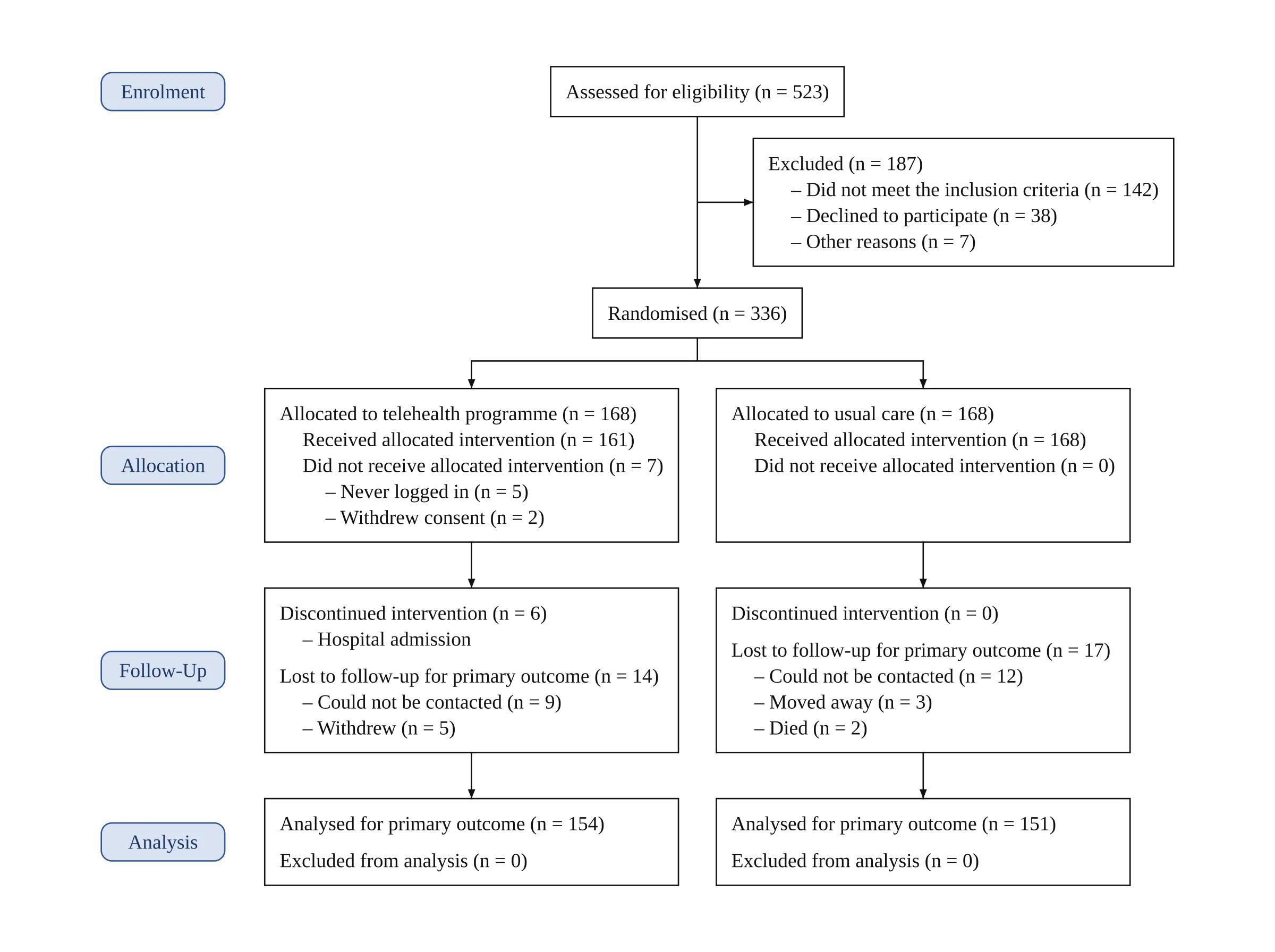
Vizcept, from a one-paragraph description of a two-arm trial; every count above appears in that paragraph.
2/ The current templates: CONSORT 2025 and PRISMA 2020
Vizcept lays out the CONSORT 2025 template by default (2010 wording on request) and the PRISMA 2020 template for new reviews, with the "Reports sought for retrieval" and "Reports not retrieved" boxes in place. SciDraw's CONSORT page describes a CONSORT 2010 layout. Its PRISMA page describes a four-phase layout with an eligibility phase; PRISMA 2020 has three phases (identification, screening, included). See the side-by-side below.
3/ The words in the figure are the words you typed
In a code-typeset figure every word is set in a font from your text, so letters cannot come out garbled the way painted text can. The analysis still has to be right: tested on 50 sentences that Reed and Kellogg diagrammed themselves, the sentence diagram generator matched the book line for line on 20, differed only in a later convention on 13, and placed or dropped a word wrongly on 17. You check the structure, not the spelling.
4/ Syntax trees you can paste in and copy out
The syntax tree generator has a Traditional, X-bar or Minimalist menu, draws a labeled bracket string exactly as written, and on paid plans copies the tree as LaTeX forest code or a bracket string. SciDraw's syntax tree page generates the tree from your description and lists no bracket input or LaTeX export.
5/ Sentence diagram worksheets with answer keys
The worksheet maker turns up to 20 sentences into two printable PDFs, a worksheet with the diagram lines and no words, and a matching answer key, on Letter or A4. SciDraw's sentence diagram page makes one diagram at a time.
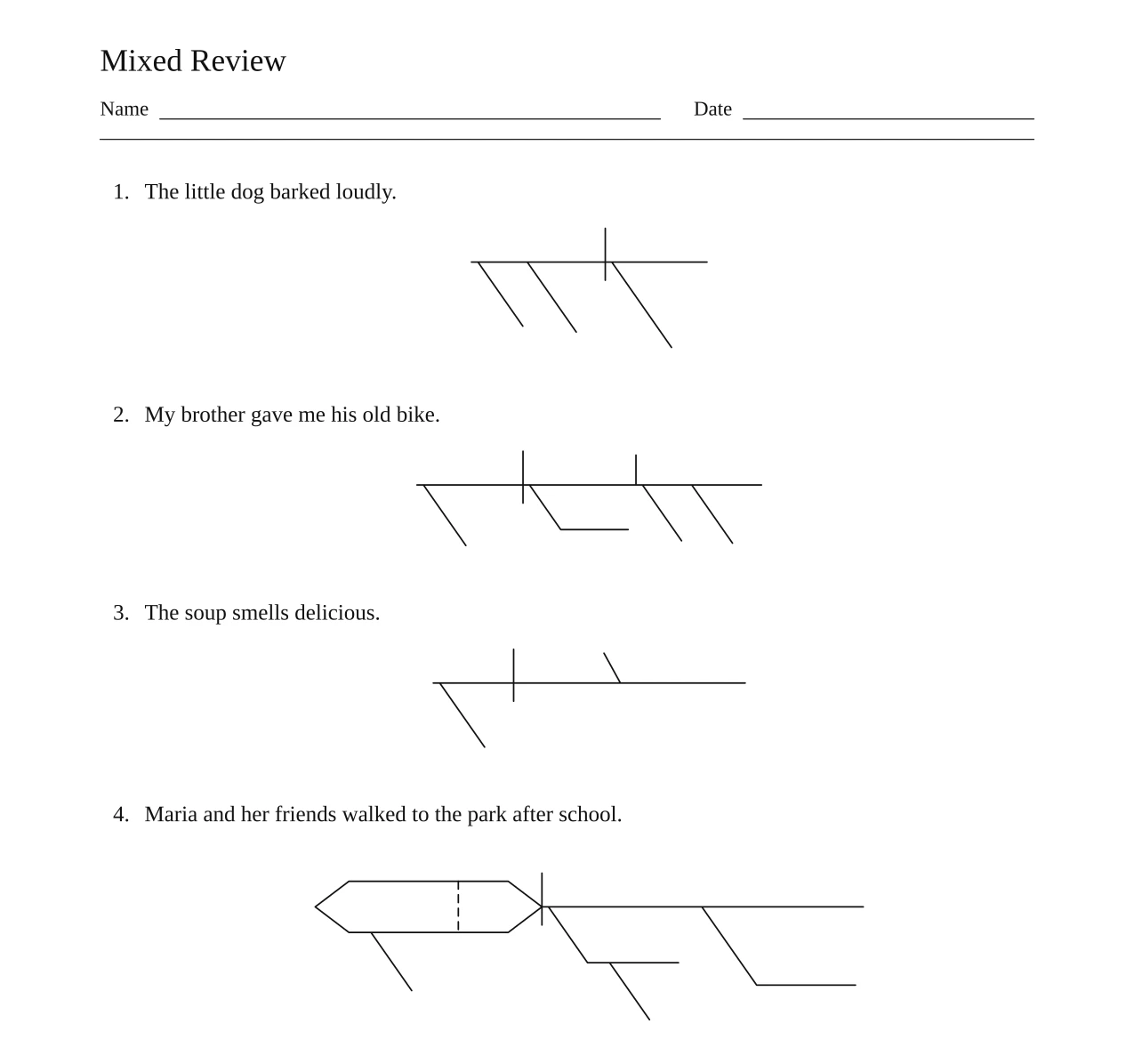
Vizcept, a real four-sentence worksheet; the answer key comes out as a second PDF.
Same input, two tools: what comes back?
We took two examples that SciDraw publishes on its own tool pages and typed the same content into Vizcept on 25 October 2026. The SciDraw images are shown as published (© SciDraw AI); the Vizcept images are the pipeline's output, not edited.
PRISMA flow diagram for a meta-analysis of randomized trials
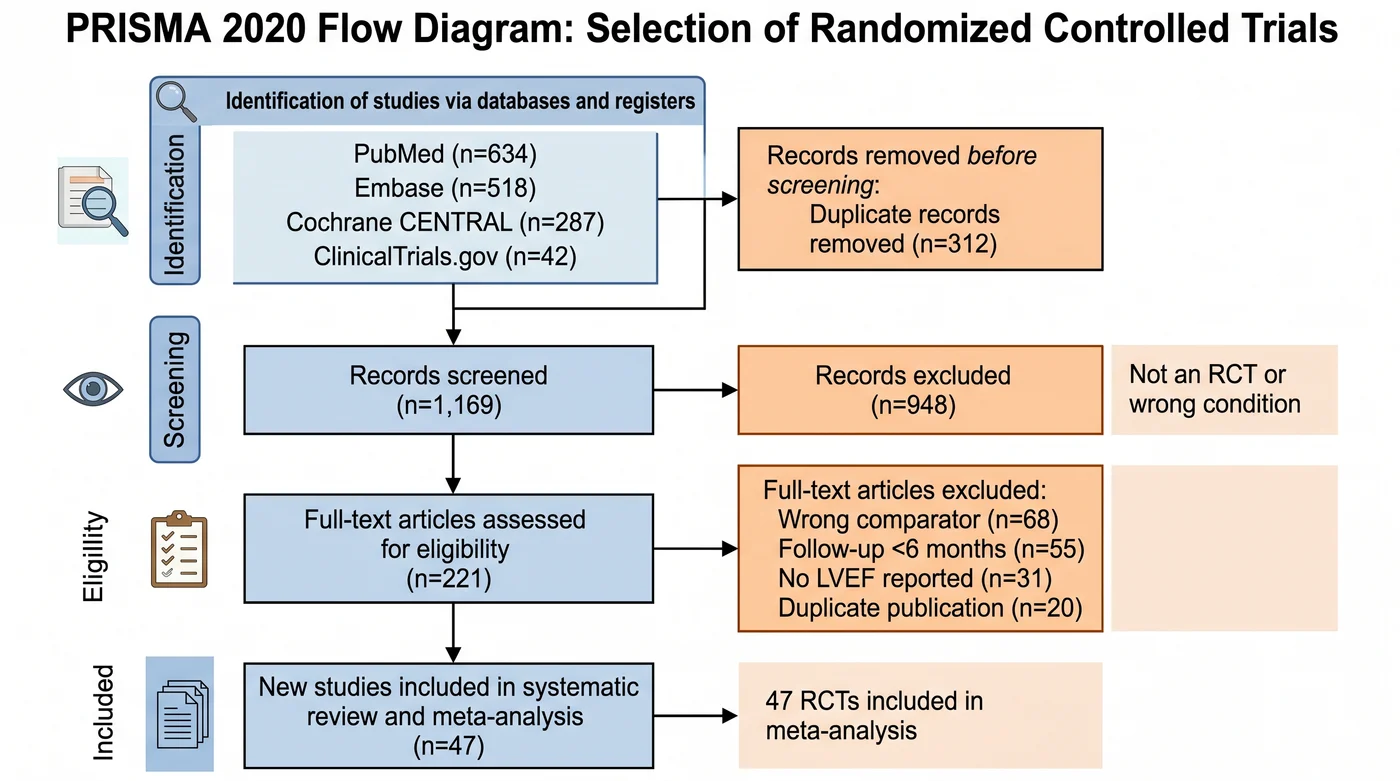
SciDraw AI, the clinical-trials example on its PRISMA flow diagram generator page. The title says PRISMA 2020; the stage labels and "Full-text articles assessed" box follow the 2009 layout, the stage label reads "Eligillity", and there are no "Reports sought for retrieval" boxes. The arithmetic is consistent: 1,481 records, minus 312 duplicates, gives 1,169.
On Vizcept we described the same search in one paragraph: the four sources and their counts, 312 duplicates, 1,169 screened, 948 excluded, 221 full texts assessed, the four exclusion reasons with their counts, and 47 included.
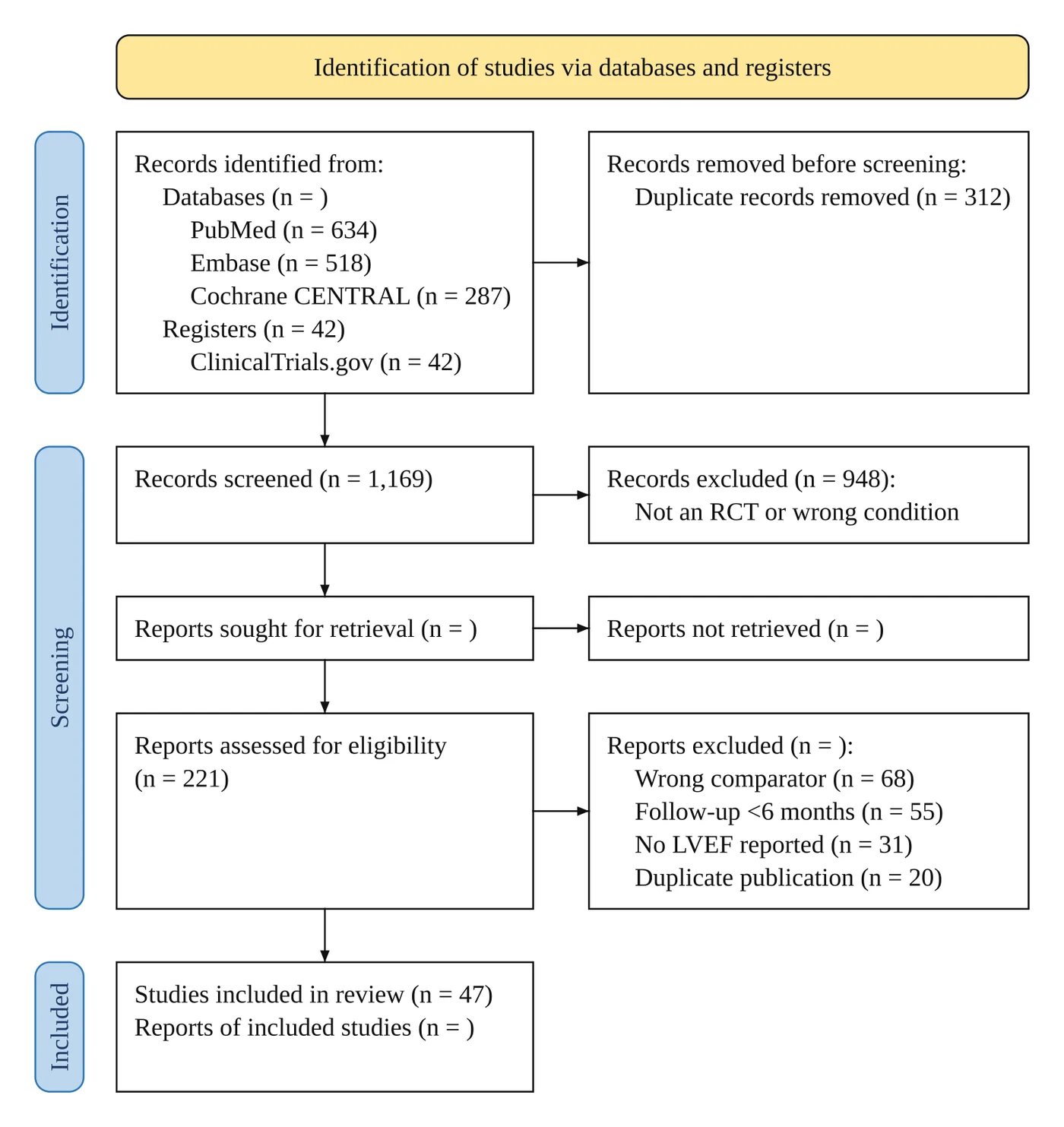
Vizcept, from the paragraph above. ClinicalTrials.gov moves to the Registers line, as PRISMA 2020 asks. Totals we never wrote (all databases, 1,439; all reports excluded, 174) and the retrieval boxes are left as (n = ) blanks to fill in.
Sentence diagram: "The cat slept on the warm windowsill."
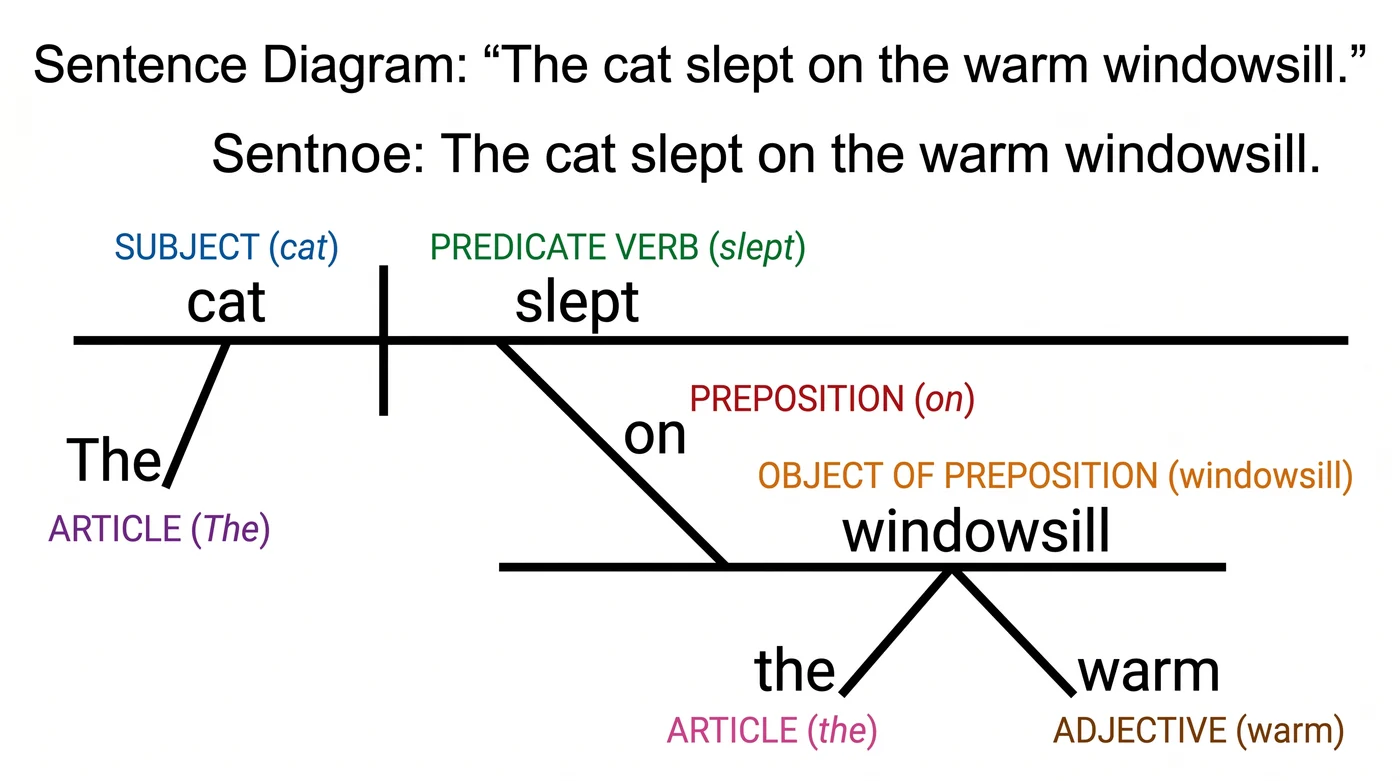
SciDraw AI, the prepositional-phrase example on its sentence diagram generator page. The diagram is drawn as pixels, including the heading line "Sentnoe: The cat slept on the warm windowsill."
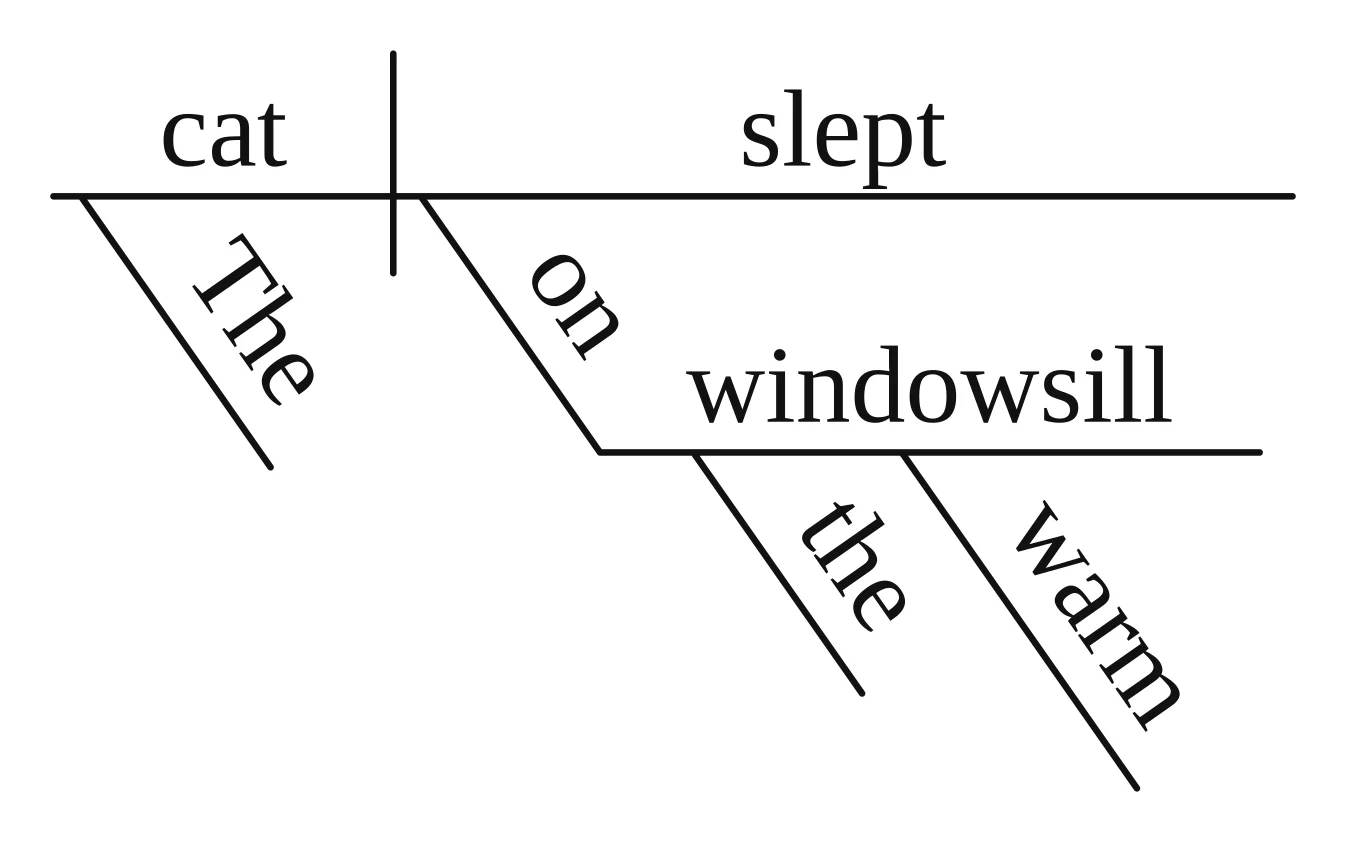
Vizcept, from the sentence alone: the same structure, typeset in one font, with no labels unless you ask for part-of-speech colors.
Both tools got the structure of these two figures right. What differs is who places the text: on SciDraw the image model paints every word and digit, so you proofread the picture; on Vizcept code sets them from your words, so you check that the analysis matches your study or your textbook.
How do Vizcept and SciDraw AI compare, feature by feature?
SciDraw covers far more kinds of figures; Vizcept goes deeper on a few. The table compares 14 features as of 25 October 2026.
| Feature | Vizcept | SciDraw AI |
|---|---|---|
| CONSORT flow diagram | ✓ code, CONSORT 2025 (2010 wording on request), 2–5 arms | ✓ image model, CONSORT 2010 layout |
| PRISMA flow diagram | ✓ code, PRISMA 2020, databases plus other methods | ✓ image model |
| Conceptual framework | ✓ code: H-numbered paths, mediators, moderators pointing at the path | ✓ image model |
| Syntax tree | ✓ code; paste brackets; LaTeX forest code (paid) | ✓ image model |
| Sentence diagram | ✓ code; worksheets with answer keys | ✓ image model |
| Counts you did not write | Left blank | Not stated; its CONSORT page asks you to check every n= |
| Illustrations, mechanism figures, graphical abstracts | ✓ image model | ✓ image model, its main product |
| Start from a sketch or reference image | ✓ attach a sketch | ✓ sketch and reference image modes |
| Data charts | Violin, box and scatter plots, drawn in the browser, free | 46 chart tools from CSV or Excel, journal style presets, Python code |
| Editable SVG | ✓ paid; typeset figures keep live text | ✓ paid plans (SVG conversion is not on the free plan) |
| PPTX export | — | ✓ |
| History | Every edit kept as a version; 30 days on Basic, permanent on Pro and Ultra | 30 days on the free plan, permanent on paid plans |
| Public API | — | ✓ REST API |
| Site languages | English, Chinese, Spanish (home page also in German, French, Portuguese) | English plus 10 other languages |
What does a thesis's worth of figures cost on each?
Take a methods chapter with three figures, a PRISMA diagram, a conceptual framework and a CONSORT diagram, each generated about three times while you fix the wording: 9 generations.
- SciDraw AI: 9 × 5 credits = 45 credits. The 10 sign-up credits plus 5 a day cover that in about a week. Publishing them in a journal needs a paid plan, since the free plan excludes journal and commercial use: Standard costs $20 for a month, or $10 a month billed yearly, for 300 credits.
- Vizcept: 9 × 2 credits = 18 credits. Sign-up and check-in credits can cover that, but free downloads are watermarked. Clean PNG, 4K and SVG come with a $19.90 pack (150 credits, valid 365 days, never renews) or a plan ($14.90 a month for 300 credits).
For a handful of figures you only draft, SciDraw's daily credits cost less. If you need the numbers placed exactly as written and the figure revised many times, Vizcept charges less per version and you proofread less.
When is SciDraw AI the better choice?
- Your figure is an illustration. Cells, organs, mechanisms, lab setups and graphical abstracts are SciDraw's main product, with text, sketch and reference-image modes and multi-round editing. Vizcept draws these with an image model too, and does not try to beat it on style.
- You need PPTX. SciDraw exports PPTX so you can edit labels in PowerPoint; Vizcept does not.
- You chart a lot of data. SciDraw's chart tools cover 46 chart types from CSV or Excel, with Nature, Science, Cell, PLOS and ACS style presets and the Python code that reproduces each chart. Vizcept has three free data plot tools: violin, box and scatter.
- You want daily free credits. 5 credits a day is one standard image a day; journal publication and commercial use start on its paid plans.
- You prefer one payment. SciDraw offers a lifetime plan; Vizcept has none.
- You build on an API or work in another language. SciDraw has a public REST API and a site in 11 languages.
- Your crossover trial needs a CONSORT diagram. SciDraw's CONSORT page says it handles crossover designs; Vizcept's code layout covers parallel-group trials and sends crossover designs to the image model.
How do I move a SciDraw figure to Vizcept?
- Reuse your prompt. The description you gave SciDraw works as it is: paste it into the CONSORT, PRISMA, conceptual framework, syntax tree or sentence diagram generator. Write the numbers you have and leave out the ones you do not; missing counts stay blank.
- Keep illustrations where they are. A SciDraw mechanism figure or graphical abstract has no code-typeset equivalent on Vizcept; moving it gains nothing.
- Disclose AI use either way. Journals ask you to name the tool in the figure legend. Our journal AI figure policy guide has the wording, and how Vizcept draws figures explains what code guarantees and what you still check.
Which should you choose: Vizcept or SciDraw AI?
Choose Vizcept when a CONSORT, PRISMA, conceptual framework, syntax tree or sentence diagram must match your text word for word and number for number: it uses the CONSORT 2025 and PRISMA 2020 templates and leaves missing counts blank. Choose SciDraw AI for illustrations, PPTX export, 46 chart tools from CSV or Excel, a public API, or 5 free credits a day.
Questions about Vizcept and SciDraw AI
Is SciDraw AI free?
Partly. SciDraw AI gives 10 credits on sign-up and 5 free credits a day, and a standard 2K image costs 5 credits, so about one image a day. SVG conversion and journal or commercial use are on its paid plans only. Vizcept's first figure needs no account; after that a code-typeset figure costs 2 credits and clean downloads need a plan or a credit pack.
How much does SciDraw AI cost?
SciDraw AI has a free plan (10 credits on sign-up and 5 a day) and three paid plans: Standard at $20 a month for 300 credits (about 60 images), Premium at $40 for 800 credits and Enterprise at $80 for 2,000 credits. Billed yearly, each costs half as much per month. It also sells a lifetime plan and credit packs, and gives students 40% and teachers 20% off. Vizcept plans start at $14.90 a month, and credit packs start at $19.90.
Is SciDraw AI the same as scidraw.io?
No. SciDraw AI (sci-draw.com) generates figures with AI. scidraw.io is a separate free library of hand-drawn scientific illustrations, scidraw.org is another AI figure site, and SciDraw at scidraw.nd.edu is a Mathematica package for plotting. This page compares Vizcept with SciDraw AI at sci-draw.com.
Can SciDraw AI make a CONSORT or PRISMA diagram?
Yes, both, drawn by its image model from your description; its CONSORT page asks you to check every n= before submitting. Vizcept typesets both with code from the numbers you enter, using the CONSORT 2025 and PRISMA 2020 templates, and leaves any count you did not write blank.
Can I export SVG or PPTX from SciDraw AI?
SciDraw AI exports SVG and PPTX, converted from the generated image, on paid plans; its free plan does not include SVG conversion. Vizcept exports SVG on paid plans; for code-typeset figures the SVG keeps every label as live text. Vizcept has no PPTX export.
What is the best SciDraw AI alternative?
The best SciDraw AI alternative depends on the figure. For CONSORT, PRISMA, conceptual frameworks, syntax trees and sentence diagrams where every count and label must match your text, a code-typeset tool such as Vizcept. For illustrations in a fixed icon style, BioRender. For data charts with code you can rerun, matplotlib, R or GraphPad Prism.
Enter the numbers you have
Your first figure needs no account. Counts you leave out stay blank. Credit packs start at $19.90 and never renew.
